MagicMirror Forum
    • Recent
    • Tags
    • Unsolved
    • Solved
    • MagicMirror² Repository
    • Documentation
    • 3rd-Party-Modules
    • Donate
    • Discord
    • Register
    • Login
    A New Chapter for MagicMirror: The Community Takes the Lead
    Read the statement by Michael Teeuw here.

    MMM-MotionEye - surveillance video stream on your mirror!

    Scheduled Pinned Locked Moved Utilities
    70 Posts 15 Posters 102.5k Views 15 Watching
    Loading More Posts
    • Oldest to Newest
    • Newest to Oldest
    • Most Votes
    Reply
    • Reply as topic
    Log in to reply
    This topic has been deleted. Only users with topic management privileges can see it.
    • S
      shashank @Cato
      last edited by

      @Cato Hi, i could not able to find the instructions to install MotionEye on raspberry Pi 3 jessie/pixel , could you please help me with instruction guide or any url reference which worked for you.

      Thanks
      Shashank

      1 Reply Last reply
      Reply Quote 0
      • C
        chrisfoerg
        last edited by

        https://github.com/ccrisan/motioneye

        S 1 Reply Last reply
        Reply Quote 1
        • S
          shashank @chrisfoerg
          last edited by

          @chrisfoerg hi i tried installing successfully using below wiki url, i am able to view camera on motioneye software, on Magic Mirror camera is blank, i tried with both url and web hock

          https://github.com/ccrisan/motioneye/wiki/Install-On-Raspbian

          {
          module: ‘MMM-MotionEye’,
          position: ‘top_right’,
          config: {
          url: “http://192.168.1.6:8081/motioneye”,
          width: “400px”,
          autoHide: true,
          autoHideDelay: 60000,
          debug: false
          }
          },

          and also tried this

          {
          module: ‘MMM-MotionEye’,
          position: ‘top_left’,
          config: {
          url: “http://192.168.1.6:8081”,
          width: “400px”,
          autoHide: false,
          autoHideDelay: 60000,
          debug: false
          }
          },

          Thanks
          shashank

          1 Reply Last reply
          Reply Quote 0
          • C
            chrisfoerg
            last edited by

            I didn’t install it on my own, sorry. Did you try localhost?

            S 1 Reply Last reply
            Reply Quote 0
            • S
              shashank @chrisfoerg
              last edited by

              @chrisfoerg , with localhost in chromium i can view the image, in MM it is blank with localhost instead of IP

              1 Reply Last reply
              Reply Quote 0
              • C
                chrisfoerg
                last edited by

                with debug: true, do you get any warnings?

                1 Reply Last reply
                Reply Quote 0
                • C
                  Cato Module Developer
                  last edited by

                  Have you installed Motion Eye on a different Raspberry Pi than the one you are running Magic Mirror on?

                  The motion trigger URL should not use same port as the video feed URL like it seems you have in your config. The last URL seems most correct. What happen when you open that in any browser?

                  1 Reply Last reply
                  Reply Quote 0
                  • SnilleS
                    Snille Module Developer
                    last edited by

                    Hi, thank you for this module! :)

                    I’m currently trying to add my Bird Nest Camera(s) to my Mirror. But I can’t get the picture to show up.

                    Running MM v2.1.1 (development)
                    And Node.js v7.4.0

                    My in my config:

                    		{
                    			module: 'MMM-MotionEye',
                    			position: 'middle_center',
                    			classes: "default everyone",
                    			header: "Holk 1",
                    			config: {
                    				url: "http://10.0.0.136:8081",
                    				width: "640px",
                    				debug: true
                    			}
                    		},
                    

                    My mirror is on: 10.0.0.112
                    IP Whitelist is (although that should not matter in this case):

                    	ipWhitelist: [
                    		"127.0.0.1",
                    		"::ffff:127.0.0.1",
                    		"::1",
                    		"::ffff:10.0.0.1/120" 
                    	],
                    

                    The picture do show up if I “browse” to it in Midori on the local Consol:
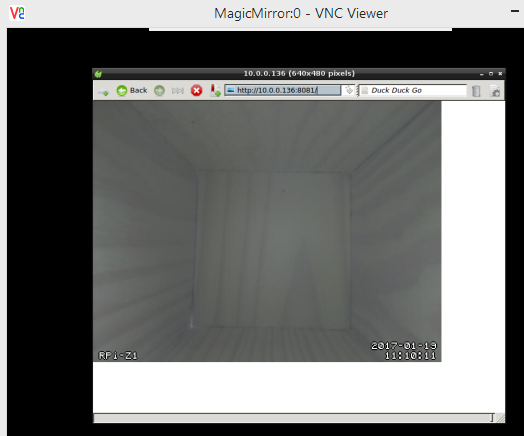
                    0_1484820689021_MM.png
                    The pm2 log shows no errors:

                    ...
                    0|mm       | Connecting socket for: calendar
                    0|mm       | Starting node helper for: calendar
                    0|mm       | Connecting socket for: newsfeed
                    0|mm       | Starting module: newsfeed
                    0|mm       | Connecting socket for: email
                    0|mm       | email helper started ...
                    0|mm       | Connecting socket for: MMM-NetworkScanner
                    0|mm       | Starting module: MMM-NetworkScanner
                    0|mm       | Connecting socket for: MMM-MotionEye
                    0|mm       | Starting module: MMM-MotionEye
                    0|mm       | Connecting socket for: MMM-Remote-Control
                    0|mm       | Starting node helper for: MMM-Remote-Control
                    ...
                    

                    What Have I forgotten?

                    Thank you.

                    Best regards Snille

                    If you cant find it, make it and share it
                    MMM-homeassistant-sensors,MMM-Modulebar,MMM-Profilepicture,MMM-Videoplayer,MMM-TautulliLatest

                    C 1 Reply Last reply
                    Reply Quote 0
                    • C
                      Cato Module Developer @Snille
                      last edited by

                      @Snille Can you try another position (and maybe size): bottom_right / 400px

                      1 Reply Last reply
                      Reply Quote 0
                      • SnilleS
                        Snille Module Developer
                        last edited by

                        @Cato Nope, same thing. The header shows up, but no picture…

                        If you cant find it, make it and share it
                        MMM-homeassistant-sensors,MMM-Modulebar,MMM-Profilepicture,MMM-Videoplayer,MMM-TautulliLatest

                        C 1 Reply Last reply
                        Reply Quote 0
                        • C
                          Cato Module Developer @Snille
                          last edited by Cato

                          @Snille I don’t remember if “motion jpeg” is enabled by default in Motion Eye. Can you check your settings in Motion Eye? I’m at work now and have no change to check myself…

                          (Maybe it has another name)

                          1 Reply Last reply
                          Reply Quote 0
                          • SnilleS
                            Snille Module Developer
                            last edited by

                            @Cato There is not a specific “mjpeg” option as I can find. However on the “?” on the “Streaming URL” it says: “A URL that provides MJPEG stream of the camera” and that’s the URL I used…

                            If you cant find it, make it and share it
                            MMM-homeassistant-sensors,MMM-Modulebar,MMM-Profilepicture,MMM-Videoplayer,MMM-TautulliLatest

                            C 1 Reply Last reply
                            Reply Quote 0
                            • C
                              Cato Module Developer @Snille
                              last edited by Cato

                              @Snille Ok found the bug - update to 1.1.0 as instructed in README.md in GitHub.

                              1 Reply Last reply
                              Reply Quote 3
                              • SnilleS
                                Snille Module Developer
                                last edited by Snille

                                Hi again, It would be cool to be able to hide the camera manually… For example visit another link… Say http://MagicMirror:8080/motioneye/1/hide
                                Right? :)

                                If you cant find it, make it and share it
                                MMM-homeassistant-sensors,MMM-Modulebar,MMM-Profilepicture,MMM-Videoplayer,MMM-TautulliLatest

                                1 Reply Last reply
                                Reply Quote 0
                                • SnilleS
                                  Snille Module Developer
                                  last edited by Snille

                                  Fixed. Just sent you a PR. :)
                                  Check it, I’m fairly new to Node.js so it may not be the best solution. :)

                                  If you cant find it, make it and share it
                                  MMM-homeassistant-sensors,MMM-Modulebar,MMM-Profilepicture,MMM-Videoplayer,MMM-TautulliLatest

                                  C 1 Reply Last reply
                                  Reply Quote 0
                                  • L
                                    lolobyte
                                    last edited by

                                    Hi @Snille

                                    before i made a MM2, i started with a motion cam. It’s running now roundabout a half year outside from 30 ° to -20 ° C.

                                    I tried to insert my IP and port, but it don’t’ run.

                                    Any proposal to try a forensic research where to find the shitty error?

                                    C 1 Reply Last reply
                                    Reply Quote 0
                                    • C
                                      Cato Module Developer @Snille
                                      last edited by

                                      @Snille Had some comments. Fix those and I’ll merge it :)

                                      SnilleS 1 Reply Last reply
                                      Reply Quote 0
                                      • C
                                        Cato Module Developer @lolobyte
                                        last edited by

                                        @lolobyte First question: What motion software do you use?

                                        L 1 Reply Last reply
                                        Reply Quote 0
                                        • SnilleS
                                          Snille Module Developer @Cato
                                          last edited by

                                          @Cato Great! Thanks for fixing my mistakes. :)

                                          If you cant find it, make it and share it
                                          MMM-homeassistant-sensors,MMM-Modulebar,MMM-Profilepicture,MMM-Videoplayer,MMM-TautulliLatest

                                          1 Reply Last reply
                                          Reply Quote 0
                                          • L
                                            lolobyte @Cato
                                            last edited by

                                            @Cato

                                            Hi, that’s the info of help.
                                            Downloaded from
                                            https://www.dropbox.com/s/xdfcxm5hu71s97d/motion-mmal.tar.gz

                                            pi@raspi3-MM2:~ $ motion -h
                                            motion Version mmaltest, Copyright 2000-2005 Jeroen Vreeken/Folkert van Heusden/Kenneth Lavrsen

                                            usage: motion [options]

                                            Possible options:

                                            -n Run in non-daemon mode.
                                            -s Run in setup mode.
                                            -c config Full path and filename of config file.
                                            -d level Log level (1-9) (EMR, ALR, CRT, ERR, WRN, NTC, ERR, DBG, ALL). default: 6 / NTC.
                                            -k type Type of log (COR, STR, ENC, NET, DBL, EVT, TRK, VID, ALL). default: ALL.
                                            -p process_id_file Full path and filename of process id file (pid file).
                                            -l log file Full path and filename of log file.
                                            -m Disable motion detection at startup.
                                            -h Show this screen.

                                            Motion is configured using a config file only. If none is supplied,
                                            it will read motion.conf from current directory, ~/.motion or /etc.

                                            C 1 Reply Last reply
                                            Reply Quote 0

                                            Hello! It looks like you're interested in this conversation, but you don't have an account yet.

                                            Getting fed up of having to scroll through the same posts each visit? When you register for an account, you'll always come back to exactly where you were before, and choose to be notified of new replies (either via email, or push notification). You'll also be able to save bookmarks and upvote posts to show your appreciation to other community members.

                                            With your input, this post could be even better 💗

                                            Register Login

                                            • 1
                                            • 2
                                            • 3
                                            • 4
                                            • 2 / 4
                                            • First post
                                              Last post
                                            Enjoying MagicMirror? Please consider a donation!
                                            MagicMirror created by Michael Teeuw.
                                            Forum managed by Sam, technical setup by Karsten.
                                            This forum is using NodeBB as its core | Contributors
                                            Contact | Privacy Policy