MagicMirror Forum
    • Recent
    • Tags
    • Unsolved
    • Solved
    • MagicMirror² Repository
    • Documentation
    • 3rd-Party-Modules
    • Donate
    • Discord
    • Register
    • Login
    A New Chapter for MagicMirror: The Community Takes the Lead
    Read the statement by Michael Teeuw here.

    MMM-MarineWeather

    Scheduled Pinned Locked Moved Utilities
    25 Posts 9 Posters 10.6k Views 10 Watching
    Loading More Posts
    • Oldest to Newest
    • Newest to Oldest
    • Most Votes
    Reply
    • Reply as topic
    Log in to reply
    This topic has been deleted. Only users with topic management privileges can see it.
    • G Offline
      grena Module Developer @minomit
      last edited by

      @minomit

      With your MMM-MarineWeather configuration, it works fine !

      {
      	module: "MMM-MarineWeather",
      	position: "top_right",
      	config: {
      		latitude: 40.10 , // Latitude
      		longitude: 18.52, // Longitude
      		appid: "414492aa-c717-11e9-a3da-0242ac130004-4144953e-c717-11e9-a3da-0242ac130004" // API Key for your tests
      	}
      },
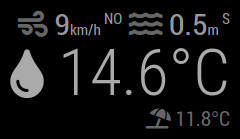
      

      marineweather-minomit.jpg

      Since I can’t reproduce your bug, you have to see if there are any error messages in the console! To start MagicMirror with DevTools open, run npm start dev from the MagicMirror folder like this in a terminal cd ~/MagicMirror/ && npm start dev.

      M 1 Reply Last reply Reply Quote 0
      • M Offline
        minomit @grena
        last edited by sdetweil

        @grena I0m copy/past some problem:

        {
                    module: "MMM-MarineWeather",
                    "pages": {
                                    "tempo reale": "top_right"
                    },
                    //position: "top_right",
                    config: {
                        latitude: 40.10 , // Latitude
                        longitude: 18.52, // Longitude
                        appid: "414492aa-c717-11e9-a3da-0242ac130004-4144953e-c717-11e9-a3da-0242ac130004" // API Key for your tests
                    }
                },
        

        edited, PLEASE use the markup around code and config blocks (three backtics on a separate line before and after)

        1 Reply Last reply Reply Quote 1
        • G Offline
          grena Module Developer
          last edited by

          @minomit, do you use MMM-Page-Selector ?

          I wanted to do a final test to reproduce your bug by installing MMM-Page-Selector, it works ! So, I added some error messages in the module to get more information but you will have to look at the console when starting MagicMirror with DevTools.

          1 Reply Last reply Reply Quote 0
          • R Offline
            ryanbeljan
            last edited by

            @grena this is a super cool module! I noticed that there are quite a few other weather parameters that the StormGlass API offers (i.e. gust, cloudCover, seaLevel, visibility, etc.) that aren’t yet built into your module. Do you have any tips/guide for how I would go about adding them in?

            https://docs.stormglass.io/#/weather

            G 1 Reply Last reply Reply Quote 0
            • B Offline
              boivinmi @minomit
              last edited by

              @grena I also have the same behavior. Here is my config :

              {
                 module: "MMM-MarineWeather",
                 header: "Marine Weather",
                 position: "top_right",
                 config: {
                    latitude: 46.829853,  // Latitude 
                    longitude: -71.254028, // Longitude
                    appid: "414492aa-c717-11e9-a3da-0242ac130004-4144953e-c717-11e9-a3da-0242ac130004",
                    dataSource: "sg",
                    params: "airTemperature,windSpeed,windDirection"
                 }
              },
              

              And result is :
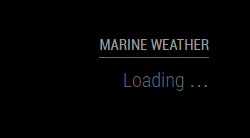
              2020-05-19 13_28_11-MagicMirror².png

              1 Reply Last reply Reply Quote 0
              • D Offline
                Deckard99
                last edited by

                I’m having the same issue where it just displays “Loading”…….

                {
                module: “MMM-MarineWeather”,
                position: “top_right”,
                config: {
                latitude: 32.7157,
                longitude: 117.16,
                appid: “XXXXXXXX-9a15-11ea-b3e2-0242ac130002-9be8a7f6-9a15-11ea-b3e2-0242ac130002” //StormGlass API Key (docs.stormglass.io)
                }
                },

                1 Reply Last reply Reply Quote 0
                • G Offline
                  grena Module Developer @ryanbeljan
                  last edited by grena

                  @ryanbeljan : Thank you for your positive feedback. I will work on a new version of the module to use the new information of API v2 (currently the module uses API v1) ;)

                  @boivinmi : Currently, it’s not possible to choose the information displayed with params. By removing this line from your configuration, it works fine!

                  @Deckard99 : Indeed, there is a problem with waveHeight at your location (probably because it is a lake and not the sea). In the next version, I will integrate a better detection of this type of error to avoid the total blocking of the module!

                  B D 2 Replies Last reply Reply Quote 0
                  • B Offline
                    boivinmi @grena
                    last edited by

                    @grena : Sorry no luck, I removed every config except latitude, longitude et appid and it still shows Loading…

                    G 1 Reply Last reply Reply Quote 0
                    • G Offline
                      grena Module Developer @boivinmi
                      last edited by

                      @boivinmi
                      With your MMM-MarineWeather configuration, it works fine! Did you restart the magic mirror?

                      {
                         module: "MMM-MarineWeather",
                         header: "Marine Weather",
                         position: "top_right",
                         config: {
                            latitude: 46.829853,  // Latitude 
                            longitude: -71.254028, // Longitude
                            appid: "414492aa-c717-11e9-a3da-0242ac130004-4144953e-c717-11e9-a3da-0242ac130004"
                         }
                      },
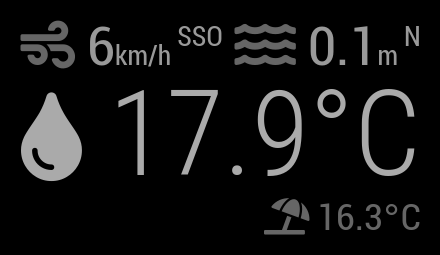
                      

                      magicmirror.png

                      Since I can’t reproduce your bug, you have to see if there are any error messages in the console!

                      1 Reply Last reply Reply Quote 0
                      • D Offline
                        Deckard99 @grena
                        last edited by

                        @grena I am by the Pacific Ocean…not a lake…not that I don’t like lakes :)

                        G 1 Reply Last reply Reply Quote 0
                        • G Offline
                          grena Module Developer @Deckard99
                          last edited by

                          @Deckard99 said in MMM-MarineWeather:

                          latitude: 32.7157,
                          longitude: 117.16,

                          For me, the place associated with this coordinates is located near a lake in China! You may be able to verify that the coordinates are correct: www.latlong.net

                          1 Reply Last reply Reply Quote 0
                          • D Offline
                            Deckard99
                            last edited by

                            Google says this is San Diego…where I live…

                            v2 is up an working, great job!

                            G 1 Reply Last reply Reply Quote 0
                            • G Offline
                              grena Module Developer @Deckard99
                              last edited by

                              @Deckard99 said in MMM-MarineWeather:

                              Google says this is San Diego…where I live…

                              I think you forgot the - for the longitude (to the west of Greenwich) !

                              With these coordinates, you’re in San Diego!

                              latitude: 32.7157,
                              longitude: -117.16,
                              
                              1 Reply Last reply Reply Quote 0
                              • G Offline
                                grena Module Developer
                                last edited by grena

                                Hello everyone,

                                MMM-MarineWeather 0.2.0 has just been released, you can now:

                                • Display additional information (pressure, cloud cover, visibility, sea level) with API v2.
                                • Customize displayed information (except water temperature and air temperature).

                                MMM-MarineWeather 0.2.0 ScreenShots

                                To update:

                                cd ~/MagicMirror/modules/MMM-MarineWeather
                                git pull
                                

                                I hope you like this new version.
                                Please inform me of any problems.

                                Grena

                                1 Reply Last reply Reply Quote 0
                                • uros76U Offline
                                  uros76
                                  last edited by

                                  Thanks for this module, it works great!

                                  My magicmirror projects: https://forum.magicmirror.builders/post/79889, https://forum.magicmirror.builders/post/93241 and https://forum.magicmirror.builders/post/94586

                                  1 Reply Last reply Reply Quote 0
                                  • A Offline
                                    andymassey
                                    last edited by

                                    @grena Nice little module!

                                    I have the full thing working (like the graphic on the left), but was hoping to use the simpler version (like the graphic on the far right) – but using params causes an error… Maybe I’m getting the syntax wrong – could you provide an example of how that line of the config should appear please?

                                    Thanks.

                                    G 1 Reply Last reply Reply Quote 0
                                    • G Offline
                                      grena Module Developer @andymassey
                                      last edited by

                                      @grena Nice little module!

                                      Thanks ;)

                                      I have the full thing working (like the graphic on the left), but was hoping to use the simpler version (like the graphic on the far right) – but using params causes an error… Maybe I’m getting the syntax wrong – could you provide an example of how that line of the config should appear please?

                                      The parameters requested from Storm Glass must be kept to a minimum, i.e., airTemperature and waterTemperature like this:

                                      modules: [
                                      	{
                                      		module: "MMM-MarineWeather",
                                      		position: "top_right",
                                      		config: {
                                      			latitude: 0, // Latitude 
                                      			longitude: 0, // Longitude
                                      			appid: "abcde12345abcde12345abcde12345ab", // StormGlass API key (docs.stormglass.io)
                                      			params: ["airTemperature", "waterTemperature"]
                                      		}
                                      	}
                                      ]
                                      
                                      R 1 Reply Last reply Reply Quote 1
                                      • R Offline
                                        RIKKO14 @grena
                                        last edited by

                                        Hello @grena ,

                                        Have you been able to rework on the module, notably on the high and low tide values ​​which are not correct and the logos that I found for you

                                        1 Reply Last reply Reply Quote 0

                                        Hello! It looks like you're interested in this conversation, but you don't have an account yet.

                                        Getting fed up of having to scroll through the same posts each visit? When you register for an account, you'll always come back to exactly where you were before, and choose to be notified of new replies (either via email, or push notification). You'll also be able to save bookmarks and upvote posts to show your appreciation to other community members.

                                        With your input, this post could be even better 💗

                                        Register Login

                                        • 1
                                        • 2
                                        • 2 / 2
                                        • First post
                                          Last post
                                        Enjoying MagicMirror? Please consider a donation!
                                        MagicMirror created by Michael Teeuw.
                                        Forum managed by Sam, technical setup by Karsten.
                                        This forum is using NodeBB as its core | Contributors
                                        Contact | Privacy Policy