Read the statement by Michael Teeuw here.
MMM-Sunrise-Sunset
-
I’ve created a module that displays the local sunrise, sunset and solar noon times. maybe it’ll be useful for people.

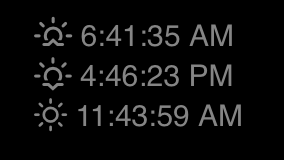
Any offers to make it better are gratefully received!
[card:prydonian/MMM-Sunrise-Sunset]
-
Looks nice. I may add that to my bedside touch screen…Thanks!
-
just added it,thanks for your work, a couple of issues i found-
it doesn’t seem to account for southern hemisphere or timezones or something as i get sunrise at 5.36 pm sunset at 7.23 am and solar noon at 12.30 am,also,in my config inline or list makes no difference,-its always inline.
heres my config-{
module: “MMM-Sunrise-Sunset”,
position: “top_left”,
config: {
latitude: “-44.57”,
longitude: “168.50”,
Layout: “list”,
}
}, -
@mrdenmark it appears that the API doesn’t like the Southern Hemisphere…
http://api.sunrise-sunset.org/json?lat=-44.57&lng=168.50&date=today
Is that config exactly as it appears in your config file? layout should be all lowercase.
-
@vbloke i changed the config file to lowercase,that fixed the layout
as for the api?not sure what the options are,i’ll see if i can an alternative,
thanks for your help -
@mrdenmark the API returns all dates in UTC, so I may look at putting a time zone offset option in the config, or if you feel confident doing that yourself, feel free to try.
-
would it be possible to add a line with the day length?i’m not sure how to go about adding a time offset,i’ll do some research
-
@mrdenmark if you update the module now, it should account for the timezone if you set it in your config. From your latitude/longitude, yours (I think) would be “Pacific/Auckland”.
Try this:
{ module: "MMM-Sunrise-Sunset", position: "top_left", config: { latitude: "-44.57", longitude: "168.50", timezone: "Pacific/Auckland", layout: "list" } }, -
worked,cheers!
-
-
https://github.com/prydonian/MMM-Sunrise-Sunset
Made a fairly big update using a different API that needs a free key.
https://ipgeolocation.io/signup.htmlIt now gives you moonrise and moonset times and day length.
-
I tried this module but activating this causes my MM to show nothing. I had no error messages on MM logs (in my case, a docker server-only instance) and nor on my Chrome console.
In other words it looks that the IPGeo free key expires in 1 day…
-
@henry2man the API is limited to 1000 calls per day. It doesn’t appear to expire after a day.
Can you post the config for the module?
it should look like this:
{ module: "MMM-Sunrise-Sunset", position: "bottom_bar", config: { apiKey: "API_KEY", latitude: "123.123", longitude: "23.456", layout: "inline" } }, -
I removed the config but seemed like yours. I followed the README from master. I’ll try again later, but also I’ve reviewed this API
https://api.sunrise-sunset.org/json?lat=36.7201600&lng=-4.4203400&formatted=0
It has enough information and seems to be free.
What do you think?
-
@henry2man that’s the one I was using before, but it required a lot of work to get the time in your local time zone as all times were returned as UTC.
The new API uses your location to format the time automatically.
-
@vbloke In this link there is a simple way to get a ISO 8601 into your local timezone --> https://stackoverflow.com/a/31453408
var utcDate = '2011-06-29T16:52:48.000Z';  // ISO-8601 formatted date returned from server
var localDate = new Date(utcDate);
api.sunrise-sunset.org can return ISO 8601 dates using
formatted=0parameter…
If date parsing is the major issue & this solution works I think this approach is simpler. Even you can default the URL and simply configure lat/long & style (inline/list)
Just my 2 cents…
-
This is right out of my MMM-SunRiseSet module.
Feel free to use it if you like. :thumbsup:
// sunrise set to local time using moment var sunrise = document.createElement("div"); sunrise.classList.add("small", "bright", "sunrise"); sunrise.innerHTML = "Sunrise is at " + moment(SunRiseSet.sunrise).local().format("h:mm a") + "     " + "Sunset is at " + moment(SunRiseSet.sunset).local().format("h:mm a"); wrapper.appendChild(sunrise); -
@henry2man
I am having the same problem, whenever I put it in my config the display is blank. -
@pugsly not in config… you have to edit the actual module code
-
@sdetweil Not sure I know what you mean. When I put this in my config the screen is all blank:
    {
        module: "MMM-Sunrise-Sunset",
        position: "top_right",
        header: "Sunrise",
        config: {
            latitude: "39.2907",
            longitude: "-75.6344",
            apikey: "xxxxxxxxxxxxxxxxxxxxxxxxxxxxxx",
            layout: "inline"
                }
    },



Hello! It looks like you're interested in this conversation, but you don't have an account yet.
Getting fed up of having to scroll through the same posts each visit? When you register for an account, you'll always come back to exactly where you were before, and choose to be notified of new replies (either via email, or push notification). You'll also be able to save bookmarks and upvote posts to show your appreciation to other community members.
With your input, this post could be even better 💗
Register Login