MagicMirror Forum
    • Recent
    • Tags
    • Unsolved
    • Solved
    • MagicMirror² Repository
    • Documentation
    • 3rd-Party-Modules
    • Donate
    • Discord
    • Register
    • Login
    A New Chapter for MagicMirror: The Community Takes the Lead
    Read the statement by Michael Teeuw here.

    MMM-HomeAssistant-Sensors (Development) - Show your HA Sensors on your Mirror

    Scheduled Pinned Locked Moved Utilities
    66 Posts 19 Posters 50.0k Views 21 Watching
    Loading More Posts
    • Oldest to Newest
    • Newest to Oldest
    • Most Votes
    Reply
    • Reply as topic
    Log in to reply
    This topic has been deleted. Only users with topic management privileges can see it.
    • B Offline
      bachoo786 @Karlberg
      last edited by

      @karlberg hey man thanks for the module. However I am getting “Error fetching stats” there is no error in HA.

      Can you please help? thnaks

      SnilleS 1 Reply Last reply Reply Quote 0
      • SnilleS Offline
        Snille Module Developer @bachoo786
        last edited by

        @bachoo786 Hi, I’m using the module and it’s working. It may be that the “request” module is missing? Have you installed it?
        Go the to the module folder and do

        npm init
        

        &

        npm install request
        

        Let me know if it works.

        If you cant find it, make it and share it!
        Modules: MMM-homeassistant-sensors, MMM-Modulebar, MMM-Profilepicture, MMM-Videoplayer

        hedmikH J 2 Replies Last reply Reply Quote 0
        • hedmikH Offline
          hedmik @Snille
          last edited by

          @snille Hi, trying to use this module but getting below error.
          I followed your instructions i hope :-)
          [07.01.2022 17:10.13.062] [ERROR] (node:30547) UnhandledPromiseRejectionWarning: TypeError: Cannot read properties of undefined (reading ‘body’)
          at /home/pi/MagicMirror/modules/MMM-homeassistant-sensors/node_helper.js:40:83
          at runMicrotasks ()
          at processTicksAndRejections (node:internal/process/task_queues:96:5)
          [07.01.2022 17:10.13.067] [ERROR] (node:30547) UnhandledPromiseRejectionWarning: Unhandled promise rejection. This error originated either by throwing inside of an async function without a catch block, or by rejecting a promise which was not handled with .catch(). To terminate the node process on unhandled promise rejection, use the CLI flag --unhandled-rejections=strict (see https://nodejs.org/api/cli.html#cli_unhandled_rejections_mode). (rejection id: 46)

          cowboysdudeC 1 Reply Last reply Reply Quote 0
          • cowboysdudeC Offline
            cowboysdude Module Developer @hedmik
            last edited by

            @hedmik Been trying to get it to work for a couple weeks now… no luck for me either… @Snille where you at? LOL

            S 1 Reply Last reply Reply Quote 0
            • S Offline
              sdetweil @cowboysdude
              last edited by

              @cowboysdude that error doesn’t line up with the code on GitHub

              line 40 col 83 is inside a routine making the url string, not handling a request response

              so, what code is actually being run?

              Sam

              How to add modules

              learning how to use browser developers window for css changes

              hedmikH 1 Reply Last reply Reply Quote 0
              • hedmikH Offline
                hedmik @sdetweil
                last edited by

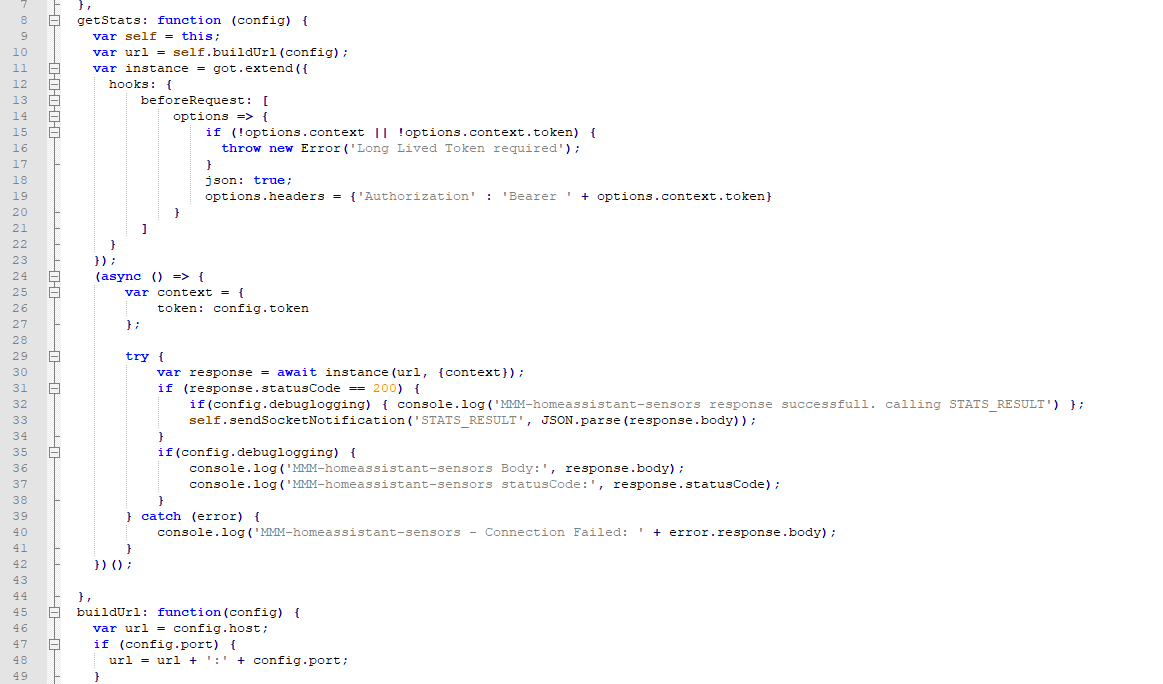
                @sdetweil my code looks like this, perhaps it’s a need for an update…?
                13b91156-d6b8-4c1a-b2ee-af3f8fc767bc-image.png

                S 1 Reply Last reply Reply Quote 0
                • S Offline
                  sdetweil @hedmik
                  last edited by

                  @hedmik well, only the error part at the moment

                  typically on error there is no body

                     error.response.body
                  

                  I would change that to

                    JSON.stringify(error,null,2)
                  

                  that way u see the whole error object

                  then, on e we know the error, we can work on the cause

                  Sam

                  How to add modules

                  learning how to use browser developers window for css changes

                  1 Reply Last reply Reply Quote 0
                  • J Offline
                    joecas65 @Snille
                    last edited by

                    @snille Hi, I’m using this module , and today suddenly magic mirror doesn’t show anymore the pictures from ha sensors (persons). The web interface from a remote computer with chrome works as usual. How can i solve ?
                    Thanks

                    SnilleS 1 Reply Last reply Reply Quote 0
                    • SnilleS Offline
                      Snille Module Developer @joecas65
                      last edited by

                      @joecas65 Hi! Yes, I do have this issue as well, I have not yet figured out how to solve it. It has to do with the “CORS Policy”. But I’m not sure how to fix it yet. I have to read up a bit and for the moment I’m out of time… Any PR:s would be appreciated! :)

                      If you cant find it, make it and share it!
                      Modules: MMM-homeassistant-sensors, MMM-Modulebar, MMM-Profilepicture, MMM-Videoplayer

                      karsten13K 1 Reply Last reply Reply Quote 0
                      • karsten13K Offline
                        karsten13 @Snille
                        last edited by

                        @snille

                        the cors policies are more restricted with newer chromium releases and therefore in electron too.

                        There are already some issues here 1, 2 …

                        If HomeAssistent and mm are running on the same pi this may works when changing the host in the module config to localhost or 127.0.01.

                        In other cases it will be difficult to access the picture urls from inside the <module-name>.js file, accessing them from the node_helper.js should work. So one solution could be to fetch them with node_helper.js to a mm directory and use these urls in <module-name>.js.

                        Because I have no HomeAssistant I can not test this so this are only my thoughts so far …

                        1 Reply Last reply Reply Quote 0
                        • A Offline
                          aseadc86
                          last edited by

                          I just set this module up and I love it. Great job. I was wondering if there was anyway to bring in 2 sensors on the same row? I’m mostly using it for temperature and humidity sensors in different rooms. Just to streamline, eliminate redundancy and save space.

                          This:
                          Master Bedroom: 70 / 40 F / %
                          Instead of:
                          Master Bedroom Temp: 70 F
                          Master Bedroom Humidity: 40 %

                          It would be really cool to have the icons directly after the value and then the units could be set to false:

                          Master Bedroom: 70 mdi:thermostat / 40 mdi:water-percent

                          I just comically dove through the code thinking I might be able to copy/paste my way through the changes. I know my limits…

                          cowboysdudeC SnilleS 2 Replies Last reply Reply Quote 0
                          • cowboysdudeC Offline
                            cowboysdude Module Developer @aseadc86
                            last edited by cowboysdude

                            This works so nice :) Thank you @Snille

                            1 Reply Last reply Reply Quote 1
                            • SnilleS Offline
                              Snille Module Developer @aseadc86
                              last edited by

                              @aseadc86 Thank you! :) It is not possible to get two values on the same row (I think) in it’s current form… And also the “pictures” from the sensors does not work. I’m just out of time to fix it… :)

                              If you cant find it, make it and share it!
                              Modules: MMM-homeassistant-sensors, MMM-Modulebar, MMM-Profilepicture, MMM-Videoplayer

                              cowboysdudeC 1 Reply Last reply Reply Quote 1
                              • I Offline
                                Ivanov_d
                                last edited by Ivanov_d

                                I have the same issue as some of the other users here “Error fetching stats” with no errors in MM or HA. I generated a new token and changed it in the config, still no luck.

                                What version of HA are you running?

                                It was working for me until HA 2021.10: https://forum.magicmirror.builders/topic/15751/mmm-homeassistant-sensors-stopped-working-after-ha-2021-10-update?_=1645122750604

                                SnilleS 1 Reply Last reply Reply Quote 0
                                • SnilleS Offline
                                  Snille Module Developer @Ivanov_d
                                  last edited by

                                  @ivanov_d Hm… Am I missing something? It’s working fine here (except for the pictures), I’m on: Core Version core-2022.2.8 and Supervisor Version supervisor-2022.01.1
                                  Where do you get the error?

                                  If you cant find it, make it and share it!
                                  Modules: MMM-homeassistant-sensors, MMM-Modulebar, MMM-Profilepicture, MMM-Videoplayer

                                  I 1 Reply Last reply Reply Quote 0
                                  • I Offline
                                    Ivanov_d @Snille
                                    last edited by

                                    @snille I don’t see any errors in either MM or HA, however I am still getting Error fetching stats in the module front end. Any suggestions for additional places where I could look? I checked the config and all seems fine to me.

                                    SnilleS 1 Reply Last reply Reply Quote 0
                                    • SnilleS Offline
                                      Snille Module Developer @Ivanov_d
                                      last edited by Snille

                                      @ivanov_d Strange… I’m running HA on it’s own machine and MM on it’s own machine as well, don’t know if that matters… The HA module works on both my “Development” build and the “Real” mirror…
                                      Oh, I’m NOT using a password for the API, that has in deed been deprecated…
                                      This is my “top” part of the Module:

                                      {
                                      	disabled: false,
                                      	module: 'MMM-homeassistant-sensors',
                                      	hiddenOnStartup: true,
                                      	position: 'top_center',
                                      	classes: "Me Work Weather",
                                      	config: {
                                      		host: "X.X.X.X",
                                      		port: "8123",
                                      		https: false,
                                      		title: "Information",
                                      		updateInterval: 60000,
                                      		fade: 0,
                                      		token: "Very-Long-MM-Token...",
                                      		values: 
                                      

                                      When did it stop working?

                                      If you cant find it, make it and share it!
                                      Modules: MMM-homeassistant-sensors, MMM-Modulebar, MMM-Profilepicture, MMM-Videoplayer

                                      I 1 Reply Last reply Reply Quote 0
                                      • I Offline
                                        Ivanov_d @Snille
                                        last edited by Ivanov_d

                                        @snille it stopped working after HA version 2021.10 when the API discovery feature was deprecated. I am running HA Supervised on one raspberry pi and MM on another raspberry pi in the same network.

                                        Here is the config of the MM module:

                                        {
                                          module: 'MMM-homeassistant-sensors',
                                          position: 'top_right',
                                          config: {
                                            title:  'Сензори',
                                            rowClass: 'normal',
                                            host: "192.168.1.19",
                                            port: "8123",
                                            https: true, //I have SSL enables since my instance is exposed to the Internet
                                            token: "here_goes_my_token",
                                            values: [
                                              {
                                                sensor: "sensor.bathroom_temp_temperature",
                                                name: 'Температура',
                                                icons: [{
                                                  "default": "thermometer"
                                                }]
                                              },
                                              {
                                                sensor: "sensor.bathroom_temp_humidity",
                                                name: 'Влажност',
                                                icons: [{
                                                  "default": "water-percent"
                                                }]
                                              },
                                              {
                                                sensor: "switch.bathroom_fan_1",
                                                name: 'Вентилатор 1',
                                                icons: [{
                                                  "on": "fan",
                                                  "off": "fan-off"
                                                }],
                                                replace: [{
                                                  "on": "вкл.",
                                                  "off": "изкл."
                                                }]
                                              },
                                              {
                                                sensor: "switch.bathroom_fan_2",
                                                name: 'Вентилатор 2',
                                                icons: [{
                                                  "on": "fan",
                                                  "off": "fan-off"
                                                }],
                                                replace: [{
                                                  "on": "вкл.",
                                                  "off": "изкл."
                                                }]
                                              },
                                            ]
                                          }
                                        },
                                        

                                        Here is the changelog of HA 2021.10:

                                        The API endpoint /api/discovery_info now only return blank values. This endpoint is scheduled to be removed in Home Assistant Core 2022.1.
                                        
                                        As a regular user of Home Assistant, this change should not affect you.
                                        
                                        (@ludeeus - #56097) (api docs)
                                        

                                        In the past I was having issues with https and the local IP address and then I changed it to the DNS hostname blabla.duckdsn.org and the external port for https (443) and it was working fine until the /api/discovery_info endpoint was deprecated.

                                        SnilleS 1 Reply Last reply Reply Quote 0
                                        • cowboysdudeC Offline
                                          cowboysdude Module Developer @Snille
                                          last edited by

                                          @snille Well that’s really not a deal breaker. It works and gaps the bridge. It’s a great module!

                                          1 Reply Last reply Reply Quote 1
                                          • SnilleS Offline
                                            Snille Module Developer @Ivanov_d
                                            last edited by Snille

                                            @ivanov_d It’s still working for me, when using https. It got to be something else…
                                            I changed my conf to this and it works…

                                            {
                                            	disabled: false,
                                            	module: 'MMM-homeassistant-sensors',
                                            	hiddenOnStartup: false,
                                            	position: 'top_right',
                                            	config: {
                                            		host: "my.ha.url.com",
                                            		port: "443",
                                            		https: true,
                                            		updateInterval: 60000,
                                            		fade: 0,
                                            		title: "Information",
                                            		noaddress: "Away",
                                            		token: "token...",
                                            		values: [
                                            			{
                                            				sensor: "sensor.living_room_temperature",
                                            				name: "Temp i Vardagsrummet %t%",
                                            				icons: [{
                                            						"default": "thermometer"
                                            					}
                                            				]
                                            			}
                                            		]
                                            	}
                                            }
                                            

                                            I’m on Hass.IO (from start), maybe the api is still active there? I don’t get it…
                                            It does not work for me on port 8123, but that’s to be expected when using ssl.

                                            If you cant find it, make it and share it!
                                            Modules: MMM-homeassistant-sensors, MMM-Modulebar, MMM-Profilepicture, MMM-Videoplayer

                                            I 1 Reply Last reply Reply Quote 1

                                            Hello! It looks like you're interested in this conversation, but you don't have an account yet.

                                            Getting fed up of having to scroll through the same posts each visit? When you register for an account, you'll always come back to exactly where you were before, and choose to be notified of new replies (either via email, or push notification). You'll also be able to save bookmarks and upvote posts to show your appreciation to other community members.

                                            With your input, this post could be even better 💗

                                            Register Login

                                            • 1
                                            • 2
                                            • 3
                                            • 4
                                            • 2 / 4
                                            • First post
                                              Last post
                                            Enjoying MagicMirror? Please consider a donation!
                                            MagicMirror created by Michael Teeuw.
                                            Forum managed by Sam, technical setup by Karsten.
                                            This forum is using NodeBB as its core | Contributors
                                            Contact | Privacy Policy