MagicMirror Forum
    • Recent
    • Tags
    • Unsolved
    • Solved
    • MagicMirror² Repository
    • Documentation
    • 3rd-Party-Modules
    • Donate
    • Discord
    • Register
    • Login
    A New Chapter for MagicMirror: The Community Takes the Lead
    Read the statement by Michael Teeuw here.

    read csv-data and put it in an array

    Scheduled Pinned Locked Moved Utilities
    313 Posts 3 Posters 495.6k Views 4 Watching
    Loading More Posts
    • Oldest to Newest
    • Newest to Oldest
    • Most Votes
    Reply
    • Reply as topic
    Log in to reply
    This topic has been deleted. Only users with topic management privileges can see it.
    • S Do not disturb
      sdetweil @Perlchamp
      last edited by sdetweil

      @Perlchamp no… see the node_helper.js

      you cannot use the csvtojson in the modulename.js

      Sam

      How to add modules

      learning how to use browser developers window for css changes

      1 Reply Last reply Reply Quote 0
      • S Do not disturb
        sdetweil @Perlchamp
        last edited by

        @Perlchamp did u use my config info above? just to make it work

        Sam

        How to add modules

        learning how to use browser developers window for css changes

        1 Reply Last reply Reply Quote 0
        • PerlchampP Offline
          Perlchamp
          last edited by

          yes.
          [“Italy”],

          which one? in your corona ?

          S 1 Reply Last reply Reply Quote 0
          • S Do not disturb
            sdetweil @Perlchamp
            last edited by

            @Perlchamp i provided a complete working sample for my module above… copy/paste it into your config.js

            Sam

            How to add modules

            learning how to use browser developers window for css changes

            1 Reply Last reply Reply Quote 0
            • PerlchampP Offline
              Perlchamp
              last edited by

              i did copy it, but doesn’t work yet. have i look on your code. is there a comma after the date. i think this shouldn’t be there. i deleted it, but still does not work => black screen

              S 1 Reply Last reply Reply Quote 0
              • S Do not disturb
                sdetweil @Perlchamp
                last edited by

                @Perlchamp you copied all this exactly, right?

                {
                			module:"MyCovid19",
                			disabled:false,
                			position:"top_left",
                			classes: 'sam',			
                			config:{
                				countries:["Italy","USA","China","Spain", "France",'Sweden'],
                				// line colors can be any definition of color either a name ,or a hex string
                				// one per country above, used in order,
                				line_colors:['red','white','green','yellow','#34ebde','#34eb00'],
                				//				
                				chart_type:"cumulative_deaths",  // or "cumulative deaths"
                				chart_title:"cumulative deaths by country", // however u want to label
                				// the vertical steps on the chart.. how tall u want it to be and how mant increments 
                				ranges:{min:0,max:30000,stepSize:5000},
                				// size of the chart in pixels
                			    width: 400,
                			    height: 400,	
                			    // only used if we need to debug something
                			    debug:false,
                			    startDate:'02/01/2020',
                			    //backgroundColor: 'white',
                			},
                		},	
                

                Sam

                How to add modules

                learning how to use browser developers window for css changes

                1 Reply Last reply Reply Quote 0
                • PerlchampP Offline
                  Perlchamp
                  last edited by

                  my config yet:

                  		{
                  			module:"MyCovid19",
                  			disabled:false,
                  			position:"top_left",
                  			classes: 'sam',			
                  			config:{
                  				countries:["Italy"],
                  				//countries:["Italy","USA","China","Spain", "France",'Sweden'],
                  				// line colors can be any definition of color either a name ,or a hex string
                  				// one per country above, used in order,
                  				//line_colors:['red','white','green','yellow','#34ebde','#34eb00'],
                  				line_colors:['white'],
                  				//				
                  				chart_type:"cumulative_deaths",  // or "cumulative deaths"
                  				chart_title:"cumulative deaths by country", // however u want to label
                  				// the vertical steps on the chart.. how tall u want it to be and how mant increments 
                  				ranges:{min:0,max:30000,stepSize:5000},
                  				// size of the chart in pixels
                  			    width: 400,
                  			    height: 400,	
                  			    // only used if we need to debug something
                  			    debug:false,
                  			    startDate:'02/01/2020'
                  			    //backgroundColor: 'white',
                  			},
                  		},
                  
                  
                  S 1 Reply Last reply Reply Quote 0
                  • S Do not disturb
                    sdetweil @Perlchamp
                    last edited by

                    @Perlchamp I used yours exactly, and works

                    Sam

                    How to add modules

                    learning how to use browser developers window for css changes

                    1 Reply Last reply Reply Quote 0
                    • PerlchampP Offline
                      Perlchamp
                      last edited by

                      may it need time to load the raw data?
                      i will start it, drink a coffee, will come back and see …

                      S 1 Reply Last reply Reply Quote 0
                      • S Do not disturb
                        sdetweil @Perlchamp
                        last edited by sdetweil

                        @Perlchamp raw data is the csv file from the source

                        it should be there within a few seconds…

                        Sam

                        How to add modules

                        learning how to use browser developers window for css changes

                        1 Reply Last reply Reply Quote 0
                        • S Do not disturb
                          sdetweil
                          last edited by

                          I will be busy for next few hours with grandson

                          Sam

                          How to add modules

                          learning how to use browser developers window for css changes

                          1 Reply Last reply Reply Quote 0
                          • PerlchampP Offline
                            Perlchamp
                            last edited by

                            my old config doesn’t go either. something’s wrong. but what ?

                            S 1 Reply Last reply Reply Quote 0
                            • S Do not disturb
                              sdetweil @Perlchamp
                              last edited by

                              @Perlchamp did you do the npm install in my module folder per the instructions?

                              Sam

                              How to add modules

                              learning how to use browser developers window for css changes

                              1 Reply Last reply Reply Quote 0
                              • PerlchampP Offline
                                Perlchamp
                                last edited by

                                shame on me. i didn’t install npm , tztztz …
                                ok, now it works fine …
                                the mistake i made before was to create an empty node_helper.js in my modul-folder, though the errors came …
                                how said, everything’s fine now, but i will have a lot of work writing a node_helper.js. i copied your node_helper.js (sample) ini my module-folder => no errors :-)
                                how said, i’m a noob and i don’t know, if i can handle this all to manage.

                                i want to code a small app, showing me the birthdays of the actual month. like this:
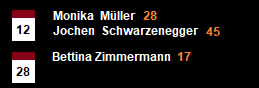
                                birthdaylist.png
                                maybe you can be my tutor, taking my hands and help me …

                                so long
                                many thanks in advance

                                stay healthy
                                keep corona away

                                S 1 Reply Last reply Reply Quote 0
                                • S Do not disturb
                                  sdetweil @Perlchamp
                                  last edited by

                                  @Perlchamp said in read csv-data and put it in an array:

                                  i want to code a small app,

                                  there is a minimum set of stuff to do… its not small if you don’t understand the stuff…
                                  I will answer questions and teach a little of the structure… I won’t write anything for you.

                                  Sam

                                  How to add modules

                                  learning how to use browser developers window for css changes

                                  1 Reply Last reply Reply Quote 0
                                  • PerlchampP Offline
                                    Perlchamp
                                    last edited by

                                    that’s not what i wanted (writing code for me). my big problem is, not to know how i can start, how i can test code-snippets and so on …
                                    i read some articles, but when i want to test some lines of code, i don’t know what to do. in my magicmirror module i can’t do that => error messages … i hope that i have expressed myself clearly and understandably …
                                    if i have a code-snoppet, go to terminal and put in

                                    node xxx.js
                                    

                                    path not found, module not found, and many other error messages … maybe i soon despair …

                                    S 1 Reply Last reply Reply Quote 0
                                    • S Do not disturb
                                      sdetweil @Perlchamp
                                      last edited by

                                      @Perlchamp is the xxx.js in the current folder? if not u need to give path to the file

                                      you can do in MM module, with messages… there are two parts… the server side (node_helper) whose messages (console.log) come out on the same terminal window
                                      the browser side (modulename.js) uses Log.log. and displays only in the developer window

                                      I have modified a logging module that will display them together on the terminal window

                                      https://github.com/sdetweil/MMM-Logging
                                      install this as the FIRST module in the list
                                      use this definition in config.js

                                      		{
                                                  module: 'MMM-Logging',
                                                  disabled: false,
                                                  config: {
                                                      // Module functions out of the box with nothing set here.
                                                      // See below for configurable options.
                                                      echoLocal: true, 
                                                      echoRemote: true,
                                                      overwriteBrowserMethods: true,
                                                      format: "{{message}} ({{folder}}/{{file}}:{{line}} {{method}})",
                                                  }
                                              },
                                      

                                      Sam

                                      How to add modules

                                      learning how to use browser developers window for css changes

                                      1 Reply Last reply Reply Quote 0
                                      • PerlchampP Offline
                                        Perlchamp
                                        last edited by

                                        thanks a lot, i will try to “play” with it. can take some time …

                                        S 1 Reply Last reply Reply Quote 0
                                        • S Do not disturb
                                          sdetweil @Perlchamp
                                          last edited by

                                          @Perlchamp ok, if you are trying to use the csv-> somethign libraries and installed them in you module folder, then u want to be IN that folder to run your sample node xxx.js tests so the module folder path is right for require()

                                          Sam

                                          How to add modules

                                          learning how to use browser developers window for css changes

                                          1 Reply Last reply Reply Quote 0
                                          • PerlchampP Offline
                                            Perlchamp
                                            last edited by

                                            @sdetweil said in read csv-data and put it in an array:

                                            u want to be IN that folder

                                            you mean in my module folder? it’s called “MMM-birthdaylist” …

                                            S 1 Reply Last reply Reply Quote 0

                                            Hello! It looks like you're interested in this conversation, but you don't have an account yet.

                                            Getting fed up of having to scroll through the same posts each visit? When you register for an account, you'll always come back to exactly where you were before, and choose to be notified of new replies (either via email, or push notification). You'll also be able to save bookmarks and upvote posts to show your appreciation to other community members.

                                            With your input, this post could be even better 💗

                                            Register Login

                                            • 1
                                            • 2
                                            • 9
                                            • 10
                                            • 11
                                            • 12
                                            • 13
                                            • 14
                                            • 15
                                            • 16
                                            • 11 / 16
                                            • First post
                                              Last post
                                            Enjoying MagicMirror? Please consider a donation!
                                            MagicMirror created by Michael Teeuw.
                                            Forum managed by Sam, technical setup by Karsten.
                                            This forum is using NodeBB as its core | Contributors
                                            Contact | Privacy Policy