MagicMirror Forum
    • Recent
    • Tags
    • Unsolved
    • Solved
    • MagicMirror² Repository
    • Documentation
    • 3rd-Party-Modules
    • Donate
    • Discord
    • Register
    • Login
    A New Chapter for MagicMirror: The Community Takes the Lead
    Read the statement by Michael Teeuw here.

    Weatherunderground - currently - hourly - daily - configurable

    Scheduled Pinned Locked Moved Utilities
    182 Posts 47 Posters 389.2k Views 51 Watching
    Loading More Posts
    • Oldest to Newest
    • Newest to Oldest
    • Most Votes
    Reply
    • Reply as topic
    Log in to reply
    This topic has been deleted. Only users with topic management privileges can see it.
    • O Offline
      ostfilinchen
      last edited by

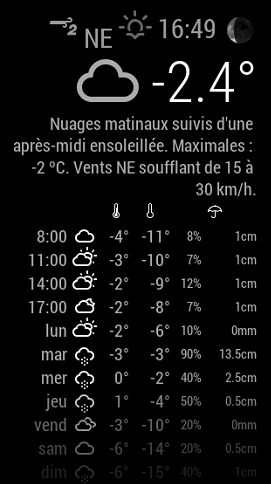
      @strawberry-3-141 That doesn’t work. I mean the Icon size left of the temperature Display on the top. In the Picture the sunbeams Project into the wind speed

      1 Reply Last reply Reply Quote 1
      • ? Offline
        A Former User
        last edited by A Former User

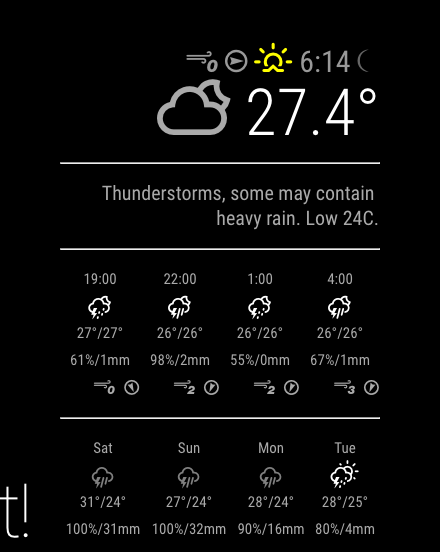
        How to Change “C” to “°C” ?, - has any one done this?
        0_1477741244161_Screenshot 2016-10-29 18.36.34.png

        1 Reply Last reply Reply Quote 0
        • ? Offline
          A Former User @yo-less
          last edited by

          @yo-less said in Weatherunderground - currently - hourly - daily - configurable:

          @RedNax I managed to parse my way through it with some crazy regex stuff a few days ago (As this is the first time I have done this, it took me an insane amount of time to add the degree symbol only where it should be added), I know I keep saying this, but I will eventually push it to my MMM-WunderGround fork and then you can decide which of my features you would like to implement.

          @yo-less please can you detail how this was accomplished?

          A 1 Reply Last reply Reply Quote 0
          • A Offline
            anatius @Guest
            last edited by

            @wjdw87

            this.forecastText = this.forecastText.replace(/(.*\d+)(C)(.*)/gi, "$1°C$3");
            around line 937 in MMM-WunderGround.js should do the trick

            O 1 Reply Last reply Reply Quote 0
            • SteffS Offline
              Steff
              last edited by

              Hi,
              two questions:
              Yesterday I updated via git pull the Weatherunderground module to its latest version, after that the icon for moonphases is not displayed (not sure if this is a new feature), it shows me a “broken” link picture. I did run after the git pull, npm install. From the readme I understood that the module is using weathericons.io. I tried to understand how the icons are used in the module, but I have to admit that I could not understand it. Are the icons “fetched” online or are they somewhere locally stored.
              The only thing I can state, after commenting in MMM-WunderGround.js the lines relating to the icon

              //var moonPhaseIcon = document.createElement(“span”);

              certainly my problem disappeared.
              Any hint what might be wrong with “my” moon icon, I would highly appreciate it.

              Second question: On the screenshots above I saw that the sunrise icon is colored. In my configuration everything is always black/white. Is there a config option I have missed up to now ?

              Thanks
              Stefan

              1 Reply Last reply Reply Quote 0
              • N Offline
                nobita
                last edited by

                This MMM-WunderGround Module,in Configuration Options in psw I don’t understand what does its mean. and How to get it

                1 Reply Last reply Reply Quote 0
                • D Offline
                  dialdn
                  last edited by

                  This looks great!

                  However, we have a mix of snow and rain at this time. It seems all precipitation is being rendered as mm when it should be cm. For example, we are expecting ~10 cm on Tuesday but it is displaying as 9 mm. Haven’t looked at the API to see how the precipitation type is sent.

                  Mike

                  D 1 Reply Last reply Reply Quote 0
                  • D Offline
                    dialdn @dialdn
                    last edited by

                    @dialdn

                    I see that you are pulling the qpf_allday but in these conditions, I would want to see snow_allday. I would think if snow_allday is >0 it should trump qpf_allday and also display using the units (cm). Not sure how the API looks when we have freezing rain in the forecast. I would assume it shows as rain.

                    	"pop":80,
                    	"qpf_allday": {
                    	"in": 0.37,
                    	"mm": 9
                    	},
                    	"qpf_day": {
                    	"in": 0.22,
                    	"mm": 6
                    	},
                    	"qpf_night": {
                    	"in": 0.15,
                    	"mm": 4
                    	},
                    	"snow_allday": {
                    	"in": 3.7,
                    	"cm": 9.4
                    	},
                    	"snow_day": {
                    	"in": 2.4,
                    	"cm": 6.1
                    	},
                    	"snow_night": {
                    	"in": 1.3,
                    	"cm": 3.3
                    	},
                    
                    RedNaxR 1 Reply Last reply Reply Quote 0
                    • PointPubMediaP Offline
                      PointPubMedia
                      last edited by

                      Also, any way to disable the alert popup completely ?

                      RedNaxR 1 Reply Last reply Reply Quote 0
                      • RedNaxR Offline
                        RedNax Module Developer @dialdn
                        last edited by

                        @dialdn This is now implemented… just pull the latest master :)

                        1 Reply Last reply Reply Quote 0
                        • RedNaxR Offline
                          RedNax Module Developer @PointPubMedia
                          last edited by

                          @PointPubMedia You can now disable the popup by adding show_popup: 0 to your config.

                          1 Reply Last reply Reply Quote 0
                          • PointPubMediaP Offline
                            PointPubMedia
                            last edited by

                            I’m stilling seeing mm instead of cm when we are having snow… normal ?

                            RedNaxR 1 Reply Last reply Reply Quote 0
                            • RedNaxR Offline
                              RedNax Module Developer @PointPubMedia
                              last edited by

                              @PointPubMedia Not really… typo in the code. Fixed now… (hopefully)

                              1 Reply Last reply Reply Quote 0
                              • PointPubMediaP Offline
                                PointPubMedia
                                last edited by

                                Working now ;)

                                0_1485176117174_2017-01-23 07_54_48-ScreenConnect - rpiHUD - Connected.png

                                1 Reply Last reply Reply Quote 0
                                • O Offline
                                  ostfilinchen @anatius
                                  last edited by

                                  @RedNax:
                                  @anatius said in Weatherunderground - currently - hourly - daily - configurable:

                                  @wjdw87

                                  this.forecastText = this.forecastText.replace(/(.*\d+)(C)(.*)/gi, "$1°C$3");
                                  around line 937 in MMM-WunderGround.js should do the trick

                                  do you have change this also?

                                  RedNaxR 1 Reply Last reply Reply Quote 0
                                  • RedNaxR Offline
                                    RedNax Module Developer @ostfilinchen
                                    last edited by

                                    @ostfilinchen Now i have, and thanks to @anatius for this!

                                    1 Reply Last reply Reply Quote 2
                                    • R Offline
                                      Renfield
                                      last edited by

                                      @RedNax
                                      Thanks for the great module!
                                      I’ve fairly heavily modified it to my own preferences and soI don’t want to roll to the latest versions. I’m getting alerts that there’s a new version available and would like to not have those alerts displayed as I don’t wish to update and lose my changes. Is there a way to not have the version update alerts but still get the weather-related alerts? I’m not familiar enough with the MM infrastructure to figure this one out.
                                      Thanks again for the great work!
                                      Ren

                                      1 Reply Last reply Reply Quote 0
                                      • lolobyteL Offline
                                        lolobyte
                                        last edited by

                                        Hello developer @RedNax

                                        Your module update is nice but please don’t waste so many place with the new layout.

                                        Please shrink the space between the lines.

                                        RedNaxR 1 Reply Last reply Reply Quote 0
                                        • RedNaxR Offline
                                          RedNax Module Developer @lolobyte
                                          last edited by

                                          @lolobyte I’m sorry to hear you’re not happy with the layout. Could you be a bit more precide on the nature of your issue? Are the icons too large, too much information… A screenshot with arrows would be nice.

                                          Thanks!

                                          O lolobyteL 3 Replies Last reply Reply Quote 0
                                          • O Offline
                                            ostfilinchen @RedNax
                                            last edited by

                                            @RedNax the space between the lines in the forecasttable is too big an the Currentweather icon is also to big. My Set was 30% size of the Currentweather icon. With this size it looks good

                                            1 Reply Last reply Reply Quote 0

                                            Hello! It looks like you're interested in this conversation, but you don't have an account yet.

                                            Getting fed up of having to scroll through the same posts each visit? When you register for an account, you'll always come back to exactly where you were before, and choose to be notified of new replies (either via email, or push notification). You'll also be able to save bookmarks and upvote posts to show your appreciation to other community members.

                                            With your input, this post could be even better 💗

                                            Register Login

                                            • 1
                                            • 2
                                            • 6
                                            • 7
                                            • 8
                                            • 9
                                            • 10
                                            • 8 / 10
                                            • First post
                                              Last post
                                            Enjoying MagicMirror? Please consider a donation!
                                            MagicMirror created by Michael Teeuw.
                                            Forum managed by Sam, technical setup by Karsten.
                                            This forum is using NodeBB as its core | Contributors
                                            Contact | Privacy Policy