MagicMirror Forum
    • Recent
    • Tags
    • Unsolved
    • Solved
    • MagicMirror² Repository
    • Documentation
    • 3rd-Party-Modules
    • Donate
    • Discord
    • Register
    • Login
    A New Chapter for MagicMirror: The Community Takes the Lead
    Read the statement by Michael Teeuw here.

    MMM-RAIN-MAP (new: version 2.x)

    Scheduled Pinned Locked Moved Utilities
    193 Posts 39 Posters 321.3k Views 42 Watching
    Loading More Posts
    • Oldest to Newest
    • Newest to Oldest
    • Most Votes
    Reply
    • Reply as topic
    Log in to reply
    This topic has been deleted. Only users with topic management privileges can see it.
    • S
      sdetweil @pminich
      last edited by

      @pminich did u do the git pull in the module directory to get the latest code?

      Sam

      How to add modules

      learning how to use browser developers window for css changes

      P 1 Reply Last reply
      Reply Quote 0
      • P
        pminich @sdetweil
        last edited by

        @sdetweil All set, thanks. Still learning my way around npm, git, etc…

        1 Reply Last reply
        Reply Quote 1
        • O
          ossman
          last edited by

          Seems like we’re in the same Boat! Weirdly enough, it hasn’t rained today. I’ll have an eye on it once it starts again!

          1 Reply Last reply
          Reply Quote 0
          • K
            kevsfastz
            last edited by

            Hello,

            Is it possible to add a layer for tropical storm/hurricane tracks similar to how NHC does with their ‘interactive map’?

            https://www.nhc.noaa.gov/refresh/graphics_at1+shtml/122110.shtml?gm_track#contents
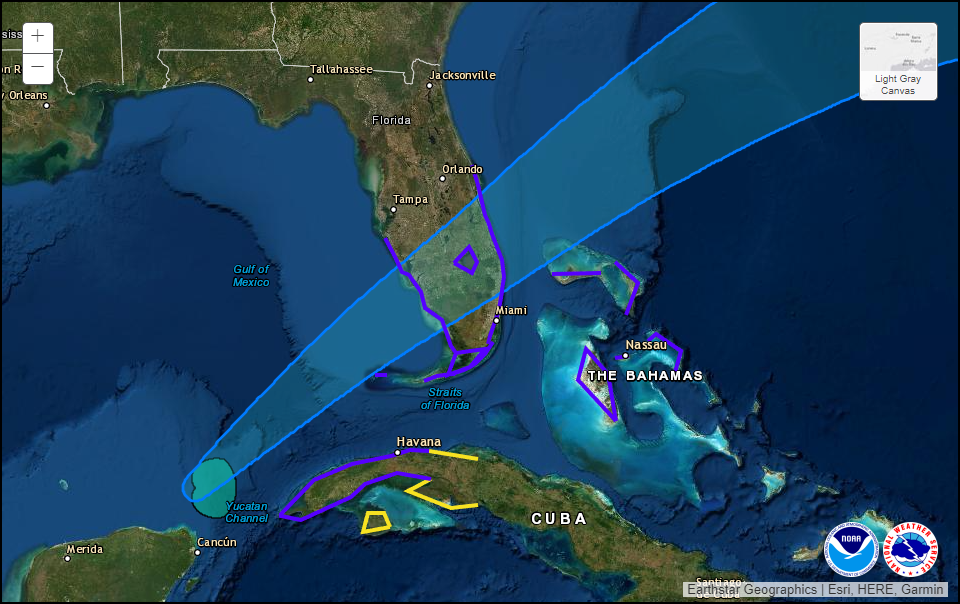
            f8642f0a-ddae-4d77-a445-5b2060f14e38-image.png

            1 Reply Last reply
            Reply Quote 0
            • plainbrokeP
              plainbroke @Jalibu
              last edited by

              @Jalibu said in MMM-RAIN-MAP (new: version 2.x):

              A few days ago, Openstreepmap obviously made some changes with their tile servers. They seem to block requests now, when the requests come from Electron applications. This is the case in most MagicMirror installations. As a consequence, MMM-RAIN-MAP does not show map tiles anymore.
              I suspect, that also other modules are effected.
              One possible fix is using another tile server for MMM-RAIN-MAP. One that still works at the moment, is the German fork “https://a.tile.openstreetmap.de/${z}/${x}/${y}.png”.
              I will adjust the module soon, to use this tile server as a default.
              You can also change the tile server by setting this property in the module config:

              {
                mapUrl: "https://a.tile.openstreetmap.de/${z}/${x}/${y}.png"
              }
              

              How do I go about getting that for the usa in particular kansas.?

              Slow learner. But trying anyways.
              MM is on Raspberry Pi 4B w/8gb ram loaded on a 128gb nvme drive.
              Running Trixie and the latest MM version.

              JalibuJ 1 Reply Last reply
              Reply Quote 0
              • JalibuJ
                Jalibu Module Developer @plainbroke
                last edited by

                @pminich the same way. The German fork contains world wide map data.

                plainbrokeP 1 Reply Last reply
                Reply Quote 0
                • plainbrokeP
                  plainbroke @Jalibu
                  last edited by

                  @Jalibu
                  Ok it finally found my location.
                  The Lon and Lat where not registering in the module for some reason now they are… So all is good again…

                  Slow learner. But trying anyways.
                  MM is on Raspberry Pi 4B w/8gb ram loaded on a 128gb nvme drive.
                  Running Trixie and the latest MM version.

                  S 1 Reply Last reply
                  Reply Quote 0
                  • S
                    sdetweil @plainbroke
                    last edited by

                    @plainbroke said in MMM-RAIN-MAP (new: version 2.x):

                    Lon and Lat where not registering in the module

                    system is case sensitive, and " (quotes) around numbers become strings, which cause problems all over the place

                    Sam

                    How to add modules

                    learning how to use browser developers window for css changes

                    1 Reply Last reply
                    Reply Quote 0
                    • O
                      Oboudreaux
                      last edited by

                      Does “substitudeModules” work in server only mode? “displayOnlyOnRain” works just fine but when the rain map pops up it appears under the module it’s supposed to hide.

                      1 Reply Last reply
                      Reply Quote 0
                      • H
                        hogedir
                        last edited by hogedir

                        I have an issue, I want to setup rain map to france, but I have that : NO MAP at all (with openmap) can you help me please? thanks.
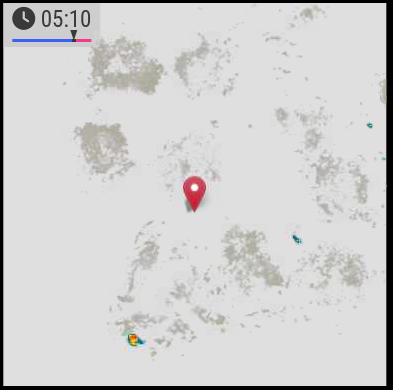
                        9da9112d-d78b-4ecc-85cc-43a86b7f7534-image.png

                        JalibuJ 1 Reply Last reply
                        Reply Quote 0
                        • JalibuJ
                          Jalibu Module Developer @hogedir
                          last edited by

                          @hogedir can you please create an issue on github for that? Without further information (config, version) it is hard to find the reason 😉

                          H 1 Reply Last reply
                          Reply Quote 0
                          • H
                            hogedir @Jalibu
                            last edited by

                            @Jalibu ok no problem. can you indicate me where i can find some logs for this module especially?

                            JalibuJ 1 Reply Last reply
                            Reply Quote 0
                            • JalibuJ
                              Jalibu Module Developer @hogedir
                              last edited by

                              @hogedir in the Browser‘s console log and net tab

                              1 Reply Last reply
                              Reply Quote 0
                              • H
                                hogedir
                                last edited by

                                @Jalibu it’s simply a raspi 4B 8GB, with a normal installation of MMM. I don’t know if i need to open a bug, it’s just the dump of the map that doesn’t work as you see on the screen.

                                A question : Your module accept FRENCH locations no for the rain map ?

                                Your module works well here, it’s only the map that is not get.

                                I don’t have any blocker in the dns. so I don’t undertand because all the other modules works fine, except of that map dump.

                                Here is my config.js :

                                {
                                module: “MMM-RAIN-MAP”,
                                position: “top_center”,
                                config: {
                                animationSpeedMs: 400,
                                colorScheme: 2,
                                colorizeTime: true,
                                defaultZoomLevel: 8,
                                displayTime: true,
                                displayTimeline: true,
                                displayClockSymbol: true,
                                displayHoursBeforeRain: -1,
                                extraDelayLastFrameMs: 1000,
                                extraDelayCurrentFrameMs: 3000,
                                // markers: [
                                // { lat: 49.41, lng: 8.717, color: “red” },
                                // { lat: 48.856, lng: 2.35, color: “green” },
                                // ],
                                // mapPositions: [
                                // { lat: 8.717, lng: -2.725, zoom: 9, loops: 1 },
                                // { lat: 8.717, lng: -2.725, zoom: 6, loops: 2 },
                                // { lat: 48.856, lng: 2.35, zoom: 6, loops: 1 },
                                // { lat: 48.856, lng: 2.35, zoom: 9, loops: 2 },
                                // { lat: 49.15, lng: 6.154, zoom: 5, loops: 2 },
                                // ],
                                // mapUrl: “https://a.tile.openstreetmap.de/48.2649/{x}/{y}.png”,
                                mapUrl: “https://a.tile.openstreetmap.de/#map=8/48.471/-2.725”,
                                // mapUrl: “https://tiles.wmflabs.org/bw-mapnik/8/48.471/-2.725”,
                                mapHeight: “420px”, // must be a pixel value (no percent)
                                mapWidth: “420px”, // must be a pixel value (no percent)
                                maxHistoryFrames: -1,
                                maxForecastFrames: -1,
                                substitudeModules: [],
                                updateIntervalInSeconds: 300,
                                }
                                },

                                JalibuJ 1 Reply Last reply
                                Reply Quote 0
                                • JalibuJ
                                  Jalibu Module Developer @hogedir
                                  last edited by Jalibu

                                  @hogedir your configuration is buggy. Please read the module’s Readme.
                                  You don’t have to (and should not) change the mapUrl at all.
                                  Use mapPositions to justify it. The module should work world-wide.
                                  I’d recommend to use the default values whenever possible and just to set values you need to override.

                                  Does that work for you?

                                  {
                                   module: "MMM-RAIN-MAP",
                                   position: "top_center",
                                   config: {
                                    mapPositions: [
                                     { lat: 48.472, lng: -2.725 }    
                                    ]
                                   }
                                  }
                                  
                                  H 1 Reply Last reply
                                  Reply Quote 0
                                  • H
                                    hogedir @Jalibu
                                    last edited by

                                    @Jalibu Thanks. I copied your code, and nothing again. No map.
                                    f701d2bd-9f62-42b3-9922-eab8b1a5702a-image.png

                                    S JalibuJ 2 Replies Last reply
                                    Reply Quote 0
                                    • S
                                      sdetweil @hogedir
                                      last edited by

                                      @hogedir can you show the messages at mm startup?

                                      either npm start or if you use pm2, then

                                      pm2 logs --lines=50

                                      Sam

                                      How to add modules

                                      learning how to use browser developers window for css changes

                                      1 Reply Last reply
                                      Reply Quote 0
                                      • JalibuJ
                                        Jalibu Module Developer @hogedir
                                        last edited by

                                        @hogedir I noticed there were wrong double quote characters in the code of my last post.
                                        Please try again with the code below. Otherwise, please open an issue on GitHub and provide all the information asked in the form (entire config & logs)

                                        {
                                         module: "MMM-RAIN-MAP",
                                         position: "top_center",
                                         config: {
                                          mapPositions: [
                                           { lat: 48.472, lng: -2.725 }    
                                          ]
                                         }
                                        }
                                        
                                        H 1 Reply Last reply
                                        Reply Quote 0
                                        • H
                                          hogedir
                                          last edited by hogedir

                                          @hogedir @Jalibu it’s working now Thanks ! : the map is showing well now BUT the rain is not showed very well !

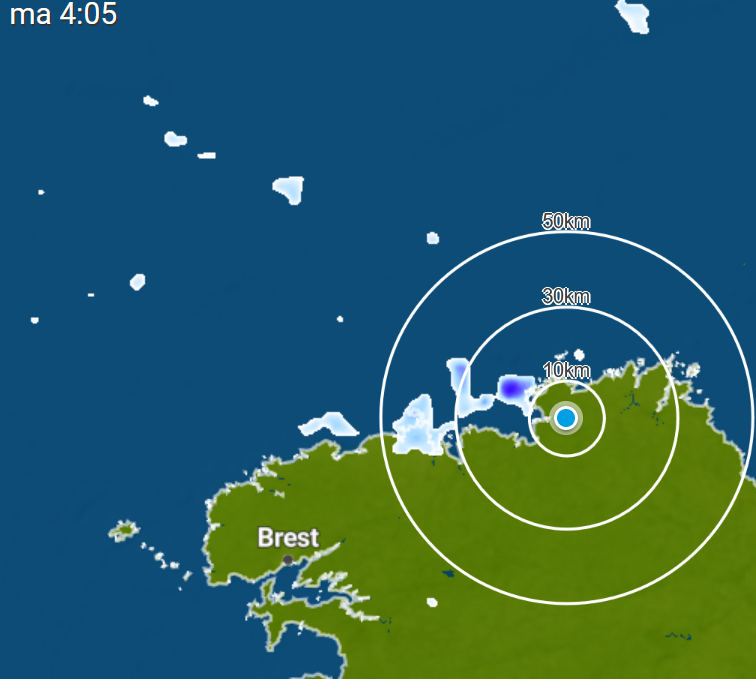
                                          I compared what i see outside of my home and we had 5minutes before some rain and your data flow is not precise at all, i did not saw a rain in my region on your map but i saw it in weatherplaza.

                                          I give you the page which is more precise and realistic than the rain data you have in the module : https://www.weerplaza.nl/regenradar/europa/frankrijk/

                                          Map of rains with weather plaza : :
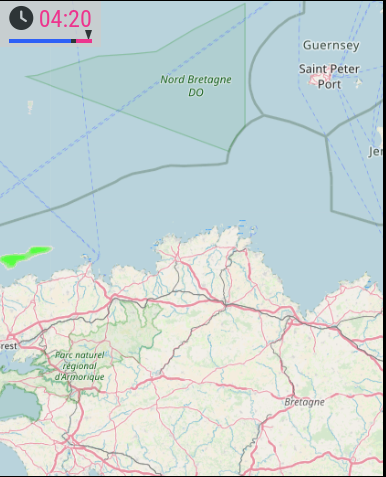
                                          fdac3039-d82d-4f7c-bedf-b7d959e375fc-image.png

                                          Map of rains with your module : :

                                          de450518-6d5d-4101-8ea5-4a2a2f1c0265-image.png

                                          Lots of difference, weather plaza is realistic (i checked outside 2 times yesterday, your module did not show well the rain.)

                                          • Second thing, I noticed something too : i want the “pause” time before the red zone to be more fast (some mms more fast). is it possible to change the “pause timer” ? Thanks
                                          1 Reply Last reply
                                          Reply Quote 1
                                          • H
                                            hogedir @Jalibu
                                            last edited by hogedir

                                            @Jalibu Look Here is the map of Weatherplaza (meteoplaza) in the same time than yours, if it can help.
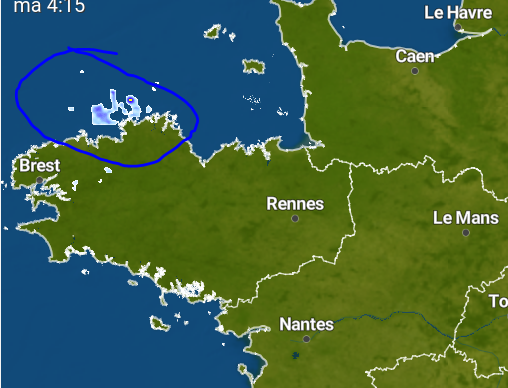
                                            3a971133-4157-43ea-8012-e5a259516b48-image.png

                                            and then the data flow on the module (less rain and less precise) :
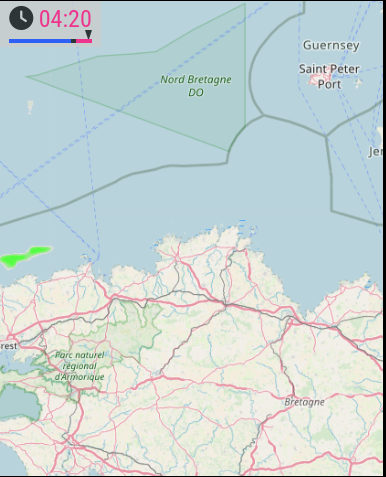
                                            d6608816-5d56-42be-bff5-4b551658c684-image.png

                                            thanks

                                            S 1 Reply Last reply
                                            Reply Quote 0

                                            Hello! It looks like you're interested in this conversation, but you don't have an account yet.

                                            Getting fed up of having to scroll through the same posts each visit? When you register for an account, you'll always come back to exactly where you were before, and choose to be notified of new replies (either via email, or push notification). You'll also be able to save bookmarks and upvote posts to show your appreciation to other community members.

                                            With your input, this post could be even better 💗

                                            Register Login

                                            • 1
                                            • 2
                                            • 3
                                            • 4
                                            • 5
                                            • 6
                                            • 9
                                            • 10
                                            • 4 / 10
                                            • First post
                                              Last post
                                            Enjoying MagicMirror? Please consider a donation!
                                            MagicMirror created by Michael Teeuw.
                                            Forum managed by Sam, technical setup by Karsten.
                                            This forum is using NodeBB as its core | Contributors
                                            Contact | Privacy Policy