MagicMirror Forum
    • Recent
    • Tags
    • Unsolved
    • Solved
    • MagicMirror² Repository
    • Documentation
    • 3rd-Party-Modules
    • Donate
    • Discord
    • Register
    • Login
    A New Chapter for MagicMirror: The Community Takes the Lead
    Read the statement by Michael Teeuw here.

    disable NO signal message

    Scheduled Pinned Locked Moved Hardware
    22 Posts 9 Posters 23.2k Views 8 Watching
    Loading More Posts
    • Oldest to Newest
    • Newest to Oldest
    • Most Votes
    Reply
    • Reply as topic
    Log in to reply
    This topic has been deleted. Only users with topic management privileges can see it.
    • brobergB Offline
      broberg Project Sponsor @Deniz
      last edited by

      @Deniz to my knowledge the “no signal” thing is something that primarily TV-screens do, None of my 5 different types of computer monitors displays any text, they go directly to sleep/standby when there is no input.

      To my mirror I bought a 24" Samsung LED monitor for about 99Eur. Goes directly to standby when signal is lost.

      D 1 Reply Last reply Reply Quote 0
      • B Offline
        bibi
        last edited by

        My monitor is a philips and not so old but displays the message… so better not go for this brand.
        @broberg : that’s what i thought as well but was wondering if any solution may exist… thx for for reply.

        1 Reply Last reply Reply Quote 0
        • B Offline
          bibi
          last edited by bibi

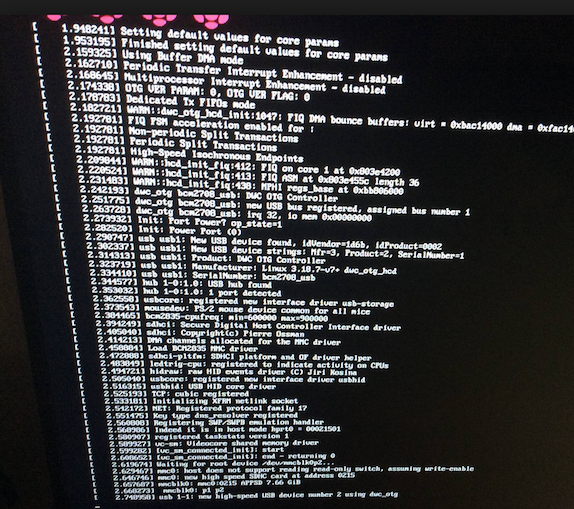
          small last question, is there a way to avoid all the boot up code scrolling when the Pi starts? 0_1483372291118_Capture d’écran 2017-01-02 à 16.48.01.png
          1 Reply Last reply Reply Quote 0
          • bheplerB Offline
            bhepler Module Developer
            last edited by bhepler

            Yes, but it’s not recommended. Those messages are there in case there is a problem during boot.

            But if you really want it… Stack Exchange to the rescue. If that doesn’t do it for you, some quality time with Google and “Raspbery Pi silent boot” should get you there.

            Edit: It seems that someone on YouTube has also done this.

            B 1 Reply Last reply Reply Quote 1
            • B Offline
              bibi @bhepler
              last edited by

              @bhepler thx a lot for your reply/time :)

              strawberry 3.141S 1 Reply Last reply Reply Quote 0
              • strawberry 3.141S Offline
                strawberry 3.141 Project Sponsor Module Developer @bibi
                last edited by

                @bibi the boot screen is replaced in the newest version if you are using the new raspbian version which is using PIXEL

                Please create a github issue if you need help, so I can keep track

                B 1 Reply Last reply Reply Quote 1
                • B Offline
                  bibi @strawberry 3.141
                  last edited by

                  @strawberry-3.141 i am not using it yet but will def. check that :) thx
                  can i have also your opinion regarding my 1st query pls?

                  strawberry 3.141S lolobyteL 2 Replies Last reply Reply Quote 0
                  • strawberry 3.141S Offline
                    strawberry 3.141 Project Sponsor Module Developer @bibi
                    last edited by

                    @bibi my monitor shows also no signal

                    Please create a github issue if you need help, so I can keep track

                    1 Reply Last reply Reply Quote 1
                    • lolobyteL Offline
                      lolobyte @bibi
                      last edited by

                      @bibi

                      You cam manage boot options in raspi-config if you don’t have install jessi light.

                      execute following command.

                      sudo raspi-config

                      chose menu point

                      3 Boot Options
                      3B Splash Screen

                      and activate it wit “YES”

                      save and reboot with

                      sudo reboot
                      Next topic:
                      My screen show me a message with no signal for approx. 5 sec.
                      After that, the screen is complete black and off.

                      B 1 Reply Last reply Reply Quote 1
                      • B Offline
                        bibi @lolobyte
                        last edited by

                        @lolobyte many thx for this how to! :))

                        1 Reply Last reply Reply Quote 0
                        • D Offline
                          Deniz @broberg
                          last edited by

                          @broberg thx for the reply.
                          Are you satisfied with the monitor you are using?
                          Could you tell me the model number?

                          lolobyteL 1 Reply Last reply Reply Quote 0
                          • lolobyteL Offline
                            lolobyte @Deniz
                            last edited by lolobyte

                            @Deniz

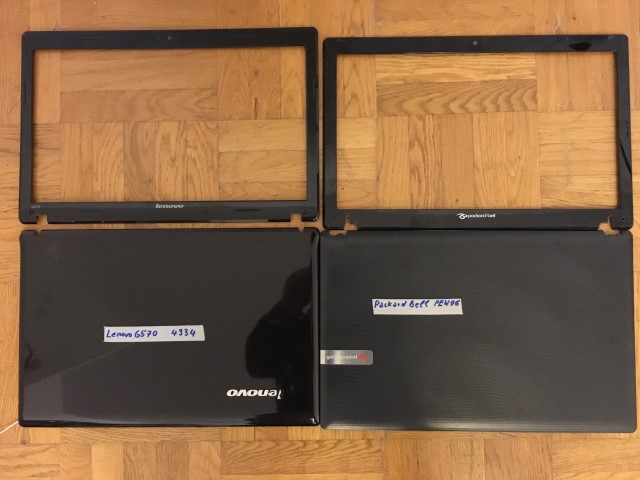
                            Hi, the screen i used, is a old monitor from a Lenovo G670 and one from a Pacard Bell PEW96

                            I use for each one a controller from eBay to to use them with the raspi.

                            HDMI+DVI+VGA+Audio LCD Controller Kit for 15.6" B156XW02 V.2 LED Panel 1366x768

                            HDMI+DVI+VGA+Audio Controller Board Driver Kit for LTN156AT05 LTN156AT02
                            0_1483528126366_IMG_0869 (Small).JPG

                            yawnsY 1 Reply Last reply Reply Quote 0
                            • yawnsY Offline
                              yawns Moderator @lolobyte
                              last edited by

                              @lolobyte
                              Are you happy with these 3rd party video controllers? I intend to buy one for my screen as well

                              lolobyteL 1 Reply Last reply Reply Quote 0
                              • lolobyteL Offline
                                lolobyte @yawns
                                last edited by

                                @yawns

                                They work and do whats the must.

                                You can adjust the volume, brightness, contrast and so on.
                                The raspi recognize the right resolution and the depth of your mirror is very small.

                                A result you have a very thin MagicMirror. Approx. the thickness of a raspi.

                                1 Reply Last reply Reply Quote 1
                                • A Offline
                                  aboulezz
                                  last edited by

                                  I faced the same problem with my LG screen but found a work around.

                                  Step 1) I used wiringpi.com and modified the simple blink example to send out just one impulse:

                                  #include
                                  int main (void)
                                  {
                                  wiringPiSetup () ;
                                  pinMode (0, OUTPUT) ;
                                  digitalWrite (0, HIGH) ; delay (200) ;
                                  digitalWrite (0, LOW) ;
                                  return 0 ;
                                  }

                                  Step 2) I modified the PIR modules’ node_helper.js so within the functions activate / deactivate don’t enable/disable the HDMI output but execute my compiled ‘blink’ command.

                                  Step 3) I hard - wired the singal pin to the (with resistor / transistor) to the screens power-button.

                                  done :-)

                                  D 1 Reply Last reply Reply Quote 0
                                  • D Offline
                                    Desertswing
                                    last edited by Desertswing

                                    Is there new info about this situation…?
                                    Really want to use my 47’ Philips tv (older version)

                                    Hope someone replies!

                                    bheplerB 1 Reply Last reply Reply Quote 0
                                    • bheplerB Offline
                                      bhepler Module Developer @Desertswing
                                      last edited by

                                      @desertswing What I do with my mirror is that I power the monitor and the pi with a switch. So when I’m done, I just flip the power off and the monitor & Pi snap to black.

                                      On boot, the Pi is usually up & booting before the monitor is done with its splash screen. The latest version of Magic Mirror includes a splash screen that replaces the Pi’s boot messages. It’s definitely slick.

                                      D 1 Reply Last reply Reply Quote 0
                                      • D Offline
                                        Desertswing @bhepler
                                        last edited by

                                        @bhepler , But when i want to keep my raspberry always online i have to do something about this situation, it is possible to put new firmware on the TV but i can`t find any modding software thats easier then Hexa codes to configure…

                                        with an LG tv its possible because u can get the firmware software download on a USB drive from the TV, but i want to use a tv that i don`t use anymore.(Recycle project).

                                        1 Reply Last reply Reply Quote 0
                                        • D Offline
                                          Desertswing @aboulezz
                                          last edited by

                                          @aboulezz said in disable NO signal message:

                                          I faced the same problem with my LG screen but found a work around.

                                          Step 1) I used wiringpi.com and modified the simple blink example to send out just one impulse:

                                          #include
                                          int main (void)
                                          {
                                          wiringPiSetup () ;
                                          pinMode (0, OUTPUT) ;
                                          digitalWrite (0, HIGH) ; delay (200) ;
                                          digitalWrite (0, LOW) ;
                                          return 0 ;
                                          }

                                          Step 2) I modified the PIR modules’ node_helper.js so within the functions activate / deactivate don’t enable/disable the HDMI output but execute my compiled ‘blink’ command.

                                          Step 3) I hard - wired the singal pin to the (with resistor / transistor) to the screens power-button.

                                          done :-)

                                          Can`t i use this instead and make my raspberry a longer time to get the HDMI port visible to the TV, ore do i get the message still when giving the HDMI port a command to show himself. (If u know what i mean).

                                          1 Reply Last reply Reply Quote 0

                                          Hello! It looks like you're interested in this conversation, but you don't have an account yet.

                                          Getting fed up of having to scroll through the same posts each visit? When you register for an account, you'll always come back to exactly where you were before, and choose to be notified of new replies (either via email, or push notification). You'll also be able to save bookmarks and upvote posts to show your appreciation to other community members.

                                          With your input, this post could be even better 💗

                                          Register Login

                                          • 1
                                          • 2
                                          • 1 / 2
                                          • First post
                                            Last post
                                          Enjoying MagicMirror? Please consider a donation!
                                          MagicMirror created by Michael Teeuw.
                                          Forum managed by Sam, technical setup by Karsten.
                                          This forum is using NodeBB as its core | Contributors
                                          Contact | Privacy Policy