MagicMirror Forum
    • Recent
    • Tags
    • Unsolved
    • Solved
    • MagicMirror² Repository
    • Documentation
    • 3rd-Party-Modules
    • Donate
    • Discord
    • Register
    • Login
    A New Chapter for MagicMirror: The Community Takes the Lead
    Read the statement by Michael Teeuw here.

    MMM-OpenWeatherForecast - Replacement for MMM-DarkSkyForecast

    Scheduled Pinned Locked Moved Utilities
    256 Posts 55 Posters 631.5k Views 57 Watching
    Loading More Posts
    • Oldest to Newest
    • Newest to Oldest
    • Most Votes
    Reply
    • Reply as topic
    Log in to reply
    This topic has been deleted. Only users with topic management privileges can see it.
    • A Offline
      anubis273
      last edited by

      Howdy!

      I installed this beautiful module to my magic mirror2. i run my mm in docker container and I´m at version 2.14. When I take a view at the official site it seems the latest version with 2.14 is confirmed.

      I think you know what comes next: I have installed the module properly and adjusted the configuration. However, only the word “forecast” is displayed. Now I have seen in the notes that I should be at least on version 2.2 with the magic mirror. I am slightly confused because 2.14 is the latest version?
      When I do a git pull it says that the latest version is already installed.
      Do I have a thinking error in my approach?
      Would be happy to hear something about this :-)

      kind regards,

      Nubi

      J 1 Reply Last reply Reply Quote 0
      • ebolisaE Offline
        ebolisa @j.e.f.f
        last edited by

        @j-e-f-f It works on P0. My bad, had an extra space in the api key. Thank you.

        1 Reply Last reply Reply Quote 0
        • J Offline
          j.e.f.f Project Sponsor Module Developer @anubis273
          last edited by

          @anubis273 This module works on 2.14 – tested that specifically myself. MagicMirror’s version numbering can get a bit confusing… 2.14 is MUCH newer than 2.2. Versioning goes 2.2, 2.3, … 2.9, 2.10, 2.11, etc.

          Double check your config settings. Maybe try with just the minimal config required for MMM-OpenWeatherForecast – apikey, latitude, and longitude – and see if the module works with just those. Also make sure you’ve run npm install in the MMM-OpenWeatherForecast directory.

          If the module runs with just the above, then start adding your additional configuration options one at a time to see which one caused it to fail. Let me know and we can take it from there.

          A 1 Reply Last reply Reply Quote 0
          • A Offline
            anubis273 @j.e.f.f
            last edited by

            @j-e-f-f

            Hey j-e-f-f,

            thanks for clearing up my confusion about MagicMirror versions ;-) And thanks also for the quick feedback!

            So, I double checked the configuration and it doesn’t seem to have any syntax errors:

             {
                    module: "MMM-OpenWeatherForecast",
                    position: "top_right",
                    header: "Forecast",
                        config: {
                        apikey: "myAPIKey",                                                                                            //only string here
                        latitude: 50.748780,                                                                                           //number works here
                        longitude: 7.137300                                                                                            //so does a string
                                    }
              },


            I tried the minimal configuration as you suggested, unfortunately without success. I also checked the Api Key of OpenWeatherMap, this is also correct. The module also seems to work. The problem is that it just doesn’t load any weather data and I don’t understand why.
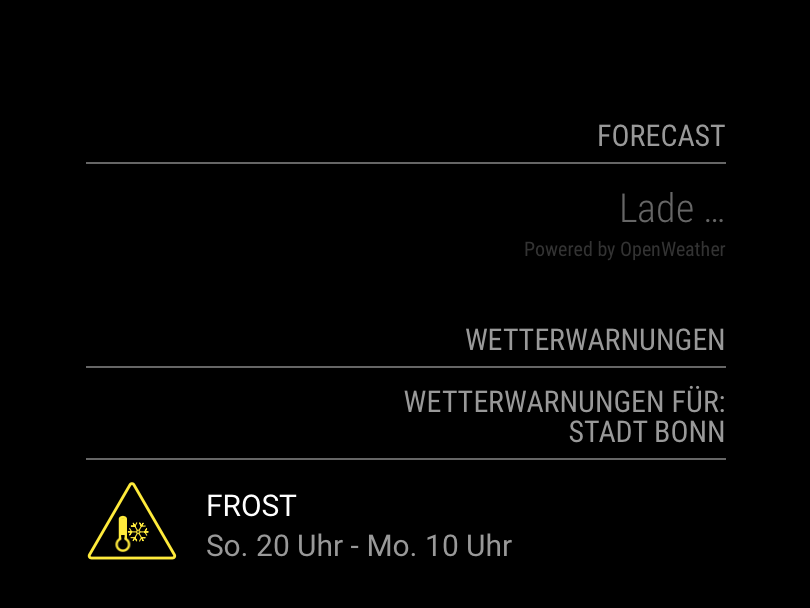
            Bildschirmfoto 2021-03-07 um 19.33.00.png

            If I find a solution to this, I will of course get back to you.

            Many greetings,

            Nubi

            J 1 Reply Last reply Reply Quote 0
            • J Offline
              j.e.f.f Project Sponsor Module Developer @anubis273
              last edited by

              @anubis273 I just tried the default config with your long/lat settings and the module worked for me. So let’s try digging a little more. Are you seeing any errors in the logs? There are a bunch of places to look:

              If you are running MagicMirror using PM2, run pm2 restart mm && pm2 logs mm. Look for any output prefixed with [MMM-OpenWeatherForecast]. If you are instead running MagicMirror from the command line, any errors will be in the in the console, prefixed like above.

              Also need to check to see if Electron is throwing any errors. start MagicMirror in dev mode npm start dev. Any Electron errors will show in the browser console, usually in red.

              Also, since the basic config isn’t working for you, but is for me, can you double check that your API Key is correct?

              • Jeff
              A 2 Replies Last reply Reply Quote 0
              • A Offline
                anubis273 @j.e.f.f
                last edited by

                @j-e-f-f
                Hey j-e-f-f,

                thanks for your quick reply. I will investigate every single point you wrote. Give me a little time for that, I will get back to you as soon as possible.

                Regards from Germany,

                Nubi

                1 Reply Last reply Reply Quote 0
                • A Offline
                  anubis273 @j.e.f.f
                  last edited by

                  @j-e-f-f
                  Hey Jeff,

                  just a little update from my side:

                  I am using my MagicMirror in a Docker container on a Synology DS718+ NAS. On my physical Mirror is an RPi4 which shows the MagicMirror in fullscreen mode via Browser. It is incredibly hard to get log files this way.
                  When I open the log from Docker itself I see entries for the module, but they are all unspectacular.

                  Bildschirmfoto 2021-03-08 um 15.43.48.png

                  I took the API key and put it into a Get command via Postman:

                  GET http://api.openweathermap.org/data/3.0/stations?appid=34a2f353f6933ab3b5deletedpart>

                  [
                      {
                          "id": "5ff1e82e09<deletedpart>",
                          "created_at": "2021-01-03T15:52:14.089Z",
                          "updated_at": "2021-01-03T15:52:14.089Z",
                          "external_id": "IKNVILIC5",
                          "name": "Neu-Vilich Bonn",
                          "longitude": 7.13,
                          "latitude": 50.74,
                          "altitude": 70,
                          "rank": 10
                      }
                  ]
                  

                  The result looks good, the API key seems to work.

                  I don’t have PM2 in my Docker container unfortunately, so I’ll have to see how to get the appropriate log files. I’ll get back to you when I have new findings on this.

                  Many greetings,

                  Nubi

                  0m4r0 1 Reply Last reply Reply Quote 0
                  • D Offline
                    dkhorse74 @j.e.f.f
                    last edited by

                    @j-e-f-f This is AWESOME!! SO SO much better than the default weather module… Question, how do I change the current weather header from “Forecast” to “Current”?
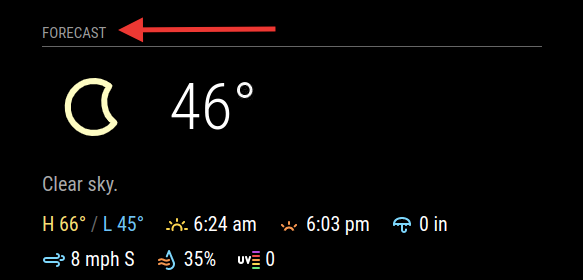
                    Screen Shot 2021-03-08 at 10.31.03 PM.png

                    BKeyportB J 2 Replies Last reply Reply Quote 0
                    • BKeyportB Offline
                      BKeyport Module Developer @dkhorse74
                      last edited by

                      @dkhorse74 That’s the main header… hint…

                      The "E" in "Javascript" stands for "Easy"

                      D 1 Reply Last reply Reply Quote 0
                      • S Offline
                        shiryu1031
                        last edited by

                        thank you so much for the awesome job.
                        however, may I ask how can I change the unit for the wind speed? I can’t seem to find where I can customize this.

                        J 1 Reply Last reply Reply Quote 0
                        • 0m4r0 Offline
                          0m4r Module Developer @anubis273
                          last edited by

                          @anubis273 how do you start your magic mirror?
                          I guess with either npm run start or npm run server
                          In either case, you should be able to see the logs that are generated in the console…

                          you may also want to try to change the log level in your config.js to a more verbose level than “ERORR” (which I believe is the default)

                          https://github.com/0m4r

                          1 Reply Last reply Reply Quote 0
                          • O Offline
                            OberfragGER
                            last edited by OberfragGER

                            Nice Module.

                            But i dont get the german time format (24H) not working. And do you have any idea how to have the germany translation of the warnings?

                            Here is my config:

                            		{
                            		module: "MMM-OpenWeatherForecast",
                            		position: "top_right",
                            //		header: "Forecast",
                            		config: {
                            			apikey: "myKey", //only string here
                            			latitude: 53,            //number works here
                            			longitude: 10,          //so does a string
                            			language: "de",
                            			forecastHeaderText: "Wetter Vorhersage für ....",
                            			iconset: "3c",
                            			label_timeFormat: "k[h]",
                            			label_days: ["So", "Mo", "Di", "Mi", "Do", "Fr", "Sa"]
                            			}
                            		},
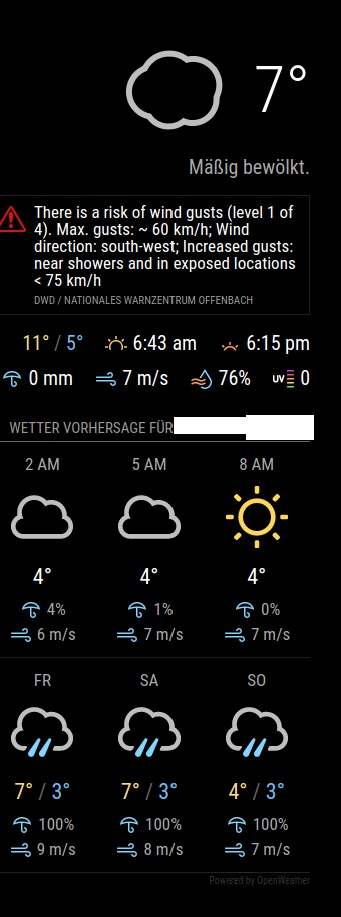
                            

                            2eb0fb96-7fcb-4765-adff-5090b39e526e-image.png

                            O 1 Reply Last reply Reply Quote 0
                            • O Offline
                              OberfragGER @OberfragGER
                              last edited by OberfragGER

                              @oberfragger ok. Got sunrise working in german. There was a missing config line:

                              label_sunriseTimeFormat: "hh:mm",
                              

                              and also with the time… also a typo (forgot the “hourly”):

                              label_hourlyTimeFormat: "k[h]",
                              

                              I edited this to:

                              label_hourlyTimeFormat: "k[ Uhr]",
                              

                              Still inspecting the storm warning in german…

                              karsten13K 1 Reply Last reply Reply Quote 0
                              • karsten13K Online
                                karsten13 @OberfragGER
                                last edited by

                                @oberfragger

                                Still inspecting the storm warning in german…

                                same problem here, saw meanwhile some of this warnings in german but mostly in english. Looks like a problem on the provider side, when inspecting the called url in the browser the retrieved data is in english.

                                So this can’t be solved by the module.

                                karsten13K 1 Reply Last reply Reply Quote 0
                                • swvalentiS Offline
                                  swvalenti Project Sponsor
                                  last edited by

                                  @j-e-f-f Anyway to hide the special weather advisory? Really jacks up my layout, I took a look at config but nothing stood out.
                                  Thanks
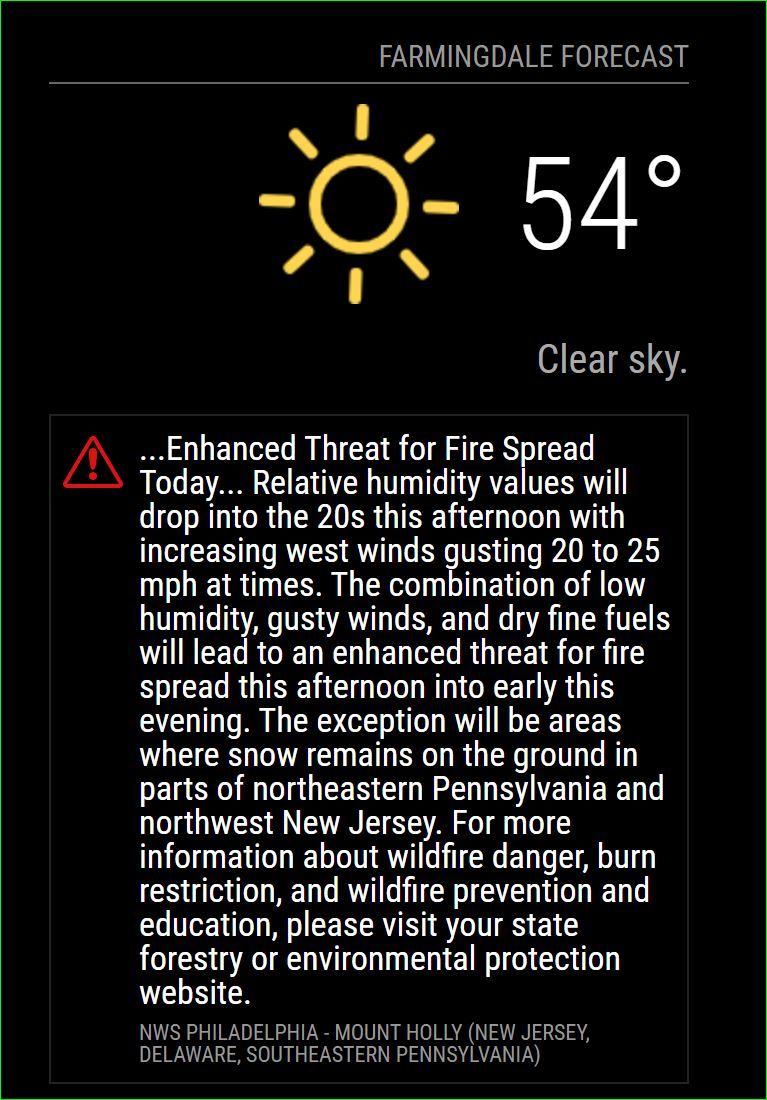
                                  Capture.JPG

                                  J 2 Replies Last reply Reply Quote 0
                                  • D Offline
                                    dkhorse74 @BKeyport
                                    last edited by

                                    @bkeyport said in MMM-OpenWeatherForecast - Replacement for MMM-DarkSkyForecast:

                                    @dkhorse74 That’s the main header… hint…

                                    :thumbs_up: Thank You

                                    1 Reply Last reply Reply Quote 0
                                    • karsten13K Online
                                      karsten13 @karsten13
                                      last edited by

                                      so now i catched the situation where the alerts are in english and in german:
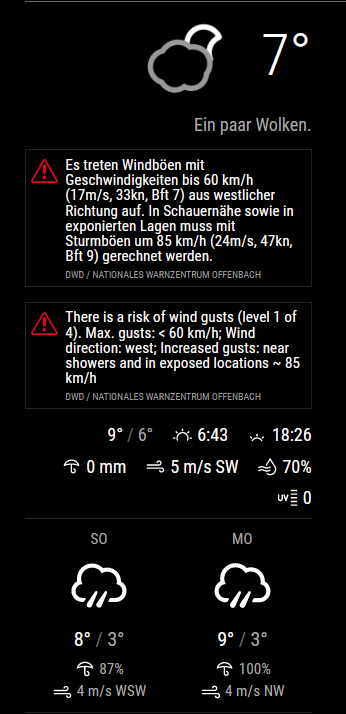
                                      a118b88d-d530-46fc-bd79-9885c3a097f4-grafik.png

                                      the data is coming directly from openweathermap, here the json-part:

                                      213ed321-e420-41cd-933d-69cb716a8a00-grafik.png

                                      J 1 Reply Last reply Reply Quote 0
                                      • J Offline
                                        j.e.f.f Project Sponsor Module Developer @dkhorse74
                                        last edited by

                                        @dkhorse74 that’s the main header for the module. Change it like this:

                                          {
                                            module: "MMM-OpenWeatherForecast",
                                            position: "top_right",
                                            header: "Forecast",  <— here
                                            config: {
                                              apikey: "a1b2c3d4e5f6g7h8j9k0", //only string here
                                              latitude: 51.490230,            //number works here
                                              longitude: "-0.258810"          //so does a string
                                            }
                                          },
                                        
                                        D 1 Reply Last reply Reply Quote 0
                                        • J Offline
                                          j.e.f.f Project Sponsor Module Developer @shiryu1031
                                          last edited by

                                          @shiryu1031 you can’t do that independently on the main units setting. OpenWeather returns mph for imperial, and m/s for standard and metric.

                                          S 1 Reply Last reply Reply Quote 0
                                          • J Offline
                                            j.e.f.f Project Sponsor Module Developer @swvalenti
                                            last edited by

                                            @swvalenti yes you can. The weather alerts are part of the summary section. OpenWeather returns such a short summary that I didn’t think it necessary to make two separate configure. Two ways to turn off the alerts:

                                            • set summary : false
                                            • if you want the summary but not the alerts, you can hide them in your custom css as follows:
                                            .MMM-OpenWeatherForecast .weather-alert {
                                              display: none;
                                            }
                                            

                                            I think I’ll look at a way to truncate weather alerts so they don’t take up so much space.

                                            swvalentiS 1 Reply Last reply Reply Quote 1

                                            Hello! It looks like you're interested in this conversation, but you don't have an account yet.

                                            Getting fed up of having to scroll through the same posts each visit? When you register for an account, you'll always come back to exactly where you were before, and choose to be notified of new replies (either via email, or push notification). You'll also be able to save bookmarks and upvote posts to show your appreciation to other community members.

                                            With your input, this post could be even better 💗

                                            Register Login

                                            • 1
                                            • 2
                                            • 3
                                            • 4
                                            • 5
                                            • 6
                                            • 7
                                            • 8
                                            • 12
                                            • 13
                                            • 6 / 13
                                            • First post
                                              Last post
                                            Enjoying MagicMirror? Please consider a donation!
                                            MagicMirror created by Michael Teeuw.
                                            Forum managed by Sam, technical setup by Karsten.
                                            This forum is using NodeBB as its core | Contributors
                                            Contact | Privacy Policy