MagicMirror Forum
    • Recent
    • Tags
    • Unsolved
    • Solved
    • MagicMirror² Repository
    • Documentation
    • 3rd-Party-Modules
    • Donate
    • Discord
    • Register
    • Login
    A New Chapter for MagicMirror: The Community Takes the Lead
    Read the statement by Michael Teeuw here.

    MMM-OpenWeatherForecast - Replacement for MMM-DarkSkyForecast

    Scheduled Pinned Locked Moved Utilities
    256 Posts 55 Posters 631.8k Views 57 Watching
    Loading More Posts
    • Oldest to Newest
    • Newest to Oldest
    • Most Votes
    Reply
    • Reply as topic
    Log in to reply
    This topic has been deleted. Only users with topic management privileges can see it.
    • D Offline
      dkhorse74 @j.e.f.f
      last edited by

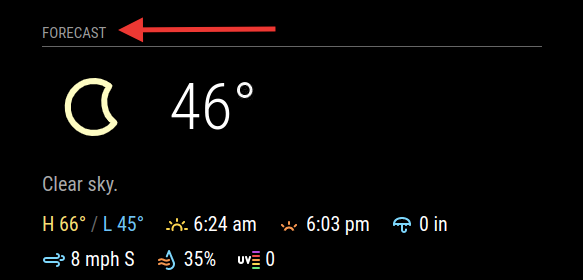
      @j-e-f-f This is AWESOME!! SO SO much better than the default weather module… Question, how do I change the current weather header from “Forecast” to “Current”?
      Screen Shot 2021-03-08 at 10.31.03 PM.png

      BKeyportB J 2 Replies Last reply Reply Quote 0
      • BKeyportB Offline
        BKeyport Module Developer @dkhorse74
        last edited by

        @dkhorse74 That’s the main header… hint…

        The "E" in "Javascript" stands for "Easy"

        D 1 Reply Last reply Reply Quote 0
        • S Offline
          shiryu1031
          last edited by

          thank you so much for the awesome job.
          however, may I ask how can I change the unit for the wind speed? I can’t seem to find where I can customize this.

          J 1 Reply Last reply Reply Quote 0
          • 0m4r0 Offline
            0m4r Module Developer @anubis273
            last edited by

            @anubis273 how do you start your magic mirror?
            I guess with either npm run start or npm run server
            In either case, you should be able to see the logs that are generated in the console…

            you may also want to try to change the log level in your config.js to a more verbose level than “ERORR” (which I believe is the default)

            https://github.com/0m4r

            1 Reply Last reply Reply Quote 0
            • O Offline
              OberfragGER
              last edited by OberfragGER

              Nice Module.

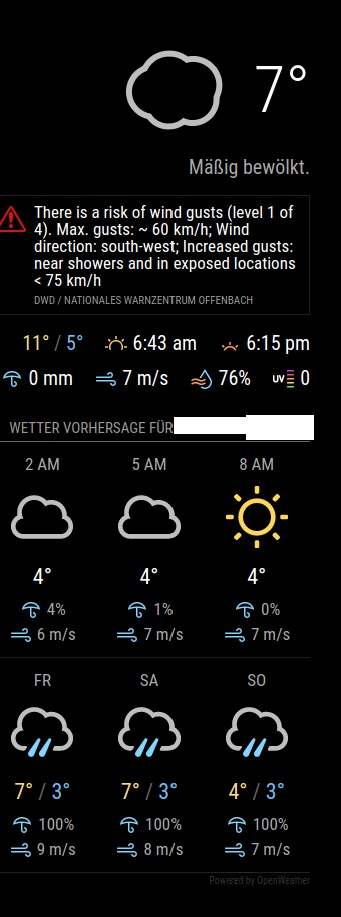
              But i dont get the german time format (24H) not working. And do you have any idea how to have the germany translation of the warnings?

              Here is my config:

              		{
              		module: "MMM-OpenWeatherForecast",
              		position: "top_right",
              //		header: "Forecast",
              		config: {
              			apikey: "myKey", //only string here
              			latitude: 53,            //number works here
              			longitude: 10,          //so does a string
              			language: "de",
              			forecastHeaderText: "Wetter Vorhersage für ....",
              			iconset: "3c",
              			label_timeFormat: "k[h]",
              			label_days: ["So", "Mo", "Di", "Mi", "Do", "Fr", "Sa"]
              			}
              		},
              

              2eb0fb96-7fcb-4765-adff-5090b39e526e-image.png

              O 1 Reply Last reply Reply Quote 0
              • O Offline
                OberfragGER @OberfragGER
                last edited by OberfragGER

                @oberfragger ok. Got sunrise working in german. There was a missing config line:

                label_sunriseTimeFormat: "hh:mm",
                

                and also with the time… also a typo (forgot the “hourly”):

                label_hourlyTimeFormat: "k[h]",
                

                I edited this to:

                label_hourlyTimeFormat: "k[ Uhr]",
                

                Still inspecting the storm warning in german…

                karsten13K 1 Reply Last reply Reply Quote 0
                • karsten13K Offline
                  karsten13 @OberfragGER
                  last edited by

                  @oberfragger

                  Still inspecting the storm warning in german…

                  same problem here, saw meanwhile some of this warnings in german but mostly in english. Looks like a problem on the provider side, when inspecting the called url in the browser the retrieved data is in english.

                  So this can’t be solved by the module.

                  karsten13K 1 Reply Last reply Reply Quote 0
                  • swvalentiS Offline
                    swvalenti Project Sponsor
                    last edited by

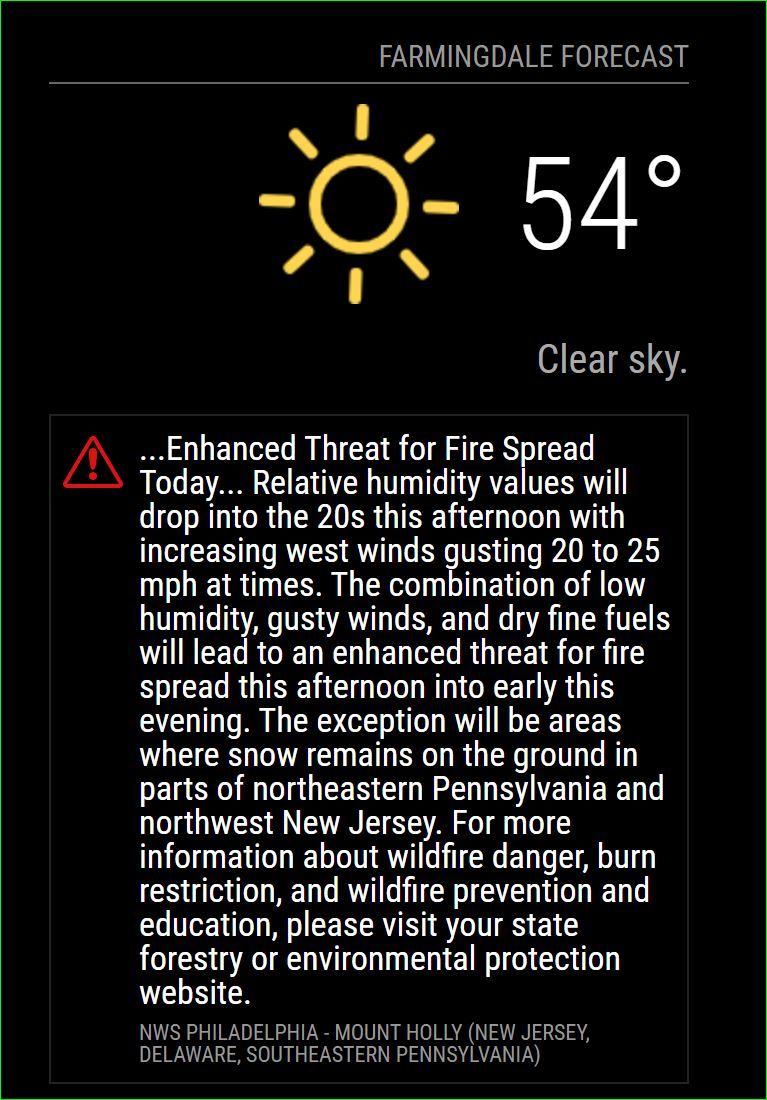
                    @j-e-f-f Anyway to hide the special weather advisory? Really jacks up my layout, I took a look at config but nothing stood out.
                    Thanks
                    Capture.JPG

                    J 2 Replies Last reply Reply Quote 0
                    • D Offline
                      dkhorse74 @BKeyport
                      last edited by

                      @bkeyport said in MMM-OpenWeatherForecast - Replacement for MMM-DarkSkyForecast:

                      @dkhorse74 That’s the main header… hint…

                      :thumbs_up: Thank You

                      1 Reply Last reply Reply Quote 0
                      • karsten13K Offline
                        karsten13 @karsten13
                        last edited by

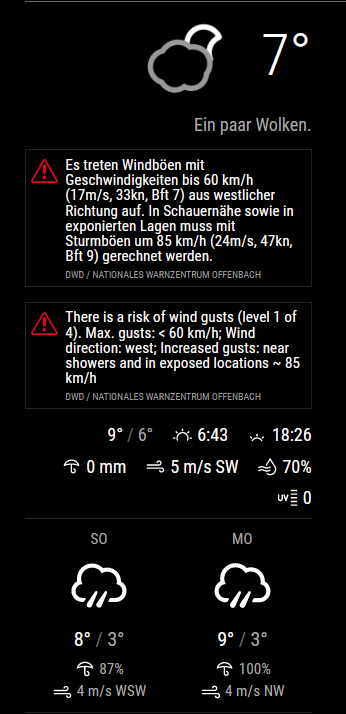
                        so now i catched the situation where the alerts are in english and in german:
                        a118b88d-d530-46fc-bd79-9885c3a097f4-grafik.png

                        the data is coming directly from openweathermap, here the json-part:

                        213ed321-e420-41cd-933d-69cb716a8a00-grafik.png

                        J 1 Reply Last reply Reply Quote 0
                        • J Offline
                          j.e.f.f Project Sponsor Module Developer @dkhorse74
                          last edited by

                          @dkhorse74 that’s the main header for the module. Change it like this:

                            {
                              module: "MMM-OpenWeatherForecast",
                              position: "top_right",
                              header: "Forecast",  <— here
                              config: {
                                apikey: "a1b2c3d4e5f6g7h8j9k0", //only string here
                                latitude: 51.490230,            //number works here
                                longitude: "-0.258810"          //so does a string
                              }
                            },
                          
                          D 1 Reply Last reply Reply Quote 0
                          • J Offline
                            j.e.f.f Project Sponsor Module Developer @shiryu1031
                            last edited by

                            @shiryu1031 you can’t do that independently on the main units setting. OpenWeather returns mph for imperial, and m/s for standard and metric.

                            S 1 Reply Last reply Reply Quote 0
                            • J Offline
                              j.e.f.f Project Sponsor Module Developer @swvalenti
                              last edited by

                              @swvalenti yes you can. The weather alerts are part of the summary section. OpenWeather returns such a short summary that I didn’t think it necessary to make two separate configure. Two ways to turn off the alerts:

                              • set summary : false
                              • if you want the summary but not the alerts, you can hide them in your custom css as follows:
                              .MMM-OpenWeatherForecast .weather-alert {
                                display: none;
                              }
                              

                              I think I’ll look at a way to truncate weather alerts so they don’t take up so much space.

                              swvalentiS 1 Reply Last reply Reply Quote 1
                              • J Offline
                                j.e.f.f Project Sponsor Module Developer @karsten13
                                last edited by

                                @karsten13 I don’t think there is much I can do here. I’ve coded this module to explicitly pass through a language parameter, either whatever is set in your main MM config, or whatever you explicitly set in the module’s config. It seems that OpenWeather doesn’t translate the weather alert, but merely passes them on as-is from whatever source it gets them from. Which is why sometimes you’re getting only English, and other times you’re getting multiple translations.

                                karsten13K 1 Reply Last reply Reply Quote 0
                                • swvalentiS Offline
                                  swvalenti Project Sponsor @j.e.f.f
                                  last edited by

                                  @j-e-f-f said in MMM-OpenWeatherForecast - Replacement for MMM-DarkSkyForecast:

                                  @swvalenti yes you can. The weather alerts are part of the summary section. OpenWeather returns such a short summary that I didn’t think it necessary to make two separate configure. Two ways to turn off the alerts:

                                  • set summary : false
                                  • if you want the summary but not the alerts, you can hide them in your custom css as follows:
                                  .MMM-OpenWeatherForecast .weather-alert {
                                    display: none;
                                  }
                                  

                                  I think I’ll look at a way to truncate weather alerts so they don’t take up so much space.

                                  Awesome thanks @j-e-f-f !

                                  1 Reply Last reply Reply Quote 1
                                  • D Offline
                                    dkhorse74 @j.e.f.f
                                    last edited by

                                    @j-e-f-f

                                    Thanks Jeff!!

                                    1 Reply Last reply Reply Quote 0
                                    • S Offline
                                      shiryu1031 @j.e.f.f
                                      last edited by

                                      @j-e-f-f I see, thank you for your help. I thought it can be done because the example picture on Github is in km/h, but for myself, I am only seeing m/s as you mentioned. I guess it can not be change from m/s to km/h?

                                      J 1 Reply Last reply Reply Quote 0
                                      • karsten13K Offline
                                        karsten13 @j.e.f.f
                                        last edited by

                                        @j-e-f-f

                                        I don’t think there is much I can do here.

                                        yes, I’m aware of this. Sent a mail to openweathermap.org and will let you know if I ever get a response …

                                        O 1 Reply Last reply Reply Quote 0
                                        • O Offline
                                          OberfragGER @karsten13
                                          last edited by

                                          Did anyone have an idea how to chage the timeformat from sundown?
                                          Now its displayed: 6:20… i want to have 18:20
                                          I already changed the rest.

                                          karsten13K 1 Reply Last reply Reply Quote 0
                                          • karsten13K Offline
                                            karsten13 @OberfragGER
                                            last edited by

                                            @oberfragger

                                            label_sunriseTimeFormat: "k:mm",

                                            O 1 Reply Last reply Reply Quote 0

                                            Hello! It looks like you're interested in this conversation, but you don't have an account yet.

                                            Getting fed up of having to scroll through the same posts each visit? When you register for an account, you'll always come back to exactly where you were before, and choose to be notified of new replies (either via email, or push notification). You'll also be able to save bookmarks and upvote posts to show your appreciation to other community members.

                                            With your input, this post could be even better 💗

                                            Register Login

                                            • 1
                                            • 2
                                            • 3
                                            • 4
                                            • 5
                                            • 12
                                            • 13
                                            • 2 / 13
                                            • First post
                                              Last post
                                            Enjoying MagicMirror? Please consider a donation!
                                            MagicMirror created by Michael Teeuw.
                                            Forum managed by Sam, technical setup by Karsten.
                                            This forum is using NodeBB as its core | Contributors
                                            Contact | Privacy Policy