Read the statement by Michael Teeuw here.
Bullseye
-
Installing helper tools ...
Updating packages ...
[     <=>                                                                                                                                       ]Check current Node installation ...
Node.js is not installed.
Installing Node.js ...
chmod: cannot access '/usr/share/doc/nodejs/api/embedding.json.gz': No such file or directory
Reading package lists... Done
Building dependency tree... Done
Reading state information... Done
The following packages were automatically installed and are no longer required:
  libc-ares2 libjs-highlight.js nodejs-doc
Use 'sudo apt autoremove' to remove them.
The following NEW packages will be installed:
  nodejs
0 upgraded, 1 newly installed, 0 to remove and 0 not upgraded.
Need to get 0 B/22.9 MB of archives.
After this operation, 116 MB of additional disk space will be used.
Selecting previously unselected package nodejs.
(Reading database ... 99829 files and directories currently installed.)
Preparing to unpack .../nodejs_14.18.1-deb-1nodesource1_armhf.deb ...
Unpacking nodejs (14.18.1-deb-1nodesource1) ...
dpkg: error processing archive /var/cache/apt/archives/nodejs_14.18.1-deb-1nodesource1_armhf.deb (--unpack):
 trying to overwrite '/usr/share/doc/nodejs/api/embedding.json.gz', which is also in package nodejs-doc 12.22.5~dfsg-2~11u1
dpkg-deb: error: paste subprocess was killed by signal (Broken pipe)
Errors were encountered while processing:
 /var/cache/apt/archives/nodejs_14.18.1-deb-1nodesource1_armhf.deb
E: Sub-process /usr/bin/dpkg returned an error code (1)
node version is bash: line 227: node: command not found
bash: line 229: node: command not found
Node.js installation Done! version=
Check current NPM installation ...
NPM currently installed. Checking version number.
/usr/bin/env: ‘node’: No such file or directory
Minimum npm version: V6.0.0
Installed npm version: V
npm should be upgraded.
Installing npm ...
E: Unable to correct problems, you have held broken packages.
/usr/bin/env: ‘node’: No such file or directory
/usr/bin/env: ‘node’: No such file or directory
npm installation Done! version=V
Cloning MagicMirror ...
Cloning into 'MagicMirror'...
remote: Enumerating objects: 325, done.
remote: Counting objects: 100% (325/325), done.
remote: Compressing objects: 100% (290/290), done.
remote: Total 325 (delta 53), reused 146 (delta 22), pack-reused 0
Receiving objects: 100% (325/325), 477.94 KiB | 4.78 MiB/s, done.
Resolving deltas: 100% (53/53), done.
Cloning MagicMirror Done!
touch: cannot touch '/etc/chromium-browser/customizations/01-disable-update-check': No such file or directory
Installing dependencies ...
/usr/bin/env: ‘node’: No such file or directory
Unable to install dependencies!
log added to issue…
-
@bkeyport wonderful…
-
@bkeyport think I fixed it… give it a try, still bullseye in the urls
-
-
@bugsounet i get v12.22.5 right after boot up, image downloaded yesterday
-
@bugsounet did u select yes to install updates during setup? I selected no… do it later
reflashing SD card now.
-
I get on 1st boot after config, enabling ssh , and setting hostname
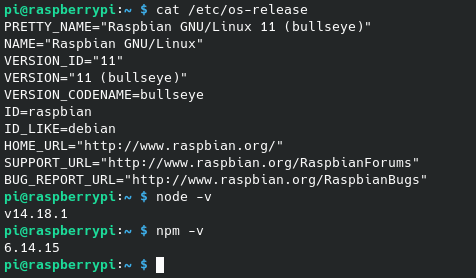
node -v
v12.22.5cat /etc/apt/sources.list.d/nodesource.list
cat: /etc/apt/sources.list.d/nodesource.list: No such file or directoryls /etc/apt/sources.list.d
raspi.list vscode.list -
curl -sL https://deb.nodesource.com/setup_14.x | sudo -E bash -can help ?
-
@bugsounet i got it in the latest script… different approach, but understand
-
@sdetweil
Sorry for asking but i dont get the point.1 day before the release of Bullseye i installed busetr an used your script to get MM working. That worked flawless. Glad i made a backup then with my config.
Days later, i upgraded to Bullseye and MM was not working any longer. I thought due some autostart things or something like that.
When i now make a fresh bullseye install and use your script- is that working? No, or?
-
@oberfragger yes, if you use the bullseye adjusted url (note the word master is replaced by bullseye i the url)
bash -c "$(curl -sL https://raw.githubusercontent.com/sdetweil/MagicMirror_scripts/bullseye/raspberry.sh)"I don’t want to break the current version while we test this out…
I just updated the instructions with this link
-
Ok i tried
bash -c "$(curl -sL https://raw.githubusercontent.com/sdetweil/MagicMirror_scripts/bullseye/raspberry.sh)"And it did not work. What I did was use the master version then rename MM folder after install then use above code and then it work?
-
@djboob66 can u post the ~/install.log?
-
I have to do it again but will do it as soon as i can or is log found on file and were?
-
@sdetweil Failed all over the place.
I’ll upload install.log, then nuking card and starting over.
-
@bkeyport did u use the bullseye link ?
before then if u used the old link, things get messed up w no recovery (well there is but it’s half an hour of ugly work)
reflash
-
@sdetweil Yes, I used the bullseye link. installing a new card now.
The “E” in “Javascript” stands for “Easy”
-
@sdetweil
the install went without problem this time only thing did diff was i SSH not VNC will test VNC install and see if error.
the only think i get is“Installing dependencies …
npm WARN deprecated @stylelint/postcss-markdown@0.36.2: Use the original unforke d package instead: postcss-markdown
npm WARN deprecated uuid@3.4.0: Please upgrade to version 7 or higher. Older v ersions may use Math.random() in certain circumstances, which is known to be pro blematic. See https://v8.dev/blog/math-random for details.
npm notice created a lockfile as package-lock.json. You should commit this file.
npm WARN optional SKIPPING OPTIONAL DEPENDENCY: fsevents@^2.3.2 (node_modules/je st-haste-map/node_modules/fsevents):
npm WARN notsup SKIPPING OPTIONAL DEPENDENCY: Unsupported platform for fsevents@ 2.3.2: wanted {“os”:“darwin”,“arch”:“any”} (current: {“os”:“linux”,“arch”:“arm”} )
npm WARN tsutils@3.21.0 requires a peer of typescript@>=2.8.0 || >= 3.2.0-dev || >= 3.3.0-dev || >= 3.4.0-dev || >= 3.5.0-dev || >= 3.6.0-dev || >= 3.6.0-beta | | >= 3.7.0-dev || >= 3.7.0-beta but none is installed. You must install peer dep endencies yourself.”Do i need to fix anything??
Hope this helps. -
@djboob66 no, nothing to fix
-
On new card it worked flawlessly. I’m assuming the old conditions of partial installs and whatnot had the old install broke things.
Nothing but warnings about depreciated modules.



Hello! It looks like you're interested in this conversation, but you don't have an account yet.
Getting fed up of having to scroll through the same posts each visit? When you register for an account, you'll always come back to exactly where you were before, and choose to be notified of new replies (either via email, or push notification). You'll also be able to save bookmarks and upvote posts to show your appreciation to other community members.
With your input, this post could be even better 💗
Register Login