MagicMirror Forum
    • Recent
    • Tags
    • Unsolved
    • Solved
    • MagicMirror² Repository
    • Documentation
    • 3rd-Party-Modules
    • Donate
    • Discord
    • Register
    • Login
    A New Chapter for MagicMirror: The Community Takes the Lead
    Read the statement by Michael Teeuw here.

    MMM-CalendarExt3Agenda

    Scheduled Pinned Locked Moved Utilities
    224 Posts 30 Posters 362.0k Views 32 Watching
    Loading More Posts
    • Oldest to Newest
    • Newest to Oldest
    • Most Votes
    Reply
    • Reply as topic
    Log in to reply
    This topic has been deleted. Only users with topic management privileges can see it.
    • BKeyportB Offline
      BKeyport Module Developer @BKeyport
      last edited by

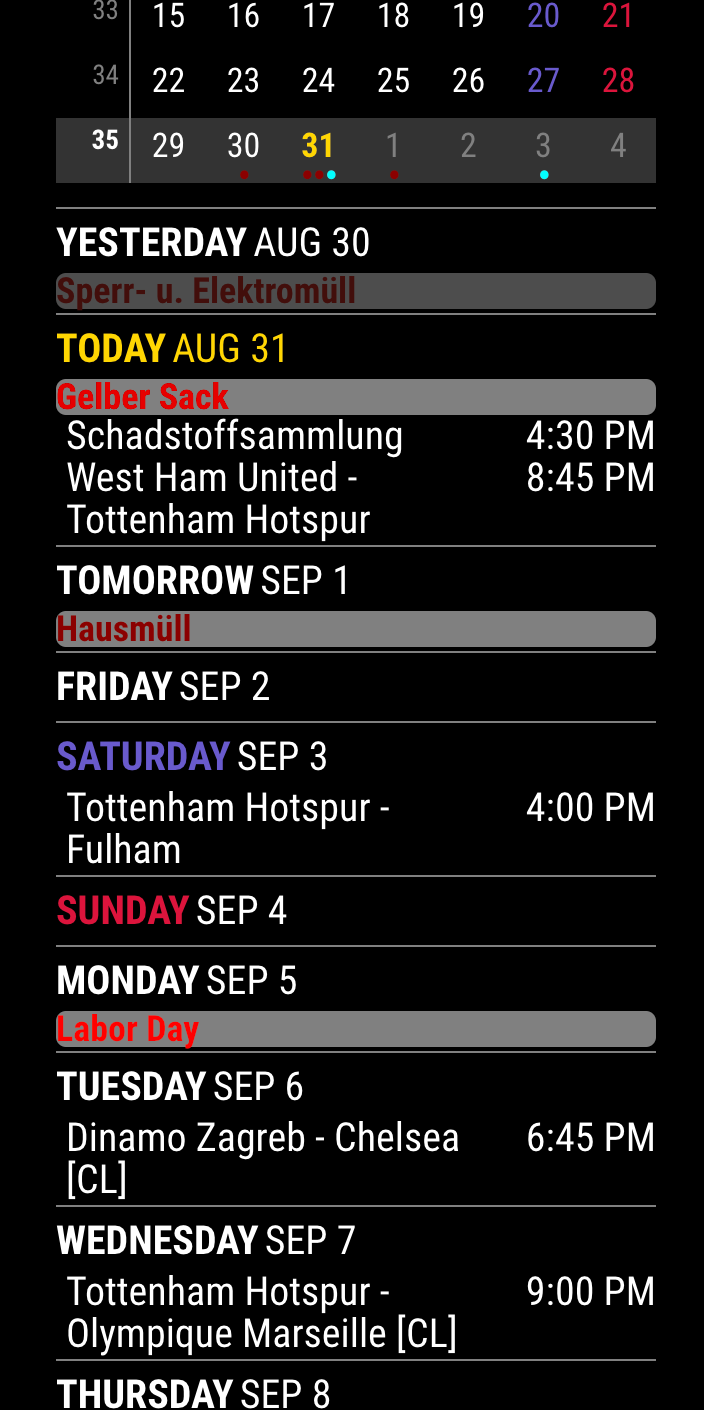
      So, here’s my final config in CSS -

      * CalendarExtende3 Agenda */
        
      .CX3A .event .description {
        display: none;
      }
      
      .CX3A .event .headline .symbol.noSymbol::after {
        content: '';
      }
      
      .CX3A .cellBody .fullday {
        display: flex;
        justify-content: flex-start;
        flex-wrap: wrap;
      }
      
      .CX3A .cellBody .fullday .event {
        color: var(--calendarColor);
        background-color: gray;
        max-width: 100%;
        padding: 0px 0px;
      }
      
      .CX3A .cellBody .fullday .event .title {
        color: inherit;
        overflow: unset;
        white-space: unset;
        text-overflow: unset;
      }
      
      .CX3A .cellBody .fullday .event .headline :not(.title) {
        display: inline-block;
      }
      
      .CX3A .cellBody .fullday .event .headline .time {
        display: none;
       }
      
      .CX3A .event .time {
        width: 55px; /* adjust for your entire CSS harmony */ 
        text-align: right;
      }
      
      .CX3A .event .location {
        display: none;
      }
      
      .CX3A::after {
        height: 0;
      }
      

      Results in:

      7cdfcb3f-ce93-45c6-a1ab-a3a193bd954d-image.png

      The "E" in "Javascript" stands for "Easy"

      1 Reply Last reply Reply Quote 1
      • luisestradaL Offline
        luisestrada @BKeyport
        last edited by

        @BKeyport said in MMM-CalendarExt3Agenda:

        @MMRIZE at least you have good taste and follow the bluejays. :P

        I cannot agree more with that :)

        1 Reply Last reply Reply Quote 0
        • M Offline
          MMRIZE
          last edited by

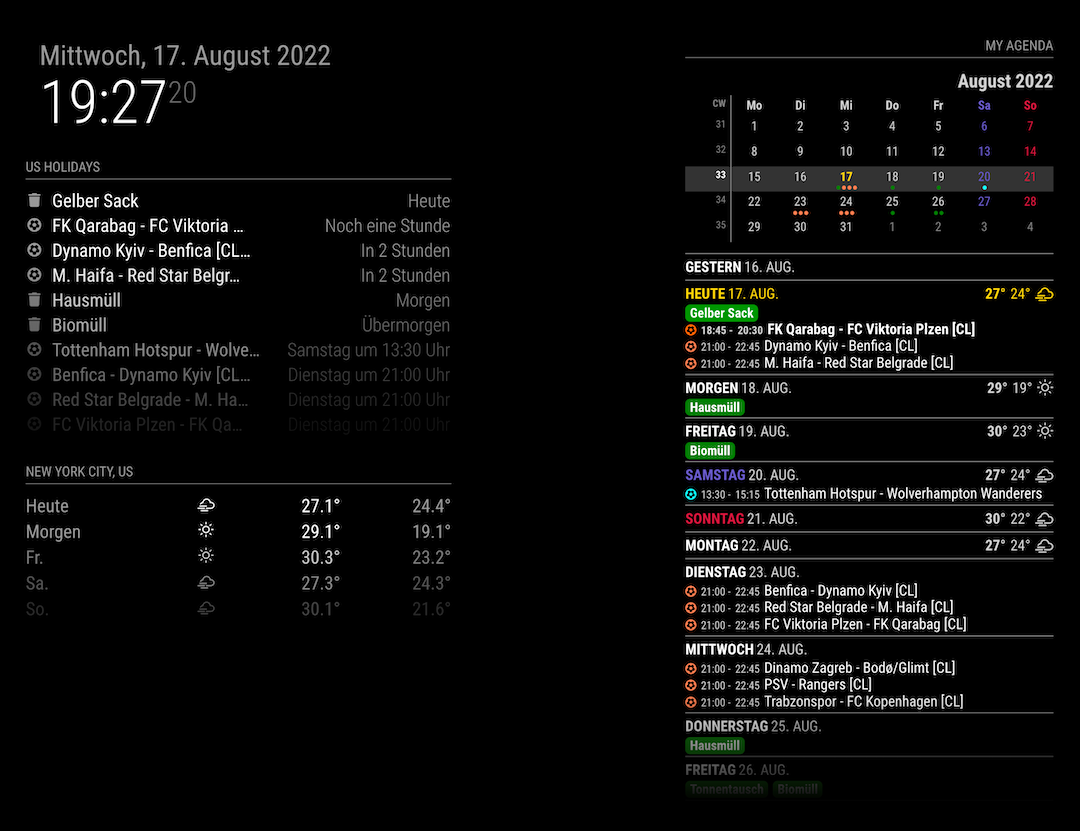
          Updated

          CX3A_110.png

          1.1.0 (2022-08-17)

          • ADDED : miniMonth calendar
          • FIXED : some minor bugs fixes and code refactoring
          BKeyportB 1 Reply Last reply Reply Quote 0
          • BKeyportB Offline
            BKeyport Module Developer @MMRIZE
            last edited by

            @MMRIZE ya know, I hate that you’re so efficient in getting stuff like this to work natively, without external code. geezer.gif

            The "E" in "Javascript" stands for "Easy"

            M 1 Reply Last reply Reply Quote 0
            • M Offline
              MMRIZE @BKeyport
              last edited by

              @BKeyport
              :D

              I just want to get a similar look with Fantastical App on MagicMirror because I majorly am using that app in my real world. ;)month.5.png
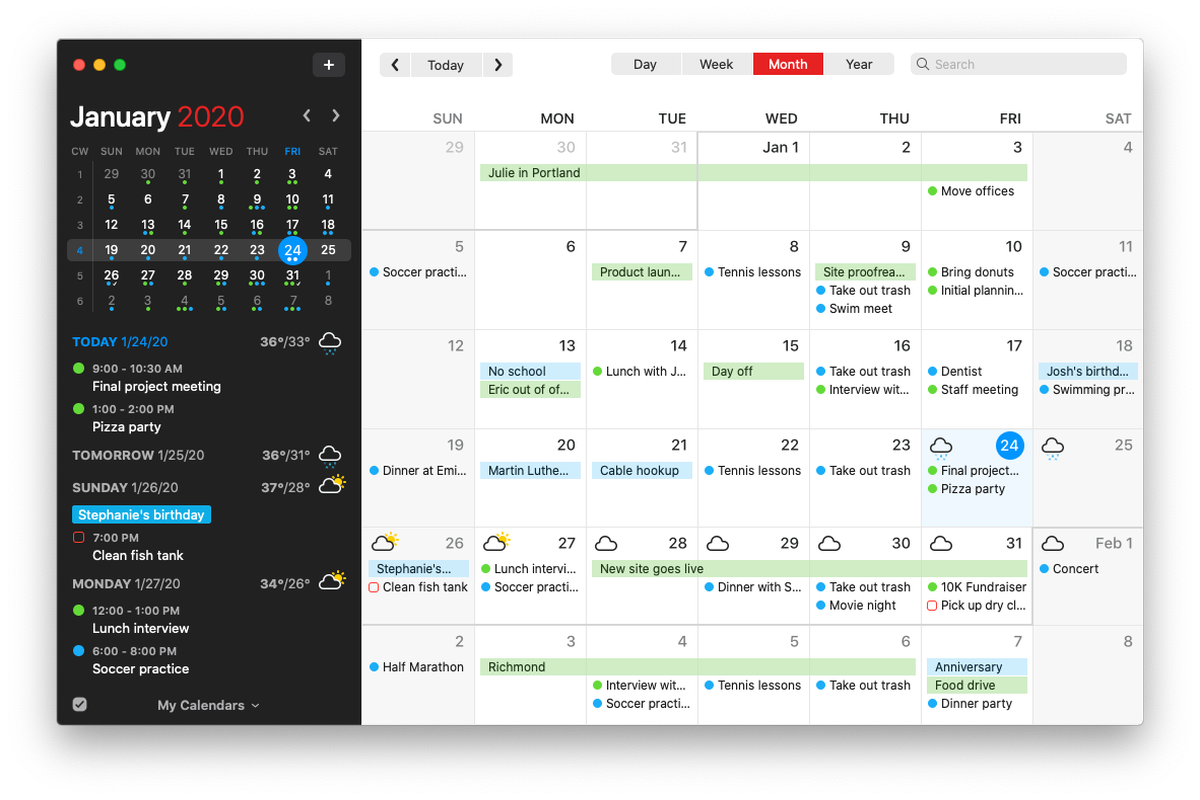
              BKeyportB 1 Reply Last reply Reply Quote 0
              • BKeyportB Offline
                BKeyport Module Developer @MMRIZE
                last edited by

                OK, Seriously - do you want to do two things:

                1. Setup your minical to show by itself, without an agenda.
                2. Allow it to expand to multiple months like my MMM-Minimonth

                If so, I’m seriously considering dropping the module, as I’m getting very frustrated in porting away from moment.js - and frankly, I’m to the point of dropping out - I’d rather concentrate on other things.

                The "E" in "Javascript" stands for "Easy"

                M 1 Reply Last reply Reply Quote 0
                • M Offline
                  MMRIZE @BKeyport
                  last edited by

                  @BKeyport
                  Not at all.
                  That mini cal belongs to agenda. I don’t have interesting standalone. And 3 months view? I never use that kind in real world. Basically, i will not build what I won’t use. So don’t worry.

                  BKeyportB 1 Reply Last reply Reply Quote 0
                  • BKeyportB Offline
                    BKeyport Module Developer @MMRIZE
                    last edited by

                    @MMRIZE z’arright.

                    The "E" in "Javascript" stands for "Easy"

                    BKeyportB 1 Reply Last reply Reply Quote 0
                    • BKeyportB Offline
                      BKeyport Module Developer @BKeyport
                      last edited by

                      @MMRIZE hey, Having trouble with a transform, I’ve noticed.

                      In redoing my CSS (reason for finding bug posted on github), I noticed my transformer isn’t quite working like I want.

                      this works:

                      eventTransformer: (ev) => {
                      	if (ev.title.search("⚾") > -1)
                      	ev.title = ev.title.replace("⚾","");
                      	return ev
                      },
                      

                      However, I would also like to take out the space after the baseball, so that these events line up with the rest of the events that don’t try and get fancy and put emoji into the title.

                      two attempts I’ve made: ev.title.replace("⚾ ",""); and ev.title.replace("⚾ ",""); totally disable to the transform. Suggestions?

                      The "E" in "Javascript" stands for "Easy"

                      S 1 Reply Last reply Reply Quote 0
                      • S Offline
                        sdetweil @BKeyport
                        last edited by

                        @BKeyport said in MMM-CalendarExt3Agenda:

                        eventTransformer: (ev) => {
                        if (ev.title.search(“⚾”) > -1)
                        ev.title = ev.title.replace(“⚾”,“”);
                        return ev
                        },

                        so, lets make a little node script to test outside the transform

                        xxx.js

                        let title= " put in your chars"

                        console.log(title.replace(“… etc”,“”)

                        save and then run

                        node xxx.js

                        then u can play with it
                        til you get what you expect

                        Sam

                        How to add modules

                        learning how to use browser developers window for css changes

                        BKeyportB 1 Reply Last reply Reply Quote 0
                        • BKeyportB Offline
                          BKeyport Module Developer @sdetweil
                          last edited by

                          @sdetweil Found it, ended up being a special char, likely a tab or something stupid. cut and paste saves the day.

                          The "E" in "Javascript" stands for "Easy"

                          BKeyportB 1 Reply Last reply Reply Quote 1
                          • BKeyportB Offline
                            BKeyport Module Developer @BKeyport
                            last edited by BKeyport

                            Three things I wanna change that I can’t figure out.

                            1. I would like the all day events that don’t wrap (“Yard Waste”) to stretch across the window (grey bar).
                            2. I would like times to not wrap.
                            3. I would like times to right align, so that the events are in a nice straight line.

                            custom CSS and screenshot attached. I’m in top_center.

                            Thanks!
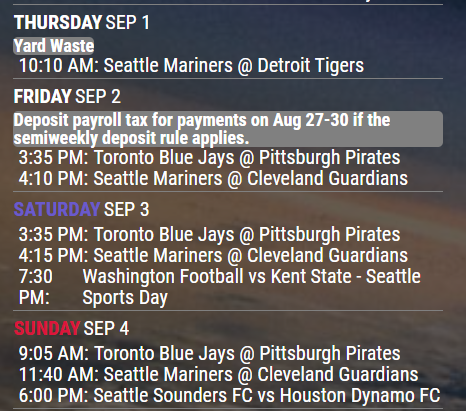
                            5e91c435-db38-4156-acbe-298536164ac1-image.png

                            /* offset top center to fit for large right and small left */
                            .region.top.center {
                              left: 62%;
                              transform: translateX(-50%);
                              text-align:center;
                            }
                            
                            /* CalendarExt3Agenda */
                            /* Set CX3a to size, etc. */
                            .CX3A {
                              font-size: 20px;
                              min-width: 300px;
                              max-width: 430px;
                              max-height: 900px;
                              overflow-y: unset;
                              text-align: left;
                              position: relative;
                              color: white;
                            }
                            
                            /* Hide useless descriptions, you wanna know, load your calendar */
                            .CX3A .event .description {
                              display: none;
                            }
                            
                            /* Hide useless locations, you wanna know, load your calendar */
                            .CX3A .event .location {
                              display: none;
                            }
                            
                            /* Set up custom full day look */ 
                            .CX3A .cellBody .fullday .event {
                              color: var(--calendarColor);
                              background-color: gray;
                              max-width: 100%;
                              padding: 0px 0px;
                            }
                            
                            /* make fullday events overflow onto next line */
                            .CX3A .cellBody .fullday .event .title {
                              color: inherit;
                              overflow: unset;
                              white-space: unset;
                              text-overflow: unset;
                            }
                            
                            /* Add the icon to full day events
                            .CX3A .cellBody .fullday .event .headline {
                              display: inline-block;
                            }
                            
                            */
                            
                            /* get rid of the icon for blanks  */
                            .CX3A .event .headline .symbol.noSymbol::after {
                              content: '';
                            }
                            
                            /* fullday keep the times hidden */
                            .CX3A .cellBody .fullday .event .headline .time {
                              display: none;
                            }
                            
                            /* Change the dash to a colon, get rid of spare space */
                            .CX3A .event .startTime::after {
                              content: ':';
                            }
                            
                            /* Adjust time space */ 
                            .CX3A .event .time {
                              font-size: unset;
                             }
                              
                            /* Remove End time */
                            .CX3A .event .endTime {
                              display: none;
                            }
                            
                              
                            /* Adjust how tall app is */
                            .CX3A .agenda {
                              position: relative;
                              max-height: 900px;
                              overflow-y: hidden;
                            }
                            
                            /* Fade eliminator */
                            .CX3A .agenda::after {
                              position: absolute;
                              bottom: 0;
                              left: 0;
                              height: 20%;
                              width: 100%;
                              content: ' ';
                              background-image: unset;
                            }
                            

                            The "E" in "Javascript" stands for "Easy"

                            M 1 Reply Last reply Reply Quote 0
                            • M Offline
                              MMRIZE @BKeyport
                              last edited by MMRIZE

                              f063beef-81c2-46b4-9c36-ce3eb6210c08-image.png

                              Append below into your custom.css

                              .CX3A {
                                width: 300px; /* to test text-wrapping */
                              }
                              
                              
                              .CX3A .cellBody .fullday .event {
                                width: 100%;
                              }
                              
                              
                              .CX3A .event .startTime::after {
                                content: '';
                              }
                              
                              .CX3A .event .title {
                                order: 1;
                                width: 180px; /* Adjust for your region width. Here I am using fixed value to make things simple */
                                flex-grow: 1;
                              }
                              
                              .CX3A .event .symbol {
                                order: 1;
                              }
                              
                              .CX3A .event .time.startTime {
                                order: 2;
                                width: 90px;  /* Adjust for your region width. Here I am using fixed value to make things simple */
                                text-align: right;
                              }
                              
                              .CX3A .event .headline {
                                justify-content: space-between;
                              }
                              
                              BKeyportB 1 Reply Last reply Reply Quote 0
                              • BKeyportB Offline
                                BKeyport Module Developer @MMRIZE
                                last edited by

                                @MMRIZE nearly perfect. Thanks! (I’m tweaking minor things from this)

                                The "E" in "Javascript" stands for "Easy"

                                1 Reply Last reply Reply Quote 0
                                • H Offline
                                  hogedir
                                  last edited by hogedir

                                  Hi to all !

                                  I just installed the module MMM-CalendarExt3Agenda which looks like very good but i’m lost in the config file ! i have an error.

                                  Here is my setup :

                                  I’ve done 2 tests of config.js:

                                  TEST1 :
                                  config.js with
                                  {
                                  module: “MMM-CalendarExt3Agenda”,
                                  position: “top_left”,
                                  },

                                  Result : TEST OK, the module is shown.

                                  TEST2 :
                                  When I add t config.js

                                  {
                                  module: “MMM-CalendarExt3Agenda”,
                                  position: “top_left”,
                                  title: “My Agenda”,
                                  config: {
                                  instanceId: “basicCalendar”,
                                  locale: ‘de-DE’,
                                  firstDayOfWeek: 1,
                                  startDayIndex: -1,
                                  endDayIndex: 10,
                                  calendarSet: [‘us_holiday’,],
                                  }
                                  },

                                  /* default/calendar module configuration */
                                  {
                                  module: “calendar”,
                                  position: “top_left”,
                                  config: {
                                  broadcastPastEvents: true, // <= IMPORTANT to see past events
                                  calendars: [
                                  {
                                  url: “webcal://www.calendarlabs.com/ical-calendar/ics/76/US_Holidays.ics”,
                                  name: “us_holiday”, // <-- specify calendar name
                                  color: “skyblue”, // <-- if you don’t want to get color, just remove this line.
                                  broadcastPastEvents: true, // <-- need to broadcast past events
                                  maximalNumberOfDays: 30, // <-- how old events would be broadcasted
                                  maximumEntries: 100, // <-- assign enough number to prevent truncating new events by old events.
                                  symbol: ‘camera’, // <-- when you want to display simbol. If you don’t want, just set as symbol:[],
                                  },

                                  RESULT : error (black screen) and when i do a tail -50 /home/pi/.pm2/logs/MagicMirror-error.log I don’t see nothing special

                                  Can someone help please?

                                  M H 2 Replies Last reply Reply Quote 0
                                  • M Offline
                                    MMRIZE @hogedir
                                    last edited by MMRIZE

                                    @hogedir
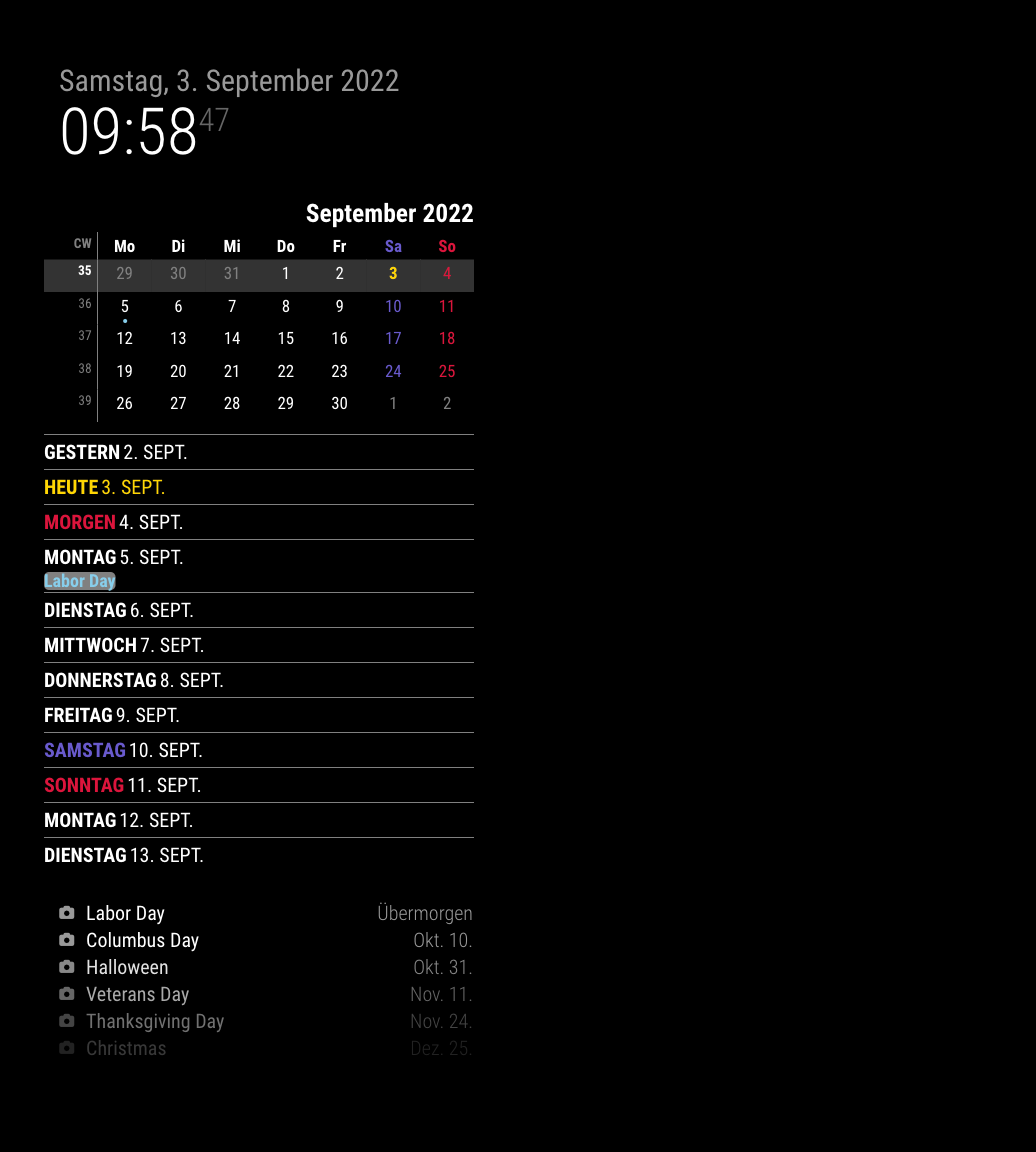
                                    I cleaned your config to test.

                                    • Your quotation mark and double quotation mark seem not standard ASCII code. (It sometimes happens when you copy the codes from Text Editor, which is not for coding.)
                                    • The last bracket ] for calendars and } of module config seem missing but I think it was just a mistake when you posted the code here.

                                    Anyway, after cleaning, it works for me.

                                    {
                                      module: "MMM-CalendarExt3Agenda",
                                      position: 'top_left',
                                      title: 'My Agenda',
                                      config: {
                                        instanceId: 'basicCalendar',
                                        locale: 'de-DE',
                                        firstDayOfWeek: 1,
                                        startDayIndex: -1,
                                        endDayIndex: 10,
                                        calendarSet: ['us_holiday'],
                                      }
                                    },
                                    
                                    {
                                      module: 'calendar',
                                      position: 'top_left',
                                      config: {
                                        broadcastPastEvents: true,
                                        calendars: [
                                        {
                                          url: 'webcal://www.calendarlabs.com/ical-calendar/ics/76/US_Holidays.ics',
                                          name: 'us_holiday',
                                          color: 'skyblue', 
                                          broadcastPastEvents: true,
                                          maximalNumberOfDays: 30, 
                                          maximumEntries: 100,
                                          symbol: 'camera', 
                                          },
                                        ]
                                      }
                                    },
                                    

                                    d33add4b-cc93-4e7d-a952-7a7fad0381a8-image.png

                                    S 1 Reply Last reply Reply Quote 0
                                    • S Offline
                                      sdetweil @MMRIZE
                                      last edited by

                                      @MMRIZE the quotation marks will get mangled if not wrapped in a code block. the forum code treats it as document text

                                      if u edit it, it’s correct but copy paste from here produces wird type quotes…

                                      Sam

                                      How to add modules

                                      learning how to use browser developers window for css changes

                                      1 Reply Last reply Reply Quote 0
                                      • H Offline
                                        hogedir @hogedir
                                        last edited by sdetweil

                                        @MMRIZE thank you very much !

                                        Now i have an issue. I try to connect a FRAMAGENDA calendar to your super module.

                                        Framagenda is a nextcloud like agenda. So, it needs an authentification (it’s not a direct .ics).

                                        Here is the config.js with the calendar and MMM-calendarextAgenda module config :

                                        {	
                                        			module: "calendar",
                                        			position: "top_left",
                                        		config: {
                                        		broadcastPastEvents: true, // <= IMPORTANT to see past events
                                        		calendars: [
                                        			{
                                        			url: "https://framagenda.org/remote.php/dav/calendars/calendar_1/test",
                                        			auth: {
                                        			    user: 'myuser28632HG4',
                                        			    pass: 'HDDBG5nSvdjgBVFBVDFFV',
                                        			    method: 'basic',
                                        			      },
                                        			name: "test", // <-- specify calendar name
                                        			color: "skyblue", // <-- if you don't want to get color, just remove this line.
                                                broadcastPastEvents: true, // <-- need to broadcast past events
                                                maximalNumberOfDays: 30, // <-- how old events would be broadcasted
                                                maximumEntries: 100, // <-- assign enough number to prevent truncating new events by old events.
                                                symbol:[],
                                        			},
                                        			
                                        		]
                                        			}
                                        	},
                                        
                                        	{
                                          module: "MMM-CalendarExt3Agenda",
                                          position: "top_left",
                                          title: "My Agenda",
                                          config: {
                                            instanceId: "basicCalendar",
                                            locale: 'FR',
                                            firstDayOfWeek: 1,
                                            startDayIndex: -1,
                                        		endDayIndex: 10,
                                            calendarSet: [''],
                                          }
                                          },
                                        

                                        Result : the module works now but there is not Appointment showed, nothing is get from my framagenda calendar.

                                        Where can i see why it doesn’t dump my calendar ? a log file ?

                                        S 1 Reply Last reply Reply Quote 0
                                        • S Offline
                                          sdetweil @hogedir
                                          last edited by

                                          @hogedir please put your config info in a code block

                                          paste
                                          select the text you just pasted
                                          and pish the button on the top , looks like this
                                          </>

                                          Sam

                                          How to add modules

                                          learning how to use browser developers window for css changes

                                          1 Reply Last reply Reply Quote 0
                                          • H Offline
                                            hogedir
                                            last edited by hogedir

                                            I have the connection now after multiple tests to understand the issue.

                                            but i think I found a bug in your module @MMRIZE.

                                            If I connect to a very simple calendar with 5 appoinments => result : it shows the calendar in the MM without any problem.

                                            If i connect to the same calendar but imported with much more information in it (i dumped my other calendar to it which doesn’t work with your module) => it shows NO APPOINTMENT AVAILABLE.

                                            It’s possible the french accent we use in france could be the source of the problem, Or too much info in the ics broke the connection?

                                            The special caracter like , : ! are ok ? or long sentence ? in the title of the appointment ?

                                            other question : what are the others symbols than camera ?
                                            How it works to affect the correct symbol to the right appointment? I don’t understand this feature.

                                            ==>>Where can i see the log file about your module especially please?

                                            thanks a lot

                                            W 1 Reply Last reply Reply Quote 0

                                            Hello! It looks like you're interested in this conversation, but you don't have an account yet.

                                            Getting fed up of having to scroll through the same posts each visit? When you register for an account, you'll always come back to exactly where you were before, and choose to be notified of new replies (either via email, or push notification). You'll also be able to save bookmarks and upvote posts to show your appreciation to other community members.

                                            With your input, this post could be even better 💗

                                            Register Login

                                            • 1
                                            • 2
                                            • 8
                                            • 9
                                            • 10
                                            • 11
                                            • 12
                                            • 12 / 12
                                            • First post
                                              Last post
                                            Enjoying MagicMirror? Please consider a donation!
                                            MagicMirror created by Michael Teeuw.
                                            Forum managed by Sam, technical setup by Karsten.
                                            This forum is using NodeBB as its core | Contributors
                                            Contact | Privacy Policy