Read the statement by Michael Teeuw here.
Go East, young icon!
-
Hi all,
I don’t even know if it’s possible, and it really isn’t necessary, but I’m trying to move the “mobile” icon in MMM-NetworkScanner from its place on the left of the device name to the right of the device name. I spent a good amount of time trying to achieve this, and I was trying where I probably shouldn’t ( the MMM-NetworkScanner.js file), and still no success.
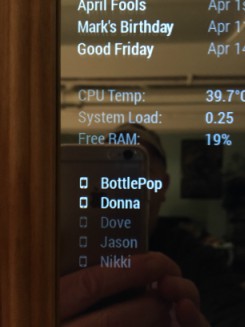
This is where the mobile icon appears by default, to the left of the devices name.
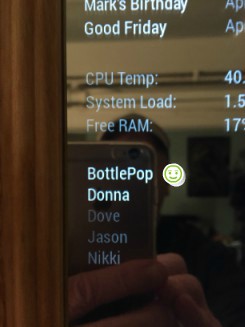
I’d rather it be here, on the right of the device name, where the smiley face is.
If this is the developers jurisdiction then I humbly acquiesce.
Peace :peace:
-
The reason why it’s a bad practice to change the maker’s code is because you cannot do an easy git pull anymore due to the changes. That means that every time there is a new version of the module you will have to redownload it and then modify the code again.
That being said there is no way to get what you want without modifying the code, unless the maker adds this as a feature in the future.
To get what you want you only have to change code inside
MMM-NetworkScanner.js.
Inside the getDom function you can find the lines:// Icon icon = document.createElement("i"); icon.classList.add("fa-li", "fa", "fa-" + device.icon); deviceItem.appendChild(icon); // Name deviceItem.innerHTML += device.name;All you have to do is change that part into:
// Name
deviceItem.innerHTML += device.name;

// Icon
icon =  document.createElement("i");
icon.classList.add("fa-li", "fa", "fa-" + device.icon);
deviceItem.appendChild(icon);
So this is basically swapping the order in which the icon and the text are added to
deviceItem.Hope this helps :D
Note: I am currently on mobile so have no way of testing it. If it doesn’t work then let me know and i will search another solution (and I will be confused since I am pretty sure this works)
If there is anything don’t hesitate to contact me!
ProfileSwitcher, TouchNotifications -
@tosti007 said in Go East, young icon!:
Note: I am currently on mobile so have no way of testing it. If it doesn’t work then let me know and i will search another solution (and I will be confused since I am pretty sure this works)
It’s 7am here. I’m running off to work but I will try as soon as I get home. I will let you know. Many thanks.
-
@Mykle1 you can achieve this without modifying the code
custom.css
.MMM-NetworkScanner .fa-ul li .fa-li {
  float: right;
}
if this ends up with a to big gap you can limit the wifht of the list with
.MMM-NetworkScanner .fa-ul {
  width: 200px;
}
Please create a github issue if you need help, so I can keep track
-
@strawberry-3.141 said in Go East, young icon!:
custom.css
.MMM-NetworkScanner .fa-ul li .fa-li {
float: right;
}This did not work for me. The mobile icon remained on the left side of the device name. I should note that I already have an entry in custom.css for MMM-NetworkScanner. I tried your suggestion as a separate entry. Am I supposed to incorporate it into the existing entry?
body {
margin: 20px;
height: calc(100% - 40px);
width: calc(100% - 40px);
}.MMM-NetworkScanner .fa-ul {
margin-left: 2px;
}.MMM-WunderGround .max-temp {
color: #f66;
} -
@tosti007 said in Go East, young icon!:
Note: I am currently on mobile so have no way of testing it. If it doesn’t work then let me know and i will search another solution (and I will be confused since I am pretty sure this works)
I tried this after going the custom.css route and it did not work.
Thank you for your suggestion
-
@strawberry-3.141 said in Go East, young icon!:
you can achieve this without modifying the code
Strawberry-3.141 deserves an award. He went above and beyond in helping me customize the NetworkScanner module for me. Apparently, he is a genius, and willing to work well past midnight to help someone (me) with their MM. You have my highest praise.
All credit for this custom.css goes to Strawberry-3.141
}
.MMM-NetworkScanner .fa-ul {
margin-left: 2px; /* This aligned NetworkScanner to the left margin /
width: 130px; / If you remove this line it will be the same width as the widest module in the region, this can lead to a big gap, thats why i limited it to 130px if you add devices with longer names you might want to increase this value */
}.MMM-NetworkScanner .fa-li {
position: relative; /* This put the icon on the right side */
float: right;
left: initial;
}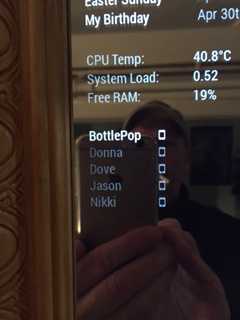
I dreamed it. He made it happen.
-
@Mykle1 said in Go East, young icon!:
.MMM-NetworkScanner .fa-ul {
margin-left: 2px; /* This aligned NetworkScanner to the left margin /
width: 130px; / If you remove this line it will be the same width as the widest module in the region, this can lead to a big gap, thats why i limited it to 130px if you add devices with longer names you might want to increase this value /
}
.MMM-NetworkScanner .fa-li {
position: relative; / This put the icon on the right side */
float: right;
left: initial;
}@strawberry-3-141 : How to make icon on the left, but without margin?
regards,
Slamet PS
-
@slametps said in Go East, young icon!:
How to make icon on the left, but without margin?
The icon is on the left by default
-
@slametps the space on the left ogf the icon or the space between the icon and the name?
-
@strawberry-3.141 : the space on the left of the icon. How to remove it?
-
@slametps said in Go East, young icon!:
the space on the left of the icon. How to remove it?
Strawberry helped me with this. I’m not trying to answer for him, but while you’re waiting, this is what he did for me.
Add this to your custon.css file.
.MMM-NetworkScanner .fa-ul {
  margin-left: 0px;
}
/* This aligned NetworkScanner to the left margin. Thanks to Strawberry-3.141 */
-
@Mykle1 said in Go East, young icon!:
@slametps said in Go East, young icon!:
the space on the left of the icon. How to remove it?
Strawberry helped me with this. I’m not trying to answer for him, but while you’re waiting, this is what he did for me.
Add this to your custon.css file.
.MMM-NetworkScanner .fa-ul {
  margin-left: 0px;
}
/* This aligned NetworkScanner to the left margin. Thanks to Strawberry-3.141 */
I’m using this on my custom.css, but still no luck.
.MMM-NetworkScanner .fa-ul {
  margin-left: 1px;
}
the icon still has space I mention earlier.
-
@slametps for me this works
.MMM-NetworkScanner .fa-ul { margin-left: 35px; } -
@strawberry-3.141 said in Go East, young icon!:
@slametps for me this works
.MMM-NetworkScanner .fa-ul {
    margin-left: 35px;
}
this style will cause the icon has a left-margin about 35px. what I want is the icon is left-aligned without a margin, and set margin-left to 0 or 1px is not working as expected.
-
@slametps can you share a screenshot? for me its aligned to the left
-
@strawberry-3.141 said in Go East, young icon!:
@slametps can you share a screenshot? for me its aligned to the left
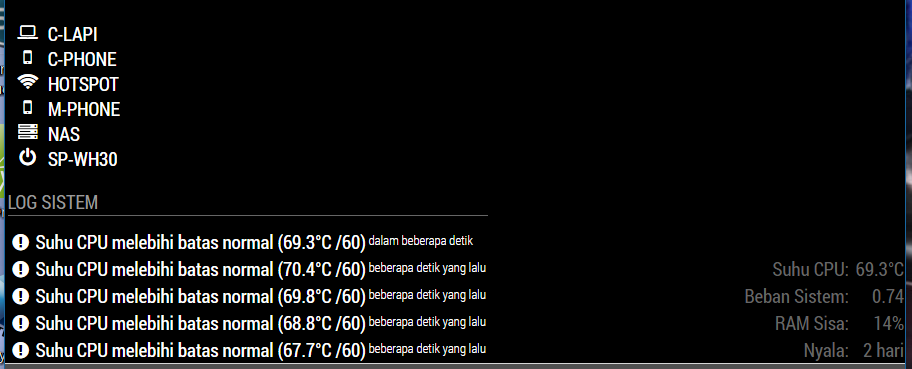
using following css:
.MMM-NetworkScanner .fa-ul {
  margin-left: 0px; /* This aligned NetworkScanner to the left margin */
  width: 35 px; /* If you remove this line it will be the same width as the widest module in the region, this can lead to a big gap, thats why i limited it to 130px if you add devices with longer names you might want to increase this value */
}

.MMM-NetworkScanner .fa-li {
  position: relative; /* This put the icon on the right side */
  float: left;
  left: initial;
  margin-left: 0px;
}
There are spaces between icon in NetworkScanner module and the left-edge. Is it possible to make it full left-aligned?
-
@slametps replace your rules with
.MMM-NetworkScanner .fa-ul { margin-left: 35px; } .MMM-NetworkScanner .fa-li { left: -35px; text-align: initial; } -
@strawberry-3.141 said in Go East, young icon!:
.MMM-NetworkScanner .fa-ul {
margin-left: 35px;
}.MMM-NetworkScanner .fa-li {
left: -35px;
text-align: initial;
}Yap, this works. Thx a lot, @strawberry-3-141.
-
How do i change the color of the names?



Hello! It looks like you're interested in this conversation, but you don't have an account yet.
Getting fed up of having to scroll through the same posts each visit? When you register for an account, you'll always come back to exactly where you were before, and choose to be notified of new replies (either via email, or push notification). You'll also be able to save bookmarks and upvote posts to show your appreciation to other community members.
With your input, this post could be even better 💗
Register Login