Read the statement by Michael Teeuw here.
Docker install on synology nas
-
I have been trying to install the karsten13/magicmirror docker image on my synology NAS. I’ve tried with docker run scripts ssh’d in as root as well as normal compose method.
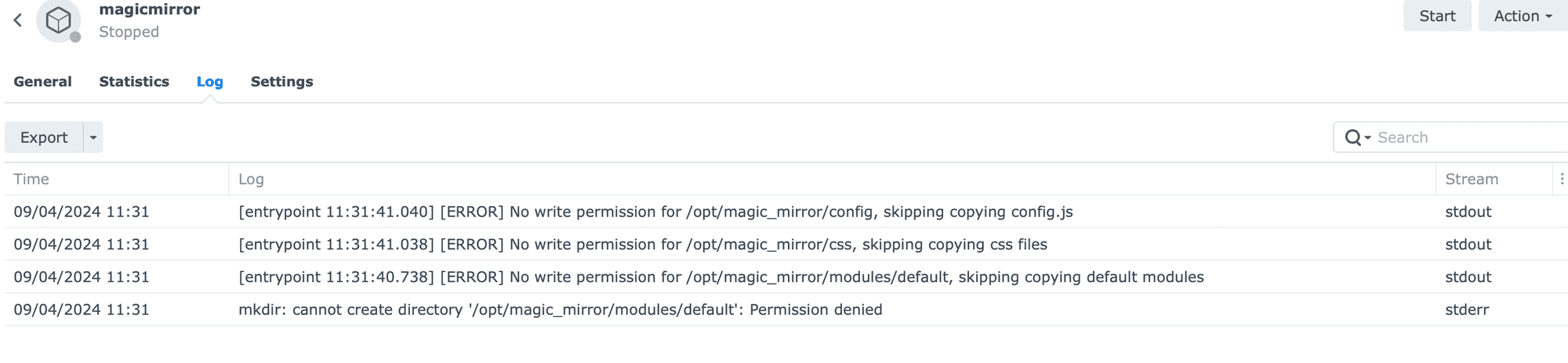
The image always fails with this error in the log “mkdir: cannot create directory ‘/opt/magic_mirror/modules/default’: Permission denied”
I can install and run the older bastilimbach/docker-magicmirror image without this error, but it is no longer supported and the custom css doesn’t properly load anymore with this image.
Any advice would be greatly appreciated, I feel like I’m banging my head against a wall with this!
-
this turned out to be a permissions problem. the folder was created w the synology user, but the container is running as user 1000
-
to understand what is happening I need
- the full logs of the container
- the start command (full
docker run ...or compose file)
-
@karsten13 of course thanks for checking it out.
Here is the docker start command:
docker run  -d \
    --name magicmirror \
    --publish 8036:8080 \
    --restart unless-stopped \
    -e TZ=America/Chicago \
    --volume /volume1/docker/magicmirror/config:/opt/magic_mirror/config \
    --volume /volume1/docker/magicmirror/modules:/opt/magic_mirror/modules \
    --volume /volume1/docker/magicmirror/css:/opt/magic_mirror/css \
    karsten13/magicmirror:latest
and here are the logs of the container:
-
looks like the volumes on the host were created by
root. The user in the container runs as usernodewith uid/gid 1000.So you can try
a) cd to
/volume1/docker/on the host and runchown -R 1000:1000 ./magicmirror(you have to do this asroot)or
b) run the container as user
root, you have to add--user root \to the
docker run ...command -
S sdetweil referenced this topic on
-
@karsten13 i think /opt is non existent on synology
-
@sdetweil said in Docker install on synology nas:
@karsten13 i think /opt is non existent on synology
but in the container
-
this turned out to be a permissions problem. the folder was created w the synology user, but the container is running as user 1000
-
S sdetweil has marked this topic as solved on
-
I have the same issue but I do not really know how to run the container as user node with uid/gid 1000.
You wrote two ways with the hint that this should happen as root. How do I do this?
And can I make this run just for the MagicMirror docker? Because I have other dockers with other uids/gids.
Thanks for your help.
Paua
-
@pauabaer just change the docker compose .env file userid number from 1000 to whatever it is on your synology nas ( mine is 1026)
(note the . in front of env) -
@pauabaer yes, the user info is separate for each docker container
think of a docker container as a mini pc disc, memory, cpu and software all inside a little case (container shell)
-
@sdetweil
I tried it in the Synology gui. I have added puid and pgid as I did in other containers.But I got the same message: access denied.
So what would be the difference when I change the entry whithin the compose?
And how do I find this file at my synology? :)
-
@pauabaer i do not know how to do it with the gui,
there is a place where you can paste in the compose file . i have not tried thati ssh’d into the nas and did the manual install steps via commandline
-
@sdetweil
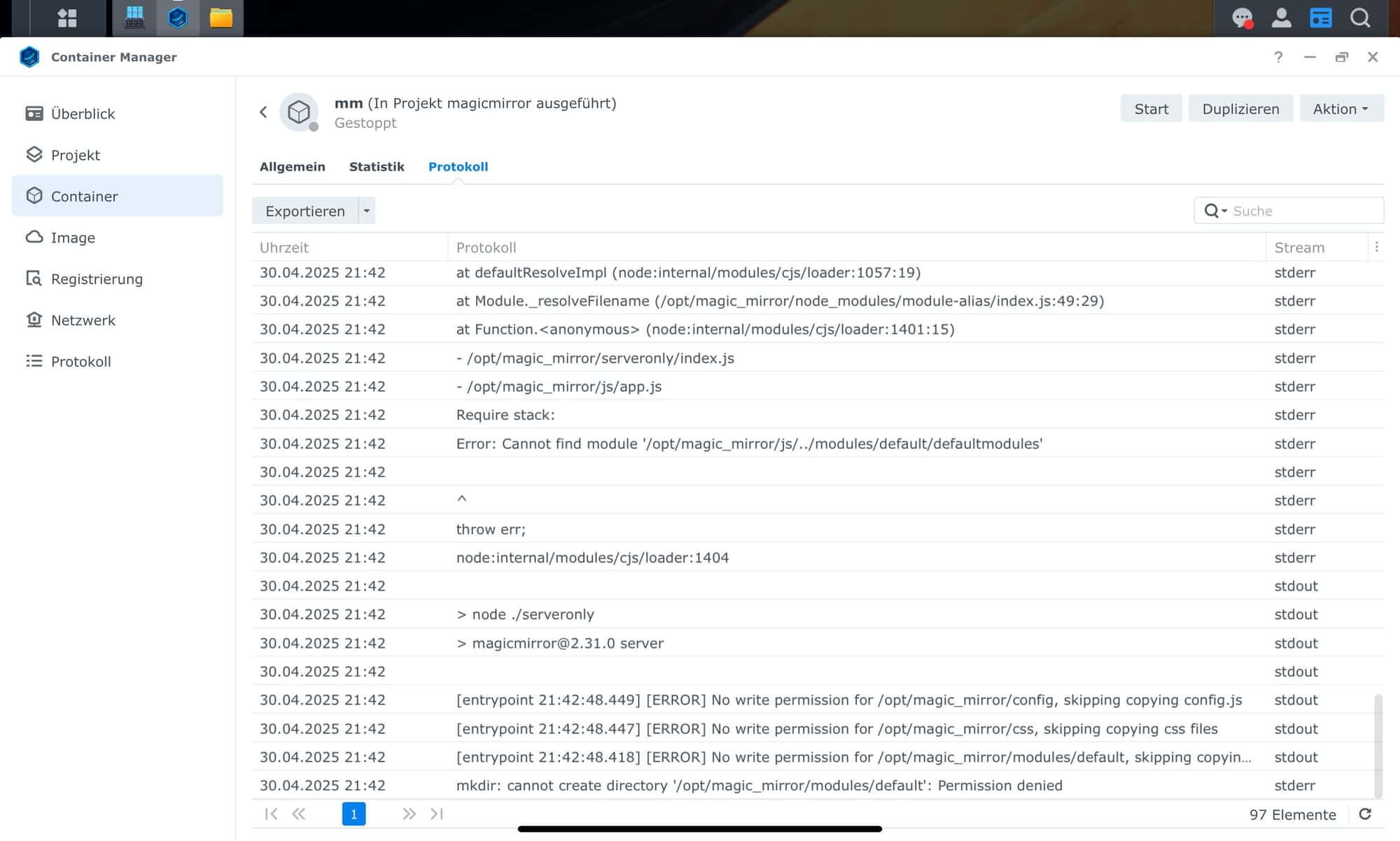
I startet the container with a compose file where I added the user 1026 and group ID 100 but there is no success.Still the same error - see attached file.
-
@pauabaer typically the group id is the same as the user id
-
id -u will get this users id number
id -g will get this users group number -
@sdetweil
That’s what i checked before. Id -u > 1026 / id -g > 100.
These parameters i inserted in the compose file. -
I tried to start via command line
paua@NAS:~$ docker run  -d \
>         --user root \
> --name magicmirror \
>     --publish 8036:8080 \
>     --restart unless-stopped \
>     -e TZ=Europe/Berlin \
>     --volume /volume2/docker/MagicMirror/config:/opt/magic_mirror/config \
>     --volume /volume2/docker/MagicMirror/modules:/opt/magic_mirror/modules \
>     --volume /volume2/docker/MagicMirror/css:/opt/magic_mirror/css \
>     karsten13/magicmirror:latest
docker: permission denied while trying to connect to the Docker daemon socket at unix:///var/run/docker.sock: Post "http://%2Fvar%2Frun%2Fdocker.sock/v1.24/containers/create?name=magicmirror": dial unix /var/run/docker.sock: connect: permission denied.
See 'docker run --help'.
But again I got the permission error.
-
I fixed it and now MM is running in docker on my synology diskstation.
I had to insertuser: rootin the compose file. It is working fine.

Hello! It looks like you're interested in this conversation, but you don't have an account yet.
Getting fed up of having to scroll through the same posts each visit? When you register for an account, you'll always come back to exactly where you were before, and choose to be notified of new replies (either via email, or push notification). You'll also be able to save bookmarks and upvote posts to show your appreciation to other community members.
With your input, this post could be even better 💗
Register Login