MagicMirror Forum
    • Recent
    • Tags
    • Unsolved
    • Solved
    • MagicMirror² Repository
    • Documentation
    • 3rd-Party-Modules
    • Donate
    • Discord
    • Register
    • Login
    A New Chapter for MagicMirror: The Community Takes the Lead
    Read the statement by Michael Teeuw here.

    Weatherunderground - currently - hourly - daily - configurable

    Scheduled Pinned Locked Moved Troubleshooting
    126 Posts 26 Posters 225.7k Views 13 Watching
    Loading More Posts
    • Oldest to Newest
    • Newest to Oldest
    • Most Votes
    Reply
    • Reply as topic
    Log in to reply
    This topic has been deleted. Only users with topic management privileges can see it.
    • P Offline
      Pauliolio @RedNax
      last edited by paviro

      @RedNax

      That’s a handy test - Many thanks.
      When I request:
      http://api.wunderground.com/api/[my key]/conditions/forecast10day/astronomy/alerts/lang:EN/q/pws:IBATTLE3.json

      I get a full set of data back.
      The module is still getting stuck on ‘Loading’ on the mirror though.
      My config is:

      {
          module: 'MMM-WunderGround',
          position: 'top_right',
          config:  {
                  apikey: '[my key]',
                  pws: 'IBATTLE3;loctype:1',
                  lang: 'EN',
                  fctext: '1',
                  fcdaycount: "5",
                  fcdaystart: "0",
                  hourly: '1',
                  hourlyinterval: "3",
                  hourlycount: "2",
                  alerttime: 10000,
                  alerttruncatestring: "english:"
          }
      },
      

      Can you see anything wrong there please?

      Thank you.


      Note from admin: Please use Markdown on code snippets for easier reading!

      1 Reply Last reply Reply Quote 0
      • P Offline
        Pauliolio @RedNax
        last edited by paviro

        @RedNax

        This may explain the issue to you hopefully. I thought I’d given you this info before, but it seems not.

        In the console I get an error:
        MMM-WunderGround.js:407 Uncaught TypeError: Cannot read property 'length' of undefined

        The relevant code is:

        	processWeather: function(data) {
        		this.alerttext = "";
        		this.alertmsg = "";
        		for (var i = 0, count = data.alerts.length; i < count; i++) {
        

        Any idea why the array would be undefined?

        Many thanks.


        Note from admin: Please use Markdown on code snippets for easier reading!

        RedNaxR 1 Reply Last reply Reply Quote 0
        • RedNaxR Offline
          RedNax Module Developer @Pauliolio
          last edited by

          @Pauliolio The issue is with the config. try the following change:

          pws: 'pws:IBATTLE3',
          
          P 1 Reply Last reply Reply Quote 0
          • yo-lessY Offline
            yo-less Module Developer
            last edited by

            Hi @RedNax,
            thanks for the excellent module! I seem to have some difficulty having night time icons displayed. I’m not sure what I’m doing wrong as this is what my module looks like at 1 am in the morning:
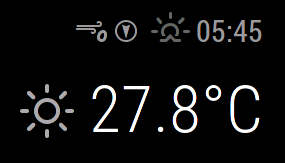
            0_1469055256185_nighttime.png

            Using the API in my browser window I get the following two lines:

            “icon”:“clear”,
            “icon_url”:“http://icons.wxug.com/i/c/k/nt_clear.gif”

            It seems to me that I’m getting the daytime “clear” condition icon, maybe due to the ambiguous icon declaration, anything I can do to change icons like this one to nighttime icons?

            1 Reply Last reply Reply Quote 0
            • RedNaxR Offline
              RedNax Module Developer
              last edited by RedNax

              Easiest way to do this is to define another icontable for nighttime use and switching to it after sunset…

              When i have some time, i’ll look into it…

              UPDATE: Who am i kidding ;) Nighttime icons now included…

              yo-lessY 1 Reply Last reply Reply Quote 1
              • M Offline
                murattyilmaz
                last edited by

                Where is the github url or download url of these module? Can’t find it.

                KirAsh4K 1 Reply Last reply Reply Quote 0
                • KirAsh4K Offline
                  KirAsh4 Moderator @murattyilmaz
                  last edited by

                  @murattyilmaz,

                  You need to look under the Showcase category to find the actual link. This category here is the Troubleshooting side of those modules.

                  https://forum.magicmirror.builders/topic/128/weatherunderground-currently-hourly-daily-configurable

                  A Life? Cool! Where can I download one of those from?

                  1 Reply Last reply Reply Quote 0
                  • P Offline
                    Pauliolio @RedNax
                    last edited by

                    @RedNax

                    Hi - I’d already tried that unfortunately. Still gets stuck at the same point in the code & displaying ‘Loading’ on the screen.

                    Would wrapping that for loop in an if that checks whether data.alerts is actually defined or a try block help do you think?

                    RedNaxR 1 Reply Last reply Reply Quote 0
                    • RedNaxR Offline
                      RedNax Module Developer @Pauliolio
                      last edited by RedNax

                      Hi!

                      The alerts array is always there, even when there’s zero items in it. The behaviour you’re seeing is only possible if/when the api errors out and doesn’t send a meaningful payload. Could build a check for that…

                      Could it be BATTLE3 goes offline at times? When using the earlier mentiond config setting, it works just fine here… (there was a flod warning if i remember correctly)…

                      1 Reply Last reply Reply Quote 0
                      • yo-lessY Offline
                        yo-less Module Developer @RedNax
                        last edited by yo-less

                        @RedNax
                        You, sir, are amazing :). Thanks, man, I just checked this thread to see if there were any more ideas on how to get night-time weather icons to appear and have only just now seen that you have already fixed my problem!! Thanks for this amazing update, at this stage I’m only good at fiddling with code that has already been written, but I’m not good enough myself to add in an icon table change based on the time of day.

                        For some weird reason, in the css file the night-time clear icon is defined as “wi-nt-clear” and not as wi-night-clear" , you need to change that in your code to make the night-time clear icon appear (or change it in the css file, which is what I did in my configuration).

                        Funnily enough, this is what happens now once you change that and check out the mirror after sundown (the forecast starts using the night icons):
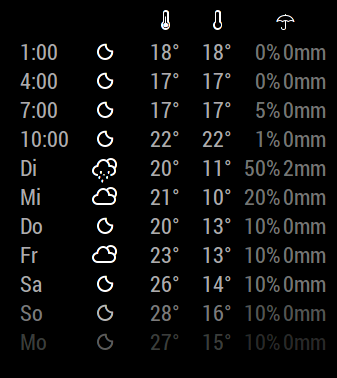
                        0_1470610163794_forecast-icons.png

                        I was able to fix this behaviour myself, first I attacked line 461

                        	this.iconTableHeader = (sunrise < now && sunset > now) ? this.config.iconTableDay : this.config.iconTableNight;
                        	this.iconTable = this.config.iconTableDay;
                        

                        This is what I did to line 490:

                        	this.weatherTypeHeader = this.iconTableHeader[data.current_observation.icon];
                        	this.weatherType = this.iconTable[data.current_observation.icon];
                        

                        Finally, I changed line 178 to:

                        	weatherIcon.className = "wi weathericon " + this.weatherTypeHeader;
                        

                        Not sure if this is the best way of implementing a fix, but this seems to have resolved the issues I was facing :).
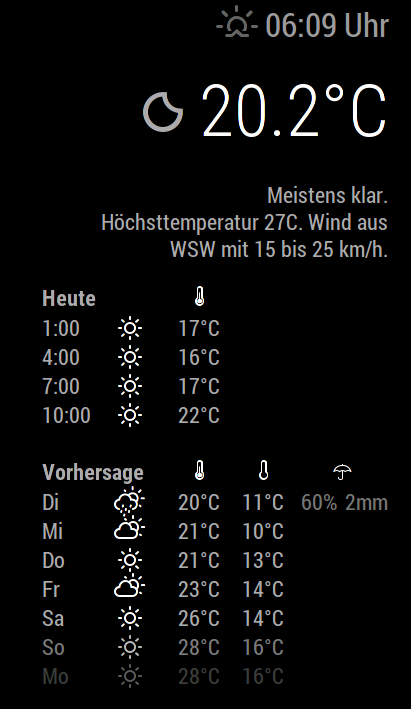
                        0_1470610827538_forecast-icons-now.png

                        I’m all happy now, thanks again, love your modifications to the module which have allowed me to add in some modifications of my own. I suppose there is a way to somehow upload my changes to github to suggest some changes to the developer but since I’m pretty much a newbie at this stage, I have no idea how ^^.

                        So, all’s well, right? Well… :D

                        I noticed that the weather-icons set has different icons depending on the current moon phase. Could you point me in the right direction as to what code I would have to add in to pull this information from the wunderground.com API?Maybe I could manage to have the mirror only show the full-moon night-time icons when there actually is a full moon outside.

                        EDIT:
                        I realized there are more icons that I would change in the icon table, here’s my version:

                        	iconTableNight: {                        
                                "chanceflurries": "wi-night-snow-wind",
                                "chancerain": "wi-night-showers",
                                "chancesleet": "wi-night-sleet",
                                "chancesnow": "wi-night-alt-snow",
                                "chancetstorms": "wi-night-alt-storm-showers",
                                "clear": "wi-stars",
                                "cloudy": "wi-night-alt-cloudy",
                                "flurries": "wi-night-alt-snow-wind",
                                "fog": "wi-night-fog",
                                "haze": "wi-night-alt-cloudy-windy",
                                "mostlycloudy": "wi-night-alt-cloudy",
                                "mostlysunny": "wi-night-alt-partly-cloudy",
                                "partlycloudy": "night-alt-partly-cloudy",
                                "partlysunny": "wi-night-alt-partly-cloudy",
                                "rain": "wi-night-alt-rain",
                                "sleet": "wi-night-alt-sleet",
                                "snow": "wi-night-alt-snow",
                                "tstorms": "wi-night-alt-thunderstorm"
                        	},
                        
                        yo-lessY 1 Reply Last reply Reply Quote 0
                        • yo-lessY Offline
                          yo-less Module Developer @yo-less
                          last edited by

                          @yo-less said in Weatherunderground - currently - hourly - daily - configurable:

                          EDIT:
                          I realized there are more icons that I would change in the icon table, here’s my version:

                          In fact, it should look like this -> ( changed “night-alt-partly-cloudy” to "“wi-night-alt-partly-cloudy”)

                          iconTableNight: {                        
                                  "chanceflurries": "wi-night-snow-wind",
                                  "chancerain": "wi-night-showers",
                                  "chancesleet": "wi-night-sleet",
                                  "chancesnow": "wi-night-alt-snow",
                                  "chancetstorms": "wi-night-alt-storm-showers",
                                  "clear": "wi-night-clear",
                                  "cloudy": "wi-night-alt-cloudy",
                                  "flurries": "wi-night-alt-snow-wind",
                                  "fog": "wi-night-fog",
                                  "haze": "wi-night-alt-cloudy-windy",
                                  "mostlycloudy": "wi-night-alt-cloudy",
                                  "mostlysunny": "wi-night-alt-partly-cloudy",
                                  "partlycloudy": "wi-night-alt-partly-cloudy",
                                  "partlysunny": "wi-night-alt-partly-cloudy",
                                  "rain": "wi-night-alt-rain",
                                  "sleet": "wi-night-alt-sleet",
                                  "snow": "wi-night-alt-snow",
                                  "tstorms": "wi-night-alt-thunderstorm"
                          	},
                          
                          1 Reply Last reply Reply Quote 0
                          • yo-lessY Offline
                            yo-less Module Developer
                            last edited by

                            Alright, I have noticed one more issue. With the current code the sun shines all throughout the night in the hourly forecasts:
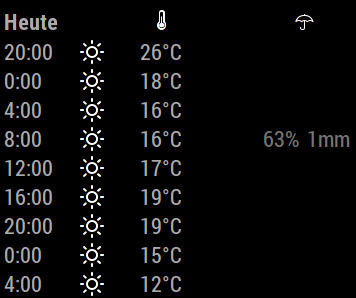
                            0_1470678948573_hourly-forecasts-old.png

                            I have written some code to fix it so that it looks like this instead:
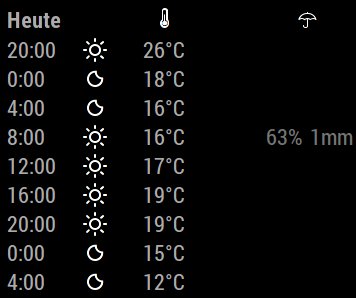
                            0_1470678980956_hourly-forecasts.png

                            Here is what I did to lines 552 - 563 in MMM-WunderGround.js ->

                            		var hourlyTime = new Date();
                            		hourlyTime.setHours(hourlyforecast.FCTTIME.hour,00,00);
                            		
                            		if (hourlyTime > sunset || hourlyTime < sunrise) {
                            						
                            		this.hourlyforecast.push({
                            
                            			hour:    this.thour,
                            			maxTemp: this.tmaxTemp,
                            			minTemp: this.tminTemp,
                            			icon:    this.config.iconTableNight[forecast.icon],
                            			pop:	 hourlyforecast.pop,
                            			mm:	 this.tmm
                            		});
                            		
                            		} else {
                            						
                            		this.hourlyforecast.push({
                            
                            			hour:    this.thour,
                            			maxTemp: this.tmaxTemp,
                            			minTemp: this.tminTemp,
                            			icon:    this.config.iconTableDay[forecast.icon],
                            			pop:	 hourlyforecast.pop,
                            			mm:	 this.tmm
                            		}); 
                            		}
                            	}
                            	}
                            

                            Again, I’m not sure if this can be done more efficiently, I’m happy to be pointed in a better direction :). But for now, everything seems to be just fine.

                            1 Reply Last reply Reply Quote 0
                            • yo-lessY Offline
                              yo-less Module Developer
                              last edited by

                              My bad, code should have been:

                              	var hourlyTime = new Date();
                              	hourlyTime.setHours(hourlyforecast.FCTTIME.hour,00,00);
                              	
                              	if (hourlyTime > sunset || hourlyTime < sunrise) {
                              					
                              	this.hourlyforecast.push({
                              
                              		hour:    this.thour,
                              		maxTemp: this.tmaxTemp,
                              		minTemp: this.tminTemp,
                              		icon:    this.config.iconTableNight[hourlyforecast.icon],
                              		pop:	 hourlyforecast.pop,
                              		mm:	 this.tmm
                              	});
                              	
                              	} else {
                              					
                              	this.hourlyforecast.push({
                              
                              		hour:    this.thour,
                              		maxTemp: this.tmaxTemp,
                              		minTemp: this.tminTemp,
                              		icon:    this.config.iconTableDay[hourlyforecast.icon],
                              		pop:	 hourlyforecast.pop,
                              		mm:	 this.tmm
                              	}); 
                              	}
                              }
                              }
                              
                              1 Reply Last reply Reply Quote 0
                              • RedNaxR Offline
                                RedNax Module Developer
                                last edited by

                                Hi,

                                Thanks for debugging :D Added (a version) of this in the develop branch!

                                yo-lessY 1 Reply Last reply Reply Quote 0
                                • yo-lessY Offline
                                  yo-less Module Developer @RedNax
                                  last edited by

                                  @RedNax Glad to hear I could add some thoughts to the project, love your module!

                                  1 Reply Last reply Reply Quote 0
                                  • yo-lessY Offline
                                    yo-less Module Developer
                                    last edited by

                                    Quick question. Today I updated my mirror to version 2.0.4 via git pull. Afterwards the umbrella weather icon didn’t work any more as @MichMich has updated the weather font. Is this expected behavior or am I simply not getting another step I should take after updating? I have now manually copied the old files into the vendor/weather-icons folder and now it’s working again, but I suspect this is not what I should be doing ^^.

                                    1 Reply Last reply Reply Quote 0
                                    • RedNaxR Offline
                                      RedNax Module Developer
                                      last edited by

                                      Actually the weatherfont update in 2.0.4 is actually my doing… Should nstill work as expected when you’ve pulled the latest Wunderground module… You could also switch to the one in the development branch which takes advantage of having the weathericons now being part of the main framework.

                                      yo-lessY 1 Reply Last reply Reply Quote 0
                                      • yo-lessY Offline
                                        yo-less Module Developer @RedNax
                                        last edited by

                                        @RedNax Alright, thanks for the information. I have meddled so much with your code that a fresh pull would reverse all my customizations. But I’ll have a look at the development branch to get the weather module to pull the icons from its own folder.

                                        Could you explain to me why the new weather fonts include fewer icon definitions?

                                        RedNaxR 1 Reply Last reply Reply Quote 0
                                        • RedNaxR Offline
                                          RedNax Module Developer @yo-less
                                          last edited by

                                          @yo-less Do they? They’re taken straight from http://weathericons.io/ which isn’t under my control. What’s missing?

                                          1 Reply Last reply Reply Quote 0
                                          • yo-lessY Offline
                                            yo-less Module Developer
                                            last edited by

                                            @RedNax No, it seems they don’t, sorry. I just rechecked and the wi-umbrella definition is there. Strangely, though, when I performed a “git pull” in the MM main folder, my umbrellas in the Weather Underground module disappeared and I had to manually overwrite the css file in the vendor folder with the older version. I must have made some other changes to the folder prior to that, because in the github repository everything seems to be fine.

                                            RedNaxR 1 Reply Last reply Reply Quote 0

                                            Hello! It looks like you're interested in this conversation, but you don't have an account yet.

                                            Getting fed up of having to scroll through the same posts each visit? When you register for an account, you'll always come back to exactly where you were before, and choose to be notified of new replies (either via email, or push notification). You'll also be able to save bookmarks and upvote posts to show your appreciation to other community members.

                                            With your input, this post could be even better 💗

                                            Register Login

                                            • 1
                                            • 2
                                            • 3
                                            • 4
                                            • 5
                                            • 6
                                            • 7
                                            • 7 / 7
                                            • First post
                                              Last post
                                            Enjoying MagicMirror? Please consider a donation!
                                            MagicMirror created by Michael Teeuw.
                                            Forum managed by Sam, technical setup by Karsten.
                                            This forum is using NodeBB as its core | Contributors
                                            Contact | Privacy Policy