Read the statement by Michael Teeuw here.
Weatherunderground - currently - hourly - daily - configurable
-
Where is the github url or download url of these module? Can’t find it.
-
You need to look under the Showcase category to find the actual link. This category here is the Troubleshooting side of those modules.
https://forum.magicmirror.builders/topic/128/weatherunderground-currently-hourly-daily-configurable
-
Hi - I’d already tried that unfortunately. Still gets stuck at the same point in the code & displaying ‘Loading’ on the screen.
Would wrapping that for loop in an if that checks whether data.alerts is actually defined or a try block help do you think?
-
Hi!
The alerts array is always there, even when there’s zero items in it. The behaviour you’re seeing is only possible if/when the api errors out and doesn’t send a meaningful payload. Could build a check for that…
Could it be BATTLE3 goes offline at times? When using the earlier mentiond config setting, it works just fine here… (there was a flod warning if i remember correctly)…
-
@RedNax
You, sir, are amazing :). Thanks, man, I just checked this thread to see if there were any more ideas on how to get night-time weather icons to appear and have only just now seen that you have already fixed my problem!! Thanks for this amazing update, at this stage I’m only good at fiddling with code that has already been written, but I’m not good enough myself to add in an icon table change based on the time of day.For some weird reason, in the css file the night-time clear icon is defined as “wi-nt-clear” and not as wi-
night-clear" , you need to change that in your code to make the night-time clear icon appear (or change it in the css file, which is what I did in my configuration).Funnily enough, this is what happens now once you change that and check out the mirror after sundown (the forecast starts using the night icons):
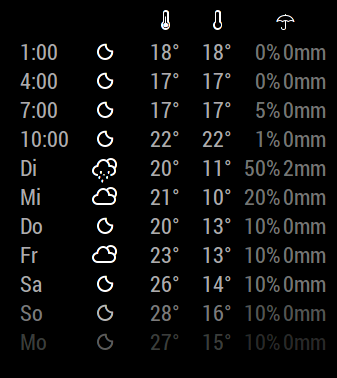
I was able to fix this behaviour myself, first I attacked line 461
	this.iconTableHeader = (sunrise < now && sunset > now) ? this.config.iconTableDay : this.config.iconTableNight;
	this.iconTable = this.config.iconTableDay;
This is what I did to line 490:
	this.weatherTypeHeader = this.iconTableHeader[data.current_observation.icon];
	this.weatherType = this.iconTable[data.current_observation.icon];
Finally, I changed line 178 to:
weatherIcon.className = "wi weathericon " + this.weatherTypeHeader;Not sure if this is the best way of implementing a fix, but this seems to have resolved the issues I was facing :).
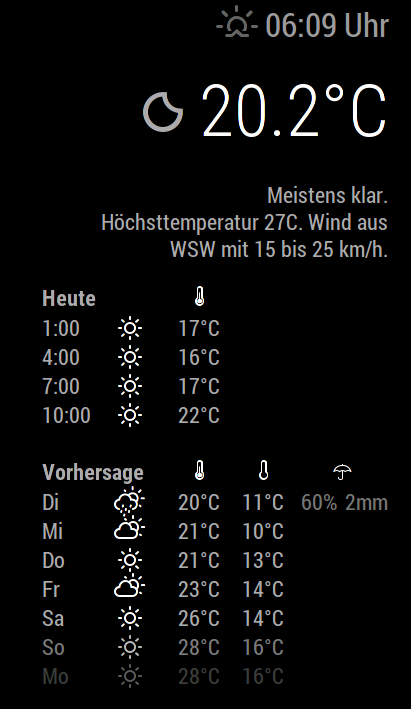
I’m all happy now, thanks again, love your modifications to the module which have allowed me to add in some modifications of my own. I suppose there is a way to somehow upload my changes to github to suggest some changes to the developer but since I’m pretty much a newbie at this stage, I have no idea how ^^.
So, all’s well, right? Well… :D
I noticed that the weather-icons set has different icons depending on the current moon phase. Could you point me in the right direction as to what code I would have to add in to pull this information from the wunderground.com API?Maybe I could manage to have the mirror only show the full-moon night-time icons when there actually is a full moon outside.
EDIT:
I realized there are more icons that I would change in the icon table, here’s my version:iconTableNight: { "chanceflurries": "wi-night-snow-wind", "chancerain": "wi-night-showers", "chancesleet": "wi-night-sleet", "chancesnow": "wi-night-alt-snow", "chancetstorms": "wi-night-alt-storm-showers", "clear": "wi-stars", "cloudy": "wi-night-alt-cloudy", "flurries": "wi-night-alt-snow-wind", "fog": "wi-night-fog", "haze": "wi-night-alt-cloudy-windy", "mostlycloudy": "wi-night-alt-cloudy", "mostlysunny": "wi-night-alt-partly-cloudy", "partlycloudy": "night-alt-partly-cloudy", "partlysunny": "wi-night-alt-partly-cloudy", "rain": "wi-night-alt-rain", "sleet": "wi-night-alt-sleet", "snow": "wi-night-alt-snow", "tstorms": "wi-night-alt-thunderstorm" }, -
@yo-less said in Weatherunderground - currently - hourly - daily - configurable:
EDIT:
I realized there are more icons that I would change in the icon table, here’s my version:In fact, it should look like this -> ( changed
“night-alt-partly-cloudy”to "“wi-night-alt-partly-cloudy”)iconTableNight: { "chanceflurries": "wi-night-snow-wind", "chancerain": "wi-night-showers", "chancesleet": "wi-night-sleet", "chancesnow": "wi-night-alt-snow", "chancetstorms": "wi-night-alt-storm-showers", "clear": "wi-night-clear", "cloudy": "wi-night-alt-cloudy", "flurries": "wi-night-alt-snow-wind", "fog": "wi-night-fog", "haze": "wi-night-alt-cloudy-windy", "mostlycloudy": "wi-night-alt-cloudy", "mostlysunny": "wi-night-alt-partly-cloudy", "partlycloudy": "wi-night-alt-partly-cloudy", "partlysunny": "wi-night-alt-partly-cloudy", "rain": "wi-night-alt-rain", "sleet": "wi-night-alt-sleet", "snow": "wi-night-alt-snow", "tstorms": "wi-night-alt-thunderstorm" }, -
Alright, I have noticed one more issue. With the current code the sun shines all throughout the night in the hourly forecasts:
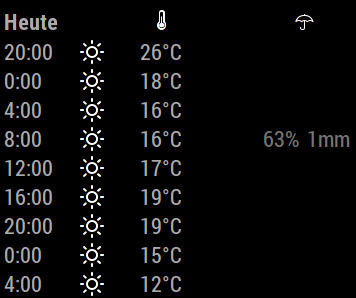
I have written some code to fix it so that it looks like this instead:
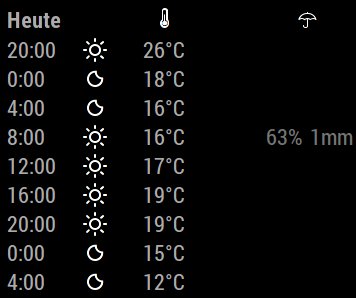
Here is what I did to lines 552 - 563 in MMM-WunderGround.js ->
		var hourlyTime = new Date();
		hourlyTime.setHours(hourlyforecast.FCTTIME.hour,00,00);

		if (hourlyTime > sunset || hourlyTime < sunrise) {

		this.hourlyforecast.push({

			hour:    this.thour,
			maxTemp: this.tmaxTemp,
			minTemp: this.tminTemp,
			icon:    this.config.iconTableNight[forecast.icon],
			pop:	 hourlyforecast.pop,
			mm:	 this.tmm
		});

		} else {

		this.hourlyforecast.push({

			hour:    this.thour,
			maxTemp: this.tmaxTemp,
			minTemp: this.tminTemp,
			icon:    this.config.iconTableDay[forecast.icon],
			pop:	 hourlyforecast.pop,
			mm:	 this.tmm
		});
		}
	}
	}
Again, I’m not sure if this can be done more efficiently, I’m happy to be pointed in a better direction :). But for now, everything seems to be just fine.
-
My bad, code should have been:
var hourlyTime = new Date(); hourlyTime.setHours(hourlyforecast.FCTTIME.hour,00,00); if (hourlyTime > sunset || hourlyTime < sunrise) { this.hourlyforecast.push({ hour: this.thour, maxTemp: this.tmaxTemp, minTemp: this.tminTemp, icon: this.config.iconTableNight[hourlyforecast.icon], pop: hourlyforecast.pop, mm: this.tmm }); } else { this.hourlyforecast.push({ hour: this.thour, maxTemp: this.tmaxTemp, minTemp: this.tminTemp, icon: this.config.iconTableDay[hourlyforecast.icon], pop: hourlyforecast.pop, mm: this.tmm }); } } } -
Hi,
Thanks for debugging :D Added (a version) of this in the develop branch!
-
@RedNax Glad to hear I could add some thoughts to the project, love your module!
-
Quick question. Today I updated my mirror to version 2.0.4 via git pull. Afterwards the umbrella weather icon didn’t work any more as @MichMich has updated the weather font. Is this expected behavior or am I simply not getting another step I should take after updating? I have now manually copied the old files into the vendor/weather-icons folder and now it’s working again, but I suspect this is not what I should be doing ^^.
-
Actually the weatherfont update in 2.0.4 is actually my doing… Should nstill work as expected when you’ve pulled the latest Wunderground module… You could also switch to the one in the development branch which takes advantage of having the weathericons now being part of the main framework.
-
@RedNax Alright, thanks for the information. I have meddled so much with your code that a fresh pull would reverse all my customizations. But I’ll have a look at the development branch to get the weather module to pull the icons from its own folder.
Could you explain to me why the new weather fonts include fewer icon definitions?
-
@yo-less Do they? They’re taken straight from http://weathericons.io/ which isn’t under my control. What’s missing?
-
@RedNax No, it seems they don’t, sorry. I just rechecked and the wi-umbrella definition is there. Strangely, though, when I performed a “git pull” in the MM main folder, my umbrellas in the Weather Underground module disappeared and I had to manually overwrite the css file in the vendor folder with the older version. I must have made some other changes to the folder prior to that, because in the github repository everything seems to be fine.
-
@yo-less Did you also pull the MM 2.0.4 main framework? That’s where the icons went… Then again, when you did heavy modding… ;) Care to share screenshots of your version?
-
@RedNax I went to my home/pi/MagicMirror folder and typed in “git pull”, which is when it updated. If there is an additional step to update the main framework, please let me know.
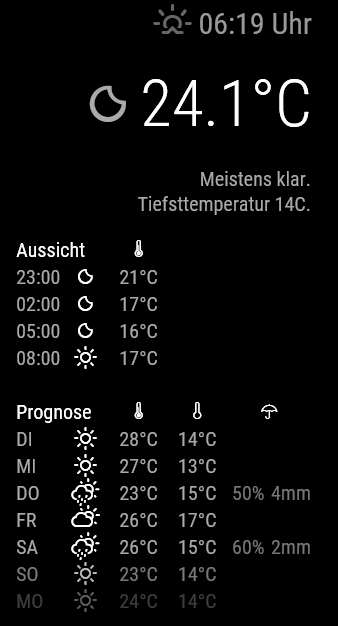
Sure, the adjustments I have made so far are mostly based around the idea that information should only be presented if it is relevant (or actually existent at all)
- Only show precipitation if the probability for rain and the expected precipitation is above 0 % / mm
- Only show the umbrella icon if there is a day with precipitation in the forecast table
- Only show windspeed if it is above 0 kph.
- I’ve removed the windspeed icon and changed it to a text line like this: 12 km/h + wind direction icon
- In the forecast table the forecast temperature for any given day is shown until sunrise of that day (As I have the hourly forecasts I don’t really need the forecast for the day after sunrise, so generally I have my forecast table start the day after today - In the time between midnight and sunrise, this isn’t all that great though as it means that I only see the forecast until, say 10am, shortly after midnight)
- I’ve added some spaces to unclutter the layout
- I’ve changed the short version of the days to all caps
Here’s a screenshot of my layout:
What I’m planning to add:
- 7am temperature in the forecast table
Here’s why: Where I live it can sometimes get pretty cold in the morning, but within hours it’s humid and hot and sometimes it gets cold later in the evening so a simple quote of the daily high and low doesn’t really represent the days all that well. And if you know that it’s mild in the morning and hot in the afternoon you can dress differently than when it’s cold in the morning and then hot for the rest of the day. Not sure if that is all too helpful for others out there ^^.
-
@yo-less Your changes look great, would it be possible to provide the code?
-
@alihallo Sure, just contact me and I can provide you with my modifications.
-
Good job ! I’m also interested by your changes, let us know where we can find it.
Could be nice to add a module parameters like : “light_display : true/false” or something like that ?
Hello! It looks like you're interested in this conversation, but you don't have an account yet.
Getting fed up of having to scroll through the same posts each visit? When you register for an account, you'll always come back to exactly where you were before, and choose to be notified of new replies (either via email, or push notification). You'll also be able to save bookmarks and upvote posts to show your appreciation to other community members.
With your input, this post could be even better 💗
Register Login