Read the statement by Michael Teeuw here.
MLB Standings...
-
Description:
Major League Baseball Standings in a rotating fashion. See Readme for installation and config options.
Screenshots:
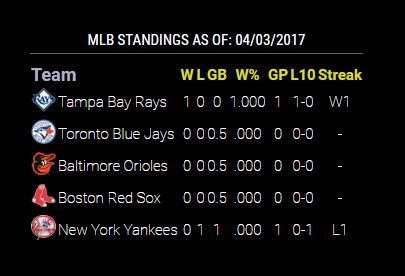

Download:
[card:cowboysdude/MMM-MLBStandings]
Version 1.0.0
-
Uh, can you . . . ? ;-)
-
Nice module! Will be installing this today for sure! Is there a way to pick which teams you want to see? If not, no biggy
-
@hartattack I hadn’t planned on that… but what I am working on is showing the conference - division… :)
-
@cowboysdude I would be happy with that! Still going up on the mirror as soon as I get home!
-
Description:
Update: added Conference~Division column as a config option
Screenshots:
With: [true or leave out of config.js will automatically be true]
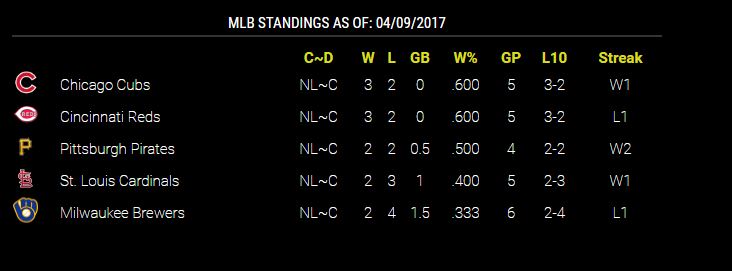
Without: [setting confdiv: false in config.js]
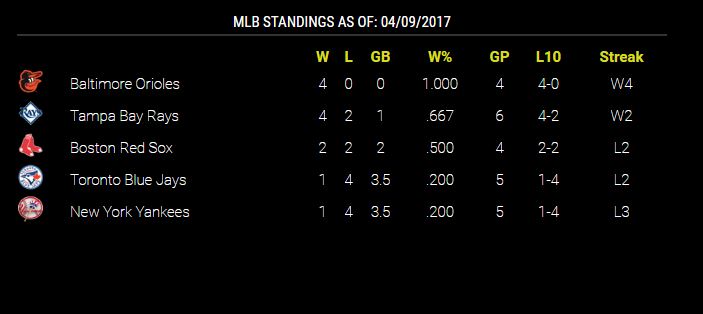
Download:
[card:cowboysdude/MMM-MLBStandings]
Version 1.0.1
-
Genius!
-
I can’t seem to get this module to work. I get a black screen. I was able to use the MLB scores module with no problem.
-
I’d have to see what error your getting.
Can you post your config.js?
-
the main.js and the css files have MLBstandings with lower case “s”. The module folder and the config entry have MLBStandings with upper case “S”. I’ve made the developer aware of it and he is going to fix it. In a moment or two you can do a git pull to update the fix.
It’s a beautiful module. I dare say, you are going to like it.
-
Good catch @Mykle1 :)
Description:
Update: Corrected file names
Screenshots:
With: [true or leave out of config.js will automatically be true]
Without: [setting confdiv: false in config.js]
Download:
[card:cowboysdude/MMM-MLBStandings]
Version 1.0.2
-
@cowboysdude said in MLB Standings...:
Good catch @Mykle1
It just gives me another chance to say, Awesome Freakin Module! :thumbsup:
-
@Mykle1 Thanks!
-
-
@daveyg_71 said in MLB Standings...:
That fixed it.
ThanksAll thanks go to @cowboysdude for his fantastic work and his immediate response and correction.
However, you’re welcome. :-)
-
The module only shows standings for the AL East, shouldn’t it cycle through the divisions?
-
You’re right… it’s not rotating…
Please do a ‘git pull’ to update that should fix it! Thank you again!!!
-
git pull worked. Problem fixed.
Thank you for developing and troubleshooting both MLB modules. I am a huge baseball
-
@Flip357 said in MLB Standings...:
git pull worked. Problem fixed.
Thank you for developing and troubleshooting both MLB modules. I am a huge baseball
I JUST caught this… so you’re a huge baseball huh? hahahahhaahha
-
I you got it before I did. lol



Hello! It looks like you're interested in this conversation, but you don't have an account yet.
Getting fed up of having to scroll through the same posts each visit? When you register for an account, you'll always come back to exactly where you were before, and choose to be notified of new replies (either via email, or push notification). You'll also be able to save bookmarks and upvote posts to show your appreciation to other community members.
With your input, this post could be even better 💗
Register Login