MagicMirror Forum
    • Recent
    • Tags
    • Unsolved
    • Solved
    • MagicMirror² Repository
    • Documentation
    • 3rd-Party-Modules
    • Donate
    • Discord
    • Register
    • Login
    A New Chapter for MagicMirror: The Community Takes the Lead
    Read the statement by Michael Teeuw here.

    27" custom framed magic mirror - fun to get done

    Scheduled Pinned Locked Moved Show your Mirror
    41 Posts 13 Posters 70.2k Views 17 Watching
    Loading More Posts
    • Oldest to Newest
    • Newest to Oldest
    • Most Votes
    Reply
    • Reply as topic
    Log in to reply
    This topic has been deleted. Only users with topic management privileges can see it.
    • I Offline
      iwaldrum @iwaldrum
      last edited by

      @cowboysdude

      This is how I integrated my security cameras. If you have any questions or want more details let me know.

      @iwaldrum said in 27" custom framed magic mirror - fun to get done:

      @disakos

      I’m using a program called Netcam Studio on the same pc that I’m running MM in serveronly mode. Netcam Studio allows you to connect to multiple types of cameras, either local or IP based. I’m using it to connect my q-see surveillance system using RSTP connections, as well as several Foscam and PC connected cams.

      Once the cameras are connected to netcamstudio, you can then generate a secure token based url for each one. I then took each url and placed them into a single html file and put it on a webserver (same pc). Using the iFrame module I pointed to the html file to display it on my MM. You’ll need to play with the positioning and sizing of the iframe, as well as the webpage layout and image sizes in the html.

      I typically get 5-10 fps for each camera. Depending on the # of cameras you will be displaying and the type of system your running MM on will drive the performance of the playback.

      I know the setup is a little complex, but I felt it was the best way to get a flexible, integrated look that performed the best.

      Let me know if you have any questions.

      1 Reply Last reply Reply Quote 1
      • C Offline
        cohron
        last edited by

        I cant find the little weather icons. Temp hi and lo and the umbrella.

        0_1492796477309_upload-210cadc3-e54f-425e-94b6-0466ae88aa00

        C 1 Reply Last reply Reply Quote 0
        • C Offline
          cohron @cohron
          last edited by

          @cohron nevermind im a dummy, copied the custom.css without really reading it:

          .region.top.right .MMM-WunderGround table th {
          display: none; /* removes icons above max-temp, min-temp and % chance of rain */
          }

          1 Reply Last reply Reply Quote 3
          • C Offline
            cmille34
            last edited by

            This mirror looks great! It’s been the inspiration to take a stab at making one as well. I like the idea of running MM on an existing windows server I have in the house and just rely on the Pi3 to load the webpage.

            With your mirror do you turn off the screen when no motion is detected or does it display everything constantly? If you do turn off the screen, how are you triggering it on and off? I see there are PIR modules for MM but since you’ve made the decision to simply view the MM page remotely, I was wondering if you had some way to turn off the screen?

            Thanks for taking the time to detail this out!

            I 1 Reply Last reply Reply Quote 0
            • I Offline
              iwaldrum @cmille34
              last edited by

              @cmille34

              Glad I could inspire you. I do like running it centrally. Since I made this one, I’ve setup another one in my son’s room. Different size screen and content. .All I had to do is run another instance on my server - copy and paste folder and change the config file to my liking… done…

              0_1494584759279_mm-johns.JPG

              I do not turn my screen off. It’s on my todo list… To your point, it might be a little trick to do so since MM isn’t running locally. We’ll need to find an external solution to do so that works on fullpageOS or whatever platform you are running at the endpoint. If I find something Ill post…

              1 Reply Last reply Reply Quote 3
              • W Offline
                wbleek @iwaldrum
                last edited by wbleek

                @iwaldrum your project looks great! It is almost the module configuration I am also aiming for. Could you share how you integrated the surveillance cameras (iframe code)? I have trouble integrating mine. They offer rtsp and also jpegs that you can pull via http request. Which seems to be very similar to your setup. I would be interested in how you used the iframes to do it. Did you simply put the token-url in the iFrame-Module? How did you handle the refresh? Maybe you could share some code.
                Thanks very much
                Wolf

                C 1 Reply Last reply Reply Quote 0
                • C Offline
                  cmille34 @wbleek
                  last edited by

                  @wbleek I achieved the cameras on my mirror pretty easily with Blue Iris. I simply made a custom .HTM file and placed it in the /modules directory of the MagicMirror then using iFrameReload i just call the /modules/custom.htm URL to load the cameras. Below is my custom.htm file I am calling in the iFrameReload module:

                  
                  <table>
                  <tr>
                  </tr><tr>
                  <td>
                  <img src="http://192.168.1.108:81/mjpg/BackyardCam/video.mjpg?q=25&amp;s=25" alt="BackyardCam" />
                  </td>
                  <td>
                  <img src="http://192.168.1.108:81/mjpg/FrontDoor/video.mjpg?q=40&amp;s=40" alt="DrivewayCam" />
                  </td>
                  </tr>
                  <tr>
                  <td>
                  <img src="http://192.168.1.108:81/mjpg/DriveWayCam/video.mjpg?q=25&amp;s=25" alt="FrontdoorCam" />
                  </td>
                  </tr>
                  </table>


                  In lieu of having blue iris you could possibly simply pull the mjpg streams straight from each cameras individually and slap them in the img tag. That may be a better way actually but it seems to be working fine for me through Blue Iris this way.

                  Below is the code from my config.js showing how I am calling this custom HTM file:

                  {
                  	module: 'MMM-iFrameReload',
                  	position: 'bottom_bar', // This can be any of the regions.
                  		config: {
                  		// See 'Configuration options' for more information.
                  		url: "http://192.168.1.108:9000/modules/custom.htm",
                  		width: "100%", // Optional. Default: 400px
                  		height: "850px", // Optional. Default: 800px
                  		scrolling:"no",
                  		refreshInterval: 600, //Optional. Default: 3600 = 1 hour
                  		animationSpeed: 4000,
                  		}
                  	},
                  

                  My setup is similar to the OP in terms of running the MagicMirror server on a central server and simply running fullpageos on the raspberry pi to call the magicmirror page.

                  Hope this helps.

                  W 1 Reply Last reply Reply Quote 2
                  • P Offline
                    pepemujica
                    last edited by

                    Hi! Looks awesome! Congrats!
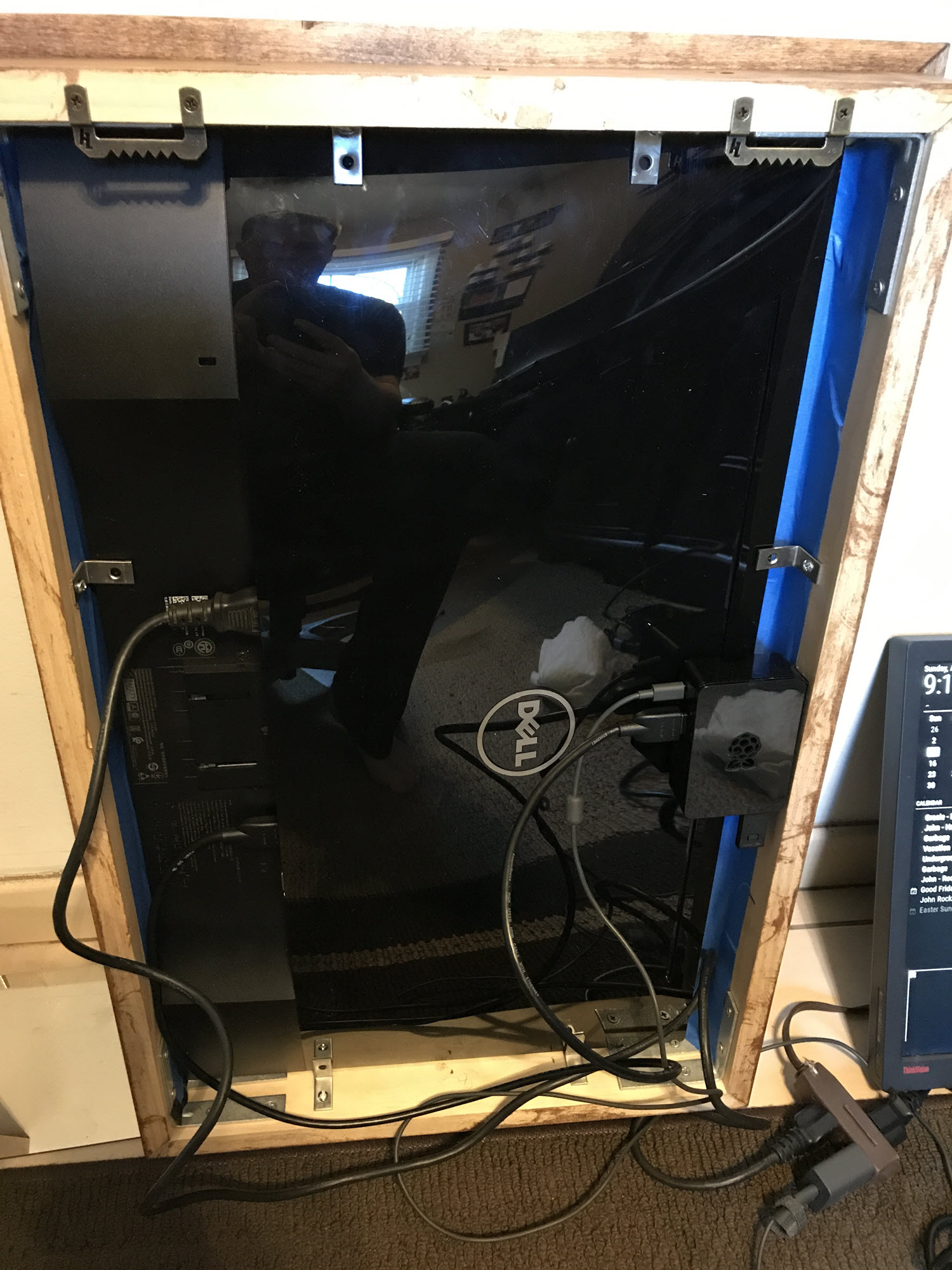
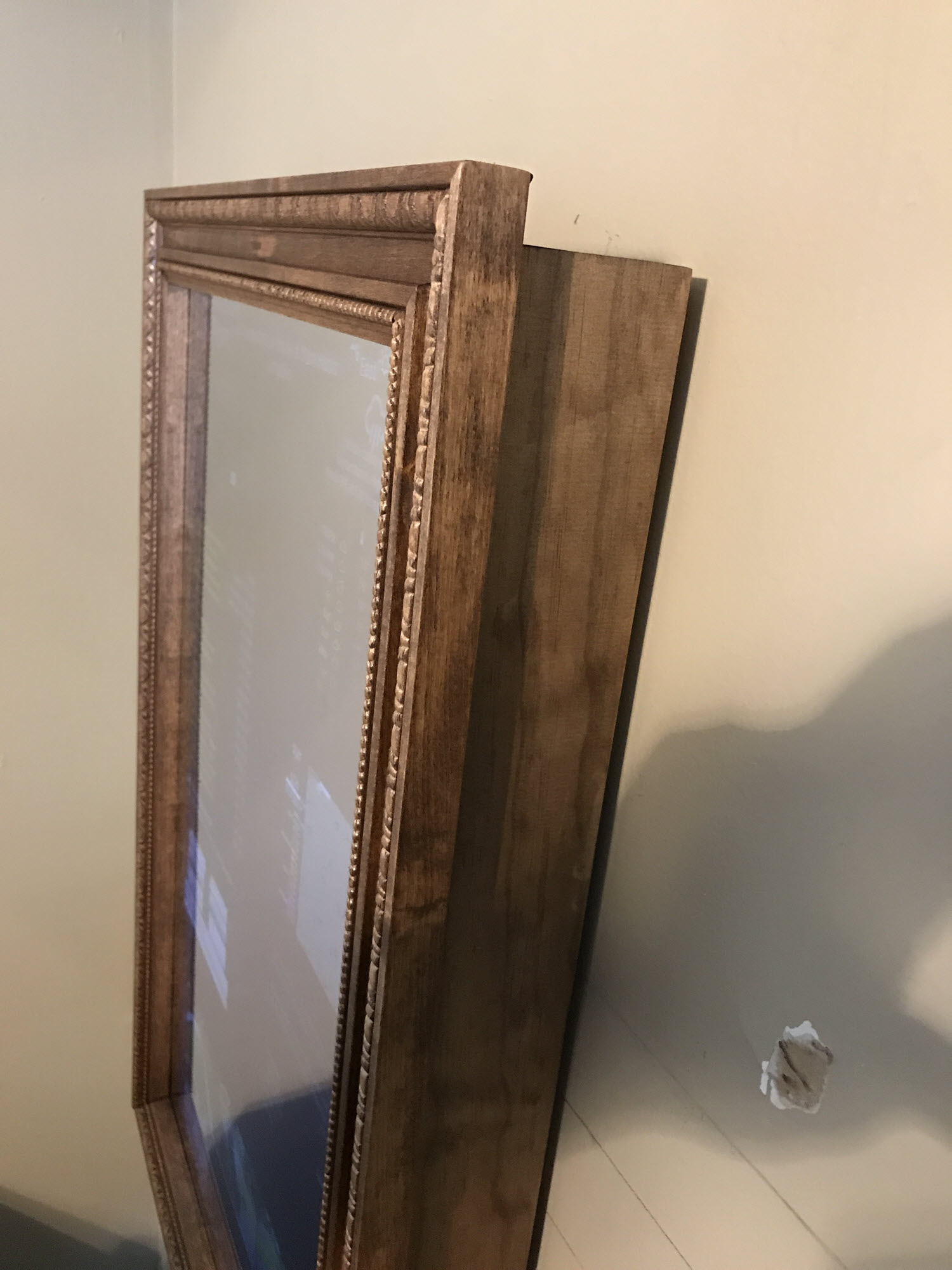
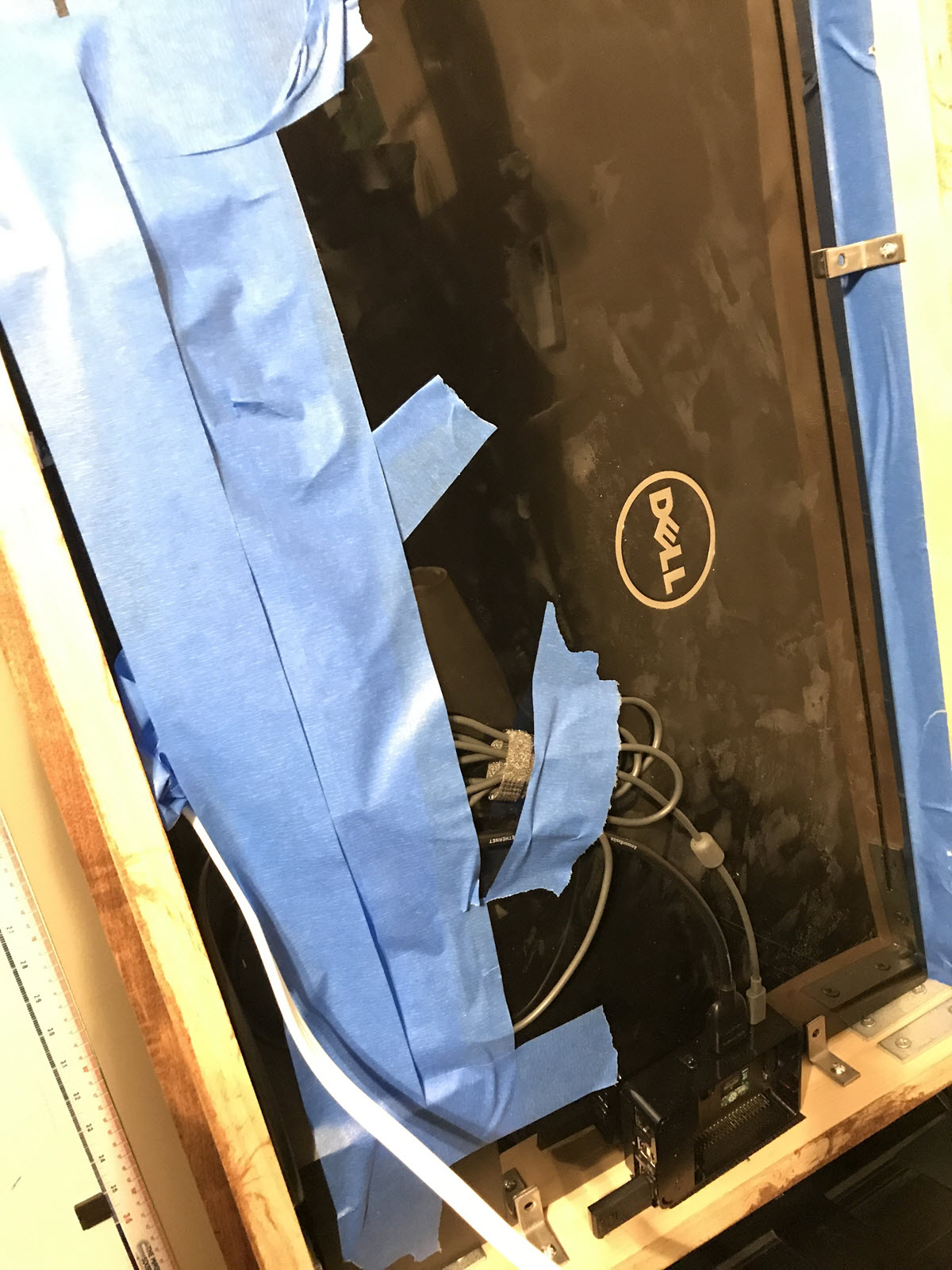
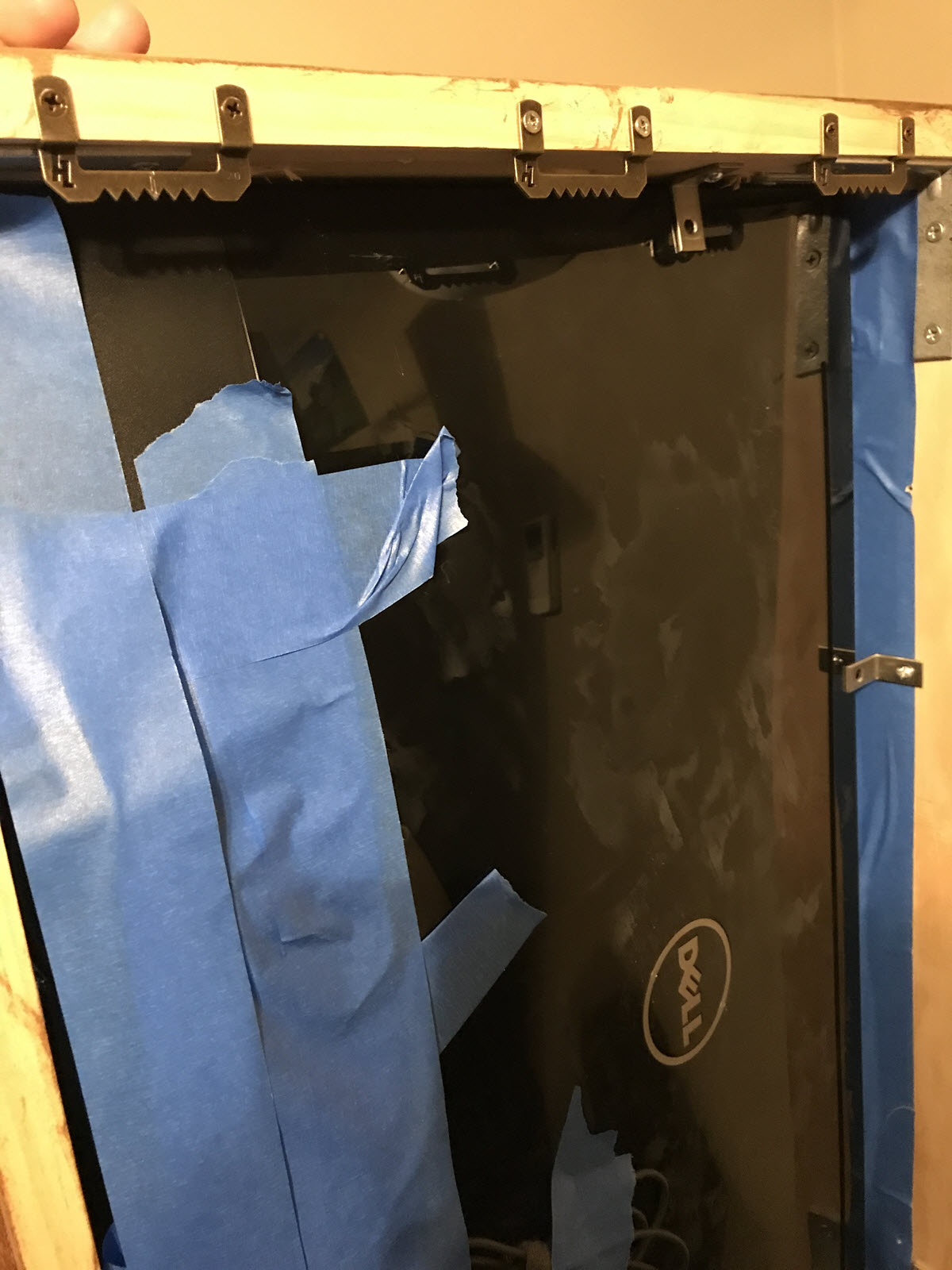
                    Do you have any photo from the sides and/or back?

                    I 1 Reply Last reply Reply Quote 0
                    • W Offline
                      wbleek @cmille34
                      last edited by

                      @cmille34 Hey, thanks for your answer. I appreciate that. My NVR only provides still JPEGs or RTSP for pictures. If I use JPEGs I have to reload them in a 200ms interval to achieve acceptable motion.

                      At this point, I have tried the following:

                      1. uses MMM-iFrame
                      • do the reload via embedded HTML meta-tag
                      • strong flickers (approx. half of the time blank)
                      • works, but not visually accaptable
                      • does not scale due to the flickering
                      1. use MMM-iFrame
                      • do the reload via embedded Java-Script function
                      • almost no flicker, almost fluid motion
                      • works for 30-60 minutes, then the module stops
                      • does not scale since it stops earlier with more modules
                      1. use oxmplayer as an overlay
                      • needs '–avdict rtsp_transport:tcp ’ switches to work without banding
                      • rtsp with 640x360 works with 30fps
                      • tested to concurrent streams

                      I am happy with the omxplayer solution even though it is not integrated in the MagicMirror. But for the user it looks integrated and it delivery a very good video quality.

                      Cheers
                      wolf

                      1 Reply Last reply Reply Quote 2
                      • J Offline
                        Jayh391
                        last edited by

                        I would like to know how you brought your Homeseer info in?

                        Jay

                        I 1 Reply Last reply Reply Quote 1
                        • zdenekZ Offline
                          zdenek @iwaldrum
                          last edited by

                          @iwaldrum MMM-SimpleLogo - pulls updated radar image from wundergound - can u plz share details? What´s exactly in the config?

                          thanks, Zdeněk

                          I 1 Reply Last reply Reply Quote 1
                          • I Offline
                            iwaldrum @pepemujica
                            last edited by

                            @pepemujica

                            Here are some additional pics… The back isn’t the prettiest, but it does the job. Used painters tape, L brackets and velcro to keep everything in place.
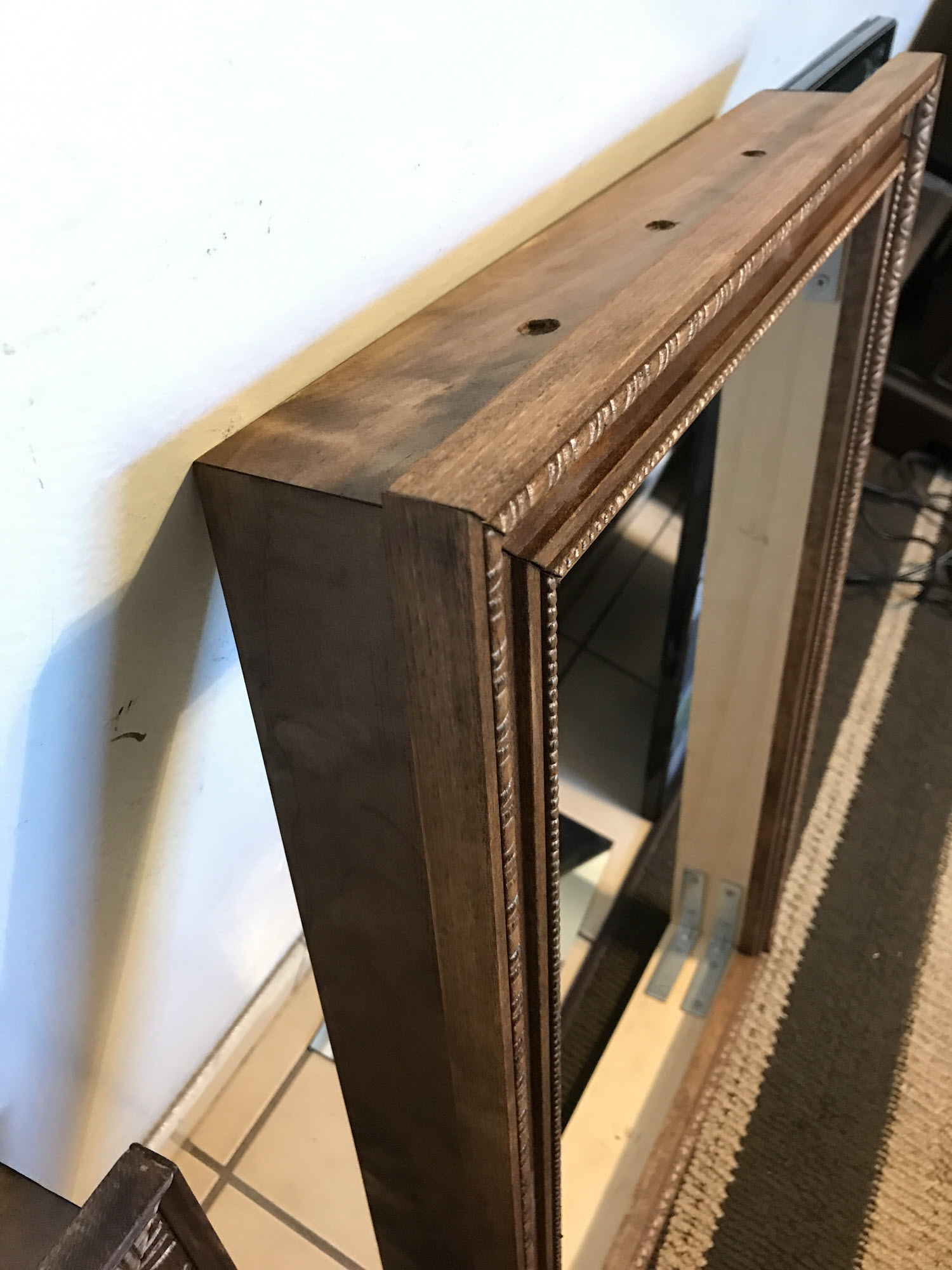
                            0_1496222337049_IMG_1961.JPG 0_1496222343783_IMG_2065.JPG 0_1496222351990_IMG_2788.JPG 0_1496222360052_IMG_2866.JPG 0_1496222364276_IMG_2867.JPG

                            1 Reply Last reply Reply Quote 0
                            • I Offline
                              iwaldrum @Jayh391
                              last edited by

                              @Jayh391

                              I used the MMM-Rest module to pull the device data via the rest api in Homeseer. Here is the section in my config file. Still work in progress…

                              		module: 'MMM-Rest',
                              		header: 'House Status',
                              		position: 'top_right',	// This can be any of the regions.
                              									// Best results in one of the side regions like: top_left
                                      config: {
                                              debug: false,
                                              mappings: {
                                                  on_off: {
                                                      true: 'on',
                                                      false: 'off',
                                                  },
                                                  temperature: {
                                                      1: 'cold',
                                                      2: 'warm',
                                                      3: 'HOT',
                                                  },
                                              },
                                              sections: [
                                              {
                                                  format: '%d',
                                                  url: 'http://yourURLhere:port/HomeSeer_REST_API.aspx?function=getdevicestatusvaluebyid¶m1=108¶m2=value',
                                              },
                                              {
                                                  format: '%df',
                                                  url: 'http://yourURLhere:port/HomeSeer_REST_API.aspx?function=getdevicestatusvaluebyid¶m1=103¶m2=value',
                                              },
                                              {
                                                  format: '%d',
                                                  url: 'http://yourURLhere:port/HomeSeer_REST_API.aspx?function=getdevicestatusvaluebyid¶m1=128¶m2=value',
                                              },
                                              {
                                                  format: '%df',
                                                  url: 'http://yourURLhere:port/HomeSeer_REST_API.aspx?function=getdevicestatusvaluebyid¶m1=187¶m2=value',
                                              },
                                              {
                                                  format: '%d',
                                                  url: 'http://yourURLhere:port/HomeSeer_REST_API.aspx?function=getdevicestatusvaluebyid¶m1=118¶m2=value',
                                              },
                                              {
                                                  format: '%df',
                                                  url: 'http://http://yourURLhere:port/HomeSeer_REST_API.aspx?function=getdevicestatusvaluebyid¶m1=113¶m2=value',
                                              },
                                              {
                                                  format: '%df',
                                                  url: 'http://yourURLhere:port/HomeSeer_REST_API.aspx?function=getdevicestatusvaluebyid¶m1=92¶m2=value',
                                              },
                                              {
                                                  format: '%s',
                                                  mapping: 'temperature',
                              		    url: 'http://yourURLhere:port/HomeSeer_REST_API.aspx?function=getdevicestatusvaluebyid¶m1=137¶m2=value',
                                              },
                                              {
                                                  format: '%d',
                                                  url: 'http://yourURLhere:port/HomeSeer_REST_API.aspx?function=getdevicestatusvaluebyid¶m1=108¶m2=value',
                                              },
                                              {
                                                  format: 'Lights %s',
                                                  mapping: 'on_off',
                                                  url: 'http://yourURLhere:port/HomeSeer_REST_API.aspx?function=getdevicestatusvaluebyid¶m1=108¶m2=value',
                                              },
                                          ],
                                          output: [
                                              ['<b>Location:</b>',,'<b>Temp:</b>'],
                                              ['Family Room',,'@2'],
                                              ['Living Room','@6'],
                                              ['Upstairs','@4'],
                                              ['Garage','@7'],
                                          ],
                              	    },
                              	},
                              
                              J 1 Reply Last reply Reply Quote 0
                              • I Offline
                                iwaldrum @zdenek
                                last edited by iwaldrum

                                @zdenek

                                I used wunderground.com to create the animated radar image and MMM-SimpleLogo to display it.

                                Create your custom image at https://www.wunderground.com/weather-radar - looks like US, Canda & Australia only. Once created, copy the URL and place it in the MMM-SimpleLogo module.

                                Wunderground updates the radar image every 10-20 minutes. Since I’m using FullpageOS as my mm frontend I have the page refresh every 30 minutes which then pulls an updated image.

                                    {
                                        module: 'MMM-SimpleLogo',
                                        position: 'top_right',    // This can be any of the regions.
                                        config: {
                                		fileUrl: "https://radblast.wunderground.com/cgi-bin/radar/WUNIDS_map?station=DIX&brand=wui&num=1&delay=15&type=N0R&frame=0&scale=1.000&noclutter=0&showstorms=0&mapx=400&mapy=240¢erx=400¢ery=240&transx=0&transy=0&showlabels=1&severe=0&rainsnow=0&lightning=0&smooth=0&rand=24937062&lat=40.75000000&lon=-74.00000000&label=New+York%2C+NY",
                                		width: "400px",
                                		position: "center",
                                       }
                                    },
                                
                                C zdenekZ 2 Replies Last reply Reply Quote 0
                                • C Offline
                                  cmille34 @iwaldrum
                                  last edited by

                                  @iwaldrum said in [27" custom framed magic mirror - fun to get done] Since I’m using FullpageOS as my mm frontend I have the page refresh every 30 minutes which then pulls an updated image.

                                  How is you have the page reload every 30 mins in fullpageOS? My calendar app doesn’t appear to be updating, I’m hoping a page reload every 30 mins will fix that.

                                  I 1 Reply Last reply Reply Quote 0
                                  • I Offline
                                    iwaldrum @cmille34
                                    last edited by

                                    @cmille34

                                    There is a refresh script included with fullpageOS. it’s located at /home/pi/scripts/refresh. I added it to the crontab to run every 30min. I also added a line to crontab to reboot at midnight. This helps keep the system fresh and free up any processes or used memory on the Pi.

                                    Here is my config
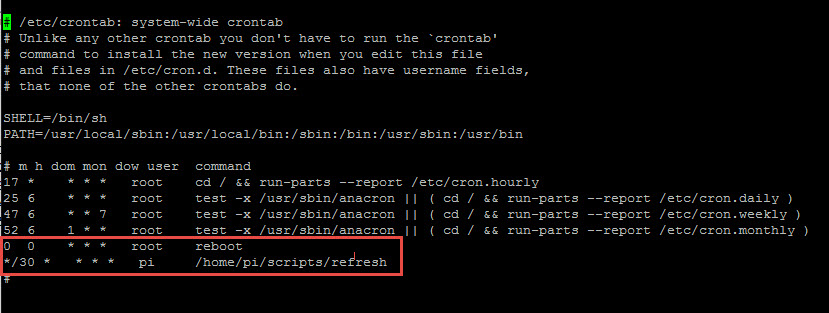
                                    0_1496228243752_fullpageos-reboot-refresh.jpg

                                    sudo nano /etc/crontab
                                    
                                    Add:
                                    0  0    * * *   root    reboot
                                    */30 *   * * *   pi     /home/pi/scripts/refresh
                                    
                                    C zdenekZ 2 Replies Last reply Reply Quote 0
                                    • C Offline
                                      cmille34 @iwaldrum
                                      last edited by

                                      @iwaldrum said in 27" custom framed magic mirror - fun to get done:

                                      sudo nano /etc/crontab
                                      
                                      Add:
                                      0  0    * * *   root    reboot
                                      */30 *   * * *   pi     /home/pi/scripts/refresh
                                      

                                      Brilliant! I forgot I was calling that script when I woke the screen with the motion sensor
                                      already. Hopefully adding it to cron every 30 minutes like you’ve shown will help get the calendar to update more regularly. Thanks for the quick help!

                                      I 1 Reply Last reply Reply Quote 1
                                      • I Offline
                                        iwaldrum @cmille34
                                        last edited by

                                        @cmille34

                                        I’d love to hear how you have your motion sensor setup with fullpageOS. On my todo list…

                                        C 1 Reply Last reply Reply Quote 0
                                        • C Offline
                                          cmille34 @iwaldrum
                                          last edited by

                                          @iwaldrum said in 27" custom framed magic mirror - fun to get done:

                                          @cmille34

                                          I’d love to hear how you have your motion sensor setup with fullpageOS. On my todo list…

                                          This is far from perfect but it appears to work for me. Generally the screen is dim when I look at the mirror from afar or an angle but if I walk near it, it comes to life. I’m using the cheapie ol’ HC-SR501 motion sensor for this. I think I got a 5 pack for like 5 bucks on eBay. I actually have my sensor dangling at the bottom of my mirror, essentially aiming at the floor. These things are pretty darn sensitive it seems.

                                          I essentially have the sensor hooked up to the Pi and and have converted the following Python script to a service that runs at startup. The monitor still has power but the HDMI signal is essentially disabled when motion isn’t detected with the tvservice command (whatever it is! ha).

                                          /home/pi/motiondetector.py

                                          import os
                                          import subprocess
                                          import time
                                          from gpiozero import MotionSensor
                                          
                                          pir = MotionSensor(4)
                                          while True:
                                                  pir.wait_for_motion()
                                                  print("Motion!")
                                                  subprocess.call(["/bin/sh","/home/pi/scripts/refresh"])
                                                  os.system("tvservice -p; fbset -depth 8; fbset -depth 16")
                                                  pir.wait_for_no_motion()
                                                  print("No motion...")
                                                  os.system("tvservice -o")
                                          

                                          The sources I used to cobble this together:

                                          Install gpiozero
                                          https://gpiozero.readthedocs.io/en/stable/

                                          I think I had some issue getting the gpiozero module to load, but this thread looks familiar. I think the issue is I started with Jessie Lite.
                                          https://www.raspberrypi.org/forums/viewtopic.php?f=63&t=126320

                                          Script as service
                                          http://www.diegoacuna.me/how-to-run-a-script-as-a-service-in-raspberry-pi-raspbian-jessie/

                                          Sensitivity Adjustment (this takes some tinkering for sure)
                                          http://henrysbench.capnfatz.com/henrys-bench/arduino-sensors-and-input/arduino-hc-sr501-motion-sensor-tutorial/

                                          You could probably gather all this with a few minutes of googling but I figured I’d share what I’ve cobbled together so far. A short range IR type sensor may be better if you only want the screen to activate when you get right in front of it, if you just want some mostly automated way of turning the screen off, this should work though.

                                          1 Reply Last reply Reply Quote 1
                                          • J Offline
                                            Jayh391 @iwaldrum
                                            last edited by

                                            @iwaldrum

                                            Thanks ! I will give it a try!

                                            J 1 Reply Last reply Reply Quote 0

                                            Hello! It looks like you're interested in this conversation, but you don't have an account yet.

                                            Getting fed up of having to scroll through the same posts each visit? When you register for an account, you'll always come back to exactly where you were before, and choose to be notified of new replies (either via email, or push notification). You'll also be able to save bookmarks and upvote posts to show your appreciation to other community members.

                                            With your input, this post could be even better 💗

                                            Register Login

                                            • 1
                                            • 2
                                            • 3
                                            • 2 / 3
                                            • First post
                                              Last post
                                            Enjoying MagicMirror? Please consider a donation!
                                            MagicMirror created by Michael Teeuw.
                                            Forum managed by Sam, technical setup by Karsten.
                                            This forum is using NodeBB as its core | Contributors
                                            Contact | Privacy Policy