Read the statement by Michael Teeuw here.
Black screen + access Denied trough web
-
Hello ,
Im complete new to magicmirror so maybe im seeing something not right.
First installed everything and after npm start magicmirror Launch and its Black.screen.
Then intro to acces it trough the web but then i get acces denied.I try to delete modules and to charge the config file with different ip adres. But nothing works. Does anybody have a sollotion for me.
Thnak you !
-
@reddevel75 use this guide for ip whitelist to access the mirror from another computer :
https://forum.magicmirror.builders/topic/1326/ipwhitelist-howtoOR change the config to
ipWhitelist: [ ],To allow every ip to access the mirrorPlease post you config file content so we can see if there is any issues with it (but remove any personal api-keys before you post)
-
Thank you for you reaction.
First off thanks for helping out with the connecting that problem is solved now.
Still I have the problem that nothing seems to work because it’s still black screen…
here is my config.js
/* Magic Mirror Config Sample
 *
 * By Michael Teeuw http://michaelteeuw.nl
 * MIT Licensed.
 */

var config = {
        port: 8080,
        ipWhitelist: [ ],

        language: "nl",
        timeFormat: 24,
        units: "metric",

        modules: [
                {
                        module: "alert",
                },
                {
                        module: "updatenotification",
                        position: "top_bar"
                },
                {
                        module: "clock",
                        position: "top_left"
                },
                {
                        module: "calendar",
                        header: "US Holidays",
                        position: "top_left",
                        config: {
                                calendars: [
                                        {
                                                symbol: "calendar-check-o ",
                                                url: "webcal://www.calendarlabs.com/templates/ical/US-Holidays.ics"
                                        }
                                ]
                        }
                },
                {
                        module: "compliments",
                        position: "lower_third"
                },
                {
                        module: "currentweather",
                        position: "top_right",
                        config: {
                                location: "New York",
                                locationID: "",  //ID from http://www.openweathermap.org/help/city_list.txt
                                appid: "YOUR_OPENWEATHER_API_KEY"
                        }
                },
                {
                        module: "weatherforecast",
                        position: "top_right",
                        header: "Weather Forecast",
                        config: {
                                location: "New York",
                                locationID: "5128581",  //ID from http://www.openweathermap.org/help/city_list.txt
                                appid: "YOUR_OPENWEATHER_API_KEY"
                        }
                },
                         {
                        module: "newsfeed",
                        position: "bottom_bar",
                        config: {
                                feeds: [
                                        {
                                                title: "New York Times",
                                                url: "http://www.nytimes.com/services/xml/rss/nyt/HomePage.xml"
                                        }
                                ],
                                showSourceTitle: true,
                                showPublishDate: true
                        }
                },
        ]

};

/*************** DO NOT EDIT THE LINE BELOW ***************/
if (typeof module !== "undefined") {module.exports = config;}
hopefully you can find the problem…
-
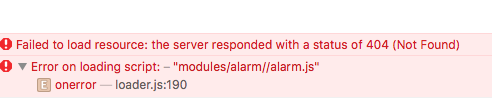
when just programming one module i get this error:
-
could you please try this config?
/* Magic Mirror Config Sample
 *
 * By Michael Teeuw http://michaelteeuw.nl
 * MIT Licensed.
 */

var config = {
	port: 8080,
	ipWhitelist: [], // Set [] to allow all IP addresses.

	language: "en",
	timeFormat: 24,
	units: "metric",

	modules: [
		{
			module: "clock",
			position: "top_left"
		},
		{
			module: "compliments",
			position: "lower_third"
		}
	]

};

/*************** DO NOT EDIT THE LINE BELOW ***************/
if (typeof module !== "undefined") {module.exports = config;}
But it seems you have other issues, it tries to load a module that doesn’t exist (alarm module).
-
What module are your programming? Do you mean you are trying to add a module to the default config. I just loaded your config from above, adding my API key, and it works correctly. Can you explain a little better what you are trying to do, please?
-
@broberg said in Black screen + access Denied trough web:
could you please try this config?
Ah, you beat me! :thumbsup:
-
Just trying to get it running for the first time nothing custom stuff.
when i upload you code i get this problem.
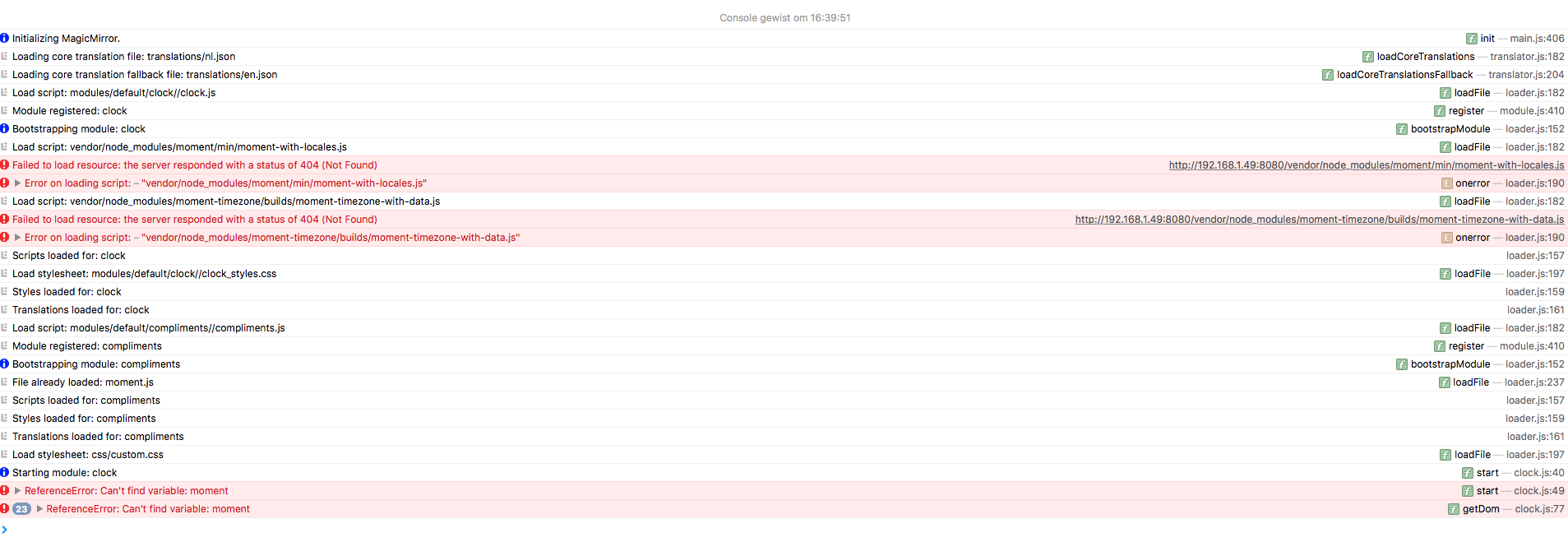
Maybe a fresh install will do the trick ?
-
@reddevel75 did you do the
npm installin the magicmirror folder after you cloned the magicmirror? -
just did a fresh install, now everything seems to work :)
-
I am getting the same issue with the black screen. When I access via localhost:8080, I get the default screen that tells you to create a config file. I was using a config.js file from an old build I did that worked, but I replaced it with the config file posted above and I get the same issue.
pi@n8MM:~/MagicMirror $ npm start

> magicmirror@2.1.1 start /home/pi/MagicMirror
> sh run-start.sh

Starting MagicMirror: v2.1.1
Loading config ...
Loading module helpers ...
No helper found for module: clock.
No helper found for module: compliments.
All module helpers loaded.
Starting server on port 8080 ...
Starting server op port 8080 ...
You're using a full whitelist configuration to allow for all IPs
Server started ...
Sockets connected & modules started ...
Launching application.
^C
pi@n8MM:~/MagicMirror $ node -v
v7.9.0
pi@n8MM:~/MagicMirror $ electron -v
v1.3.15
pi@n8MM:~/MagicMirror $

Hello! It looks like you're interested in this conversation, but you don't have an account yet.
Getting fed up of having to scroll through the same posts each visit? When you register for an account, you'll always come back to exactly where you were before, and choose to be notified of new replies (either via email, or push notification). You'll also be able to save bookmarks and upvote posts to show your appreciation to other community members.
With your input, this post could be even better 💗
Register Login