Read the statement by Michael Teeuw here.
MMM-MyCommute
-
@j.e.f.f yes I have and check
-
@BanksyPaint @j.e.f.f
Hi there i am having the same exact issue with the MyCommute module.
It was working fine until i got the notification of the update than no more displaying of my commutes and i see a spike in cpu usage to almost 100% .
I have cheked my google API key and it is current … i did the git pull commant do update and it did not fix the issue … i npm unistalled it removed it completely went back and git clone again and npm install and still the same issue
Like i said it was working just fine before and nothing has changed on the MM config file other than adding a couple of new modules.
What do you think it is happening??
Any help will be greatly appreciated and it really is a great module -
LOL never mind i got it… I am retarted :) :)
i was testing it on Saturday and Sunday so it was just not displaying since i still had the 0 and 6 hide days LOL
thank you
Great work -
@richland007 ;)
-
Hey,
this is a great module. love it. but i got some issues by using the alternative routes.
the “avoid” feature works, but it would be nice if i could see all available routes in one destination. With “available routes” i mean the alternative routes that google maps shows you normally.i tried like this:
{
                        module: 'MMM-MyCommute',
                        position: 'top_left',
                        header: 'Verkehrslage',
                        classes: 'default everyone',
                        config: {
                                apikey: 'xxx_hide_xxx',
                                origin: 'xxx_hide_xxx',

                               destinations: [
      {
        destination: 'xxx_hide_xxx',
        label: 'Arbeit',
        mode: 'driving',
        alternatives: 'true', // < thats what i mean!!!
        time: null
      },
      {
        destination: 'xxx_hide_xxx',
        label: 'Arbeit',
        mode: 'driving',
        avoid: 'highways',
        time: null
      },
      {
        destination: 'xxx_hide_xxx',
        label: 'xxx_hide_xxx',
        mode: 'driving',
        time: null
      },
    ]
   }
  },
but it looks just like this:
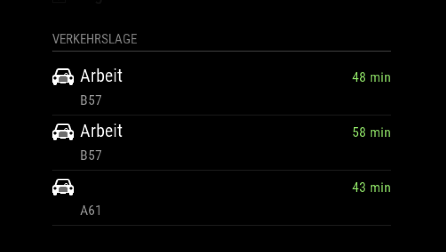
any idea?
-
@cruunnerr the readme says, that
alternativeshas to be used withshowSummary: trueotherwise it will not have an effect -
i thought it is set to “true” by default.
i tried it like this, but still not working:
{
        destination: 'xxx_hide_xxx',
        label: 'Arbeit',
        mode: 'driving',
        showSummary: 'true',
        alternatives: 'true',
        time: null
      },
edit:
still checked the “MMM-MyCommute.js”showSummary is true
-
@cruunnerr make sure you’ve got your API key set correctly. Without it you’ll only get limited functionality. Make sure to set property name as
apikey. Some people have tried to useapi_keyorapiKey, neither of which will work. -
its correct.
intentionally i typed in a wrong apikey, what effects an error message when module loads up.
its this format and its correct:
apikey: 'ABCDabcd1234abcd5679',edit:
i used the “standard api key” from google. there was also a “premium api key”, but this one i don’t need, right?
to make sure that I express myself correctly… i want it to looks like this:

-
@cruunnerr standard API key is fine.
I’m currently in the process of moving my family overseas, so I don’t have a lot of time to help troubleshoot this at the moment. Send me a private message with your complete config and i’ll try and troubleshoot it on my side when I get a few minutes.
Might be a few days, please be patient :)
-
For sure this is no problem. Take as much time as u need for your family. thats much more important!
didn’t find a private message option, just a chat^^ sorry for that. I post my config right here.
just for info: I didn’t touch the MMM-MyCommute.js, so its just this one i need: https://github.com/jclarke0000/MMM-MyCommute/blob/master/MMM-MyCommute.js
So here is my full config:
/* Magic Mirror Config Sample
 *
 * By Michael Teeuw http://michaelteeuw.nl
 * MIT Licensed.
 *
 * For more information how you can configurate this file
 * See https://github.com/MichMich/MagicMirror#configuration
 *
 */

var config = {
	address: "0.0.0.0", // Address to listen on, can be:
	                      // - "localhost", "127.0.0.1", "::1" to listen on loopback interface
	                      // - another specific IPv4/6 to listen on a specific interface
	                      // - "", "0.0.0.0", "::" to listen on any interface
	                      // Default, when address config is left out, is "localhost"
	port: 8080,
	ipWhitelist: ["192.0.0.0/3", "::fff:0.0.0.0/1", "::fff:128.0.0.0/2", "::fff:192.0.0.0/3", "::fff:224.0.0.0/4", "127.0.0.1", "::ffff:127.0.0.1", "::1"], // Set [] to allow all IP addresses
	                                                       // or add a specific IPv4 of 192.168.1.5 :
	                                                       // ["127.0.0.1", "::ffff:127.0.0.1", "::1", "::ffff:192.168.1.5"],
	                                                       // or IPv4 range of 192.168.3.0 --> 192.168.3.15 use CIDR format :
	                                                       // ["127.0.0.1", "::ffff:127.0.0.1", "::1", "::ffff:192.168.3.0/28"],

	language: "de",
	timeFormat: 24,
	units: "metric",

	modules: [
		{
			module: "alert",
		},
		{
        		module: 'MMM-Remote-Control'
        		// uncomment the following line to show the URL of the remote control on the mirror
        		// , position: 'bottom_left'
        		// you can hide this module afterwards from the remote control itself
    		},
		{
		module: 'MMM-SystemStats',
		position: 'top_center', // This can be any of the regions.
		classes: 'small dimmed', // Add your own styling. Optional.
		config: {
			updateInterval: 5000,
			animationSpeed: 0,
			align: 'right', // align labels
			//header: 'System Stats', // This is optional
			},
		},
		{
			module: "updatenotification",
			position: "top_bar"
		},
		{
			module: "clock",
			position: "top_left"
		},
		{
			module: 'calendar',
			header: 'Chris Kalender',
			position: 'top_left',
			config: {
				calendars: [
					{
						symbol: 'calendar-check-o ',
						url: '*private*'
					},
					{
                                                symbol: 'calendar-check-o ',
                                                url: 'http://i.cal.to/ical/61/nrw/feiertage/71e91ccb.83fad41c-d19fda68.ics'
                                        },

				]

			}
		},
		{
			module: 'MMM-MyCommute',
			position: 'top_left',
			header: 'Verkehrslage',
			classes: 'default everyone',
			showSummary: 'true',
			config: {
				apikey: '*private*',
    				origin: '*private*',
				destinations: [
      				{
        				destination: '*private*',
        				label: 'Arbeit',
        				mode: 'driving',
					alternatives: 'true',
					time: null
      				},
      				{
        				destination: '*private*',
        				label: '*private*',
        				mode: 'driving',
        				time: null
      				},
    				]
   			}
  		},
//		{
//			module: "compliments",
//			position: "lower_third"
//		},
//		{
//			module: "currentweather",
//			position: "top_right",
//			config: {
//				location: "New York",
//				locationID: "",  //ID from http://www.openweathermap.org/help/city_list.txt
//				appid: "YOUR_OPENWEATHER_API_KEY"
//			}
//		},
//		{
//			module: "weatherforecast",
//			position: "top_right",
//			header: "Weather Forecast",
//			config: {
//				location: "New York",
//				locationID: "5128581",  //ID from http://www.openweathermap.org/help/city_list.txt
//				appid: "YOUR_OPENWEATHER_API_KEY"
//			}
//		},
		{
			disabled: false,
			module: 'MMM-NOAA',
			position: 'top_right',
			config: {

				apiKey: "*private*",    // https://www.wunderground.com/weather/api  select the middle plan...
				useAir: false,             // set to false if you do not want to use Air Quality Index
				airKey: "*private*",    // IF you want Air Quality Index
				pws: "*private*",         // go here to find your pws: https://www.wunderground.com/wundermap
				showClock: false,           // Hides or shows clock
				dformat: false,             // for M/D/YYYY format, false for D/M/YYYY
				format: "24",              // 12 or 24 hour format.. will default to 12 hour if none selected.
				ampm: false,                // to show AM and PM on Sunrise/Sunset time
				showGreet: false,          // deafult is false - to show greeting under clock and above date
				name: "",                  // Your name
				showWind: false,
				showDate: false,
				showForecast: true,         //show bottom 3 day forecast
				flash: true,                 //Today in forecast flashes halo
				showUV: true,               //show UV index
	      			showBar: true,             // show Barometer
	    			showHum: true,              //show Humidity level
				position: 'top_right',       //whatever you have in above position must also be here
	      			alert: true                //show weather alerts default is true
				}
		},
		{
			module: 'MMM-Globe',
			position: 'top_right',
			config: {
					style: 'natColor',
					imageSize: 200,
					ownImagePath:'',
					updateInterval: 10*60*1000
				}
		},
		{
			module: "newsfeed",
			position: "bottom_bar",
			config: {
				feeds: [
					{
						title: "Tagesschau Themen",
						url: "http://www.tagesschau.de/xml/rss2"
					}
				],
				showSourceTitle: true,
				showPublishDate: true,
				showDescription: true,
				updateInterval: 25000,
			}
		},
	]

};

/*************** DO NOT EDIT THE LINE BELOW ***************/
if (typeof module !== "undefined") {module.exports = config;}
Thank u very much for helping :)
-
@cruunnerr sorry yes. Chat was what I meant. Send me your entire MMM-MyCommute config without hiding anything so I can test your exact config.
-
ok. i send it to you, but the code looks scary with the chat.
i uploaded it to my ftp-server and send you the link
thanks for helping me
edit:
Got it!
you have too write it like this:alternatives: true, //does worknot like this:
alternatives: 'true', //doesn't workThank you anyway :)
-
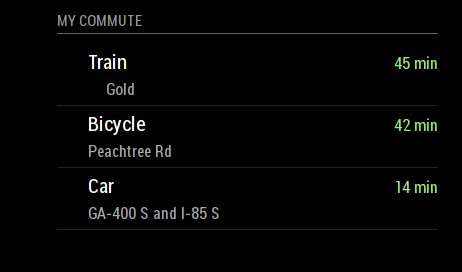
Has anyone else had trouble getting the icons to display? I’m not sure if the SVG file I’m using has been corrupted, but I also seem to get an error message whenever I try opening that file separately, even after pulling the latest from the git. Below is how it renders for me.
Great module btw!
-
I Just recently installed and configured MMM-MyCalendar and MMM-MyCommute with few issues and love the modules. I noticed in the config for the calendar (and also in the console logs) that the calendar is broadcasting an array with data such as location, geo, etc.
I was hoping someone with a little more JS experience (I have PS and VB scripting experience but this is my first dive into development) might help me out a little. I have been trying to use the receiveNotification: Function to pull the location and title values from the calendar and use them to update the destination and label fields from MyCommute respectively. Essentially I want the driving duration displayed in MyCommute to give me driving times to my next calendar appointment. I have been searching and throwing code at this module for 3 days now and am ready to start smashing things.
Help me MagicMirror forums…you’re my only hope.
-
@ATibbs This is not my work (I’m not that smart) but I did find a fork of this module that adds what I think you’re looking for – it’s behind the master still, but it works pretty well by and large. Check out the
calendar-integrationbranch of this repository (courtesy of olexs on github).You may need some additional configuration settings to make it work. I don’t currently have access to mine, but iirc I guessed at the changes based on this changelog from the pull request on the master repo.
In a few days I’ll be back home, feel free to shoot me a message if you can’t get it up and running an I’ll send you my config once I can get to it.
-
@pyrosmiley Oh man, thank you so much for this. I was on the right track too but this would have taken me a month to figure out. Now I just need to sit here at work for the next 8 hours waiting to try this out. Thanks again for this, Ill update here if I get it working.
-
@pyrosmiley So I copy/Pasta’d the .js file from the calendar-integration branch and it worked like a charm without any configuration other than changing the showcalendarevents value from false. Thanks again, this is huge for me.
-
@ATibbs I’m the author of the calendar-integration fork. It’s quite old but works stable enough for myself. OP has a very valid issue with it, in that it uses up a lot of API calls if you have many events refreshing often - so be careful to limit the showcalendarevents to a low value. I have it running with 3 events shown and haven’t had an API limit issue in many months of use.
I’ll take a look at upstream changes and update/rebase the fork to the current master, to keep it up to date and compatible.
-
@olexs Thanks for putting the work in, you did a great job. I too have showcalendarevents set to 3 and everything seems to be running fine. Thanks again.




Hello! It looks like you're interested in this conversation, but you don't have an account yet.
Getting fed up of having to scroll through the same posts each visit? When you register for an account, you'll always come back to exactly where you were before, and choose to be notified of new replies (either via email, or push notification). You'll also be able to save bookmarks and upvote posts to show your appreciation to other community members.
With your input, this post could be even better 💗
Register Login