MagicMirror Forum
    • Recent
    • Tags
    • Unsolved
    • Solved
    • MagicMirror² Repository
    • Documentation
    • 3rd-Party-Modules
    • Donate
    • Discord
    • Register
    • Login
    A New Chapter for MagicMirror: The Community Takes the Lead
    Read the statement by Michael Teeuw here.

    [MMM-RTSPStream] - Video Streaming from Live Feeds & Security Cameras

    Scheduled Pinned Locked Moved Utilities
    602 Posts 67 Posters 2.1m Views 68 Watching
    Loading More Posts
    • Oldest to Newest
    • Newest to Oldest
    • Most Votes
    Reply
    • Reply as topic
    Log in to reply
    This topic has been deleted. Only users with topic management privileges can see it.
    • BKeyportB Offline
      BKeyport Module Developer @shbatm
      last edited by

      @shbatm Thanks for updating us on what’s going on.

      The "E" in "Javascript" stands for "Easy"

      1 Reply Last reply Reply Quote 0
      • K Offline
        KumarTRD @BKeyport
        last edited by

        @BKeyport what module would you suggest using? I have a Lorex NVR system and this is the last module that i NEED/WANT to complete my build.

        BKeyportB 1 Reply Last reply Reply Quote 0
        • K Offline
          KumarTRD @sdetweil
          last edited by

          @sdetweil Have you had any success with this module?

          S 1 Reply Last reply Reply Quote 0
          • S Offline
            sdetweil @KumarTRD
            last edited by

            @KumarTRD I don’t have a need, so haven’t really tried. a year or so ago

            Sam

            How to add modules

            learning how to use browser developers window for css changes

            1 Reply Last reply Reply Quote 0
            • BKeyportB Offline
              BKeyport Module Developer @KumarTRD
              last edited by

              @KumarTRD Honestly, I run OMXPlayer direct, and have a custom built module to cut out the space for it.

              The "E" in "Javascript" stands for "Easy"

              K 1 Reply Last reply Reply Quote 0
              • K Offline
                KumarTRD @BKeyport
                last edited by

                @BKeyport ahhh gotcha… i kinda got the module working last night but cant get t the configuration of it
                that is the wall ive been running into.

                1 Reply Last reply Reply Quote 0
                • Cr4z33C Offline
                  Cr4z33 @BKeyport
                  last edited by

                  @BKeyport said in [MMM-RTSPStream] - Video Streaming from Live Feeds & Security Cameras:

                  @Cr4z33 Good answer. 🤣🤣

                  Then, again, I’m not sure how MMM-FreeboxTV is supposed to help with RTSP streaming - wanna comment, @Bugsounet ?

                  It is VERY similar to MMM-RTSPStream therefore you add the IP and options in a similar way. :)

                  I’ve got some hacked Xiaomi IP cams around the house and so far so good with MMM-FreeboxTV.

                  G 1 Reply Last reply Reply Quote 0
                  • G Offline
                    goprojojo @Cr4z33
                    last edited by

                    @Cr4z33 That sounds great. Could you share a screenshot how these camera’s looks like on the monitor/mirror?

                    Cr4z33C 1 Reply Last reply Reply Quote 0
                    • Cr4z33C Offline
                      Cr4z33 @goprojojo
                      last edited by

                      @goprojojo I am away from home, but it is nothing different from how it looks in MMM-RTSPStream. ;)

                      1 Reply Last reply Reply Quote 0
                      • H Offline
                        Hram2008 @evroom
                        last edited by

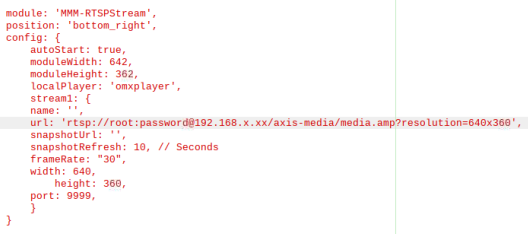
                        @evroom
                        Please see below.

                        3d1a42df-2236-45e1-bc15-e578697da057-image.png

                        Any thoughts would be appreciated.

                        evroomE BKeyportB 2 Replies Last reply Reply Quote 0
                        • evroomE Online
                          evroom @Hram2008
                          last edited by

                          @Hram2008 said in [MMM-RTSPStream] - Video Streaming from Live Feeds & Security Cameras:

                          Any thoughts would be appreciated.

                          I am not able to respond to your settings right now, please remind me when I do not answer in a few days.

                          MagicMirror version: 2.33.0
                          Raspberry Pi 4 Model B Rev 1.5 (8 GB RAM)
                          Raspbian GNU/Linux 12 (bookworm)

                          Test environment:
                          MagicMirror version: v2.33.0
                          Raspberry Pi 3 Model B Plus Rev 1.3 (1 GB RAM)
                          Raspbian GNU/Linux 12 (bookworm)

                          1 Reply Last reply Reply Quote 0
                          • BKeyportB Offline
                            BKeyport Module Developer @Hram2008
                            last edited by

                            @Hram2008 Honestly, if it’s gonna work, you’ve got a good config. I don’t think “port” is valid (you’d put it on the URI)

                            Other than that…

                            Did you check the URI through https://www.ispyconnect.com/sources.aspx ?

                            iSpy is a great resource to get accurate URIs.

                            The "E" in "Javascript" stands for "Easy"

                            H 1 Reply Last reply Reply Quote 0
                            • S Offline
                              sdetweil
                              last edited by

                              I’ve got a good one, just playing with RTPStream module… my MM is on a second monitor, and the box is shown on the MM screen, but the ffmpeg video is displayed in the same position on the 1st screen… oops…

                              Sam

                              How to add modules

                              learning how to use browser developers window for css changes

                              BKeyportB 1 Reply Last reply Reply Quote 0
                              • BKeyportB Offline
                                BKeyport Module Developer @sdetweil
                                last edited by

                                @sdetweil whoops!

                                The "E" in "Javascript" stands for "Easy"

                                1 Reply Last reply Reply Quote 0
                                • R Offline
                                  raf
                                  last edited by raf

                                  on my other two rpi I use the rpisurv program which has been doing great for a number of years
                                  you can find it in ipcamtalk forum

                                  1 Reply Last reply Reply Quote 0
                                  • H Offline
                                    Hram2008 @BKeyport
                                    last edited by

                                    @BKeyport
                                    I used Ispy to generate the URL… when tested in the VLC player it works. Just wont show on the MM screen. I only get Loading RTSP Stream displayed or a black box.

                                    R 1 Reply Last reply Reply Quote 0
                                    • evroomE Online
                                      evroom
                                      last edited by

                                      @Hram2008 said in [MMM-RTSPStream] - Video Streaming from Live Feeds & Security Cameras:

                                      Please see below.

                                      Hi,

                                      I would first disable the module (disabled: true,) and restart MM.
                                      Check if there are no omx_streams running (pm2 status).
                                      Stop them when present (pm2 stop omx_stream1 / pm2 delete omx_stream1).

                                      Then verify if omxplayer works standalone (use your own user & password & IP address).
                                      If it does not work standalone, then there is no need to continue trying the module.

                                      $ omxplayer --avdict rtsp_transport:tcp --win 85,65,725,425 --live --video_queue 4 --fps 30 --no-osd rtsp://user:password@192.168.178.55/axis-media/media.amp?resolution=640x360
                                      

                                      If that works you can try this verified config (use your own user & password & IP address):

                                      $ vi ~/MagicMirror/config/config.js
                                      
                                        {
                                          module: "MMM-RTSPStream",
                                          //disabled: false,
                                          disabled: true,
                                          position: "middle_center",
                                          header: "Axis Security Monitor",
                                          config: {
                                            autoStart: true,
                                            rotateStreams: false,
                                            moduleWidth: 640,
                                            moduleHeight: 360,
                                            localPlayer: 'omxplayer',
                                            remotePlayer: 'none',
                                            showSnapWhenPaused: false,
                                            remoteSnaps: false,
                                            stream1: {
                                              name: 'Axis_P1448_LE',
                                              url: 'rtsp://user:password@192.168.178.55/axis-media/media.amp?resolution=640x360',
                                              frameRate: "30",
                                              protocol: "tcp",
                                              width: 640,
                                              height: 360,
                                              omxRestart: 1,
                                              hwAccel: true,
                                            }
                                          }
                                        },
                                      

                                      This works for Axis P1448-LE, M2026-LE Mk II and M1125-E.

                                      Good luck.

                                      MagicMirror version: 2.33.0
                                      Raspberry Pi 4 Model B Rev 1.5 (8 GB RAM)
                                      Raspbian GNU/Linux 12 (bookworm)

                                      Test environment:
                                      MagicMirror version: v2.33.0
                                      Raspberry Pi 3 Model B Plus Rev 1.3 (1 GB RAM)
                                      Raspbian GNU/Linux 12 (bookworm)

                                      H W 2 Replies Last reply Reply Quote 0
                                      • H Offline
                                        Hram2008 @evroom
                                        last edited by

                                        @evroom
                                        Thank you for the details, I am happy to report that the shared config also works for the Axis
                                        Q3615. Thank you assist.

                                        1 Reply Last reply Reply Quote 0
                                        • W Offline
                                          warrendt @evroom
                                          last edited by

                                          @evroom thanks for this, I am trying to get my vivotek cameras working,

                                          omxplayer --avdict rtsp_transport:tcp --win 85,65,725,425 --live --video_queue 4 --fps 30 --no-osd rtsp://user:password@192.168.1.###/live1s3.sdp

                                          This works great, and I see the feed perfect in the OMX player,

                                          However, my config in the plugin doesn’t. I just get a black box. Any ideas would be appreciated.

                                          		module: "MMM-RTSPStream",
                                          			//disabled: false,
                                          			//disabled: true,
                                          			position: "top_right",
                                          			header: "Cameras",
                                          			config: {
                                          				autoStart: true,
                                          				rotateStreams: false,
                                          				moduleWidth: 640,
                                          				moduleHeight: 480,
                                          				localPlayer: 'omxplayer',
                                          				remotePlayer: 'none',
                                          				showSnapWhenPaused: false,
                                          				remoteSnaps: false,
                                          				stream1: {
                                          					name: 'Driveway',
                                          					url: 'rtsp://user:password@192.168.1.###/live1s3.sdp',
                                          					frameRate: "30",
                                          					protocol: "tcp",
                                          					width: 640,
                                          					height: 480,
                                          					omxRestart: 1,
                                          					hwAccel: true,
                                          					}
                                              		}
                                          		},
                                          
                                          evroomE 1 Reply Last reply Reply Quote 0
                                          • evroomE Online
                                            evroom @warrendt
                                            last edited by

                                            @warrendt

                                            Can you check following ?

                                            Process omx_stream1 present:

                                            $ pm2 status
                                            
                                            $ ps -eaf | grep -v grep | grep omxplayer
                                            

                                            Entries in pm2 log:

                                            $ pm2 logs --lines 100
                                            

                                            Might need to flush the logs and restart MM in order to show new RTSPStream log entries:

                                            $ pm2 flush
                                            $ pm2 restart MagicMirror
                                            
                                            $ pm2 logs --lines 100
                                            

                                            omxplayer version:

                                            $ omxplayer -version
                                            

                                            MMM-RTSPStream git status

                                            $ cd ~/MagicMirror/modules/MMM-RTSPStream
                                            $ git status
                                            

                                            I am on the develop branch, you might need o switch to that too.

                                            $ cd ~/MagicMirror/modules/MMM-RTSPStream
                                            $ git checkout develop
                                            $ npm install
                                            

                                            MagicMirror version: 2.33.0
                                            Raspberry Pi 4 Model B Rev 1.5 (8 GB RAM)
                                            Raspbian GNU/Linux 12 (bookworm)

                                            Test environment:
                                            MagicMirror version: v2.33.0
                                            Raspberry Pi 3 Model B Plus Rev 1.3 (1 GB RAM)
                                            Raspbian GNU/Linux 12 (bookworm)

                                            1 Reply Last reply Reply Quote 0

                                            Hello! It looks like you're interested in this conversation, but you don't have an account yet.

                                            Getting fed up of having to scroll through the same posts each visit? When you register for an account, you'll always come back to exactly where you were before, and choose to be notified of new replies (either via email, or push notification). You'll also be able to save bookmarks and upvote posts to show your appreciation to other community members.

                                            With your input, this post could be even better 💗

                                            Register Login

                                            • 1
                                            • 2
                                            • 27
                                            • 28
                                            • 29
                                            • 30
                                            • 31
                                            • 29 / 31
                                            • First post
                                              Last post
                                            Enjoying MagicMirror? Please consider a donation!
                                            MagicMirror created by Michael Teeuw.
                                            Forum managed by Sam, technical setup by Karsten.
                                            This forum is using NodeBB as its core | Contributors
                                            Contact | Privacy Policy