Read the statement by Michael Teeuw here.
DHT22 Sensor
-
Hi Experts :-)
i’ve connected a temperature and humidity sensor DHT22 and would like to show these values.
Is it possible to build some new module for this?Maybe it’s not necessary, i can readout the values via phyton script, but don’t know to integrate them…
Greetings from Germany,
stefanh -
Yes, I also have this requirement.
-
https://github.com/momenso/node-dht-sensor?files=1
Think it might be possible. Think it can Be useable.
First hit in Google btw.
Spit through code And learn? Or wait utill someone will have some sparetime.
-
Thank your for great googeling :-)
I will try to integrate it myself. -
Where will I need to install node-dht-sensor using it with MagicMirror?
a:
~/MagicMirror/folder
b:~/MagicMirror/modules/folder
c:~/MagicMirror/modules/MMM-Temperature/folderusing this command:
npm install node-dht-sensorI would like to use it in node_helper.js inside a new module.
Thanks!
-
@Bangee go into the directory of your new module e.g.
~/MagicMirror/modules/MMM-Temperature/and typenpm initand follow the instructions, after that typenpm install --save node-dht-sensor -
@strawberry-3-141 thank you! that worked for me.
But now i’ve got this error:mm-0 App threw an error during load mm-0 Error: Module version mismatch. Expected 49, got 48. mm-0 at Error (native) mm-0 at process.module.(anonymous function) [as dlopen] (ELECTRON_ASAR.js:167:20) mm-0 at Object.Module._extensions..node (module.js:568:18) mm-0 at Object.module.(anonymous function) [as .node] (ELECTRON_ASAR.js:167:20) mm-0 at Module.load (module.js:458:32) mm-0 at tryModuleLoad (module.js:417:12) mm-0 at Function.Module._load (module.js:409:3) mm-0 at Module.require (module.js:468:17) mm-0 at require (internal/module.js:20:19) mm-0 at Object.<anonymous> (/home/pi/MagicMirror/modules/temperature/node_helper.js:2:17) mm-0 Whoops! There was an uncaught exception... mm-0 Error: Module version mismatch. Expected 49, got 48. mm-0 at Error (native) mm-0 at process.module.(anonymous function) [as dlopen] (ELECTRON_ASAR.js:167:20) mm-0 at Object.Module._extensions..node (module.js:568:18) mm-0 at Object.module.(anonymous function) [as .node] (ELECTRON_ASAR.js:167:20) mm-0 at Module.load (module.js:458:32) mm-0 at tryModuleLoad (module.js:417:12) mm-0 at Function.Module._load (module.js:409:3) mm-0 at Module.require (module.js:468:17) mm-0 at require (internal/module.js:20:19) mm-0 at Object.<anonymous> (/home/pi/MagicMirror/modules/temperature/node_helper.js:2:17) mm-0 MagicMirror will not quit, but it might be a good idea to check why this happened. Maybe no internet connection? mm-0 If you think this really is an issue, please open an issue on GitHub: https://github.com/MichMich/MagicMirror/issues mm-0 Launching application.On line 2:
var sensorLib = require("node-dht-sensor");Node Version
pi@raspberrypi:~/MagicMirror/modules $ node -v v6.3.1 -
@Bangee depending on your other post about this problem in a different thread I assume you have a newer node version installed as you had on your old sd card, so maybe this will help you https://docs.npmjs.com/cli/rebuild
-
@strawberry-3-141 I’ve tried this before, but did not work for me. I’ve also made a reboot.
Will i need to have a downgrade?
-
@Bangee never had such an issue before, did a clean install instead of copying images on sdcard, is there a reason why you copied an old image?
-
ah no, I’ve made a new installation on a brand new sd card.
I moved my own moduls. the temperature module is a new one.But I’ve got the same with @paviro PIR moudle… :-(
-
did you copy all the node_modules directories? if so this is propably the issue go to the module remove the directories and run npm install
-
No, I’ve installed the node_modules with npm install.
-
then I have no clue sry
-
I could fix this with the same workaround as the PIR Sensor.
now its runnig but electron start up everything and crashes after loading all data.
Any idea howto debug this? ther is nothing in my error logs…
/var/log/messages:
pi@raspberrypi:~/MagicMirror/modules/temperature $ tail -f /var/log/messages
Sep 14 13:16:05 raspberrypi kernel: [706942.834881] gpiomem-bcm2835 3f200000.gpiomem: gpiomem device opened.
Sep 14 13:16:32 raspberrypi kernel: [706969.575020] gpiomem-bcm2835 3f200000.gpiomem: gpiomem device opened.
Sep 14 13:17:00 raspberrypi kernel: [706997.192894] gpiomem-bcm2835 3f200000.gpiomem: gpiomem device opened.
thats all… :-(
node_helper.js:
'use strict';

/* Magic Mirror
 * Module: temperatur.js
 *
 * By Benjamin Angst
 * MIT Licensed.
 */

const NodeHelper = require('node_helper');
const sensorLib = require('node-dht-sensor');

module.exports = NodeHelper.create({
		 start: function () {
			 console.log('Temperatur helper started ...');
		 },

		 // Subclass socketNotificationReceived received.
		 socketNotificationReceived: function(notification, payload) {
		   const self = this;
		   if (notification === 'REQUEST') {
			 var sensor = {
			     initialize: function () {
			         return sensorLib.initialize(22, 27);
			     },
			     read: function () {
			         var readout = sensorLib.read();
			         console.log('Temperature: ' + readout.temperature.toFixed(2) + 'C, ' +
			             'humidity: ' + readout.humidity.toFixed(2) + '%');
			         setTimeout(function () {
			             sensor.read();
			         }, 2000);
			         // Send Temperatur
			         self.sendSocketNotification('DATA',{
							temp: readout.temperature.toFixed(2),
							humidity: readout.humidity.toFixed(2)
					 });
			     }
			 };

			 if (sensor.initialize()) {
			     sensor.read();
			 } else {
			     console.warn('Failed to initialize sensor');
			 }
		   }
		 }

});
temperature.js
/* Magic Mirror * Module: temperatur.js * * By Benjamin Angst * MIT Licensed. */ Module.register("temperature",{ // Default module config. defaults: { gpioPIN: 27, sensorType: 22, // Can be 22 or 11 prependString: "Temperatur ", }, // Override dom generator. getDom: function() { var wrapper = document.createElement("div"); wrapper.innerHTML = "T: " + this.temperature + " °C / H: " + this.humidity + " %"; return wrapper; }, start: function() { this.temperature = 'fetching...'; this.sendSocketNotification('REQUEST'); }, socketNotificationReceived: function(notification, payload) { if (notification === 'DATA') { this.temperature = payload.temp; this.humidity = payload.humidity; this.updateDom(); } }, }); -
Hi, i’m a totally beginner and the temperature/ humidity sensor is one of my first modules i want to install by myself. Here is the github link:
https://github.com/bernardpletikosa/MMM-DHT-Sensor
This were the first things i did:
pi@raspberrypi:~ $ cd ~/MagicMirror/modules
pi@raspberrypi:~/MagicMirror/modules $ git clone https://github.com/bernardpletikosa/MMM-DHT-Sensor.git
Klone nach 'MMM-DHT-Sensor'...
remote: Counting objects: 18, done.
remote: Total 18 (delta 0), reused 0 (delta 0), pack-reused 18
Entpacke Objekte: 100% (18/18), Fertig.
Prüfe Konnektivität... Fertig.
pi@raspberrypi:~/MagicMirror/modules $ cd MMM-DHT-Sensor
pi@raspberrypi:~/MagicMirror/modules/MMM-DHT-Sensor $ npm install
But then there came these lines:
npm WARN prefer global node-gyp@3.6.0 should be installed with -g

> rpi-dht-sensor@0.1.1 install /home/pi/MagicMirror/modules/MMM-DHT-Sensor/node_modules/rpi-dht-sensor
> node-gyp rebuild

make: Entering directory '/home/pi/MagicMirror/modules/MMM-DHT-Sensor/node_modules/rpi-dht-sensor/build'
  CC(target) Release/obj.target/node_dht_sensor/src/bcm2835.o
  CXX(target) Release/obj.target/node_dht_sensor/src/node-dht-sensor.o
  SOLINK_MODULE(target) Release/obj.target/node_dht_sensor.node
  COPY Release/node_dht_sensor.node
make: Leaving directory '/home/pi/MagicMirror/modules/MMM-DHT-Sensor/node_modules/rpi-dht-sensor/build'

> Magic-Mirror-Module-DHT-Sensor@1.0.0 postinstall /home/pi/MagicMirror/modules/MMM-DHT-Sensor
> electron-rebuild -e ../../node_modules/electron-prebuilt

An unhandled error occurred inside electron-rebuild
Unable to find electron-prebuilt's version number, either install it or specify an explicit version

Error: Unable to find electron-prebuilt's version number, either install it or specify an explicit version
    at _callee$ (/home/pi/MagicMirror/modules/MMM-DHT-Sensor/node_modules/electron-rebuild/lib/cli.js:74:17)
    at tryCatch (/home/pi/MagicMirror/modules/MMM-DHT-Sensor/node_modules/babel-runtime/node_modules/regenerator-runtime/runtime.js:63:40)
    at GeneratorFunctionPrototype.invoke [as _invoke] (/home/pi/MagicMirror/modules/MMM-DHT-Sensor/node_modules/babel-runtime/node_modules/regenerator-runtime/runtime.js:337:22)
    at GeneratorFunctionPrototype.prototype.(anonymous function) [as next] (/home/pi/MagicMirror/modules/MMM-DHT-Sensor/node_modules/babel-runtime/node_modules/regenerator-runtime/runtime.js:96:21)
    at GeneratorFunctionPrototype.tryCatcher (/home/pi/MagicMirror/modules/MMM-DHT-Sensor/node_modules/bluebird/js/release/util.js:16:23)
    at PromiseSpawn._promiseFulfilled (/home/pi/MagicMirror/modules/MMM-DHT-Sensor/node_modules/bluebird/js/release/generators.js:97:49)
    at /home/pi/MagicMirror/modules/MMM-DHT-Sensor/node_modules/bluebird/js/release/generators.js:201:15
    at Object. (/home/pi/MagicMirror/modules/MMM-DHT-Sensor/node_modules/electron-rebuild/lib/cli.js:197:4)
    at Module._compile (module.js:570:32)
    at Object.Module._extensions..js (module.js:579:10)
    at Module.load (module.js:487:32)
    at tryModuleLoad (module.js:446:12)
    at Function.Module._load (module.js:438:3)
    at Module.runMain (module.js:604:10)
    at run (bootstrap_node.js:394:7)
    at startup (bootstrap_node.js:149:9)

npm WARN Magic-Mirror-Module-DHT-Sensor@1.0.0 No repository field.
npm WARN Magic-Mirror-Module-DHT-Sensor@1.0.0 No license field.
npm ERR! Linux 4.4.34-v7+
npm ERR! argv "/usr/bin/nodejs" "/usr/bin/npm" "install"
npm ERR! node v6.10.0
npm ERR! npm  v3.10.10
npm ERR! code ELIFECYCLE
npm ERR! Magic-Mirror-Module-DHT-Sensor@1.0.0 postinstall: `electron-rebuild -e ../../node_modules/electron-prebuilt`
npm ERR! Exit status 255
npm ERR!
npm ERR! Failed at the Magic-Mirror-Module-DHT-Sensor@1.0.0 postinstall script 'electron-rebuild -e ../../node_modules/electron-prebuilt'.
npm ERR! Make sure you have the latest version of node.js and npm installed.
npm ERR! If you do, this is most likely a problem with the Magic-Mirror-Module-DHT-Sensor package,
npm ERR! not with npm itself.
npm ERR! Tell the author that this fails on your system:
npm ERR!     electron-rebuild -e ../../node_modules/electron-prebuilt
npm ERR! You can get information on how to open an issue for this project with:
npm ERR!     npm bugs Magic-Mirror-Module-DHT-Sensor
npm ERR! Or if that isn't available, you can get their info via:
npm ERR!     npm owner ls Magic-Mirror-Module-DHT-Sensor
npm ERR! There is likely additional logging output above.

npm ERR! Please include the following file with any support request:
npm ERR!     /home/pi/MagicMirror/modules/MMM-DHT-Sensor/npm-debug.log
The way i connected the dht11 sensor is shown in the following picture:
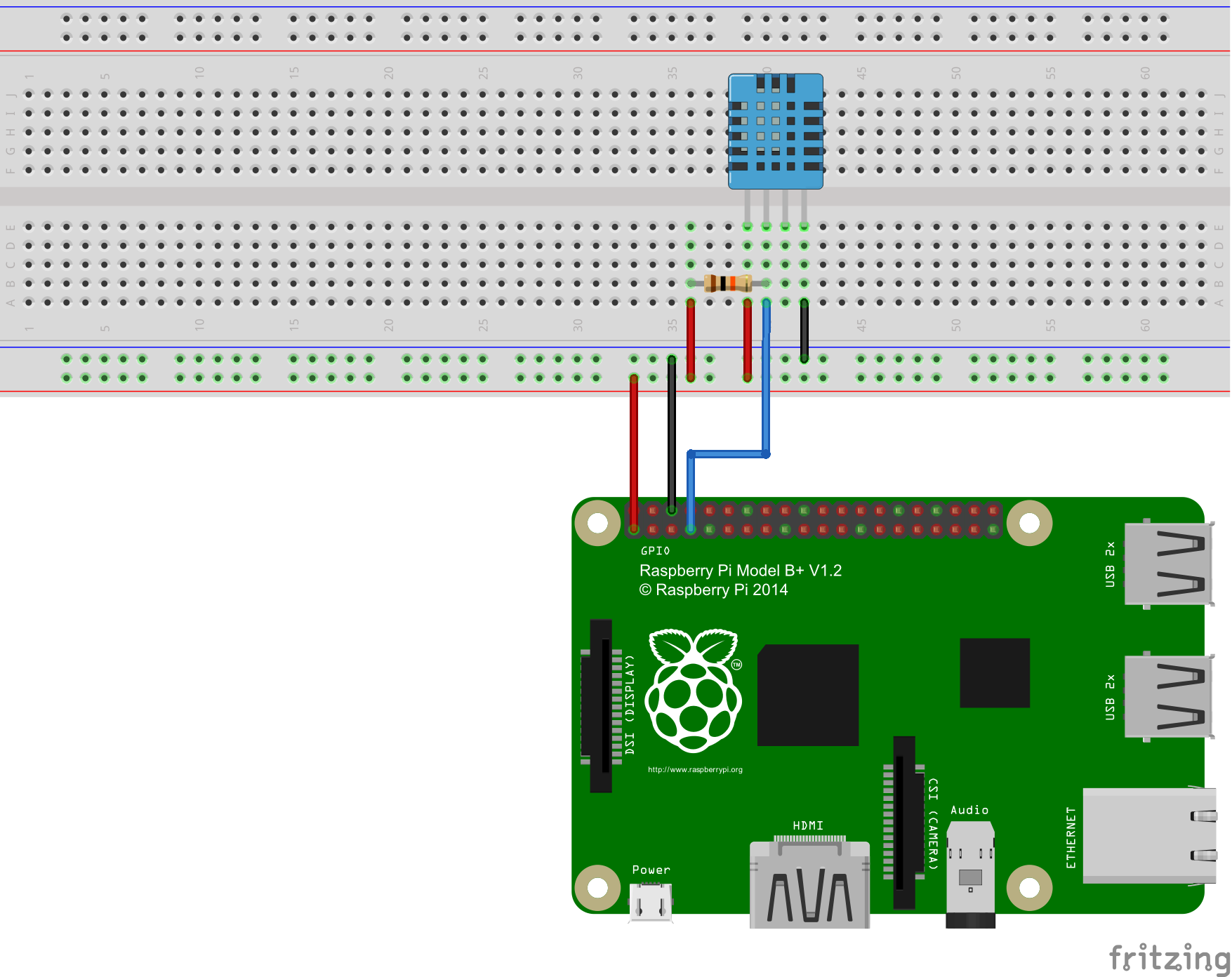
I dont know what i did wrong, can anyone help me please?

Hello! It looks like you're interested in this conversation, but you don't have an account yet.
Getting fed up of having to scroll through the same posts each visit? When you register for an account, you'll always come back to exactly where you were before, and choose to be notified of new replies (either via email, or push notification). You'll also be able to save bookmarks and upvote posts to show your appreciation to other community members.
With your input, this post could be even better 💗
Register Login