Read the statement by Michael Teeuw here.
New and confused.
-
@caseyrcoughlin said in New and confused.:
@Mykle1 said in New and confused.:
@caseyrcoughlin said in New and confused.:
So I’m still doing something wrong, still not sure what. Any help is appreciated.
A few questions:
Can you create a new document with your text editor? If so, then the problem is NOT your text editor.Is your config.js file named EXACTLY, “config.js”? The icon should look like a “gear”. Text files should look like a page of text. If the file “type” is incorrect then that could make the text editor unable to open the file. Check the properties of the file.
Long shot here: Are you sure the file isn’t opening below the visible area of the window? Meaning, make sure you scroll all the way through the entire window as the file may have opened outside of your view.
The file is named config.js exactly with a gear for an icon. It also has a config.js.sample next to it and the icon looks like a page with lines on it so I’m assuming that’s a text file. But as far as the Text Editor, therein may lie the problem. I can’t even find the text editor on my raspberry pi…does it not come with one? It comes up on the “Choose Application” box under “Accessories” but under the Applications Menu under “Accessories” I only have File Manager, Task Manager, and Terminal. Also, another question…when the Magic Mirror is running, how to I get it to stop and get back to the desktop GUI? I’ve just been rebooting it so far.
Hit the ALT key on the keyboard and a menu will pop up at the top… from there you can exit MM.
-
@cowboysdude said in New and confused.:
That makes life so much easier, can’t believe I didn’t think to hit the ALT key before. So I got into the config menu through the terminal but I messed some stuff up and deleted a few of the modules that I want back to mess around with some more. I’d like to uninstall and reinstall Magic Mirror. How do I uninstall it?
EDIT - Nevermind, figured out how to install it again. At least a workaround anyway. I renamed the old Magic Mirror and I’m reinstalling it again. I’d imagine I’ll have about 25 failed versions of Magic Mirror under various names before I get it to how I want it lol. Is there anyway to delete these files off of the RPi?
-
You can delete the old folders by simply dragging them to the trash, as you would any other file or folder.
It’s odd that you don’t have a text editor. What OS are you installing? Rasbian Jessie certainly has a text editor. Are you using a Pi 3? You could always install a 3rd party text editor if you wanted to. You have options.
I’m curious. Open a terminal and type
leafpadand Enter. This would launch the default text editor in Jessie, if that’s what you’re running.How did you manage to edit your config.js file in the first place to get your MagicMirror running? Or, you haven’t gotten that far?
-
@caseyrcoughlin said in New and confused.:
@cowboysdude said in New and confused.:
That makes life so much easier, can’t believe I didn’t think to hit the ALT key before. So I got into the config menu through the terminal but I messed some stuff up and deleted a few of the modules that I want back to mess around with some more. I’d like to uninstall and reinstall Magic Mirror. How do I uninstall it?
EDIT - Nevermind, figured out how to install it again. At least a workaround anyway. I renamed the old Magic Mirror and I’m reinstalling it again. I’d imagine I’ll have about 25 failed versions of Magic Mirror under various names before I get it to how I want it lol. Is there anyway to delete these files off of the RPi?
DO NOT feel bad…we’ve all been there :) You’re trying and that’s what this project is all about. Feel free to ask questions… it’s how we learn ;)
-
Well me and my ten thumbs were playing around and i entered the config.js file to alter parts of the weather module ( i managed to get an API key and my location I.D. as the weather in New York doesn’t really interest me at the mo :-))) ) and entered them in to the code, between the speech marks, saved it and then ran MM but the weather module wasn’t present, everything else was …any ideas??? Next will be altering the holidays/calendar etc (i’m trying to work out how to use my google calendar with all of my saved dates etc, so expect more questions) :0. Thanks.
Mick -
@mickyas said in New and confused.:
Well me and my ten thumbs were playing around and i entered the config.js file to alter parts of the weather module ( i managed to get an API key and my location I.D. as the weather in New York doesn’t really interest me at the mo :-))) ) and entered them in to the code, between the speech marks, saved it and then ran MM but the weather module wasn’t present, everything else was …any ideas??? Next will be altering the holidays/calendar etc (i’m trying to work out how to use my google calendar with all of my saved dates etc, so expect more questions) :0. Thanks.
MickMy advice is always the same… if you have a working config.js then copy it to config.bak then you know no matter what you’ll never be down :)
THEN:
It’s easier if you post your config.js minus the api keys just put xx in place of that… then we can peek at it :)
-
@mickyas said in New and confused.:
entered them in to the code, between the speech marks, saved it and then ran MM but the weather module wasn’t present, everything else was …any ideas???
You likely made a small mistake somewhere. As @cowboysdude said, it would be easier for us to help you if would copy and paste that portion of your config.js file (minus the API key)
Next will be altering the holidays/calendar etc (i’m trying to work out how to use my google calendar with all of my saved dates etc, so expect more questions) :0.
Go to your google calendar. On the LEFT side of the page you’ll see My Calendars, Other Calendars. Hover (don’t click) your mouse over the individual calendar that you want. A down arrow
vappears to the RIGHT of the calendar. Click the down arrowvand choose Calendar settings. Click the green ICAL button. This will give you the url you need to enter into the calendar module -
@cowboysdude Sorry but you assume i know what you’re on about :-)))) what’s config.bak??? I have NO knowledge whatsoever of any kind of coding etc, my computer abilities stretch as far as writing a n e-mail and doing the odd letter. :-))).
Mick -
@Mykle1 Damn…you’re a genius :-))))))))))))))))))))))))))
-
@mickyas said in New and confused.:
what’s config.bak???
What @cowboysdude means is this:
When you have a working config.js file and BEFORE you’re going to edit it (ex adding another module) you should make a backup of that config.js file. Then you do your edit. If something goes awry, you have your backup file that you KNOW is working.Simply: Go to your working config.js file. Right click on it. Choose Copy. Right click somewhere else in that same window. Choose Paste. Rename the copy to config.bak as @cowboysdude instructed. Click Rename.
So now you’ve have a file named config.bak. If something goes wrong with your working config.js file, you can delete it and rename your backup to config.js. So, make a backup every time you successfully make additions to your config.js so you don’t have to start from square one.
I hope you’re writing this down. ;-)
-
@mickyas said in New and confused.:
Damn…
Oh, hey Mick,
When you want help with your config.js file you really should copy and paste it here so that we can look at it as @cowboysdude and I have both advised. Surely you know how to copy and paste! :-)
-
@Mykle1 said in New and confused.:
@mickyas said in New and confused.:
Damn…
Oh, hey Mick,
Surely you know how to copy and paste! :-)
I do, but since i haven’t worked out how to tether my laptop o my PI…it’s a slow laborious process :-))))))))))))))
Well, got my calendar and newsfeed changed and both up and running, just working on my weathermap. I’ll try and sort out copying it here :-))) thanks for the step by step, it worked perfectly first time :-)))
Mick -
ok here goes…this is what i have for the weathermap…
,
module: “currentweather”,
position: “top_right”,
config: {
location: “”,
locationID: “8224783”, //ID from http://www.openweathermap.org/help/city_list.txt
appid: “my api i.d. here”
}
},
{
In the location i had written “stanley” but it made no difference. the above is the same for module “weatherforecast”
mick -
Assuming your location ID is correct, and that your API key is valid and that you enter your API key precisely, inside the quotes, this will work for you. The location doesn’t matter as it is overridden by the locationID. Refer to the guide on adding a module. You can copy and paste what I’ve entered below.
{ module: "currentweather", position: "top_right", config: { location: "", locationID: "8224783", //ID from http://www.openweathermap.org/help/city_list.txt appid: "my api i.d. here" } }, -
@Mykle1 MINT…worked a treat, :-)))))))))))))) I don’t know what i had different, as i never changed anything else in the module other than the location i.d. and the api key!!! anyhoo, all up and running…next stop changing the ‘compliments’ :-)))) I owe you a pint :-)) (although i do have some home grown cider on the go ;-))
Mick -
@mickyas said in New and confused.:
I owe you a pint :-))
My favorite pint and my favorite pub to drink it in. Unfortunately, it’s 3,459 miles away from where I live, on the other side of the pond.


-
@Mykle1 Just a couple of questions…
- I noticed a previous post from you about the colour weather module you installed, is it available to clone???
- Can i have multiple modules running at once, or do i have to switch between them…i.e the Magic mirror, Alexa, remote control (which i’d really like to try) etc?
Thanks
Mick
This is crazy…the more i search, the more confused i become and the more i get distracted by the umpteen modules i’d like to have :-)))…first off is using my laptop to access the pi3 (its annoying trying to pull up pages etc on the pi).
P.S. just done it using VNC all working so far :-))) -
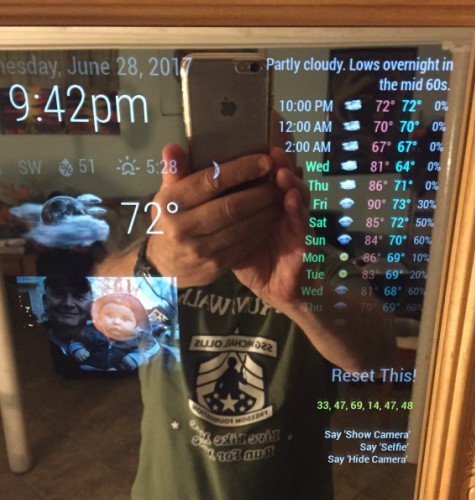
@mickyas said in New and confused.:
I noticed a previous post from you about the colour weather module you installed, is it available to clone???
I’m pretty sure you mean WunderGround. That’s what I use. Here is the link.
https://github.com/RedNax67/MMM-WunderGround
Also, @j-e-f-f has done some remarkable things with some weather modules. Look around/search for his work.
Can i have multiple modules running at once, or do i have to switch between them…i.e the Magic mirror, Alexa, remote control (which i’d really like to try) etc?
Not sure what you mean here. Yes, you can have many modules running at the same time. Didn’t you start out with a clock, and a calendar, and a newsfeed, all at the same time?
I think everyone goes through that, including me. I wanted to LOAD UP on as many modules as I could fit on the mirror. Ultimately, I chose the ones that I like the most, with a few of my own. You’ll have to decide what you want at some point. It doesn’t hurt to try them all to decide what you want.
Yes, I use VNC also. I haven’t touched the actual mirror in months. I just sit at my dev machine and work on the mirror from there
-
@mickyas said in New and confused.:
I noticed a previous post from you about the colour weather module you installed, is it available to clone
Is this the weather you mean? See the link above
-
This post is deleted!



Hello! It looks like you're interested in this conversation, but you don't have an account yet.
Getting fed up of having to scroll through the same posts each visit? When you register for an account, you'll always come back to exactly where you were before, and choose to be notified of new replies (either via email, or push notification). You'll also be able to save bookmarks and upvote posts to show your appreciation to other community members.
With your input, this post could be even better 💗
Register Login