MagicMirror Forum
    • Recent
    • Tags
    • Unsolved
    • Solved
    • MagicMirror² Repository
    • Documentation
    • 3rd-Party-Modules
    • Donate
    • Discord
    • Register
    • Login
    A New Chapter for MagicMirror: The Community Takes the Lead
    Read the statement by Michael Teeuw here.

    How to add modules. For absolute beginners.

    Scheduled Pinned Locked Moved Troubleshooting
    91 Posts 16 Posters 147.0k Views 24 Watching
    Loading More Posts
    • Oldest to Newest
    • Newest to Oldest
    • Most Votes
    Reply
    • Reply as topic
    Log in to reply
    This topic has been deleted. Only users with topic management privileges can see it.
    • Mykle1M Offline
      Mykle1 Project Sponsor Module Developer @sdetweil
      last edited by

      @sdetweil said in How to add modules. For absolute beginners.:

      i suspect you did not do the required install

      For the record, I did not have to install dependencies.

      Create a working config
      How to add modules

      S 1 Reply Last reply Reply Quote 0
      • S Do not disturb
        sdetweil @Mykle1
        last edited by sdetweil

        @Mykle1 because some other module already had. npm install would have resolved that, if he had provided the package. json

        Sam

        How to add modules

        learning how to use browser developers window for css changes

        Mykle1M 1 Reply Last reply Reply Quote 0
        • Mykle1M Offline
          Mykle1 Project Sponsor Module Developer @sdetweil
          last edited by Mykle1

          @sdetweil said in How to add modules. For absolute beginners.:

          npm install would have resolved that, if he had provided the package. json

          :thumbsup:

          Create a working config
          How to add modules

          1 Reply Last reply Reply Quote 0
          • ebolisaE Offline
            ebolisa
            last edited by

            What if no errors are generated and yet the widget is not shown on the screen? Where do we start troubleshooting?

            TIA

            Mykle1M S 2 Replies Last reply Reply Quote 0
            • Mykle1M Offline
              Mykle1 Project Sponsor Module Developer @ebolisa
              last edited by Mykle1

              @ebolisa said in How to add modules. For absolute beginners.:

              What if no errors are generated and yet the widget is not shown on the screen? Where do we start troubleshooting?

              It would help if you named the widget (I assume you mean module) and posted your config entry for that module. Please post in a code block.

              EDIT:

              And everything @sdetweil says. :-)

              Create a working config
              How to add modules

              1 Reply Last reply Reply Quote 0
              • S Do not disturb
                sdetweil @ebolisa
                last edited by

                @ebolisa do you have a position defined? must be else MM doesn’t know where to put the content…

                next, look in the window where npm start was done, or in the logs if pm2, using pm2 logs --lines=??? ??? is a number 15 default…
                also look in the developers window
                ctrl-shift-i, select the tab labeled console, and scroll up… u can also filter by module, add some of the unique part of the module name to the filter field

                Sam

                How to add modules

                learning how to use browser developers window for css changes

                1 Reply Last reply Reply Quote 0
                • F Offline
                  fsne04
                  last edited by fsne04

                  Hi Mykle1. Thank you for doing this. I am trying to build a MagicMirror for my daughter for Christmas and have had a hard time with a few things. Absolute noobie, but have learned a bunch in the past 2 weeks of this journey.
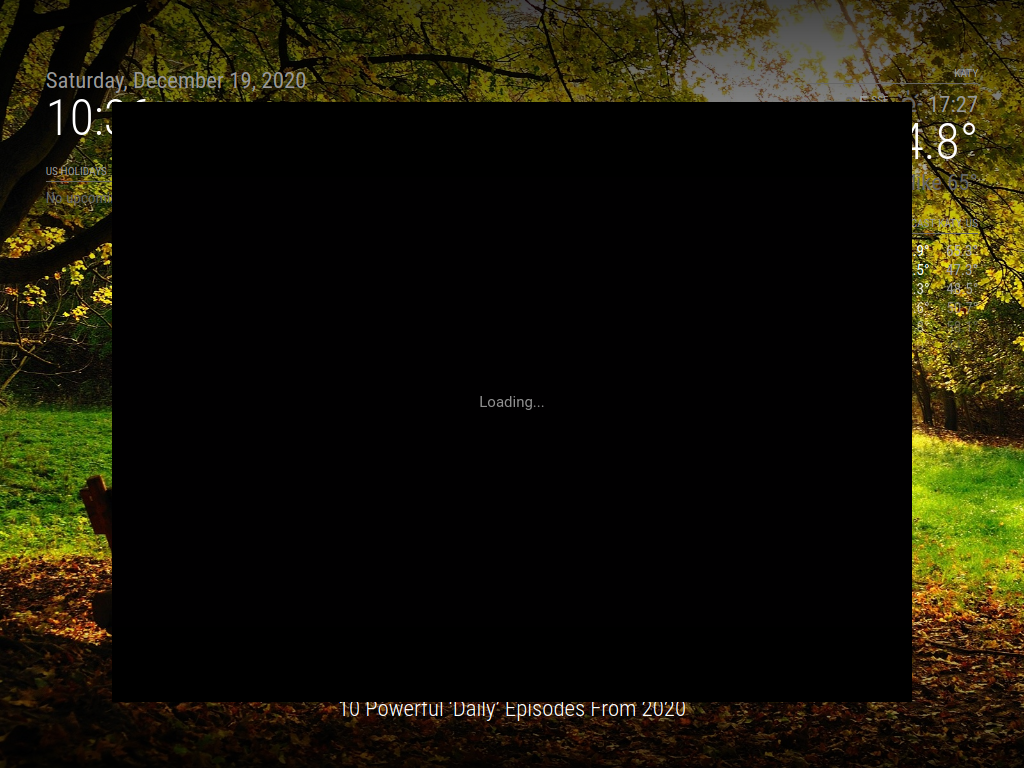
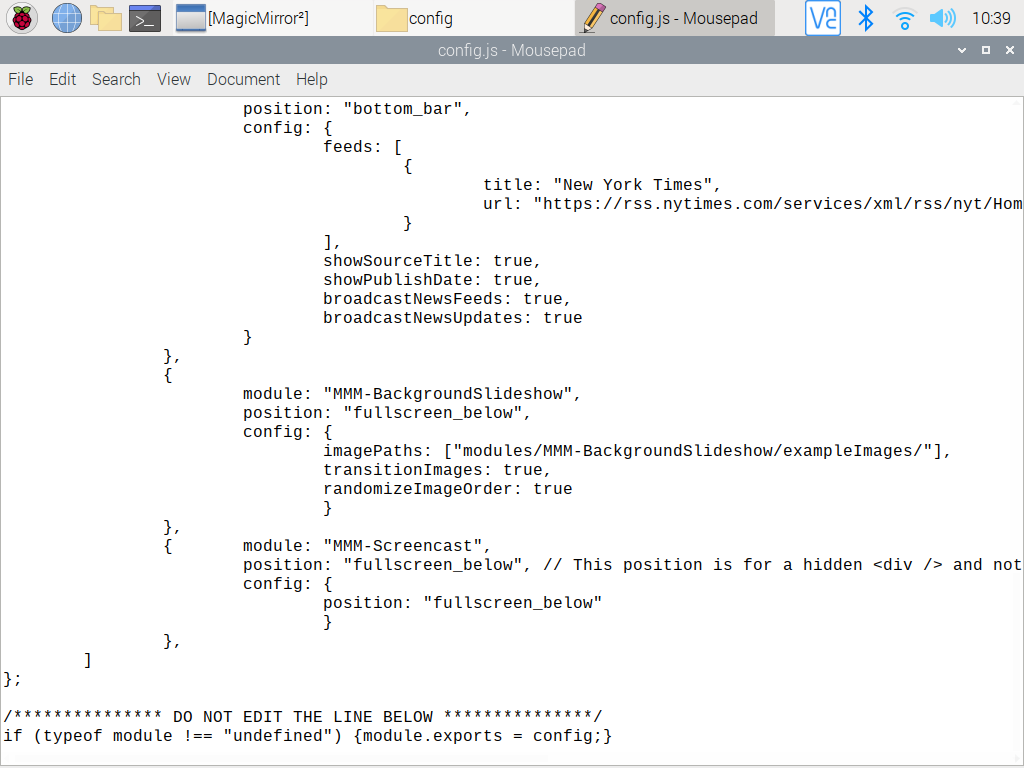
                  First question: I installed the Kevinatown MMM-Screencast module and after some trial and error, I did get the module to start, BUT as I am starting the casting from my phone, the Screencast window opens and then freezes stating “loading…” without ever actually starting the video/cast. I assume the config entry is correct, because the screencast opens, but maybe I am missing a step?
                  Your help would be greatly appreciated! ![1_1608396591977_2020-12-19-103618_1024x768_scrot.png](Uploading 100%) ![0_1608396591974_2020-12-19-103955_1024x768_scrot.png](Uploading 100%)

                  I guess the screenshots did not work. How do I send a screenshot?

                  S 1 Reply Last reply Reply Quote 0
                  • S Do not disturb
                    sdetweil @fsne04
                    last edited by

                    @fsne04 said in How to add modules. For absolute beginners.:

                    I guess the screenshots did not work. How do I send a screenshot?

                    click the button above the editor that looks like the sun over the mountain, with top right corner folded over

                    Sam

                    How to add modules

                    learning how to use browser developers window for css changes

                    1 Reply Last reply Reply Quote 0
                    • F Offline
                      fsne04
                      last edited by

                      2020-12-19-103618_1024x768_scrot.png
                      2020-12-19-103955_1024x768_scrot.png

                      S 1 Reply Last reply Reply Quote 0
                      • S Do not disturb
                        sdetweil @fsne04
                        last edited by sdetweil

                        @fsne04 open the developers window, ctrl-shift-i on the keyboard, select the tab labeled ‘console’ and scroll up…

                        u can also filter messages by module, by placing a unique part of the module name (cast) in the filter field

                        Sam

                        How to add modules

                        learning how to use browser developers window for css changes

                        F 1 Reply Last reply Reply Quote 0
                        • F Offline
                          fsne04 @sdetweil
                          last edited by fsne04

                          @sdetweil Hi Sam,
                          Thank you for the response, but I am not sure what you are asking me to do. Ctl + Shift+i on the Pi4 or on my Mac (where I am writing this)? Also, I don’t know what palancing is, or the last 4 words of your post. Sorry…
                          Actually, just figured out the last 4… in the filter field (duh)… but which filter field?
                          Oh and I tried Ctl Shift i on both Pi and Mac, neither one did something. Again sorry about the ignorance…

                          S 1 Reply Last reply Reply Quote 0
                          • S Do not disturb
                            sdetweil @fsne04
                            last edited by sdetweil

                            @fsne04 pi of course, where MM is, all keys at the same time
                            and the ‘filter’ field is the field labeled ‘filter’ in the debug screen
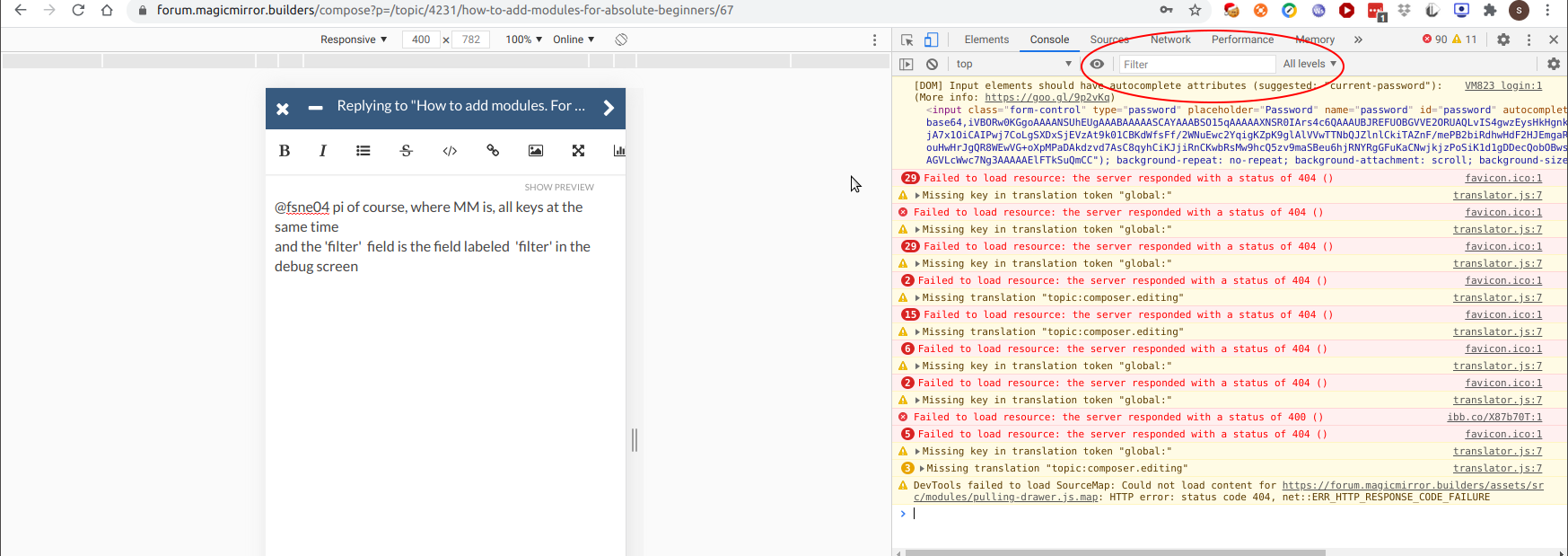
                            Screenshot at 2020-12-19 12-17-59.png

                            Sam

                            How to add modules

                            learning how to use browser developers window for css changes

                            S 1 Reply Last reply Reply Quote 0
                            • S Do not disturb
                              sdetweil @sdetweil
                              last edited by

                              you should open a different topic as this one is about installing modules

                              Sam

                              How to add modules

                              learning how to use browser developers window for css changes

                              F 1 Reply Last reply Reply Quote 0
                              • F Offline
                                fsne04 @sdetweil
                                last edited by fsne04

                                @sdetweil
                                This is my first time in a forum like this and I don’t actually know how to start a new topic…
                                I tried ctl+shft+i on the Raspbian desktop, in the MM config file, in the File Manager and in Chromium, all without any response. I can’t get to the place you have in your screenshot.

                                S 2 Replies Last reply Reply Quote 0
                                • S Do not disturb
                                  sdetweil @fsne04
                                  last edited by

                                  @fsne04 mm screen currently selected on the pi monitor, ctrl-shift-i (lower case I, not L)

                                  Sam

                                  How to add modules

                                  learning how to use browser developers window for css changes

                                  F 1 Reply Last reply Reply Quote 0
                                  • S Do not disturb
                                    sdetweil @fsne04
                                    last edited by

                                    @fsne04 said in How to add modules. For absolute beginners.:

                                    this is my first time in a forum like this and I don’t actually know how to start a new topic…

                                    click the button that says ‘new topic’

                                    Sam

                                    How to add modules

                                    learning how to use browser developers window for css changes

                                    1 Reply Last reply Reply Quote 0
                                    • F Offline
                                      fsne04 @sdetweil
                                      last edited by

                                      @sdetweil
                                      Yeah, got there. so the Elements window is open now

                                      S 1 Reply Last reply Reply Quote 0
                                      • S Do not disturb
                                        sdetweil @fsne04
                                        last edited by

                                        @fsne04 click the tab labeled ‘console’…

                                        Sam

                                        How to add modules

                                        learning how to use browser developers window for css changes

                                        F 1 Reply Last reply Reply Quote 0
                                        • F Offline
                                          fsne04 @sdetweil
                                          last edited by

                                          @sdetweil
                                          Ok, in Console. There is an “Electron” Security Warning in yellow about using insecure protocols, could that be it?

                                          S 1 Reply Last reply Reply Quote 0
                                          • S Do not disturb
                                            sdetweil @fsne04
                                            last edited by sdetweil

                                            @fsne04 ignore the warning. put ‘cast’ in the filter field (no quotes)
                                            the error may not be in the browser side of the module, but this is how you find out…

                                            otherwise, u need to look in the console where u started MM, either npm start, or if using pm2, then pm2 logs --lines=??? where ??? is a number, default 15

                                            Sam

                                            How to add modules

                                            learning how to use browser developers window for css changes

                                            F 1 Reply Last reply Reply Quote 0

                                            Hello! It looks like you're interested in this conversation, but you don't have an account yet.

                                            Getting fed up of having to scroll through the same posts each visit? When you register for an account, you'll always come back to exactly where you were before, and choose to be notified of new replies (either via email, or push notification). You'll also be able to save bookmarks and upvote posts to show your appreciation to other community members.

                                            With your input, this post could be even better 💗

                                            Register Login

                                            • 1
                                            • 2
                                            • 3
                                            • 4
                                            • 5
                                            • 2 / 5
                                            • First post
                                              Last post
                                            Enjoying MagicMirror? Please consider a donation!
                                            MagicMirror created by Michael Teeuw.
                                            Forum managed by Sam, technical setup by Karsten.
                                            This forum is using NodeBB as its core | Contributors
                                            Contact | Privacy Policy