Read the statement by Michael Teeuw here.
How to post code on the forum - For absolute beginners
-
How to post code on the forum. For absolute beginners.
I’m going to walk you through this. Why? Well, someone always helped me when I was new.
What better way to repay them? By helping others, that’s how.At some point . . .
You’re going to be asked to post some of your code so that it can be looked at by
the people here on the forum. It helps them to help you.Some of the reasons.
-
MagicMirror is telling you to create a config.js file, but you already did.
-
You added a module and now MagicMirror won’t load.
-
One of your modules just says “Loading…” on your mirror, but never does.
-
You get a black, or white, or blank screen on your mirror.
-
You get a syntax error reported in your terminal or console
The wrong way
If you just copy and paste your code into a topic on the forum, the result will look
something like this. Not too easy to look at, right? It loses its formatting.
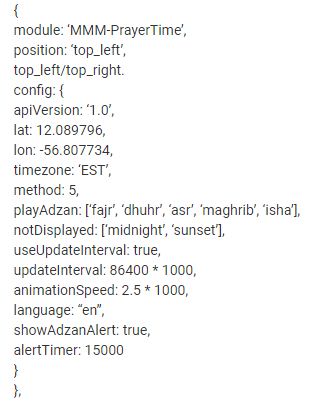
Worse than that
If someone copies the code that you posted (the wrong way) there is an anomaly that often occurs. Some characters will be changed when pasted, causing the code to fail, and leaving you wondering why because you might not notice what characters were
changed. The most common unwanted changes concern quotes', double quotes"
and the comma,. Can you say, “Syntax error?”The right way
-
The secret is . . . the “back-tick”.
-
If you enter one back-tick at the beginning of a word or words and one back-tick at the end of a word or words, you get “inline code” for that word or words.
Try it in a post. It should look likethis. Or,it can look like this.
You’ll like this
-
Now we want to post a portion (or all) of our
config.jsfile (or any code) in the forum so that it can be viewed easily (and properly) by the people trying to help us. -
You use
threeback-ticks before the code ANDthreeback-ticks after the code. That is how you “fence” blocks of code. You will love the result!
Remember that code posted above?
- Well, this is how it looks when you “fence” it in with three back-ticks, before
AND
after the code. Tell me you don’t like this better? ;)
{
    module: 'MMM - PrayerTime',
    position: 'top_left',
        config: {
        apiVersion: '1.0',
        lat: 12.089796,
        lon: -56.807734,
        timezone: 'EST',
        method: 5,
        playAdzan: ['fajr', 'dhuhr', 'asr’, 'maghrib', 'isha'],
        notDisplayed: ['midnight', 'sunset'],
        useUpdateInterval: true,
        updateInterval: 86400 * 1000,
        animationSpeed: 2.5 * 1000,
        language: "en",
        showAdzanAlert: true,
        alertTimer: 15000
    }
},
Is it a big deal?
-
No, it’s not, but for the sake of conformity we should all post code this way. You’ll like it better (because it looks nicer) and the people reading it will like it better (because it looks better) and we’ll all be one happy forum family.
-
And besides, it’s the way we’re supposed to be doing it. Climb aboard!
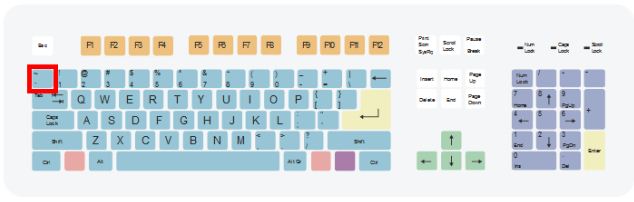
So, where is the back-tick key on my keyboard?
- On U.S. QUERTY keyboards it’s to the left of the 1 key (not the Numeric keys)
But I don’t use a U.S. QWERTY keyboard!
-
You’ll have to determine where yours is if you use a different keyboard.
-
This is the internet. Look it up. You want me to do everything for you?
An even easier way.
-
Why did I put you through all that? I don’t know. I had to learn it that way so that’s how I teach it.
-
Just do this and forget everything I said above! Simply clicking the icon indicated by the red arrow will place the correct back-ticks in the correct place, with a highlighted
//your code hereshowing you where to paste your code.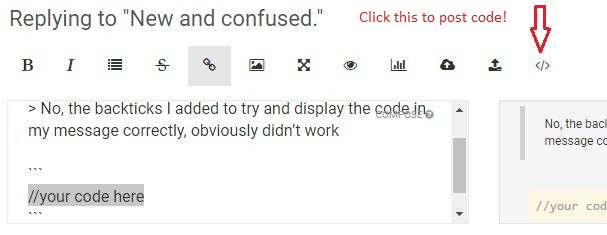
Peace! :)
-
-
Great post!!!!! -
-
Maybe it should be added that when you have problems finding the correct “back tick” character, you can also use the
</>button right above the input field to insert a code-formatted block. -
@Anhalter42 said in How to post code on the forum. - For absolute beginners.:
Maybe it should be added that when you have problems finding the correct “back tick” character, you can also use the
</>button right above the input field to insert a code-formatted block.Ok noted -
@Anhalter42 said in How to post code on the forum. - For absolute beginners.:
when you have problems finding the correct “back tick” character,
Really?
-
Thanks @Mykle1! Pinned the post to the top :)
-
@paviro said in How to post code on the forum - For absolute beginners:
Thanks @Mykle1! Pinned the post to the top :)
That’s fantastic! Thank you, too!
-
@Anhalter42 said in How to post code on the forum - For absolute beginners:
you can also use the </> button right above the input field to insert a code-formatted block.
Added to the tutorial!
-
i love your "absolute beginners" guides, keep them coming!thanks a lot !
-
@s199 said in How to post code on the forum - For absolute beginners:
i love your “absolute beginners” guides, keep them coming!
thanks a lot !
Hey, thanks for that. I do appreciate it. When I think of another one, I’ll get right to it.
Peace!
-
You might be interested in this. It’s not titled
For absolute beginners, but it’s close enough. -
lets see if this works
I have this back tick on my Android and not in my windows tablet.. so i will need to post code from this mobile!!! -
AwesomeThank you! -
Still having trouble with < and >, actually < x m l _ l I n e > (without spaces).
<xml_line>Or:
</xml_line>I did:
< x m l _ l I n e >and
< / x m l _ l I n e >Remove the spaces to get my result.
I was given a workaround for this, but of course forgot it. -
@evroom the workaround is to add a space after <
-
@sdetweil
Can’t be it. He said hopefully.
So when I have numerous lines of xml, I need to add a space after every < ?And when doing so I actually get:
< xml_line> -
@evroom yes… the space will show, uuuuuuuugly…
you would think that the three backquotes would turn off text interpretation…
but sadly not… -
I’m posting to this topic in the hope that it will be read by users that are not aware of the protocol for posting.
Your code posts should look like this:
{
            disabled: false,
            module: "MMM-EARTH",
            position: "bottom right",
            config: {
                mode: "Natural",
                rotateInterval: 15000,
                animationSpeed: 0,
                MaxWidth: "45%",
                MaxHeight: "45%",
            }
        },
NOT like this:
{
disabled: false,
module: “MMM-EARTH”,
position: “bottom right”,
config: {
mode: “Natural”,
rotateInterval: 15000,
animationSpeed: 0,
MaxWidth: “45%”,
MaxHeight: “45%”,
}
},Peace!
-
Thanks for this post. I am about to put it to good use.




Hello! It looks like you're interested in this conversation, but you don't have an account yet.
Getting fed up of having to scroll through the same posts each visit? When you register for an account, you'll always come back to exactly where you were before, and choose to be notified of new replies (either via email, or push notification). You'll also be able to save bookmarks and upvote posts to show your appreciation to other community members.
With your input, this post could be even better 💗
Register Login