MagicMirror Forum
    • Recent
    • Tags
    • Unsolved
    • Solved
    • MagicMirror² Repository
    • Documentation
    • 3rd-Party-Modules
    • Donate
    • Discord
    • Register
    • Login
    A New Chapter for MagicMirror: The Community Takes the Lead
    Read the statement by Michael Teeuw here.

    MMM-NOAA - Another Weather Module

    Scheduled Pinned Locked Moved System
    690 Posts 77 Posters 2.9m Views 70 Watching
    Loading More Posts
    • Oldest to Newest
    • Newest to Oldest
    • Most Votes
    Reply
    • Reply as topic
    Log in to reply
    This topic has been deleted. Only users with topic management privileges can see it.
    • V Offline
      Vauxdvihl
      last edited by

      @cowboysdude
      Thanks for this great module noaa3
      One question
      is there a possiblity to increase the size of the module?
      Thanks
      Regards

      cowboysdudeC justjim1220J 2 Replies Last reply Reply Quote -1
      • cowboysdudeC Offline
        cowboysdude Module Developer @Vauxdvihl
        last edited by cowboysdude

        @vauxdvihl

        This will increase or decrease the body element on the page. You would put that in your custom.css file in the CSS directory.

        …the ONLY way to make ONLY NOAA bigger is by editing the css file itself…

        body {
        zoom: 75%;
        }

        1 Reply Last reply Reply Quote 0
        • G Offline
          Galm @cowboysdude
          last edited by

          @cowboysdude : Hello, did you manage to make the openweather API to work with your module?

          cowboysdudeC 1 Reply Last reply Reply Quote 0
          • cowboysdudeC Offline
            cowboysdude Module Developer @Galm
            last edited by

            @galm Sir I am working on it and hopefully will make some progress tomorrow before football starts :)

            justjim1220J G 2 Replies Last reply Reply Quote 1
            • justjim1220J Offline
              justjim1220 Module Developer @cowboysdude
              last edited by

              @cowboysdude

              Dude! Cowboys season… :face_with_stuck-out_tongue_closed_eyes:

              "Life's Too Short To Dance With Ugly People"
              Jim Hallock - 1995

              cowboysdudeC 1 Reply Last reply Reply Quote 1
              • cowboysdudeC Offline
                cowboysdude Module Developer @justjim1220
                last edited by

                @justjim1220

                alt text

                justjim1220J 1 Reply Last reply Reply Quote 0
                • justjim1220J Offline
                  justjim1220 Module Developer @cowboysdude
                  last edited by justjim1220

                  @cowboysdude

                  0_1539486790858_kansas-city-chiefs.png

                  "Life's Too Short To Dance With Ugly People"
                  Jim Hallock - 1995

                  1 Reply Last reply Reply Quote 0
                  • G Offline
                    Galm @cowboysdude
                    last edited by

                    @cowboysdude : thanks a lot ;) Football first

                    1 Reply Last reply Reply Quote 0
                    • justjim1220J Offline
                      justjim1220 Module Developer @Vauxdvihl
                      last edited by

                      @vauxdvihl

                      I made it bigger by changing the font and image values in the css file I use. WHich, I use the CSS4 option.

                      "Life's Too Short To Dance With Ugly People"
                      Jim Hallock - 1995

                      1 Reply Last reply Reply Quote 0
                      • P Offline
                        PILuke
                        last edited by

                        Hello,
                        has someone tested the NOAA3 module with accuweather provider?
                        I think something is wrong to identify the city with lan and long.
                        With this config I don’t see any weather information from the module, only air quality:

                        		{
                        			disabled: false,
                        			module: 'MMM-NOAA3',
                        		 	position: 'top_right',
                        		     	config: {
                        				provider: "accuweather",
                        				apiKey: "xxxxxxxxxxxx",
                        				airKey: "yyyyyyyyy",
                        				css: "NOAA3",                  // THIS MUST CONTAIN A CSS STYLE NAME
                        				userlat: "45.483219", //MUST HAVE BOTH
                        				userlon: "9.203567"  //MUST HAVE BOTH
                        				}
                        		},
                        

                        In the aw.js file I find this request:

                        url =  "http://dataservice.accuweather.com/currentconditions/v1/"+zip+"?apikey="+this.config.apiKey+"&details=true";
                        

                        I think this request doesn’t pass the correct “location key” (the zip value).
                        Infact if I manually force a “location key” the “current conditions” start to work:

                        url =  "http://dataservice.accuweather.com/currentconditions/v1/214046?apikey="+this.config.apiKey+"&language="+config.language+"-it&details=true";
                        

                        This instead doesn’t work for the forecast, if I force the “location key” the module doesn’t show the “four day forecast”

                        url: "http://dataservice.accuweather.com/forecasts/v1/daily/5day/214046?apikey="+this.config.apiKey+"&language="+config.language+
                        "-us&details=true&metric=false",
                        

                        I found also another problem with the language because in the request is passed the right language but not the right region, it remains “us”, so the module doesn’t show any value :

                        &language="+config.language+"-us&details=true&metric=false"
                        

                        Can someone resolve the problem?
                        I’m not so able with js :-)
                        Thanks

                        cowboysdudeC 2 Replies Last reply Reply Quote 0
                        • cowboysdudeC Offline
                          cowboysdude Module Developer @PILuke
                          last edited by cowboysdude

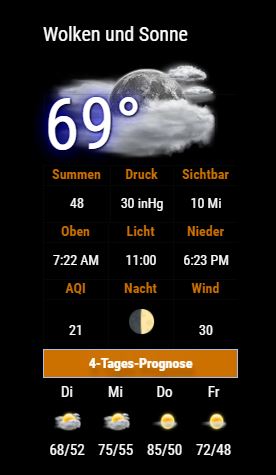
                          @piluke I will look into it. However the one problem AW provider does have is at times when you’re just starting the module you have to reload it to get the 4 day forecast…why, I’m not really sure it’s just how it’s been working.

                          I’ve made some changes but a few more need to be made here’s an example of the update:
                          0_1539658630187_de.jpg

                          P 1 Reply Last reply Reply Quote 0
                          • cowboysdudeC Offline
                            cowboysdude Module Developer @PILuke
                            last edited by cowboysdude

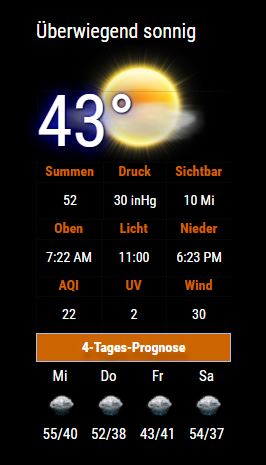
                            @piluke the updated aw.js is uploaded to git hub.

                            Do a git pull and the config has changed to include your zip…
                            REMEMBER YOU MAY HAVE TO RELOAD IT TO GET THE BOTTOM FORECAST…tis an accuweather issue…

                            {
                            			disabled: false,
                            			module: 'MMM-NOAA3',
                            		 	position: 'top_right',
                            		     	config: {
                            				provider: "accuweather",
                            				apiKey: "xxxxxxxxxxxx",
                            				airKey: "yyyyyyyyy",
                            				css: "NOAA3", 
                            				userlat: "45.483219",  
                            				userlon: "9.203567"  
                            			        zip: "11111" //YOUR ZIPCODE	
                                                       }
                            		},
                            

                            0_1539689935771_de.jpg

                            1 Reply Last reply Reply Quote 0
                            • cowboysdudeC Offline
                              cowboysdude Module Developer
                              last edited by

                              Still working on openweather api as time permits…it’s a complete train wreck LOL

                              Something has changed…but I am working to fix it.

                              1 Reply Last reply Reply Quote 1
                              • P Offline
                                PILuke @cowboysdude
                                last edited by

                                @cowboysdude many many thanks for your help and your time.
                                Now the module is working.
                                I can see current conditions and forecast (without reload the page) but … they are not correct. :-)
                                I make some test, with my zip code the aw system identify a city in Mexico not in Italy!

                                I think it’s necessary to identify a single locationKey with aw API.
                                I found three way:
                                by lat and lon:
                                https://developer.accuweather.com/accuweather-locations-api/apis/get/locations/v1/cities/geoposition/search

                                or by zip code:
                                https://developer.accuweather.com/accuweather-locations-api/apis/get/locations/v1/postalcodes/search

                                or by name:
                                https://developer.accuweather.com/accuweather-locations-api/apis/get/locations/v1/cities/search

                                but i don’t know how to use it in javascript…

                                Infact if I put (in config.js) the right locationKey for my city instead zipcode the module work perfectly.

                                cowboysdudeC 1 Reply Last reply Reply Quote 0
                                • cowboysdudeC Offline
                                  cowboysdude Module Developer @PILuke
                                  last edited by

                                  @piluke Okay so use your location key LOL

                                  P 1 Reply Last reply Reply Quote 1
                                  • G Offline
                                    gh057
                                    last edited by

                                    @cowboysdude thank you for your module, the ability to use the module with various providers is really something that makes a difference!

                                    Would you consider adding a wind direction (icon or text) in a future update ?

                                    1 Reply Last reply Reply Quote 0
                                    • P Offline
                                      PILuke @cowboysdude
                                      last edited by

                                      @cowboysdude yes, of course :-)
                                      It’s better to modify the README.md for not to use a zip code but a Locationkey from accuweather in the config file.
                                      Many thanks

                                      cowboysdudeC 1 Reply Last reply Reply Quote 1
                                      • cowboysdudeC Offline
                                        cowboysdude Module Developer @PILuke
                                        last edited by

                                        @piluke You could always do a pull request to modify the readme on github ;)

                                        1 Reply Last reply Reply Quote 1
                                        • cowboysdudeC Offline
                                          cowboysdude Module Developer
                                          last edited by cowboysdude

                                          Just updated OpenWeather and the main js…had issues with the forecast NOT loading…it’s all working now. :)

                                          In a terminal window go to:

                                          MagicMirror/modules/MMM-NOAA3
                                          type ‘git pull’ to update!

                                          J 1 Reply Last reply Reply Quote 1
                                          • J Offline
                                            Johans @cowboysdude
                                            last edited by

                                            @cowboysdude

                                            As always, great job!
                                            Didn’t noticed and I don’t know if it has to do with the upgrade or not.
                                            saw this message in the terminal window, but all seems to work fine for me.
                                            Just wanted to let you know.

                                            Whoops! There was an uncaught exception...
                                            TypeError: Cannot read property 'pollution' of undefined
                                                at Object.parseAIR (/home/pi/MagicMirror/modules/MMM-NOAA3/providers/ds.js:179:35)
                                                at Request._callback (/home/pi/MagicMirror/modules/MMM-NOAA3/providers/ds.js:171:28)
                                                at Request.self.callback (/home/pi/MagicMirror/modules/MMM-NOAA3/node_modules/request/request.js:185:22)
                                                at emitTwo (events.js:126:13)
                                                at Request.emit (events.js:214:7)
                                                at Request.<anonymous> (/home/pi/MagicMirror/modules/MMM-NOAA3/node_modules/request/request.js:1161:10)
                                                at emitOne (events.js:116:13)
                                                at Request.emit (events.js:211:7)
                                                at IncomingMessage.<anonymous> (/home/pi/MagicMirror/modules/MMM-NOAA3/node_modules/request/request.js:1083:12)
                                                at Object.onceWrapper (events.js:313:30)

                                            
                                            
                                            cowboysdudeC 1 Reply Last reply Reply Quote 0

                                            Hello! It looks like you're interested in this conversation, but you don't have an account yet.

                                            Getting fed up of having to scroll through the same posts each visit? When you register for an account, you'll always come back to exactly where you were before, and choose to be notified of new replies (either via email, or push notification). You'll also be able to save bookmarks and upvote posts to show your appreciation to other community members.

                                            With your input, this post could be even better 💗

                                            Register Login

                                            • 1
                                            • 2
                                            • 3
                                            • 4
                                            • 5
                                            • 34
                                            • 35
                                            • 3 / 35
                                            • First post
                                              Last post
                                            Enjoying MagicMirror? Please consider a donation!
                                            MagicMirror created by Michael Teeuw.
                                            Forum managed by Sam, technical setup by Karsten.
                                            This forum is using NodeBB as its core | Contributors
                                            Contact | Privacy Policy