MagicMirror Forum
    • Recent
    • Tags
    • Unsolved
    • Solved
    • MagicMirror² Repository
    • Documentation
    • 3rd-Party-Modules
    • Donate
    • Discord
    • Register
    • Login
    A New Chapter for MagicMirror: The Community Takes the Lead
    Read the statement by Michael Teeuw here.

    MMM-NOAA - Another Weather Module

    Scheduled Pinned Locked Moved System
    690 Posts 77 Posters 2.9m Views 70 Watching
    Loading More Posts
    • Oldest to Newest
    • Newest to Oldest
    • Most Votes
    Reply
    • Reply as topic
    Log in to reply
    This topic has been deleted. Only users with topic management privileges can see it.
    • B Offline
      BD0G @Mykle1
      last edited by

      @Mykle1
      Did you run npm install in the MMM-NOAA3 directory? Yes - appeared to install correctly.

      Tried deleting and recloning the module from guthub? No. Next on the list of things to do.

      Disabling your other modules? Thats another great suggestion. Gotta try that after a reclone and reinstall.

      1 Reply Last reply Reply Quote 0
      • B Offline
        BD0G
        last edited by

        Did you run npm install in the MMM-NOAA3 directory? YES

        Tried deleting and recloning the module from guthub? YES!

        Still not working at this point

        Disabling your other modules? YES! Disabled every other module and restarted Magic Mirror.
        Now the MMM-NOAA3 module is displayed !
        So there appears to be a conflict with another module.

        Next steps are to enable each module one by one and restart after doing so with each one.

        I wonder which one it is?

        Mykle1M 1 Reply Last reply Reply Quote 0
        • Mykle1M Offline
          Mykle1 Project Sponsor Module Developer @BD0G
          last edited by

          @BD0G said in MMM-NOAA - Another Weather Module:

          Next steps are to enable each module one by one and restart after doing so with each one.

          You only need restart MM, not your entire system. That shouldn’t take too long. Let me know your findings.

          Create a working config
          How to add modules

          B 1 Reply Last reply Reply Quote 0
          • B Offline
            BD0G @Mykle1
            last edited by

            @Mykle1 Yup. I just do a PM2 restart 0. :)

            Mykle1M 1 Reply Last reply Reply Quote 0
            • Mykle1M Offline
              Mykle1 Project Sponsor Module Developer @BD0G
              last edited by Mykle1

              @BD0G

              Hope you’re having some success getting a fresh config.js.sample. Remember never to modify this file. Only use “copies” of it that you rename to config.js.

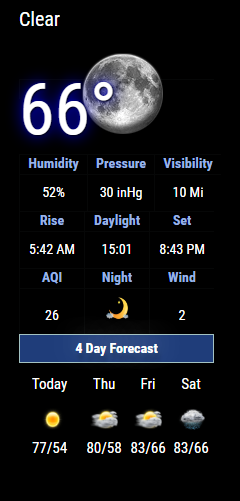
              Here you can see that the calendar and noaa3 run happily together. Talk tomorrow. Peace.

              0_1575085769903_1.png

              Create a working config
              How to add modules

              1 Reply Last reply Reply Quote 0
              • cowboysdudeC Offline
                cowboysdude Module Developer
                last edited by

                Good things happen when your config.js is working ;)

                Mykle1M 1 Reply Last reply Reply Quote 1
                • Mykle1M Offline
                  Mykle1 Project Sponsor Module Developer @cowboysdude
                  last edited by

                  @cowboysdude

                  What’s a config.js?

                  Create a working config
                  How to add modules

                  1 Reply Last reply Reply Quote 1
                  • B Offline
                    BD0G
                    last edited by BD0G

                    Now that I have scrapped my Pi Zero W and have done a fresh install of “Buster” and MM on my Pi 3 B Plus everything is playing together nicely!

                    Mykle1M 1 Reply Last reply Reply Quote 2
                    • Mykle1M Offline
                      Mykle1 Project Sponsor Module Developer @BD0G
                      last edited by

                      @BD0G said in MMM-NOAA - Another Weather Module:

                      everything is playing together nicely

                      Well done sir!

                      Create a working config
                      How to add modules

                      1 Reply Last reply Reply Quote 1
                      • S Offline
                        seramik
                        last edited by seramik

                        I’ve juste update with ‘git pull’
                        and look what arrived at the name ‘today’ ☹️
                        Lien vers mon image
                        any idéa ?

                        1 Reply Last reply Reply Quote 0
                        • S Offline
                          seramik
                          last edited by

                          This post is deleted!
                          1 Reply Last reply Reply Quote 0
                          • cowboysdudeC Offline
                            cowboysdude Module Developer
                            last edited by cowboysdude

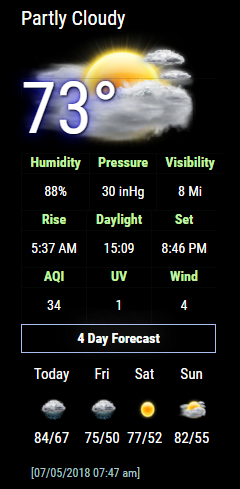
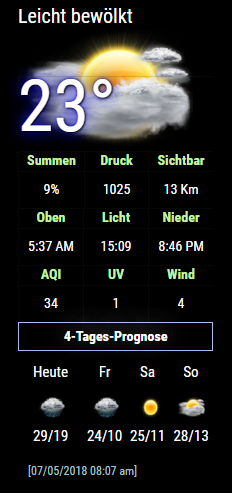
                            Description:

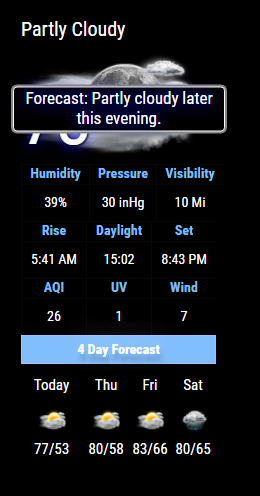
                            Added a new condensed format for NOAA3 … it uses MMM-NOAA5.css file. To set that please see readme~

                            Please follow Readme on Github!

                            0_1577639187857_noaaShort.PNG

                            To update just do a ‘git pull’ in the MagicMirror/modules/MMM-NOAA3 directory

                            Version 3.4.2

                            Download:

                            [card:cowboysdude/MMM-NOAA3]

                            Mykle1M 2 Replies Last reply Reply Quote 1
                            • Mykle1M Offline
                              Mykle1 Project Sponsor Module Developer @cowboysdude
                              last edited by

                              @cowboysdude

                              Still the best weather module. No others come close. Not even mine. I hate you for that. :-)

                              Create a working config
                              How to add modules

                              1 Reply Last reply Reply Quote 1
                              • S Offline
                                seramik
                                last edited by

                                sorry
                                my upgrade was not complete
                                tomorrow i will post you a photo

                                1 Reply Last reply Reply Quote 0
                                • D Offline
                                  doogy_rev
                                  last edited by

                                  I ran the upgrade this morning which worked great, however the 4 day forecast seems to have moved vertically. it was default and no custom changes made.

                                  Is there an easy way to revert it?

                                  0_1577663750887_Screen Shot 2019-12-29 at 3.53.44 PM.png

                                  cowboysdudeC 1 Reply Last reply Reply Quote 0
                                  • Mykle1M Offline
                                    Mykle1 Project Sponsor Module Developer @cowboysdude
                                    last edited by

                                    @cowboysdude

                                    Fired right up for me. :thumbsup:

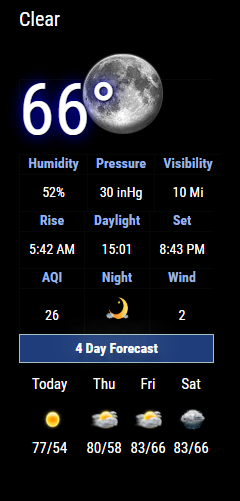
                                    0_1577668886552_Screenshot from 2019-12-29 20-06-11.png

                                    Create a working config
                                    How to add modules

                                    1 Reply Last reply Reply Quote 1
                                    • S Offline
                                      seramik
                                      last edited by

                                      now i’ve got the same trouble as doogy_rev

                                      cowboysdudeC 1 Reply Last reply Reply Quote 0
                                      • cowboysdudeC Offline
                                        cowboysdude Module Developer @doogy_rev
                                        last edited by

                                        @doogy_rev said in MMM-NOAA - Another Weather Module:

                                        I ran the upgrade this morning which worked great, however the 4 day forecast seems to have moved vertically. it was default and no custom changes made.

                                        Is there an easy way to revert it?

                                        0_1577663750887_Screen Shot 2019-12-29 at 3.53.44 PM.png

                                        Yes just use one of the other css files ;) That’s MMM-NOAA5.css file … it may be interferring with other css for some reason.

                                        1 Reply Last reply Reply Quote 0
                                        • cowboysdudeC Offline
                                          cowboysdude Module Developer @seramik
                                          last edited by cowboysdude

                                          @seramik same thing just revert back to another css file…

                                          I have uploaded MMM-NOAA3 - Copy.js file.
                                          Download it and rename it to MMM-NOAA3.js and over write the js file in the MMM-NOAA3 dir, make sure you change your config.js to the css you want to use. That will revert it back.

                                          D 1 Reply Last reply Reply Quote 0
                                          • D Offline
                                            doogy_rev @cowboysdude
                                            last edited by

                                            @cowboysdude Awesome thank you!

                                            1 Reply Last reply Reply Quote 0

                                            Hello! It looks like you're interested in this conversation, but you don't have an account yet.

                                            Getting fed up of having to scroll through the same posts each visit? When you register for an account, you'll always come back to exactly where you were before, and choose to be notified of new replies (either via email, or push notification). You'll also be able to save bookmarks and upvote posts to show your appreciation to other community members.

                                            With your input, this post could be even better 💗

                                            Register Login

                                            • 1
                                            • 2
                                            • 21
                                            • 22
                                            • 23
                                            • 24
                                            • 25
                                            • 34
                                            • 35
                                            • 23 / 35
                                            • First post
                                              Last post
                                            Enjoying MagicMirror? Please consider a donation!
                                            MagicMirror created by Michael Teeuw.
                                            Forum managed by Sam, technical setup by Karsten.
                                            This forum is using NodeBB as its core | Contributors
                                            Contact | Privacy Policy