Read the statement by Michael Teeuw here.
MMM-Lunartic
-
Description:
Up to the minute information about our Lunar partner, with a splash of EyeCandy, to boot!
Update:
Now with French translation. Other languages to follow, upon request.
Download:
[card:mykle1/MMM-Lunartic]
Version 1.0.1
-
Hi !
module work great but small mistakes
here is the perfect french translation.Distance from Earth’s core = ": "Distance du noyau terrestre = ",
"Distance from sun = ": "Distance du soleil = ",
"The next full moon is ": "Prochaine pleine lune: ",
"The next new moon is ": "Prochaine nouvelle lune: ",
"The current moon is ": "La lune actuelle est a ",
"The moon is “: “La lune est “,
“% illuminated”: “% illuminée”,
" days old”: " jours”,
“waxing”: " croissante”,
“waning”: “décroissante”,
“When the Moon hits your eye . . .”: “Quand la lune frappe votre œil. . .”
}Other question the text is not perfectly under the animated picture but a little on the left.
is it possible to modify that ?thanks Mykle1 ;)
-
@Fonfon said in MMM-Lunartic:
Other question the text is not perfectly under the animated picture but a little on the left.
is it possible to modify that ?Good morning Fonfon,
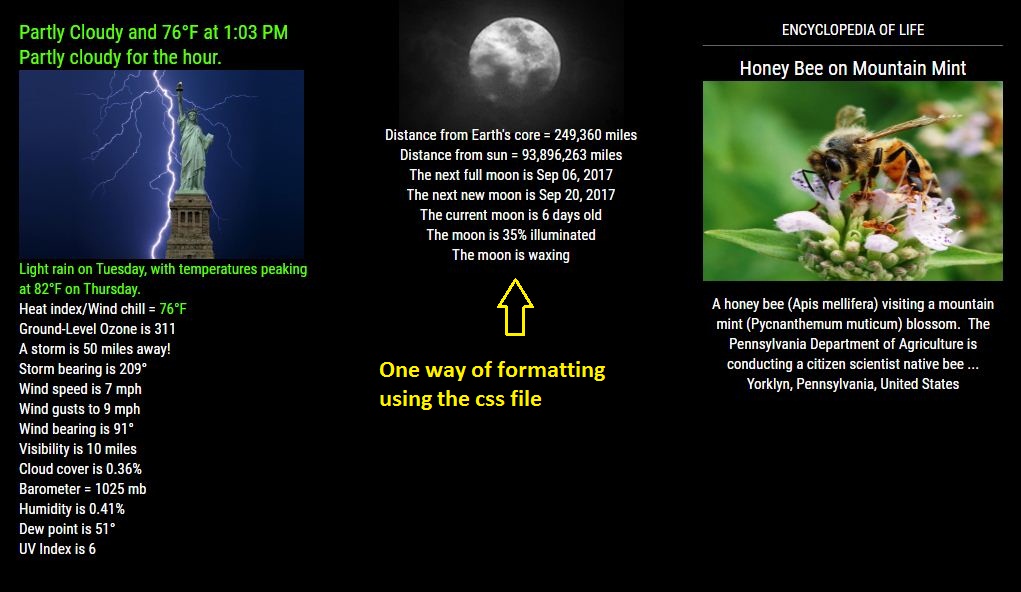
Take a look at the MMM-Lunartic.css file in your MMM-Lunartic folder. There you can change the color and positioning of every line of the module. You can also change the position of the animated picture, up, down, left, right. Ideally, you should copy and paste those entries into your custom.css file and do the editing there.
Take a screenshot of the module, post it here, and tell me what you want to achieve.
By default, all the text is aligned to the left
text-align: left;. If you want to center the text under the animated picture, simply change all thetext-align: left;totext-align: center; -
@Fonfon said in MMM-Lunartic:
here is the perfect french translation.
Fixed, thank you!
git pullin the MagicMirror/modules/MMM-Lunartic folder for the corrected translation -
@Fonfon said in MMM-Lunartic:
the text is not perfectly under the animated picture but a little on the left.
-
Update:
The API I was using for this module is no longer available. What was I to do?
Provide my own API. :^)
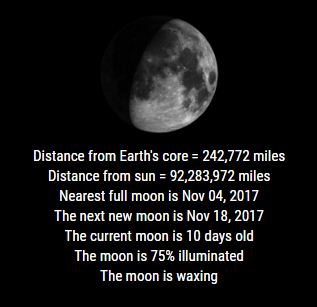
So, along with the new API, there is a new config option to view an image of the appearance of the current moon, updated minutely. Courtesy of the U.S. Navy. Salute!
Download:
[card:mykle1/MMM-Lunartic]
Version 1.0.2
Example
-
Noob questions!
-
When I pull the latest files, both the core .js files have Windows control characters in them. (I don’t think this is the source of my problems, but it seems maybe unintentional.)
-
My fresh stock MM install does not like the config files for this module. It’s the only custom module I’ve tried to add in this install. Whenever I add it to my main config, startup throws a config validation error and reverts to the default file. I’m having a hard time debugging it to provide a more precise error, since it’s just failing out at the initial validation stage. Any ideas how I can debug more precisely?
Thanks!
-
-
@thetalentedfool you can put your config here so we can have a look
-
@thetalentedfool said in MMM-Lunartic:
I don’t think this is the source of my problems, but it seems maybe unintentional.)
It’s not, but thank you for bringing that to my attention.
The problem is/was completely my fault. In a recent update to the repo, specifically the README file, I failed to place a comma at the end of the
image: "animation"line of the config entry. I’ve updated the repo and apologize for the error. Your config entry should now look like this:{ module: 'MMM-Lunartic', position: 'top_left', // Best in left, center, or right regions config: { image: "animation", // animation, current or static distance: "miles", // miles or km useHeader: false, // true if you want a header header: "The Lunartic is in my head", // Any text you want maxWidth: "300px", animationSpeed: 3000, // updated info fades in and out } },If you have any further problems or questions, don’t hesitate to post for assistance. Thanks!
Peace
-
@Mykle1 D’oh! Can’t believe I missed that too - my kingdom for an actual helpful nodejs debug message with pointers to the offending line. Works great now. Thanks for the response!
-
No, thank you. Just a stupid mistake on my part.
MM has a command that will check your config and point out the errors but that command escapes me. I’ll take a look for it. Otherwise, jshint.com and jslint.com are pretty useful when I remember to actually USE them. :-)
Cheers
-
Found it! Here is the command that will check your config if you get that error at launch. I assume you need to run it in the MagicMirror directory
npm run config:check -
I removed the comma from the config and ran
npm run config:check. The result would be enough to determine the cause.daddle@daddle-Presario-CQ57-Notebook-PC:~/MagicMirror$ npm run config:check > magicmirror@2.1.3 config:check /home/daddle/MagicMirror > node tests/configs/check_config.js Checking file... /home/daddle/MagicMirror/config/config.js Line 30 col 9 Expected '}' to match '{' from line 28 and instead saw 'distance'. Line 30 col 17 Expected '}' to match '{' from line 25 and instead saw ':'. Line 30 col 19 Expected ']' to match '[' from line 24 and instead saw 'miles'. Line 35 col 6 Missing semicolon. Line 35 col 5 Unrecoverable syntax error. (55% scanned). daddle@daddle-Presario-CQ57-Notebook-PC:~/MagicMirror$ -
I’m astonished by the fact that “npm run config:check” seems to be so unknown in the community. It is a VERY important tool in my opinion.
Whenever there is something odd, always run this one first to check if the config is ok.
However, it took me about twenty lookups into the github readme to finally remember it correctly. -
The terrible thing is that this command was exactly what I spent most of the afternoon yesterday looking for, and it’s apparently nowhere in the popular search results for debugging MM. (Git readme? Pffffft. Clearly my brain was not in a “RTactualFM” mood…lesson learned.) I’ll totally be preaching it now. Thanks for the info and demonstration!
-
@lavolp3 said in MMM-Lunartic:
I’m astonished by the fact that “npm run config:check” seems to be so unknown in the community. It is a VERY important tool in my opinion.
Well, it is a relatively new function, introduced in the last update to MM (I think). I had to look for the command because I don’t use it usually. However, I agree that it is a valuable tool
-
@thetalentedfool said in MMM-Lunartic:
it’s apparently nowhere in the popular search results for debugging MM.
I’ll write up a simple tutorial and post it so that it is easier to find using the forum search function.
-
Great idea Mykle1! Thanks in advance for the effort :-)
The function is not that new.
I’m using it for a few months now, I’d guess. -
@lavolp3 said in MMM-Lunartic:
I’m using it for a few months now, I’d guess.
Ok, but it’s not available in MM version 2.1.1 or 2.1.2 (I think) so that would only make it available in the most recent version (2.1.3). I did say relatively new. :-)
-
@lavolp3 said in MMM-Lunartic:
Great idea Mykle1! Thanks in advance for the effort :-)
I promised a tutorial. :-)



Hello! It looks like you're interested in this conversation, but you don't have an account yet.
Getting fed up of having to scroll through the same posts each visit? When you register for an account, you'll always come back to exactly where you were before, and choose to be notified of new replies (either via email, or push notification). You'll also be able to save bookmarks and upvote posts to show your appreciation to other community members.
With your input, this post could be even better 💗
Register Login