MagicMirror Forum
    • Recent
    • Tags
    • Unsolved
    • Solved
    • MagicMirror² Repository
    • Documentation
    • 3rd-Party-Modules
    • Donate
    • Discord
    • Register
    • Login
    A New Chapter for MagicMirror: The Community Takes the Lead
    Read the statement by Michael Teeuw here.

    Problem with Weather forecast

    Scheduled Pinned Locked Moved Troubleshooting
    47 Posts 14 Posters 43.6k Views 13 Watching
    Loading More Posts
    • Oldest to Newest
    • Newest to Oldest
    • Most Votes
    Reply
    • Reply as topic
    Log in to reply
    This topic has been deleted. Only users with topic management privileges can see it.
    • A Offline
      Aurelsam @Mykle1
      last edited by

      @Mykle1
      My appid is good because it works with the current weather.
      There are no other solutions?
      Thx Mykle1

      Mykle1M 1 Reply Last reply Reply Quote 0
      • Mykle1M Offline
        Mykle1 Project Sponsor Module Developer @Aurelsam
        last edited by Mykle1

        @Aurelsam

        Copy and paste my config entry above into your config and DOUBLE CHECK your appid. That entry is working.

        EDIT! Working under MM 2.1.1

        Create a working config
        How to add modules

        Mykle1M 1 Reply Last reply Reply Quote 0
        • S Offline
          Sp4M
          last edited by

          I have the same problem, even after deep investigations.

          I can get current weather calling this :
          http://api.openweathermap.org/data/2.5/weather?q=paris&units=metric&APPID=cbbxxxxxxxxxxxxxx

          I can get forecast weather with 3h timepoints using
          http://api.openweathermap.org/data/2.5/forecast?q=paris&units=metric&APPID=cbbxxxxxxxxxxxxxx

          BUT i cannot use daily forecast which is used by MM
          http://api.openweathermap.org/data/2.5/forecast/daily?q=paris&units=metric&APPID=cbbxxxxxxxxxxxxxx
          it returns : {“cod”:401, “message”: “Invalid API key. Please see http://openweathermap.org/faq#error401 for more info.”}

          it appears that daily forecast is not free (anymore ?) regarding openweather website.
          https://openweathermap.org/price

          Maybe it is a problem related to location ? I see that I actualy live just a few kilometers away from Aurelsam (Saint-Germain-les-Corbeil, France)

          1 Reply Last reply Reply Quote 0
          • S Offline
            Sp4M
            last edited by

            You can temporarly get around the problem by using 3h steps forecast (2nd link of my previous post) instead of daily, and by adding this to the weatherforecast.js :

            in function processWeather,
            after line var forecast = data.list[i];

            add:

            if (forecast.dt_txt.split(" ")[1] != “00:00:00”) continue;

            (in config)
            maxNumberOfDays parameter now counts timepoints (each 3h) and not days:
            maxNumberOfDays: 4 // means 4 forecast points: 0h, 3h, 6h, 9h
            maxNumberOfDays: 8 // means 8 timepoints of 3h = 24h = 1 day
            maxNumberOfDays: 40 // means 40 timepoints of 3h = 120h = 5 days

            You should also remove parameter check in the same script weatherforecast.js, which allow maximum 16 (for 16 days). it should be set to maximum 128 (timepoints) for 16 days.

            example:
            params += “&cnt=” + (((this.config.maxNumberOfDays < 1) || (this.config.maxNumberOfDays > 128)) ? 40 : this.config.maxNumberOfDays);

            1 Reply Last reply Reply Quote 0
            • Mykle1M Offline
              Mykle1 Project Sponsor Module Developer @Mykle1
              last edited by

              @Mykle1 said in Problem with Weather forecast:

              I don’t know what to tell you. That entry is working.

              Reply to myself! LOL

              An oversight on my part. I was testing that in MM 2.1.1 and it WAS working. I just moved to MM 2.1.2 and it does NOT

              Create a working config
              How to add modules

              A 1 Reply Last reply Reply Quote 0
              • P Offline
                plybz18
                last edited by

                Same problem here, for weatherforecast it shows incorrect appid, but same appid is working for current weather.!!!

                1 Reply Last reply Reply Quote 0
                • A Offline
                  Aurelsam @Mykle1
                  last edited by

                  @Mykle1
                  So it means that it does not work with the latest version ??
                  How do you install 2.1.1?

                  Mykle1M 1 Reply Last reply Reply Quote 0
                  • Mykle1M Offline
                    Mykle1 Project Sponsor Module Developer @Aurelsam
                    last edited by

                    @Aurelsam said in Problem with Weather forecast:

                    So it means that it does not work with the latest version ??

                    It would appear so. You could try the workaround that @SP4M provided above. I have not tried it.

                    How do you install 2.1.1?

                    https://github.com/MichMich/MagicMirror/releases

                    Create a working config
                    How to add modules

                    S 1 Reply Last reply Reply Quote 0
                    • S Offline
                      Sp4M @Mykle1
                      last edited by

                      @Mykle1 said in Problem with Weather forecast:

                      @Aurelsam said in Problem with Weather forecast:

                      So it means that it does not work with the latest version ??

                      It would appear so. You could try the workaround that @SP4M provided above. I have not tried it.

                      I did. It works with additionnal calculations if you want to use temperatures - you have to average all temperatures (min and max) from all 3h timepoints of one day.
                      By the way, it’s less precise than real min and max of the day …

                      @Mykle1 : how could it be a problem of MM version if openweather does not recognize “forecast/daily” in its url in your opinion ? I should have missed something

                      Mykle1M 2 Replies Last reply Reply Quote 0
                      • Mykle1M Offline
                        Mykle1 Project Sponsor Module Developer @Sp4M
                        last edited by

                        @Sp4M said in Problem with Weather forecast:

                        how could it be a problem of MM version if openweather does not recognize “forecast/daily” in its url in your opinion

                        Honestly, I don’t know. What I DO know is my appid was being rejected under MM 2.1.2, as reported by the console. Went back to 2.1.1 and the appid is accepted normally. I didn’t investigate any further. Perhaps something in the way the request is being made? I just don’t know.

                        Create a working config
                        How to add modules

                        1 Reply Last reply Reply Quote 0
                        • Mykle1M Offline
                          Mykle1 Project Sponsor Module Developer @Sp4M
                          last edited by

                          @Sp4M said in Problem with Weather forecast:

                          how could it be a problem of MM version

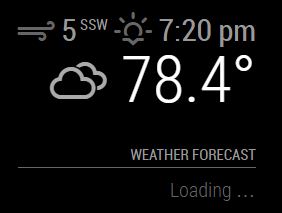
                          Well, I just moved to the develop branch, and although the unauthorized appid error is gone, weatherforecast still won’t work, and a new error is reported. The module simply stays on “Loading . . .”
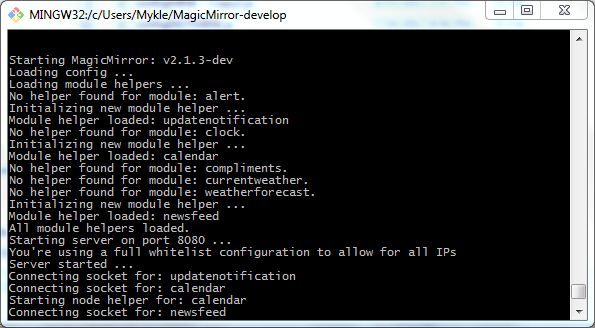

                          0_1504656609763_dev.JPG 0_1504656628065_dev error.JPG 0_1504656640984_dev loading.JPG

                          Create a working config
                          How to add modules

                          ? 2 Replies Last reply Reply Quote 0
                          • ? Offline
                            A Former User @Mykle1
                            last edited by

                            @Mykle1 I dont know about rhis module, but youd better to see scale field in config. I guess it is missed or invalid.

                            1 Reply Last reply Reply Quote 0
                            • ? Offline
                              A Former User @Mykle1
                              last edited by A Former User

                              @Mykle1 I read dev codes now, scale is not documented yet.(and it has also defined wrongly in defaults.)
                              Maybe scale:"c" or scale:"f" may work.

                              1 Reply Last reply Reply Quote 1
                              • L Offline
                                luizcarlosnery
                                last edited by

                                Same personal problem.
                                Mm2 does not display the Weatherforecast on the screen.

                                Mykle1M 1 Reply Last reply Reply Quote 0
                                • Mykle1M Offline
                                  Mykle1 Project Sponsor Module Developer @luizcarlosnery
                                  last edited by

                                  @luizcarlosnery

                                  There’s a problem with Openweather’s api not accepting certain api keys. In the meantime, you could try another weather module. There are many.

                                  Scroll down to the weather category

                                  https://github.com/MichMich/MagicMirror/wiki/MagicMirror²-Modules#3rd-party-modules

                                  Create a working config
                                  How to add modules

                                  R 1 Reply Last reply Reply Quote 0
                                  • R Offline
                                    roramirez Core Contributors @Mykle1
                                    last edited by

                                    Well… Yesterday I submitted a patch to hack the situation with the new accounts in OpenWeather.

                                    If you can test it will be great!
                                    https://github.com/roramirez/MagicMirror/commit/e8438d37d78acc7a9e29e694a6987ce068324bcd

                                    Easy module development with MagicMirror Module Template

                                    F 1 Reply Last reply Reply Quote 0
                                    • L Offline
                                      luizcarlosnery
                                      last edited by

                                      Hi Roramirez, brother, it worked! but the day of the week, which should show “Monday” “Tuesday” “Wednesday” … shows everyone how “Sunday” to solve?
                                      Thank you so much…

                                      1 Reply Last reply Reply Quote 0
                                      • F Offline
                                        frank61BS @roramirez
                                        last edited by

                                        @roramirez
                                        Hello Ramirez, I had the same problem. But with your patch I can see the weatherforeast now
                                        Thanks Frank

                                        1 Reply Last reply Reply Quote 0
                                        • AzraelA Offline
                                          Azrael
                                          last edited by

                                          Hello, I have exactly the same problem and I am trying to use your patch Ramirez. However, I am coming from the “mechanical world” and I’m new to Linux and GitHub. Could any of you write me how to apply such a patch?

                                          Mykle1M 1 Reply Last reply Reply Quote 0
                                          • Mykle1M Offline
                                            Mykle1 Project Sponsor Module Developer @Azrael
                                            last edited by

                                            @Azrael said in Problem with Weather forecast:

                                            Could any of you write me how to apply such a patch?

                                            You have to edit your weatherforecast.js file. Go to the link for the fix. The line you see highlighted in RED has to be removed (or commented out) of your weatherforecast.js file. The lines you see highlighted in GREEN have to be added in your weatherforecast.js file. The line numbers on the left make it easy for you to find exactly where the edits belong.

                                            Create a working config
                                            How to add modules

                                            1 Reply Last reply Reply Quote 1

                                            Hello! It looks like you're interested in this conversation, but you don't have an account yet.

                                            Getting fed up of having to scroll through the same posts each visit? When you register for an account, you'll always come back to exactly where you were before, and choose to be notified of new replies (either via email, or push notification). You'll also be able to save bookmarks and upvote posts to show your appreciation to other community members.

                                            With your input, this post could be even better 💗

                                            Register Login

                                            • 1
                                            • 2
                                            • 3
                                            • 1 / 3
                                            • First post
                                              Last post
                                            Enjoying MagicMirror? Please consider a donation!
                                            MagicMirror created by Michael Teeuw.
                                            Forum managed by Sam, technical setup by Karsten.
                                            This forum is using NodeBB as its core | Contributors
                                            Contact | Privacy Policy