MagicMirror Forum
    • Recent
    • Tags
    • Unsolved
    • Solved
    • MagicMirror² Repository
    • Documentation
    • 3rd-Party-Modules
    • Donate
    • Discord
    • Register
    • Login
    A New Chapter for MagicMirror: The Community Takes the Lead
    Read the statement by Michael Teeuw here.

    Motion Detector

    Scheduled Pinned Locked Moved Utilities
    213 Posts 38 Posters 525.5k Views 39 Watching
    Loading More Posts
    • Oldest to Newest
    • Newest to Oldest
    • Most Votes
    Reply
    • Reply as topic
    Log in to reply
    This topic has been deleted. Only users with topic management privileges can see it.
    • T Offline
      trividar
      last edited by

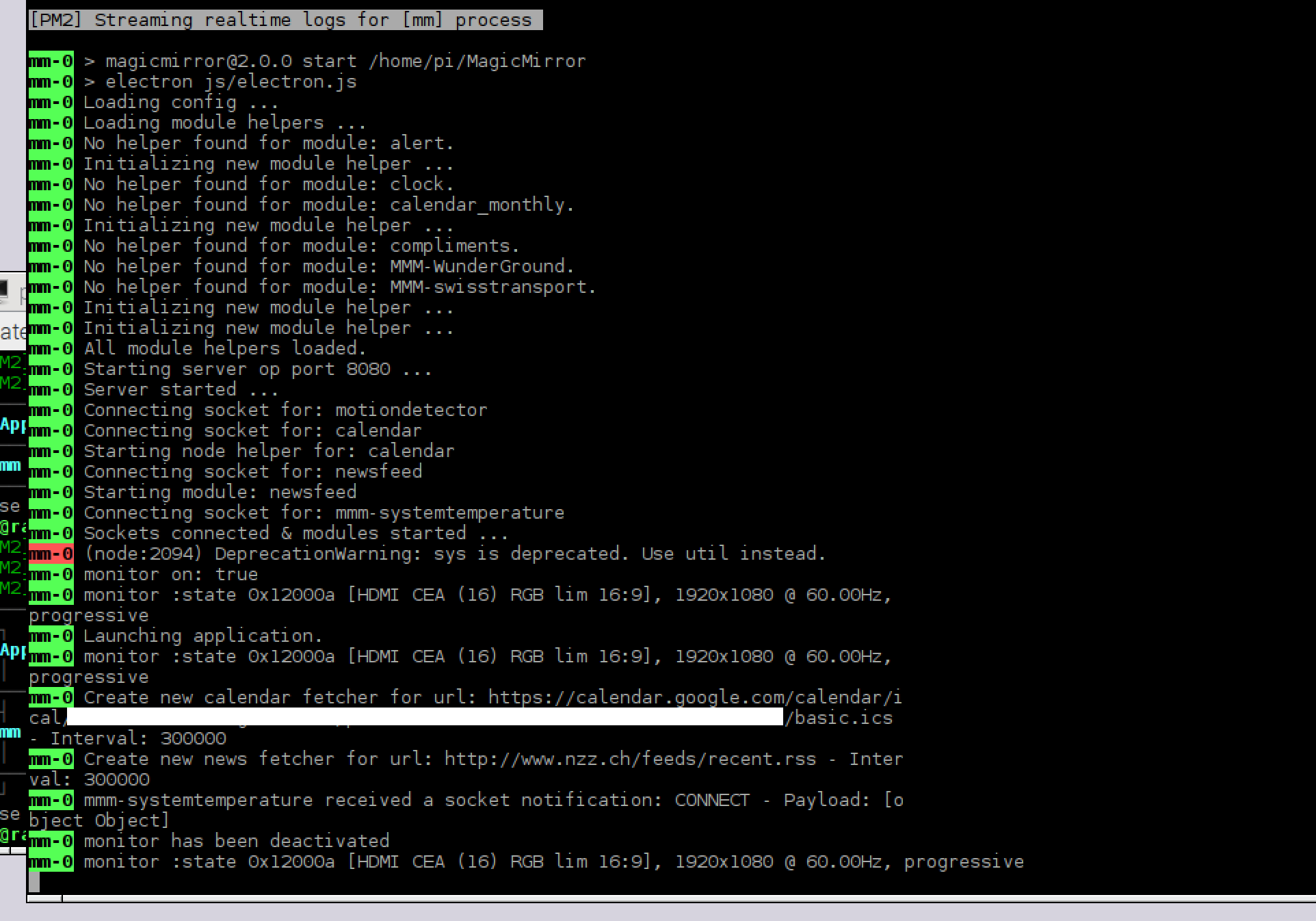
      I tried to increase the updateInterval to 200000ms and disabled all other modules, but always after the second time the monitor turn off my raspberry freeze completely and I have to reboot. My CPU is around 9 -15% when they freeze. I try again with the old version oft he motion-detector and it works, not perfect but works.

      1 Reply Last reply Reply Quote 0
      • J Offline
        jdahli1 @in_a_days
        last edited by

        @in_a_days I guess I do run more modules than what “fit” the screen, but they’re cool and I can’t make up my mind which ones I want to keep lol.

        However, I don’t believe that is the issue here. I have disabled all but three modules and still face the same issue. The second time the screen goes to sleep, it will not wake up. It doesn’t seem to matter what the CPU load or RAM is at.

        Watching the pm2 logs, I get an uncaught exception error when the screen is supposed to wake up, but that is all the details I get from it. (That I know how to see, still new to this)

        in_a_daysI 1 Reply Last reply Reply Quote 0
        • in_a_daysI Offline
          in_a_days @jdahli1
          last edited by

          @jdahli1

          Unfortunately, I’m pretty new too!

          To update - my mirror would still freeze (though it might take a couple hours) even after the changes I suggested. For me, the last error before the crash ALWAYS comes from the system status module (same exact ENOMEM error from the @trividar post). With the sys stat module disabled, I seem to be crash free. May not be the same thing you’re experiencing.

          I also removed Watchdog after reading a bit more about it’s purpose.

          If you are able to copy the log file from your most recent crash, someone smarter than me may be able to help.

          What ship would bear me ever back across so wide a Sea?

          M 1 Reply Last reply Reply Quote 0
          • M Offline
            mydiva @in_a_days
            last edited by mydiva

            @in_a_days how did you disabled sys stat module? and what is that? by the way I have the same thing happen like @trividar

            in_a_daysI 1 Reply Last reply Reply Quote 0
            • in_a_daysI Offline
              in_a_days @mydiva
              last edited by in_a_days

              @mydiva

              The system stat module I’m referring to is this one.

              https://github.com/BenRoe/MMM-SystemStats

              It would have to be specifically installed by the user. But looking at the screenshot from @trividar, there are a couple different modules throwing up errors. These couple lines show the modules that appear to be crashing the system:

              0_1483811268365_error.jpg

              You can see mmm-systemtemperature and MMM-DHT22 producing error events. I would start by commenting out these modules. Just add a

              /*

              before and a

              */

              after the section of your config.js file that loads these modules. If that eliminates the crashing you can be confident it is these modules causing the problem, and you can either try to fix them or look for alternatives.

              EDIT: The common theme between my error and the error posted here is the ENOMEM code, and the fact that all these modules are measuring system temperature. MMM-SystemStats, mmm-systemtemperature, and MMM-DHT22 are all reading temperatures. I would be willing to bet there’s a bug or memory leak somewhere in the code that is pulling or logging temperature info. I’m not convinced any of these particular errors are related to the Motion Detector module.

              What ship would bear me ever back across so wide a Sea?

              1 Reply Last reply Reply Quote 0
              • in_a_daysI Offline
                in_a_days
                last edited by

                Well… so much for that theory lol. I just got the ENOMEM error from Motion Detector.

                0_1483816079700_error.jpg

                What ship would bear me ever back across so wide a Sea?

                1 Reply Last reply Reply Quote 0
                • D Offline
                  danielis
                  last edited by

                  I had the same issue.
                  For me was the solution to increase the capture interval time from 100ms to 1000ms.
                  With the default value of 100ms the overall systemload is to high and one of the two electron processes will use after some time around 85% of the memory. At that value the system slows down extremely and the memory swap process will take all cpu ressources while trying to free up physical memory.
                  And then anything can happen … (white screen, unresponsive, ENOMEM exceptions, …)

                  Go to motiondetector.js and search for this code part:

                  DiffCamEngine.init(
                  {
                  video: video,
                  motionCanvas: canvas,

                  Add the following line to change the default capture interval time of 100ms to 1000ms:

                  DiffCamEngine.init(
                  {
                  video: video,
                  captureIntervalTime: 1000,
                  motionCanvas: canvas,

                  Observe the two electron processes and they will not reach memory values higher than 30%.

                  J T in_a_daysI 3 Replies Last reply Reply Quote 2
                  • J Offline
                    jdahli1 @danielis
                    last edited by

                    @danielis Fingers crossed, this appears to be working! The mirror has turned on and off a dozen times now with no processor or RAM issues.

                    1 Reply Last reply Reply Quote 0
                    • T Offline
                      trividar @danielis
                      last edited by

                      @danielis woooow its working now since one hour!! thank you!!!

                      1 Reply Last reply Reply Quote 1
                      • in_a_daysI Offline
                        in_a_days @danielis
                        last edited by

                        Same here. Great work and many thanks @danielis!

                        What ship would bear me ever back across so wide a Sea?

                        1 Reply Last reply Reply Quote 0
                        • slametpsS Offline
                          slametps
                          last edited by

                          Is this module work along with MMM-Facial-Recognition using the same camera?

                          regards,

                          Slamet PS

                          1 Reply Last reply Reply Quote 0
                          • D Offline
                            danielis
                            last edited by

                            Not working here. Only either one or the other.
                            But paviro said he will include a motion detection to the facial recognition module at some time.
                            I will try to do it also. Will report if I have success

                            1 Reply Last reply Reply Quote 0
                            • O Offline
                              oscarkindberg
                              last edited by

                              Hi!

                              I’m trying to get this to work, have a USB cam attached to the RPI3 and installed the .js.
                              But when I add the code:

                              {
                              module: ’motiondetector’,
                              config:
                              }
                              }

                              Am I missing something? Because it only give me errors… :(

                              (new to this)

                              in_a_daysI 1 Reply Last reply Reply Quote 0
                              • in_a_daysI Offline
                                in_a_days @oscarkindberg
                                last edited by

                                @oscarkindberg Try this instead:

                                            {
                                                    module: 'motiondetector',
                                                    config: {
                                                            timeout: 300000 // time in milliseconds for to switch off the display after last movement is detected.
                                                    }
                                            },
                                

                                This is set for a 5 minute delay. Modify the timeout value if you want a longer or shorter delay before your screen turns off.

                                What ship would bear me ever back across so wide a Sea?

                                O 1 Reply Last reply Reply Quote 0
                                • O Offline
                                  oscarkindberg @in_a_days
                                  last edited by

                                  @in_a_days Hit! Works now, BUT next issue.
                                  After 5-6 min the screens goes white, can’t find anything in the code that would cause that.

                                  D 1 Reply Last reply Reply Quote 0
                                  • P Offline
                                    phoenixrising
                                    last edited by

                                    I apologize if this a very noob question but I am having trouble getting the motion detector module running. I have clone the files to the module folder. I have modified the config file but maybe I dont have it correct. Could some one show me how the config file be modified to get the module running. Any other pointers? Thank you,

                                    D 1 Reply Last reply Reply Quote 0
                                    • D Offline
                                      danielis @oscarkindberg
                                      last edited by

                                      @oscarkindberg try hdmi_blanking=1in /boot/config.txt

                                      O 1 Reply Last reply Reply Quote 0
                                      • D Offline
                                        danielis @phoenixrising
                                        last edited by

                                        @phoenixrising look at the last reply of in_a_days.
                                        If that is not working post your config.js here.

                                        1 Reply Last reply Reply Quote 0
                                        • O Offline
                                          oscarkindberg @danielis
                                          last edited by

                                          @danielis Where do I fint that? I’ve searched all the .js files in the module and config.

                                          D 1 Reply Last reply Reply Quote 0
                                          • D Offline
                                            danielis @oscarkindberg
                                            last edited by

                                            @oscarkindberg it is the file config.txt in the folder /boot/
                                            type ‘sudo nano /boot/config.txt’ without ’
                                            add as last line:
                                            hdmi_blanking=1

                                            O 1 Reply Last reply Reply Quote 0

                                            Hello! It looks like you're interested in this conversation, but you don't have an account yet.

                                            Getting fed up of having to scroll through the same posts each visit? When you register for an account, you'll always come back to exactly where you were before, and choose to be notified of new replies (either via email, or push notification). You'll also be able to save bookmarks and upvote posts to show your appreciation to other community members.

                                            With your input, this post could be even better 💗

                                            Register Login

                                            • 1
                                            • 2
                                            • 3
                                            • 4
                                            • 5
                                            • 10
                                            • 11
                                            • 2 / 11
                                            • First post
                                              Last post
                                            Enjoying MagicMirror? Please consider a donation!
                                            MagicMirror created by Michael Teeuw.
                                            Forum managed by Sam, technical setup by Karsten.
                                            This forum is using NodeBB as its core | Contributors
                                            Contact | Privacy Policy