MagicMirror Forum
    • Recent
    • Tags
    • Unsolved
    • Solved
    • MagicMirror² Repository
    • Documentation
    • 3rd-Party-Modules
    • Donate
    • Discord
    • Register
    • Login
    A New Chapter for MagicMirror: The Community Takes the Lead
    Read the statement by Michael Teeuw here.

    Motion Detector

    Scheduled Pinned Locked Moved Utilities
    213 Posts 38 Posters 525.9k Views 39 Watching
    Loading More Posts
    • Oldest to Newest
    • Newest to Oldest
    • Most Votes
    Reply
    • Reply as topic
    Log in to reply
    This topic has been deleted. Only users with topic management privileges can see it.
    • strawberry 3.141S Offline
      strawberry 3.141 Project Sponsor Module Developer @trividar
      last edited by

      @trividar I thought the commands are working for you, as you pointed out 2 hours ago? I was struggling with this myself for a seperate module, it didn’t work in the terminal i had to login at tty6 or with the solution I posted I got weird colors and a zoom effect on my screen, but in the node_helper it worked at least for me.

      Please create a github issue if you need help, so I can keep track

      1 Reply Last reply Reply Quote 0
      • T Offline
        trividar
        last edited by paviro

        @strawberry-3-141 This two things work for me if i put it in the terminal:
        Switch off:
        /opt/vc/bin/tvservice -o
        Switch-on:
        /opt/vc/bin/tvservice --preferred && sudo chvt 6 && sudo chvt 7

        But not the module. I tried to change node_helper, but if I tried to start pm2 start mm.sh i got just a white screen. Sorry I’m not a coder, I just start to learn.

        strawberry 3.141S 1 Reply Last reply Reply Quote 0
        • strawberry 3.141S Offline
          strawberry 3.141 Project Sponsor Module Developer @trividar
          last edited by

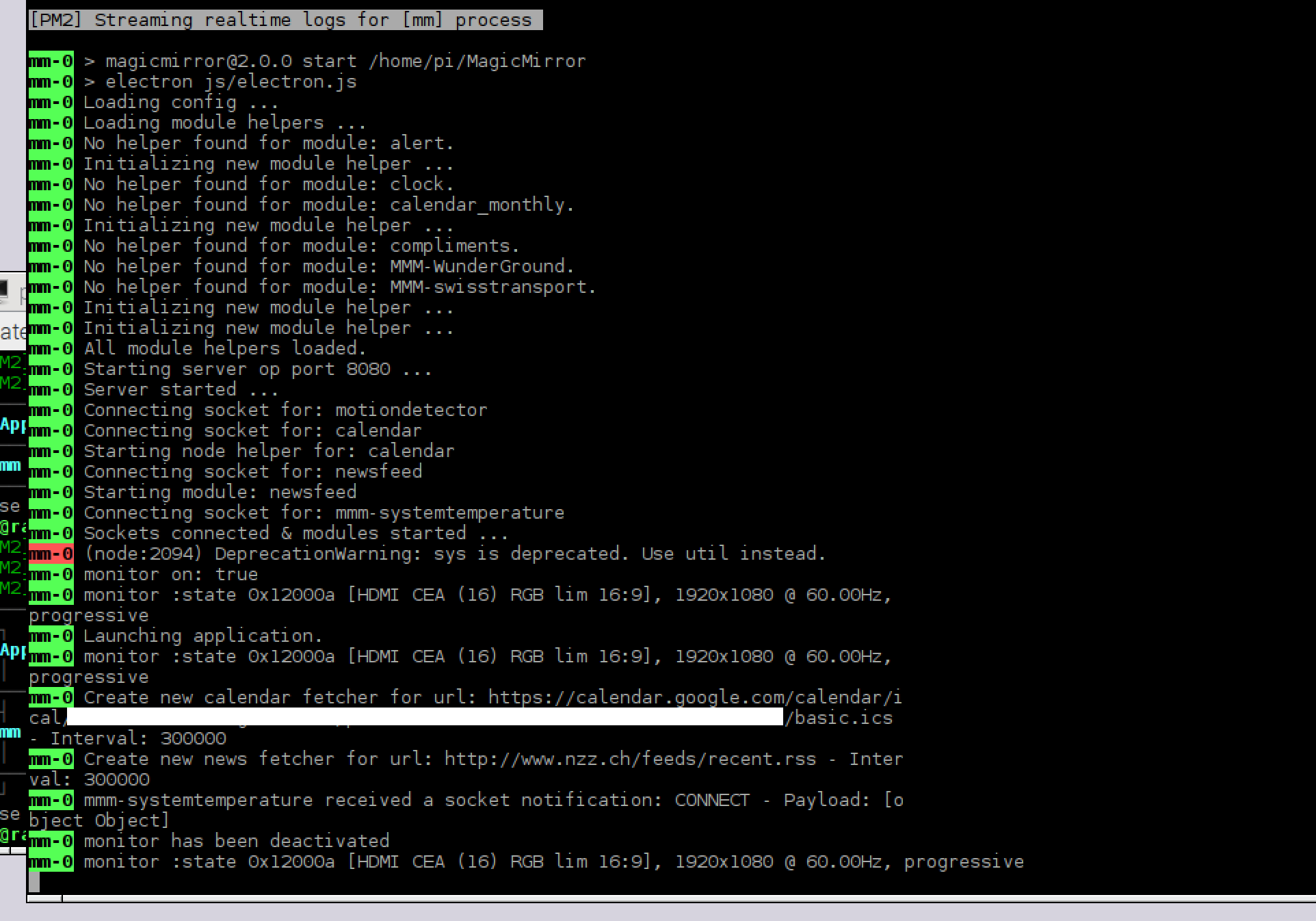
          @trividar can you post your pm2 logs

          Please create a github issue if you need help, so I can keep track

          1 Reply Last reply Reply Quote 0
          • T Offline
            trividar
            last edited by

            I will… I will be in one hour at home and I will post it.

            1 Reply Last reply Reply Quote 0
            • T Offline
              trividar
              last edited by paviro

              my logs without any changes:

              0_1472320635006_Bildschirmfoto 2016-08-27 um 19.55.48.png

              If I put in the therminal:

              /opt/vc/bin/tvservice --preferred && sudo chvt 6 && sudo chvt 7

              my monitor turn on and my mirror work…

              1 Reply Last reply Reply Quote 0
              • A Offline
                alexyak
                last edited by alexyak

                Was your monitor on when you were starting the magic mirror?

                1 Reply Last reply Reply Quote 0
                • cowboysdudeC Offline
                  cowboysdude Module Developer @alexyak
                  last edited by paviro

                  @alexyak Yes these both work via ssh
                  Switch off:

                  /opt/vc/bin/tvservice -o

                  Switch-on:

                  /opt/vc/bin/tvservice --preferred && sudo chvt 6 && sudo chvt 7

                  When I do this:
                  /opt/vc/bin/tvservice -s

                  I get this:
                  state 0x12000a [HDMI CEA (16) RGB lim 16:9], 1920x1080 @ 60.00Hz, progressive

                  But when I start the mirror with the normal npm start and it runs until the motion sensor time then the screen goes out and won’t come back on…


                  Note from admin: Please use Markdown on code snippets for easier reading!

                  A 1 Reply Last reply Reply Quote 0
                  • A Offline
                    alexyak @cowboysdude
                    last edited by

                    @cowboysdude could you please run the magic mirror from the terminal until it switches off and doesn’t switch back on, bring the monitor back with the command and post your screenshot of the terminal?

                    cowboysdudeC 1 Reply Last reply Reply Quote 0
                    • cowboysdudeC Offline
                      cowboysdude Module Developer @alexyak
                      last edited by

                      @alexyak Do you mean SSH or shell on the mirror?

                      A 1 Reply Last reply Reply Quote 0
                      • A Offline
                        alexyak
                        last edited by paviro

                        Could you also run the /opt/vc/bin/tvservice -s when your monitor is on?

                        cowboysdudeC 1 Reply Last reply Reply Quote 0
                        • cowboysdudeC Offline
                          cowboysdude Module Developer @alexyak
                          last edited by paviro

                          @alexyak I did … I posted it above LOL

                          /opt/vc/bin/tvservice -s

                          I get this:
                          state 0x12000a [HDMI CEA (16) RGB lim 16:9], 1920x1080 @ 60.00Hz, progressive

                          A 1 Reply Last reply Reply Quote 0
                          • A Offline
                            alexyak @cowboysdude
                            last edited by

                            @cowboysdude on the RPI.

                            cowboysdudeC 1 Reply Last reply Reply Quote 1
                            • cowboysdudeC Offline
                              cowboysdude Module Developer @alexyak
                              last edited by paviro

                              @alexyak /opt/vc/bin/tvservice -s

                              I get this:
                              state 0x12000a [HDMI CEA (16) RGB lim 16:9], 1920x1080 @ 60.00Hz, progressive

                              That’s where I was running it from and I still get the above

                              1 Reply Last reply Reply Quote 0
                              • A Offline
                                alexyak @cowboysdude
                                last edited by

                                @cowboysdude so just to confirm, when you run the status command on the RPI you get this output, right?

                                cowboysdudeC 1 Reply Last reply Reply Quote 0
                                • cowboysdudeC Offline
                                  cowboysdude Module Developer @alexyak
                                  last edited by

                                  @alexyak Yes that is correct

                                  1 Reply Last reply Reply Quote 0
                                  • cowboysdudeC Offline
                                    cowboysdude Module Developer
                                    last edited by

                                    Is it logging anywhere that we may be able to see what it’s doing exactly?

                                    1 Reply Last reply Reply Quote 0
                                    • A Offline
                                      alexyak
                                      last edited by

                                      It’s logging in the terminal window that you use to start the mirror with npm start. You can also start the mirror with “npm start dev” with dev tools and there will be the output from the chromium.

                                      strawberry 3.141S 1 Reply Last reply Reply Quote 0
                                      • cowboysdudeC Offline
                                        cowboysdude Module Developer
                                        last edited by

                                        This post is deleted!
                                        1 Reply Last reply Reply Quote 0
                                        • cowboysdudeC Offline
                                          cowboysdude Module Developer
                                          last edited by paviro

                                          /home/pi$ /opt/vc/bin/tvservice -o
                                          Powering off HDMI
                                          /home/pi$ /opt/vc/bin/tvservice -s
                                          state 0x120002 [TV is off]

                                          That is off
                                          /opt/vc/bin/tvservice --preferred && sudo chvt 6 && sudo chvt 7
                                          Turns it back on… no problem…this is the tvservice -s when it’s on…

                                          state 0x12000a [HDMI CEA (16) RGB lim 16:9], 1920x1080 @ 60.00Hz, progressive

                                          So somewhere it’s broken in the module itself… it does turn it off [even if you’re standing in front of it moving…which means to me it’s not taping into the camera looking for motion] but not back on… I know the camera is working I’ve taken pictures with it…

                                          So what is getting lost after it turns off? And how or where can I look to see what it’s loggin? I can’t look at the terminal window when it’s off because to do that you’d have to turn it back on… and you can’t.

                                          1 Reply Last reply Reply Quote 0
                                          • strawberry 3.141S Offline
                                            strawberry 3.141 Project Sponsor Module Developer @alexyak
                                            last edited by

                                            @alexyak the logs from @trividar show only state hdmi on never hdmi off, so maybe the check for on off is not correct in the module, as an idea create a dev branch where you don’t check with tvservice -s, just set a variable hdmi true/false after you running a command and starting with true in the start method of the nodehelper and let them checkout this branch

                                            Please create a github issue if you need help, so I can keep track

                                            A 1 Reply Last reply Reply Quote 1

                                            Hello! It looks like you're interested in this conversation, but you don't have an account yet.

                                            Getting fed up of having to scroll through the same posts each visit? When you register for an account, you'll always come back to exactly where you were before, and choose to be notified of new replies (either via email, or push notification). You'll also be able to save bookmarks and upvote posts to show your appreciation to other community members.

                                            With your input, this post could be even better 💗

                                            Register Login

                                            • 1
                                            • 2
                                            • 3
                                            • 4
                                            • 5
                                            • 10
                                            • 11
                                            • 2 / 11
                                            • First post
                                              Last post
                                            Enjoying MagicMirror? Please consider a donation!
                                            MagicMirror created by Michael Teeuw.
                                            Forum managed by Sam, technical setup by Karsten.
                                            This forum is using NodeBB as its core | Contributors
                                            Contact | Privacy Policy