Read the statement by Michael Teeuw here.
MMM-Todoist - Your todoist tasks on your mirror
-
I really liked paviro’s Wunderlist Module but I use Todoist. So I create a Module based on his work to display your Todoist todos on your mirror. It’s still relatively rough and only supports filtering by a single project, but I’ll increase the functionality when I get some more time.
-
I entered all the info in the module and I’m getting no list…
Where are you getting the :
lists: [ 166564794 ]From because I’m not seeing that anywhere…
-
This is what the readme on github says:
Array of 1 ProjectId you want to display. Possible values: array Default value: [ 166564794 ] Example: [166564794] Getting the Todoist ProjectID: 1) Go to Todoist (Log in if you aren't) 2) Click on a Project in the left menu 3) Your browser URL will change to something like "https://todoist.com/app?lang=en&v=818#project%2F166564897" Everything after %2F is the Project ID. In this case "166564897" -
That’s what I thought but when I put the list on the mirror… it’s blank :*(
Here’s what mine looks like [everything but the list number I changed ;)]
https://en.todoist.com/app?lang=en&v=820#project%2F111531720
so I used [ 111531720 ]
The list is blank on the mirror…
Here’s my config:
module: 'MMM-Todoist', position: 'bottom_bar', // This can be any of the regions. Best results in left or right regions. header: 'Work List', // This is optional config: { // See 'Configuration options' for more information. accessToken: 'xxxxxxxxxxxxxxxxxxxxxxxxxxxxxxxxxxxxxxxxx', maximumEntries: 3, interval: 30, lists: [ 111531720 ], fade: true -
Same issue, any progress?
-
@JoeSpencer said in MMM-Todoist - Your todoist tasks on your mirror:
Same issue, any progress?
None for me… I gave up on it and moved on… never got an answer to the issues I had. NO big deal… People get busy… I don’t get upset I just find a different way :)
-
@cowboysdude @JoeSpencer did you guys create an issue on github? the author is offline since over a month on this forum here, maybe you can reach him better on github
-
@strawberry-3.141 could have I guess but at the time I was onto others things…
So when I get home I’ll do that! Enjoying the sun here: https://www.google.com/maps/place/Galveston,+TX/@29.2187539,-95.2067404,10z/data=!3m1!4b1!4m5!3m4!1s0x863f59c8c4059259:0xe58b03c9b9eaecc1!8m2!3d29.3013479!4d-94.7976958
-
@cowboysdude @strawberry-3-141 I switched to the Wunderlist module that this was based on and encountered the same issue, but I fixed it by generating a new token from the API.
Maybe that would work for Todoist as well.
-
@JoeSpencer Yes I did that with a weather module and that fixed that also… sometimes those things just happen :)
-
Hi,
I had the same problem, I don’t know if you’ve solved it yet but for me it turned out to be some simple mistakes.
I thought I had followed the instructions to the letter, but actually at first I hadn’t cloned the module into the modules folder, just into the mirror folder. After cursing my own stupidity for that I carried on a while but still couldn’t get it working.
I tried the tip for generating a new access token but that wasn’t it. I then realised that when I cloned the module (into the correct folder!) I missed the small but vital step of navigating into the new folder before carrying out npm install.
I don’t know if any of you have made mistakes as daft as mine, but I finally got it working so thought I’d let you know.
Hope it helps someone!
-
Yop,
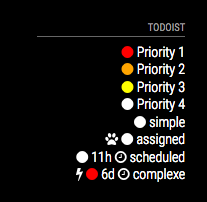
I’m looking to add the reminder and priority level (with an icon) Has anyone did something like that with this module ?
in the fetcher i found where to add the var
	 for (var i = 0; i < JSON.parse(body).items.length; i++) {
		 if (JSON.parse(body).items[i].project_id == listID) {
			 items.push(JSON.parse(body).items[i].content);
			 items.push(JSON.parse(body).items[i].priority);
			 items.push(JSON.parse(body).items[i].due_date_utc);
but i dont know how to use the answer
-
Yop,
i did it :-)
-
Thanks for this module. Dropped Wunderlist in favor of this via Alexa integration.
https://blog.todoist.com/2016/10/13/todoist-alexa-integration/
-
@tidus5 This looks awesome - how did you implement? I just got my basic Todoist module running today
-
Im having some issues with this module. When I add items to my todoist - it appears in the module, but when I mark them as completed , or they are deleted - the items dont come off the module - unless I add a new item onto the list. At that point, they disappear, and the new item gets added.
Very odd.
Ive raised it as an issue here: https://github.com/cbrooker/MMM-Todoist/issues/3
Any ideas why this might be?
-
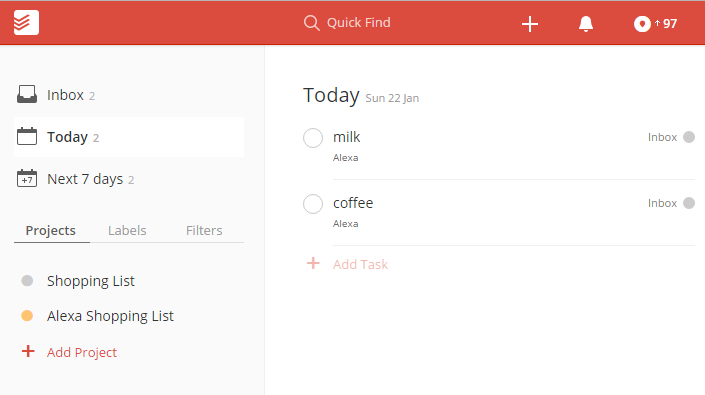
@dinkybluebug245 hi i added this module , when i add a item with Alexa voice , it gets added to inbox i could not able to get lists: [ 1234567890 ] number from the url
-
@shashank click inbox instead of today
-
I wanted to try to fix this module, but I have found that using the .ical export from todoist works great with official calendar module, so…
-
Hi, all,
Does anybody know how to sort this list? It adds new items at the bottom, so if there is no more room on the mirror, I can’t see them. I can’t figure out how to sort them on Todoist’s site easier, except alphabetically. I am using the “Alexa Shopping List” list in Todoist
Thanks



Hello! It looks like you're interested in this conversation, but you don't have an account yet.
Getting fed up of having to scroll through the same posts each visit? When you register for an account, you'll always come back to exactly where you were before, and choose to be notified of new replies (either via email, or push notification). You'll also be able to save bookmarks and upvote posts to show your appreciation to other community members.
With your input, this post could be even better 💗
Register Login