MagicMirror Forum
    • Recent
    • Tags
    • Unsolved
    • Solved
    • MagicMirror² Repository
    • Documentation
    • 3rd-Party-Modules
    • Donate
    • Discord
    • Register
    • Login
    A New Chapter for MagicMirror: The Community Takes the Lead
    Read the statement by Michael Teeuw here.

    MMM-Todoist - Your todoist tasks on your mirror

    Scheduled Pinned Locked Moved Productivity
    76 Posts 37 Posters 107.0k Views 39 Watching
    Loading More Posts
    • Oldest to Newest
    • Newest to Oldest
    • Most Votes
    Reply
    • Reply as topic
    Log in to reply
    This topic has been deleted. Only users with topic management privileges can see it.
    • tidus5T Offline
      tidus5 @shutterclick
      last edited by tidus5

      Yop,

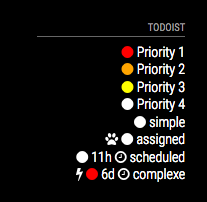
      I’m looking to add the reminder and priority level (with an icon) Has anyone did something like that with this module ?

      in the fetcher i found where to add the var

      	 for (var i = 0; i < JSON.parse(body).items.length; i++) {
      		 if (JSON.parse(body).items[i].project_id == listID) {
      			 items.push(JSON.parse(body).items[i].content);
      			 items.push(JSON.parse(body).items[i].priority);	
      			 items.push(JSON.parse(body).items[i].due_date_utc);	
      

      but i dont know how to use the answer

      1 Reply Last reply Reply Quote 0
      • tidus5T Offline
        tidus5
        last edited by

        Yop,

        i did it :-)

        0_1482838855804_Screen Shot 2016-12-27 at 12.37.48.png

        H D 2 Replies Last reply Reply Quote 3
        • O Offline
          onetwankyfive
          last edited by

          Thanks for this module. Dropped Wunderlist in favor of this via Alexa integration.

          https://blog.todoist.com/2016/10/13/todoist-alexa-integration/

          1 Reply Last reply Reply Quote 0
          • H Offline
            hhaiii @tidus5
            last edited by

            @tidus5 This looks awesome - how did you implement? I just got my basic Todoist module running today

            1 Reply Last reply Reply Quote 0
            • D Offline
              dinkybluebug245
              last edited by dinkybluebug245

              Im having some issues with this module. When I add items to my todoist - it appears in the module, but when I mark them as completed , or they are deleted - the items dont come off the module - unless I add a new item onto the list. At that point, they disappear, and the new item gets added.

              Very odd.

              Ive raised it as an issue here: https://github.com/cbrooker/MMM-Todoist/issues/3

              Any ideas why this might be?

              S 1 Reply Last reply Reply Quote 0
              • S Offline
                shashank @dinkybluebug245
                last edited by

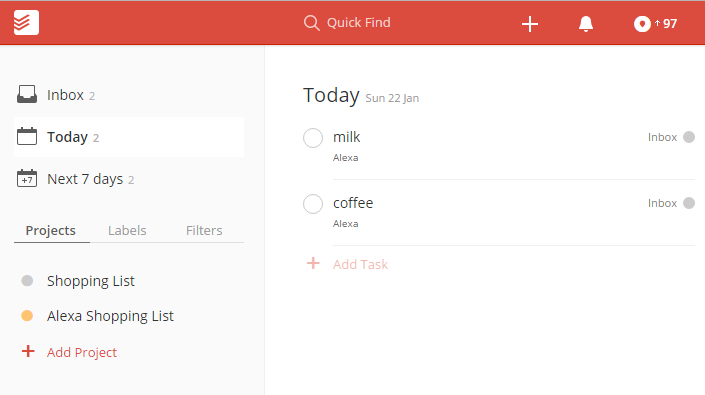
                @dinkybluebug245 hi i added this module , when i add a item with Alexa voice , it gets added to inbox i could not able to get lists: [ 1234567890 ] number from the url
                0_1485081729902_upload-88d37e27-8aef-4d99-b321-07b2922e3c9d

                O 1 Reply Last reply Reply Quote 0
                • O Offline
                  onetwankyfive @shashank
                  last edited by

                  @shashank click inbox instead of today

                  1 Reply Last reply Reply Quote 0
                  • D Offline
                    dakipro
                    last edited by

                    I wanted to try to fix this module, but I have found that using the .ical export from todoist works great with official calendar module, so…

                    1 Reply Last reply Reply Quote 0
                    • P Offline
                      psm9
                      last edited by

                      Hi, all,

                      Does anybody know how to sort this list? It adds new items at the bottom, so if there is no more room on the mirror, I can’t see them. I can’t figure out how to sort them on Todoist’s site easier, except alphabetically. I am using the “Alexa Shopping List” list in Todoist

                      Thanks

                      S 1 Reply Last reply Reply Quote 0
                      • S Offline
                        svonbentzel @psm9
                        last edited by

                        @psm9 said in MMM-Todoist - Your todoist tasks on your mirror:

                        Hi, all,

                        Does anybody know how to sort this list? It adds new items at the bottom, so if there is no more room on the mirror, I can’t see them. I can’t figure out how to sort them on Todoist’s site easier, except alphabetically. I am using the “Alexa Shopping List” list in Todoist

                        Thanks

                        Hy, please can you post your working config for the Todoist module?
                        My Module is starting but the Todos are blank ;-)

                        Thank you

                        1 Reply Last reply Reply Quote 0
                        • S Offline
                          svonbentzel
                          last edited by

                          i have figured out why the list is blank:

                          in MMM-Todoist.js is the default

                          
                          Module.register("MMM-Todoist", {
                          
                           defaults: {
                          	maximumEntries: 10,
                          	lists: ["inbox"],
                          	interval: 60,
                          	fade: true,
                          	fadePoint: 0.25
                           },


                          maybe a result of the fork from Wunderlist.

                          you can see that with pm2 logs

                          0|mm       | Create new todo fetcher for list: inbox - Interval: 60000
                          

                          the added value in the config.js doesn’t accept.

                          so I write the correct list in MMM-Todoist.js

                           defaults: {
                          	maximumEntries: 10,
                          	lists: ["198511455"],
                          	interval: 60,
                          	fade: true,
                          	fadePoint: 0.25
                          

                          save and restart MM with pm2 restart mm

                          then look at pm2 logs

                          |mm       | Create new todo fetcher for list: 198511455 - Interval: 60000
                          

                          tadaaaa ;-) the correct fetcher ^^

                          but why the config.js variable not in use — I don’t know ;-)

                          yawnsY 1 Reply Last reply Reply Quote 0
                          • yawnsY Offline
                            yawns Moderator @svonbentzel
                            last edited by

                            @svonbentzel
                            how does your config for this module look like?

                            1 Reply Last reply Reply Quote 0
                            • S Offline
                              svonbentzel
                              last edited by

                              Hi,

                              {
                              				        module: 'MMM-Todoist',
                              				        position: 'bottom_center',  // This can be any of the regions. Best results in left or right regions.
                              				        header: 'Todoist', // This is optional
                              				        config: { // See 'Configuration options' for more information.
                              				            accessToken: 'c7xxxxxxxxxxxxxxxxxxxxxxxe3b54',
                              							//lists: ["edit in MMM-Todoist.js"],
                              				            maximumEntries: 10,
                              				            interval: 60,
                              				            fade: true,
                              				      }
                              				    },
                              

                              this is my config.js

                              you must edit the /home/pi/MagicMirror/modules/MMM-Todois/MMM-Todoist.js

                              edit the list entry from list: [“inbox”] to [“1234567890”]

                              defaults: {
                              	maximumEntries: 10,
                              	lists: ["198511455"],
                              	interval: 60,
                              	fade: true,
                              	fadePoint: 0.25
                              
                              1 Reply Last reply Reply Quote 0
                              • T Offline
                                tkotz8621
                                last edited by tkotz8621

                                Hi psm9… I’m fairly new to MagicMirror but I’ve been digging into the Todoist module to sort the list by due date. Did anyone ever answer your question? I didn’t see any responses to your sort question so I started digging into it and added code to the fetcher.js for MMM-Todoist.
                                I’ve got it working on my mirror and when I add something that is due today… it will put it in the proper sequence on the next refresh. My JS skills are limited so the code may be made more efficient but it works. I’ll contact the Todoist author to see if I can add it to the module.

                                P.S. I tried adding the code to this message but it did not take all 50 lines or so.

                                1 Reply Last reply Reply Quote 0
                                • C Offline
                                  cbrooker
                                  last edited by

                                  Hey guys,

                                  Very sorry that I have been MIA. I’ve been really busy with work and haven’t been able to give this any attention. I see a number of bugs and improvements in the thread. If you could submit your improvements and changes as Pull Request to the github repo, I’ll merge them in and everyone can have them. If not, I’ll try to add them in soon.

                                  https://github.com/cbrooker/MMM-Todoist

                                  Thanks,
                                  Chris

                                  1 Reply Last reply Reply Quote 0
                                  • C Offline
                                    Chiumanfu
                                    last edited by Chiumanfu

                                    Is this module working for people? I’ve tried this one, MMM-Wunderlist and MMM-Wunderlist-Enhanced. They all behave similar. Some times they load the list, sometimes they don’t. When I add an item on my PC, it doesn’t show up in MM until reboot. I see reports of issues like this across all three modules. Since they are based on MMM-Wunderlist, maybe there is a problem in the base code?

                                    Here’s the log
                                    Create new todo fetcher for list: 2153843199 - Interval: 60000
                                    0|mm | Whoops! There was an uncaught exception…
                                    0|mm | TypeError: Cannot read property ‘substring’ of null
                                    0|mm | at Request._callback (/home/pi/MagicMirror/modules/MMM-Todoist/fetcher.js:69:35)
                                    0|mm | at Request.self.callback (/home/pi/MagicMirror/modules/MMM-Todoist/node_modules/request/request.js:188:22)
                                    0|mm | at emitTwo (events.js:106:13)
                                    0|mm | at Request.emit (events.js:191:7)
                                    0|mm | at Request. (/home/pi/MagicMirror/modules/MMM-Todoist/node_modules/request/request.js:1171:10)
                                    0|mm | at emitOne (events.js:96:13)
                                    0|mm | at Request.emit (events.js:188:7)
                                    0|mm | at IncomingMessage. (/home/pi/MagicMirror/modules/MMM-Todoist/node_modules/request/request.js:1091:12)
                                    0|mm | at Object.onceWrapper (events.js:290:19)
                                    0|mm | at emitNone (events.js:91:20)
                                    0|mm | MagicMirror will not quit, but it might be a good idea to check why this happened. Maybe no internet connection?
                                    0|mm | If you think this really is an issue, please open an issue on GitHub: https://github.com/MichMich/MagicMirror/issues

                                    1 Reply Last reply Reply Quote 0
                                    • C Offline
                                      Chiumanfu
                                      last edited by

                                      Been testing a lot and figured out if you have entries in your list that have no due date assigned, then it crashes the module. If all entries in the list have dates then it behaves well. Gonna dig into the code to see where the bug is.

                                      1 Reply Last reply Reply Quote 0
                                      • S Offline
                                        Sunburned
                                        last edited by

                                        So I have to be one of those… I am having the same problem guys but you guessed it, my list is showing blank.

                                        I have confirmed the node_modules is in the MMM-todoist folder and I updated the list number in MMM-Todoist.js. i have confirmed my access token is correct and my lists numbers are correct

                                        My MMM-Todoist.js is:

                                        Module.register("MMM-Todoist", {
                                        
                                         defaults: {
                                                      maximumEntries: 10,
                                                      lists: ["my list number here"],
                                                      interval: 60,
                                                      fade: false,
                                                      fade point: 0.25
                                        },
                                        

                                        My config.js is:

                                        {
                                                     module: 'MMM-Todoist',
                                                     position: 'bottom_left',
                                                     header: 'Todoist'
                                                     config: { // See 'Configuration options' for more information.
                                                     accessToken: 'my access token here',
                                                                      // lists: ["edit in MMM-Todoist.js"],
                                                     maximumEntries: 60,
                                                     interval: 60,
                                                     fade: false
                                                     }
                                        },
                                        

                                        If anyone has any thoughts i would be really appreciative. Been tearing out my 4 remaining hairs.

                                        M T joela85J 3 Replies Last reply Reply Quote 0
                                        • M Offline
                                          MasonT3 @Sunburned
                                          last edited by

                                          @Sunburned What worked for me is if when adding TODOs on the app or website if you give them a due date they will then show up on the mirror, in the order that they are due from soonest to latest.

                                          S T 2 Replies Last reply Reply Quote 0
                                          • D Offline
                                            dakipro
                                            last edited by

                                            Just a tip, todoist now integrates natively with google calendar, then the “official” calendar plugin works just fine.
                                            (even before todoist integrated with google, i used todoist iCal link with official calendar plugin, set manual refresh and it just works great).


                                            S 1 Reply Last reply Reply Quote 1

                                            Hello! It looks like you're interested in this conversation, but you don't have an account yet.

                                            Getting fed up of having to scroll through the same posts each visit? When you register for an account, you'll always come back to exactly where you were before, and choose to be notified of new replies (either via email, or push notification). You'll also be able to save bookmarks and upvote posts to show your appreciation to other community members.

                                            With your input, this post could be even better 💗

                                            Register Login

                                            • 1
                                            • 2
                                            • 3
                                            • 4
                                            • 2 / 4
                                            • First post
                                              Last post
                                            Enjoying MagicMirror? Please consider a donation!
                                            MagicMirror created by Michael Teeuw.
                                            Forum managed by Sam, technical setup by Karsten.
                                            This forum is using NodeBB as its core | Contributors
                                            Contact | Privacy Policy