Read the statement by Michael Teeuw here.
Internet Monitor

-
@bugsounet - Pretty sure.
Here is the GitHub discussion on the problem.EtA: I am having problems installing MMM-SpeedTest.
PS J:\Development\MagicMirrors\MagicMirror\modules> git clone https://github.com/bugsounet/MMM-SpeedTest Cloning into 'MMM-SpeedTest'... remote: Enumerating objects: 78, done. remote: Counting objects: 100% (78/78), done. remote: Compressing objects: 100% (66/66), done. remote: Total 78 (delta 33), reused 33 (delta 10), pack-reused 0 Unpacking objects: 100% (78/78), 120.78 KiB | 46.00 KiB/s, done. PS J:\Development\MagicMirrors\MagicMirror\modules> cd .\MMM-SpeedTest\ PS J:\Development\MagicMirrors\MagicMirror\modules\MMM-SpeedTest> npm install > MMM-SpeedTest@1.0.3 preinstall J:\Development\MagicMirrors\MagicMirror\modules\MMM-SpeedTest > installer/preinstall.sh 'installer' is not recognized as an internal or external command, operable program or batch file. npm ERR! code ELIFECYCLE npm ERR! errno 1 npm ERR! MMM-SpeedTest@1.0.3 preinstall: `installer/preinstall.sh` npm ERR! Exit status 1 npm ERR! npm ERR! Failed at the MMM-SpeedTest@1.0.3 preinstall script. npm ERR! This is probably not a problem with npm. There is likely additional logging output above. npm WARN Local package.json exists, but node_modules missing, did you mean to install? -
@bhepler said in Internet Monitor:
@bugsounet - Pretty sure.
Here is the GitHub discussion on the problem.EtA: I am having problems installing MMM-SpeedTest.
PS J:\Development\MagicMirrors\MagicMirror\modules> git clone https://github.com/bugsounet/MMM-SpeedTest Cloning into 'MMM-SpeedTest'... remote: Enumerating objects: 78, done. remote: Counting objects: 100% (78/78), done. remote: Compressing objects: 100% (66/66), done. remote: Total 78 (delta 33), reused 33 (delta 10), pack-reused 0 Unpacking objects: 100% (78/78), 120.78 KiB | 46.00 KiB/s, done. PS J:\Development\MagicMirrors\MagicMirror\modules> cd .\MMM-SpeedTest\ PS J:\Development\MagicMirrors\MagicMirror\modules\MMM-SpeedTest> npm install > MMM-SpeedTest@1.0.3 preinstall J:\Development\MagicMirrors\MagicMirror\modules\MMM-SpeedTest > installer/preinstall.sh 'installer' is not recognized as an internal or external command, operable program or batch file. npm ERR! code ELIFECYCLE npm ERR! errno 1 npm ERR! MMM-SpeedTest@1.0.3 preinstall: `installer/preinstall.sh` npm ERR! Exit status 1 npm ERR! npm ERR! Failed at the MMM-SpeedTest@1.0.3 preinstall script. npm ERR! This is probably not a problem with npm. There is likely additional logging output above. npm WARN Local package.json exists, but node_modules missing, did you mean to install?-
the real question is why using v1.6.2 version of SpeedTest library?
v2.2.0 solve the problem ;) -
I’m glad that you use windows :anguished_face:
Now retry with your pi, a linux env or … with wsl under windows ;)
and result is:
bugsounet@bugsounet-Kubuntu:~/MagicMirror/modules/MMM-SpeedTest$ npm install

> MMM-SpeedTest@1.0.3 preinstall
> installer/preinstall.sh

Welcome to MMM-SpeedTest v1.0.3


> MMM-SpeedTest@1.0.3 postinstall
> installer/postinstall.sh

Building SpeedTest module, please wait...

added 325 packages, and audited 326 packages in 53s

28 packages are looking for funding
  run `npm fund` for details
Screenshot:
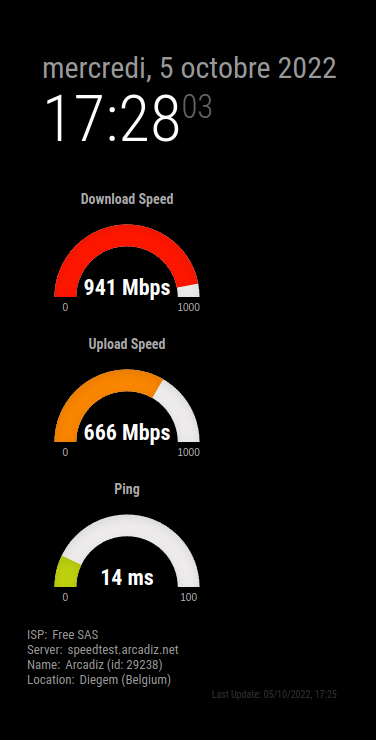
Logs in debug mode:
[05.10.2022 17:25.06.650] [LOG]   [SPEED] Ping: 15.028 ms
[05.10.2022 17:25.06.664] [LOG]   [SPEED] Ping: 14.293 ms
[05.10.2022 17:25.06.679] [LOG]   [SPEED] Ping: 14.511 ms
[05.10.2022 17:25.06.694] [LOG]   [SPEED] Ping: 14.89 ms
[05.10.2022 17:25.06.709] [LOG]   [SPEED] Ping: 14.293 ms
[05.10.2022 17:25.06.778] [LOG]   [SPEED] Download: 32.84 Mbps
[05.10.2022 17:25.06.879] [LOG]   [SPEED] Download: 355.00 Mbps
[05.10.2022 17:25.06.980] [LOG]   [SPEED] Download: 676.91 Mbps
[05.10.2022 17:25.07.081] [LOG]   [SPEED] Download: 705.64 Mbps
[05.10.2022 17:25.07.182] [LOG]   [SPEED] Download: 820.78 Mbps
[05.10.2022 17:25.07.282] [LOG]   [SPEED] Download: 834.69 Mbps
[05.10.2022 17:25.07.383] [LOG]   [SPEED] Download: 853.44 Mbps
[05.10.2022 17:25.07.484] [LOG]   [SPEED] Download: 866.43 Mbps
[05.10.2022 17:25.07.584] [LOG]   [SPEED] Download: 870.64 Mbps
[05.10.2022 17:25.07.685] [LOG]   [SPEED] Download: 874.48 Mbps
[05.10.2022 17:25.07.786] [LOG]   [SPEED] Download: 880.78 Mbps
[05.10.2022 17:25.07.886] [LOG]   [SPEED] Download: 893.37 Mbps
[05.10.2022 17:25.07.987] [LOG]   [SPEED] Download: 893.14 Mbps
[05.10.2022 17:25.08.087] [LOG]   [SPEED] Download: 894.11 Mbps
[05.10.2022 17:25.08.193] [LOG]   [SPEED] Download: 904.29 Mbps
[05.10.2022 17:25.08.294] [LOG]   [SPEED] Download: 906.78 Mbps
[05.10.2022 17:25.08.395] [LOG]   [SPEED] Download: 906.16 Mbps
[05.10.2022 17:25.08.496] [LOG]   [SPEED] Download: 906.67 Mbps
[05.10.2022 17:25.08.596] [LOG]   [SPEED] Download: 910.98 Mbps
[05.10.2022 17:25.08.697] [LOG]   [SPEED] Download: 907.16 Mbps
[05.10.2022 17:25.08.798] [LOG]   [SPEED] Download: 913.58 Mbps
[05.10.2022 17:25.08.898] [LOG]   [SPEED] Download: 915.22 Mbps
[05.10.2022 17:25.08.999] [LOG]   [SPEED] Download: 917.29 Mbps
[05.10.2022 17:25.09.100] [LOG]   [SPEED] Download: 917.54 Mbps
[05.10.2022 17:25.09.200] [LOG]   [SPEED] Download: 923.37 Mbps
[05.10.2022 17:25.09.301] [LOG]   [SPEED] Download: 926.05 Mbps
[05.10.2022 17:25.09.401] [LOG]   [SPEED] Download: 927.50 Mbps
[05.10.2022 17:25.09.502] [LOG]   [SPEED] Download: 927.97 Mbps
[05.10.2022 17:25.09.603] [LOG]   [SPEED] Download: 929.40 Mbps
[05.10.2022 17:25.09.703] [LOG]   [SPEED] Download: 929.66 Mbps
[05.10.2022 17:25.09.804] [LOG]   [SPEED] Download: 926.78 Mbps
[05.10.2022 17:25.09.904] [LOG]   [SPEED] Download: 930.49 Mbps
[05.10.2022 17:25.10.005] [LOG]   [SPEED] Download: 930.71 Mbps
[05.10.2022 17:25.10.106] [LOG]   [SPEED] Download: 932.94 Mbps
[05.10.2022 17:25.10.206] [LOG]   [SPEED] Download: 931.10 Mbps
[05.10.2022 17:25.10.307] [LOG]   [SPEED] Download: 930.12 Mbps
[05.10.2022 17:25.10.408] [LOG]   [SPEED] Download: 930.82 Mbps
[05.10.2022 17:25.10.509] [LOG]   [SPEED] Download: 934.36 Mbps
[05.10.2022 17:25.10.610] [LOG]   [SPEED] Download: 934.38 Mbps
[05.10.2022 17:25.10.710] [LOG]   [SPEED] Download: 935.15 Mbps
[05.10.2022 17:25.10.811] [LOG]   [SPEED] Download: 936.19 Mbps
[05.10.2022 17:25.10.911] [LOG]   [SPEED] Download: 936.61 Mbps
[05.10.2022 17:25.11.012] [LOG]   [SPEED] Download: 936.98 Mbps
[05.10.2022 17:25.11.112] [LOG]   [SPEED] Download: 937.93 Mbps
[05.10.2022 17:25.11.213] [LOG]   [SPEED] Download: 936.38 Mbps
[05.10.2022 17:25.11.313] [LOG]   [SPEED] Download: 938.21 Mbps
[05.10.2022 17:25.11.415] [LOG]   [SPEED] Download: 937.11 Mbps
[05.10.2022 17:25.11.516] [LOG]   [SPEED] Download: 937.77 Mbps
[05.10.2022 17:25.11.616] [LOG]   [SPEED] Download: 938.16 Mbps
[05.10.2022 17:25.11.717] [LOG]   [SPEED] Download: 938.23 Mbps
[05.10.2022 17:25.11.817] [LOG]   [SPEED] Download: 938.43 Mbps
[05.10.2022 17:25.11.918] [LOG]   [SPEED] Download: 938.74 Mbps
[05.10.2022 17:25.12.021] [LOG]   [SPEED] Download: 937.84 Mbps
[05.10.2022 17:25.12.122] [LOG]   [SPEED] Download: 938.20 Mbps
[05.10.2022 17:25.12.224] [LOG]   [SPEED] Download: 938.04 Mbps
[05.10.2022 17:25.12.325] [LOG]   [SPEED] Download: 937.89 Mbps
[05.10.2022 17:25.12.425] [LOG]   [SPEED] Download: 938.51 Mbps
[05.10.2022 17:25.12.526] [LOG]   [SPEED] Download: 938.58 Mbps
[05.10.2022 17:25.12.627] [LOG]   [SPEED] Download: 938.34 Mbps
[05.10.2022 17:25.12.727] [LOG]   [SPEED] Download: 938.65 Mbps
[05.10.2022 17:25.12.828] [LOG]   [SPEED] Download: 939.11 Mbps
[05.10.2022 17:25.12.928] [LOG]   [SPEED] Download: 938.53 Mbps
[05.10.2022 17:25.13.029] [LOG]   [SPEED] Download: 939.36 Mbps
[05.10.2022 17:25.13.129] [LOG]   [SPEED] Download: 939.51 Mbps
[05.10.2022 17:25.13.230] [LOG]   [SPEED] Download: 939.49 Mbps
[05.10.2022 17:25.13.330] [LOG]   [SPEED] Download: 939.04 Mbps
[05.10.2022 17:25.13.431] [LOG]   [SPEED] Download: 939.68 Mbps
[05.10.2022 17:25.13.532] [LOG]   [SPEED] Download: 939.33 Mbps
[05.10.2022 17:25.13.632] [LOG]   [SPEED] Download: 940.43 Mbps
[05.10.2022 17:25.13.733] [LOG]   [SPEED] Download: 940.43 Mbps
[05.10.2022 17:25.13.833] [LOG]   [SPEED] Download: 940.66 Mbps
[05.10.2022 17:25.13.934] [LOG]   [SPEED] Download: 940.26 Mbps
[05.10.2022 17:25.14.034] [LOG]   [SPEED] Download: 940.80 Mbps
[05.10.2022 17:25.14.135] [LOG]   [SPEED] Download: 939.99 Mbps
[05.10.2022 17:25.14.235] [LOG]   [SPEED] Download: 941.33 Mbps
[05.10.2022 17:25.14.336] [LOG]   [SPEED] Download: 940.78 Mbps
[05.10.2022 17:25.14.437] [LOG]   [SPEED] Download: 940.89 Mbps
[05.10.2022 17:25.14.537] [LOG]   [SPEED] Download: 939.52 Mbps
[05.10.2022 17:25.14.638] [LOG]   [SPEED] Download: 941.53 Mbps
[05.10.2022 17:25.14.739] [LOG]   [SPEED] Download: 940.80 Mbps
[05.10.2022 17:25.14.839] [LOG]   [SPEED] Download: 941.01 Mbps
[05.10.2022 17:25.14.939] [LOG]   [SPEED] Download: 940.96 Mbps
[05.10.2022 17:25.14.973] [LOG]   [SPEED] Download: 940.70 Mbps
[05.10.2022 17:25.15.326] [LOG]   [SPEED] Upload: 571.68 Mbps
[05.10.2022 17:25.15.427] [LOG]   [SPEED] Upload: 596.83 Mbps
[05.10.2022 17:25.15.527] [LOG]   [SPEED] Upload: 615.15 Mbps
[05.10.2022 17:25.15.629] [LOG]   [SPEED] Upload: 624.40 Mbps
[05.10.2022 17:25.15.729] [LOG]   [SPEED] Upload: 631.77 Mbps
[05.10.2022 17:25.15.830] [LOG]   [SPEED] Upload: 636.47 Mbps
[05.10.2022 17:25.15.931] [LOG]   [SPEED] Upload: 640.61 Mbps
[05.10.2022 17:25.16.031] [LOG]   [SPEED] Upload: 644.16 Mbps
[05.10.2022 17:25.16.132] [LOG]   [SPEED] Upload: 646.54 Mbps
[05.10.2022 17:25.16.233] [LOG]   [SPEED] Upload: 648.11 Mbps
[05.10.2022 17:25.16.334] [LOG]   [SPEED] Upload: 650.32 Mbps
[05.10.2022 17:25.16.434] [LOG]   [SPEED] Upload: 647.69 Mbps
[05.10.2022 17:25.16.535] [LOG]   [SPEED] Upload: 649.62 Mbps
[05.10.2022 17:25.16.636] [LOG]   [SPEED] Upload: 648.94 Mbps
[05.10.2022 17:25.16.736] [LOG]   [SPEED] Upload: 649.55 Mbps
[05.10.2022 17:25.16.837] [LOG]   [SPEED] Upload: 650.22 Mbps
[05.10.2022 17:25.16.938] [LOG]   [SPEED] Upload: 651.65 Mbps
[05.10.2022 17:25.17.039] [LOG]   [SPEED] Upload: 652.29 Mbps
[05.10.2022 17:25.17.139] [LOG]   [SPEED] Upload: 655.27 Mbps
[05.10.2022 17:25.17.240] [LOG]   [SPEED] Upload: 657.43 Mbps
[05.10.2022 17:25.17.341] [LOG]   [SPEED] Upload: 658.04 Mbps
[05.10.2022 17:25.17.442] [LOG]   [SPEED] Upload: 658.68 Mbps
[05.10.2022 17:25.17.542] [LOG]   [SPEED] Upload: 667.05 Mbps
[05.10.2022 17:25.17.643] [LOG]   [SPEED] Upload: 667.09 Mbps
[05.10.2022 17:25.17.744] [LOG]   [SPEED] Upload: 667.35 Mbps
[05.10.2022 17:25.17.844] [LOG]   [SPEED] Upload: 667.49 Mbps
[05.10.2022 17:25.17.945] [LOG]   [SPEED] Upload: 666.08 Mbps
[05.10.2022 17:25.18.046] [LOG]   [SPEED] Upload: 665.42 Mbps
[05.10.2022 17:25.18.146] [LOG]   [SPEED] Upload: 665.49 Mbps
[05.10.2022 17:25.18.247] [LOG]   [SPEED] Upload: 665.38 Mbps
[05.10.2022 17:25.18.347] [LOG]   [SPEED] Upload: 666.88 Mbps
[05.10.2022 17:25.18.449] [LOG]   [SPEED] Upload: 667.77 Mbps
[05.10.2022 17:25.18.549] [LOG]   [SPEED] Upload: 668.95 Mbps
[05.10.2022 17:25.18.649] [LOG]   [SPEED] Upload: 669.30 Mbps
[05.10.2022 17:25.18.750] [LOG]   [SPEED] Upload: 669.47 Mbps
[05.10.2022 17:25.18.851] [LOG]   [SPEED] Upload: 669.47 Mbps
[05.10.2022 17:25.18.952] [LOG]   [SPEED] Upload: 669.74 Mbps
[05.10.2022 17:25.19.052] [LOG]   [SPEED] Upload: 669.76 Mbps
[05.10.2022 17:25.19.153] [LOG]   [SPEED] Upload: 668.45 Mbps
[05.10.2022 17:25.19.254] [LOG]   [SPEED] Upload: 668.17 Mbps
[05.10.2022 17:25.19.354] [LOG]   [SPEED] Upload: 666.30 Mbps
[05.10.2022 17:25.19.455] [LOG]   [SPEED] Upload: 664.88 Mbps
[05.10.2022 17:25.19.556] [LOG]   [SPEED] Upload: 663.21 Mbps
[05.10.2022 17:25.19.658] [LOG]   [SPEED] Upload: 663.05 Mbps
[05.10.2022 17:25.19.758] [LOG]   [SPEED] Upload: 662.47 Mbps
[05.10.2022 17:25.19.859] [LOG]   [SPEED] Upload: 662.36 Mbps
[05.10.2022 17:25.19.960] [LOG]   [SPEED] Upload: 661.67 Mbps
[05.10.2022 17:25.20.060] [LOG]   [SPEED] Upload: 662.10 Mbps
[05.10.2022 17:25.20.161] [LOG]   [SPEED] Upload: 662.88 Mbps
[05.10.2022 17:25.20.262] [LOG]   [SPEED] Upload: 663.91 Mbps
[05.10.2022 17:25.20.362] [LOG]   [SPEED] Upload: 664.68 Mbps
[05.10.2022 17:25.20.463] [LOG]   [SPEED] Upload: 664.89 Mbps
[05.10.2022 17:25.20.564] [LOG]   [SPEED] Upload: 664.85 Mbps
[05.10.2022 17:25.20.665] [LOG]   [SPEED] Upload: 665.50 Mbps
[05.10.2022 17:25.20.765] [LOG]   [SPEED] Upload: 665.55 Mbps
[05.10.2022 17:25.20.866] [LOG]   [SPEED] Upload: 665.73 Mbps
[05.10.2022 17:25.20.967] [LOG]   [SPEED] Upload: 665.68 Mbps
[05.10.2022 17:25.21.067] [LOG]   [SPEED] Upload: 664.60 Mbps
[05.10.2022 17:25.21.169] [LOG]   [SPEED] Upload: 666.06 Mbps
[05.10.2022 17:25.21.269] [LOG]   [SPEED] Upload: 666.48 Mbps
[05.10.2022 17:25.21.370] [LOG]   [SPEED] Upload: 666.63 Mbps
[05.10.2022 17:25.21.471] [LOG]   [SPEED] Upload: 666.78 Mbps
[05.10.2022 17:25.21.571] [LOG]   [SPEED] Upload: 666.96 Mbps
[05.10.2022 17:25.21.672] [LOG]   [SPEED] Upload: 666.07 Mbps
[05.10.2022 17:25.21.774] [LOG]   [SPEED] Upload: 665.40 Mbps
[05.10.2022 17:25.21.874] [LOG]   [SPEED] Upload: 665.38 Mbps
[05.10.2022 17:25.21.974] [LOG]   [SPEED] Upload: 665.46 Mbps
[05.10.2022 17:25.22.076] [LOG]   [SPEED] Upload: 665.60 Mbps
[05.10.2022 17:25.22.177] [LOG]   [SPEED] Upload: 665.71 Mbps
[05.10.2022 17:25.22.244] [LOG]   [SPEED] Upload: 665.87 Mbps
[05.10.2022 17:25.22.898] [LOG]   [SPEED] Result: {
  timestamp: 2022-10-05T15:25:22.000Z,
  ping: { jitter: 0.353, latency: 14.293 },
  download: { bandwidth: 117587756, bytes: 958119880, elapsed: 8206 },
  upload: { bandwidth: 83233466, bytes: 596812565, elapsed: 7211 },
  packetLoss: 0,
  isp: 'Free SAS',
  interface: {
    internalIp: '192.168.0.138',
    name: 'enp3s0',
    macAddr: 'xx:xx:xx:xx:xx:x',
    isVpn: false,
    externalIp: 'xxx.xxx.xxx'
  },
  server: {
    id: 29238,
    name: 'Arcadiz',
    location: 'Diegem',
    country: 'Belgium',
    host: 'speedtest.arcadiz.net',
    port: 8080,
    ip: '185.160.128.145'
  },
  result: {
    id: '82415bc5-9799-4ec2-949c-b1a69d1774a4',
    url: 'https://www.speedtest.net/result/c/82415bc5-9799-4ec2-949c-b1a69d1774a4'
  }
}
[05.10.2022 17:25.22.899] [LOG]   [SPEED] Done
[05.10.2022 17:25.22.899] [LOG]   [SPEED] Update Programmed
I’m not a magician :)
I just follow speedtest v2.2.0 usage in the ReadMe file of this library.Note: That you can see in debug: https://www.speedtest.net/result/c/82415bc5-9799-4ec2-949c-b1a69d1774a4 is the shared link of this speedtest
It’s the same like MM² return -
-
@bugsounet said in Internet Monitor:
installer/preinstall.sh
the problem is under windows, this path is bad as it doesn’t have \
unfortunately NPM is NOT platform neutral
you can’t even do it with a .cmd (and bash script without .sh) in the current folder…
as windows would work, but then linux would fail as current folder not in the PATHI wrote a js file that could be launched on either and launch the right thing
but a pain in the rear
-
That why i says :
I’m glad that you use windows 😧
Now retry with your pi, a linux env or … with wsl under windows 😉 -
@bugsounet said in Internet Monitor:
the real question is why using v1.6.2 version of SpeedTest library?
Because using speedtest-net after this version requires a code change.
Now retry with your pi, a linux env or … with wsl under windows
Oh, great. I develop on Windows so I can make use of a proper IDE. Fine. I’ll dig up something.
@sdetweil said in Internet Monitor:
the problem is under windows, this path is bad as it doesn’t have
unfortunately NPM is NOT platform neutralSigh. It figures. Not tonight, but I’ll work on it in the near future.
-
Okay, I believe I have it fixed for this module. Please switch over to the
2022-fixbranch and give it a pull & install. Let me know if it works for you and I’ll issue a PR.Big shout out to @bugsounet for figuring it out and from whom I blatantly stole a lot of code. At some point I remembered that this isn’t my module and I’m just trying to get it functioning again. It helped me ignore a lot of things I would have changed.
-
@bhepler Where do you find the update? is this the right link? https://github.com/ronny3050/internet-monitor
-
@mayfield - No. Install from here: https://github.com/BrianHepler/internet-monitor.git
If you have installed from Ronny3050’s repository, you’ll need to delete that folder and clone from mine.
-
I suppose more detailed instructions are in order. To use my development branch of my fork of the
internet-monitormodule, give this a try.cd MagicMirror/modules sudo rm -rf internet-monitor git clone https://github.com/BrianHepler/internet-monitor.git cd internet-monitor switch 2022-fix npm installOnce it is done, you should be able to use your existing configuration. Let me know if you encounter any problems.
-
My fork of the module has been updated and the new code has been merged to the master branch. Let me know if you hit any issues with it.
-
S sdetweil referenced this topic on
-
@bhepler what do you mean by switch 2022-fix?
I am trying to get this module working but it seems the config file example has an error in it or something because when i run the mirror after copy pasting the module array it gives the error page -
@ebourne I had a branch of the internet-monitor module that I was using to test a fix. Before I merge it into the master branch, I wanted people to try out the fix and give me some feedback. I guess I never got around to deleting it. The master branch had the updates, so it’s not a big deal.
Thanks to @KristjanESPERANTO I have a new fix in place and it has been merged into the master branch. It should be easy to update the module:
- get an SSH connection to your mirror.
- navigate to the
internet-monitorfolder - pull the latest updates with
git pull - install the changes with
npm install
Restart your magic mirror process and it should work again.
Just a quick note: I don’t really maintain this module. I created a fork to get it running a long time ago after the author abandoned it. I try to help out from time to time, but this is not one of my priorities. Hence, the README file and example configuration are a bit of a mess.

Hello! It looks like you're interested in this conversation, but you don't have an account yet.
Getting fed up of having to scroll through the same posts each visit? When you register for an account, you'll always come back to exactly where you were before, and choose to be notified of new replies (either via email, or push notification). You'll also be able to save bookmarks and upvote posts to show your appreciation to other community members.
With your input, this post could be even better 💗
Register Login