Read the statement by Michael Teeuw here.
Deutsche Anleitung MagicMirror auf RaspberryPi 3
-
@35110 es gibt ein neues Update&Install script von sdetweil. Ich denke er hat dieses Problem in seinem Skript gelöst.
Eine Lösung ist jedenfalls die package-lock.json zu löschen.
rm package-lock.json
git pull && npm install
Es gibt für Node.js-Projekte eine
package.jsonund einepackage-lock.json. Diepackage.jsongibt Informationen was bei Ausführen onnpm installinstalliert werden soll. Diepackage-lock.jsonschreibt die Version der jeweils installierten Pakete fest. Wenn man sie gelöscht hat wird sie einfach neu erstellt.Eigentlich sollte die Datei nicht von git versioniert werden. Warum trotzdem immer mal wieder dieser Fehler auftritt kann ich nicht sagen.
-
@35110 u can erase the package-lock.json file
The git pull again
-
@lavolp3 und @sdetweil vielen Dank! Wenn man das weiß, lassen sich auch die Module Updaten. Die haben mir nämlich auch folgenden Fehler angezeigt, als ich versucht habe sie zu updaten:
Aktualisiere 7cf5bb3..a40302e
error: Ihre lokalen Änderungen in den folgenden Dateien würden durch den Merge
überschrieben werden:
        package.json
Bitte committen oder stashen Sie Ihre Änderungen, bevor Sie mergen.
Abbruch
einfach die package.json gelöscht und git pull ernuet ausgeführ und es lief.
Zum Schluss noch pm2 restart und alles ist aktuell ;-)
-
@35110 said in Deutsche Anleitung MagicMirror auf RaspberryPi 3:
einfach die package.json gelöscht und git pull ernuet ausgeführ und es lief.
Zum Schluss noch pm2 restart und alles ist aktuellin the future (every 3 months) , please use my nre upgrade_script, it should take care of all this for you
see https://github.com/sdetweil/MagicMirror_scriptsread the readme for the instructions
upgrade is a two part process, once to test (so you know if there will be problems than need to be addressed) and once to execute. -
@35110 wenn solche Meldungen erscheinen und man eigentlich nichts geändert haben wollte kann man auch eingeben
git reset --hardDas löscht alle lokalen Änderungen und setzt das lokale repository auf den vorherigen Stand des Quell-Repositories zurück. Dann kann man mit
git pullwieder wie gewohnt updaten. -
Hallo Gemeinde
Ich bin Neu im Thema MM.
Ich habe erfolgreich 2 Google Calender in der Config im Calendermodul eingetragen.
Einmal meinen ind den von meiner Frau.
Nun möchte ich die Kalendersymbole anders farbig darstellen.
Ich weis leider nicht wo ich was einstellen muss.
Habe schon ein paar Vorschläge aus der Googlesuche versucht, leider hat sich aber nie was geändert. Nun benötige ich mal die Hilfe hier im Forum.
Danke -
@radioman hallo und willkommen! Willst du NUR die Symbole einfärben und bei jedem Kalender ein anderes Symbol?
Das würde evtl gehen indem du in der calendar configuration die OptionsymbolClassnutzt. Siehe hier
Gib mit dieser Option dem Symbol eine spezifische Klasse, z.b. “mein_cal” und “frau_ihr_cal”Dann in der custom.css kannst du folgendes machen:
.calendar .mein_cal {
    color: 'red'
}

.calendar .frau_ihr_cal {
    color: 'green'
}
…oder so.
Wenn du die ganze Zeile einfärben willst gehts einfach mit der
coloroption des Kalenders. -
Vielen Dank für die Anleitung
Ich habe da sjetzt folgendermaßen gelößt
Ich habe in der Config folgendes gemachtmodule: "calendar", header: "Kalender", position: "top_left", config: { colored: true, coloredSymbolOnly: true, timeformat: 'absolute', urgency: 0, getRelative: 0, calendars: [ { symbol: "calendar-check", color: 'green', url: "https://calendar.google.com/calendar/ical/xxxxxxxxxxx.ics", }, { symbol: "calendar-check-o", url: "https://calendar.google.com/calendar/ical/xxxxxxxxxxxx.ics" } ] } }, {und in der Custom.css
.fa.fa-calendar-check {
  color: green
}
.fa.fa-calendar-check-o {
  color: fuchsia
}
Wobei die Farbe grün aus der Custom.css nicht übernommen wurde.
Deswegen inbder Config manuell eingetragen.Jetzt ist mein Kalender mit grünem Symbol und der meine Frau in Fuchsia
-
Nabend Forum
Ich möchte gerne bei der Kalenderanzeige erst das Datum mit der Zeit und dann das Event anzeigen lassen.
Die Anzeige mit Datum und Zeit habe ich schon hinbekommen und in der calendar.js eingestellt.
Nur die Position vor dem Event noch nicht.Danke
-
@radioman es gibt den ‘dateheaders’ Modus.
Ist der nicht was? Siehe README. -
Hi
Leider kenne ich den dateheader Modus nicht
und eine Readme habe ich auch nicht gefunden
Bitte nähere Infos
Danke -
@radioman https://docs.magicmirror.builders/modules/calendar.html
Die Readme steht in diesem Fall bei den default Modules als gesammelten Dokumentation auf der MagicMirror Homepage, und sonst bei auf der github Seite des Moduls.Ich meinte die config-Option ‘timeFormat’
-
@lavolp3 Die Readme habe ich schon mal gelesen.
Ich hatte “timeFormat” in der config.js schon auf absolute gesetzt und in der calendar.js das Format geändert sihe hier:Module.register("calendar", { // Define module defaults defaults: { maximumEntries: 10, // Total Maximum Entries maximumNumberOfDays: 365, displaySymbol: true, defaultSymbol: "calendar", // Fontawesome Symbol see https://fontawesome.com/cheatsheet?from=io showLocation: false, displayRepeatingCountTitle: false, defaultRepeatingCountTitle: "", maxTitleLength: 25, maxLocationTitleLength: 25, wrapEvents: false, // wrap events to multiple lines breaking at maxTitleLength wrapLocationEvents: false, maxTitleLines: 3, maxEventTitleLines: 3, fetchInterval: 5 * 60 * 1000, // Update every 5 minutes. animationSpeed: 2000, fade: true, urgency: 7, timeFormat: "absolute", dateFormat: "Do MM YY", dateEndFormat: "LT", fullDayEventDateFormat: "Do MM YY", showEnd: false, getRelative: 6, fadePoint: 0.25, // Start on 1/4th of the list. hidePrivate: false, hideOngoing: false, colored: false, coloredSymbolOnly: false, tableClass: "small", calendars: [Das Format hat sich auch erfolgreich geändert.
Nun möchte ich aber erst das Symbol, dann das Datum und dann den Calendereintrag (z.B. Arztbesuch) anzeigen lassen.
Bisher war erst das Calender Symbol dann kam der Termin und dann das Datum.
Wo kann mann die Rheinfolger festlegen.Danke
-
P.S.
Ich weis leider nicht was "dateheaders"bei timeFormat bewirkt -
@radioman Warum änderst du die calendar.js? Tu das nicht wenn nicht unbedingt nötig, du wirst Probleme beim Update bekommen.
Für deine spezifische config ist allein die config.js zuständig.Für dein Problem müsstest du jedoch um zum Ziel zu kommen wirklich die calendar.js manipulieren.
Ich müsste abe rnoch nachschauen wo.“dateheaders” setzt alle Termine eines Tages unter das Datum als Überschrift. Also:
31.08.
Termin 1 16:00
Termin 2 18:00
01.09.
Termin 3 20:00
Termin 4 21:00 -
Ok danke für die schnelle Antwort bezüglich der Erklärung des “dateheaders”
jetzt erschein das auch logisch.
Aber die Sache mit der Änderung in der calendar.js wäre ich dankbar. -
Hallo Gemeinde
Hat jemand schon Erfahrung wie man mit dem Alexa Control Modul den Rain Radar ein und ausblenden lassen kann.
Ich habe wohl einen Code:///// Add this function to the modules you want to control with voice ////// notificationReceived: function (notification, payload) { if (notification === 'HIDE_RADAR') { this.hide(1000); } else if (notification === 'SHOW_RADAR') { this.show(1000); } }, });Ich hab das mal so probiert aber da Startet min MM nicht und ich bekommen den Scriptfehler Hinweis:
{ module: 'MMM-AlexaControl', position: 'bottom_left', config:{ image: false, pm2ProcessName: "mm", refresh: true, restart: true, reboot: false, monitorToggle: true, vcgencmd: 'vcgencmd', deviceName: "Spiegel", startPort: 12000, notificationReceived: function (notification, payload) { if (notification === 'HIDE_RADAR') { this.hide(1000); } else if (notification === 'SHOW_RADAR') { this.show(1000); } } }, -
@radioman Du müsstest die Reihenfolge der einzelnen Elemente in der
getDom()Funktion ändern.
Es wird immer ein Tabellenelement erzeugt (timeWrapper = document.createElement("td");) und nach Erzeugung an die Tabellenzeile angehängt: (eventWrapper.appendChild("timeWrapper"))Die appendChild Methoden geben an was wo liegt weil die Objekte einfach in der Reihenfolge im Code aneinander gereiht werden. Was zuerst kommt wird zuerst angehängt.
So kannst du versuchen die Reihenfolge zu ändern indem du folgende Zeile verschiebst:eventWrapper.appendChild(titleWrapper);aus Zeile 284 in Zeile 377.
Dann sollte später dort stehen
eventWrapper.appendChild(timeWrapper);
eventWrapper.appendChild(titleWrapper);
Du hast also das Anhängen des Titlefeldes zeitlich hinter das Zeitfeld verschoben, sodass die Zeit in der Tabelle vor dem Titel stehen sollte.
Das funktioniert nicht im dateheaders Modus.
KEINE GARANTIE dass es wirklich funktioniert. Probier es aus und gib Rückmeldung.
Du kannst wenn es nicht funktioniert ALLE (!) lokalen Änderungen (ausser die an den zusätzlich installierten Modulen) zurückdrehen mit
cd ~/MagicMirror git reset --hard -
Hal leider nich geklappt:confused_face:
-
Habe noch einmal eine Frage
Beim booten des Magic Mirror kommen alle meine Module so wie es sei soll.
Ich kann mit Alexa und der Remote Funktion den Regenradar aus und einschalten.
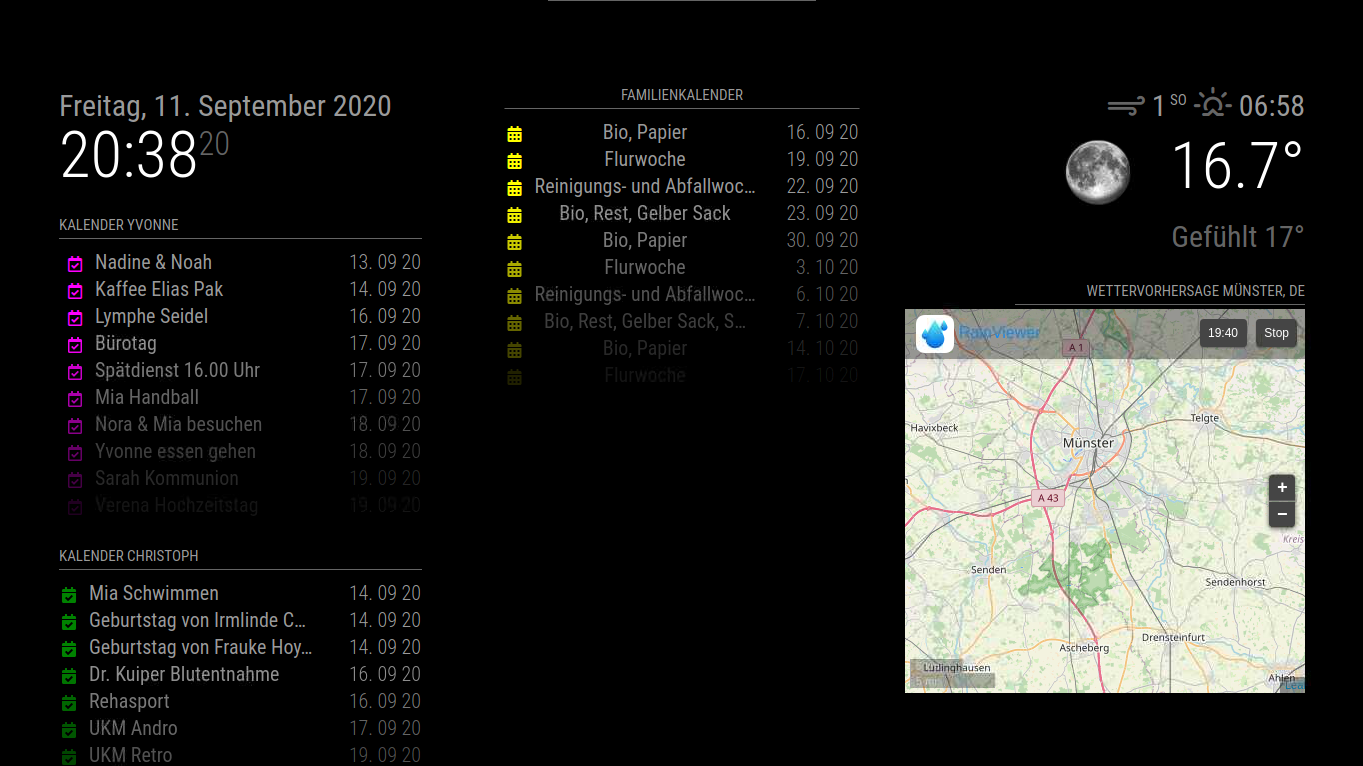
Nun möchte ich gerne das beim Boozten der Regenradar erst mal nicht angezeigt wird und erst auf anforderung mit Alexa oder Remote der Regenradar eingeblendet wird.
Wie kann mann das umsetzen.
Und kann mann den mittleren Kalender auf die gleiche höhe angleichen wie der erste linke Kalender?
Danke schon mal

Hello! It looks like you're interested in this conversation, but you don't have an account yet.
Getting fed up of having to scroll through the same posts each visit? When you register for an account, you'll always come back to exactly where you were before, and choose to be notified of new replies (either via email, or push notification). You'll also be able to save bookmarks and upvote posts to show your appreciation to other community members.
With your input, this post could be even better 💗
Register Login