Read the statement by Michael Teeuw here.
MMM-NOAA
-
Hey everyone, I am kind of new to this, but think i get the basics
I got the module installed by entering the following commands
cd MagicMirror/modules
git clone https://github.com/cowboysdude/MMM-NOAA.git
cd MMM-NOAA
npm installI then did the config as follows
Yet when it loads I dont see anything on my mirror
{ module: 'MMM-NOAA', postition: 'top_left', config: { apiKey: "4cc3880807c6aaa9", // https://www.wunderground.com/weather/api select the middle plan... airKey: "orBbd9wjdyTK6yp5R", // IF you want Air Quality Index pws1: "KMIWESTL11" , loco1: "Detroit/Us", } }, -
@kbostick88 This is what you need :)
    {
     module: 'MMM-NOAA',
    config: {
apiKey: "YOUR API KEY",
airKey: "YOUR API KEY",
pws1: "KNYELMIR13",
   }
  },
Don’t need the loco1 ;)
-
Thanks! I also wrote postition, instead of position. I got it working now. Thanks, module looks great!
-
Hello, I am a beginner in all this and I am trying to install the same module but the documentation is very poor.
Could you help me with a step-by-step guide?I got the module installed by entering the following commands
cd MagicMirror / modules
git clone https://github.com/cowboysdude/MMM-NOAA.git
What’s next after this?
I’m not sure if I have correctly executed this
cd MMM-NOAA
npm install.when I open config.js I can not see any of this.
{
module: ‘MMM-NOAA’,
postition: ‘top_left’,
config: {apiKey: "4cc3880807c6aaa9", // https://www.wunderground.com/weather/api select the middle plan... airKey: "orBbd9wjdyTK6yp5R", // IF you want Air Quality Index pws1: "KMIWESTL11" , loco1: "Detroit/Us", }},
Thank you for your help
-
@tadeus1975 You need to add this module in your
config.jsfile. It is located in the config folder in your MagicMirrors root folder. Just add the JSON Object and replace the keys with your keys. -
JSON Object
Thank you for your help @idoodler , I am an absolute beginner, after the installation I have this folder in modules, I know how to modify the file config.js, but you could tell me how to add the JSON Object, or where I find its syntax.
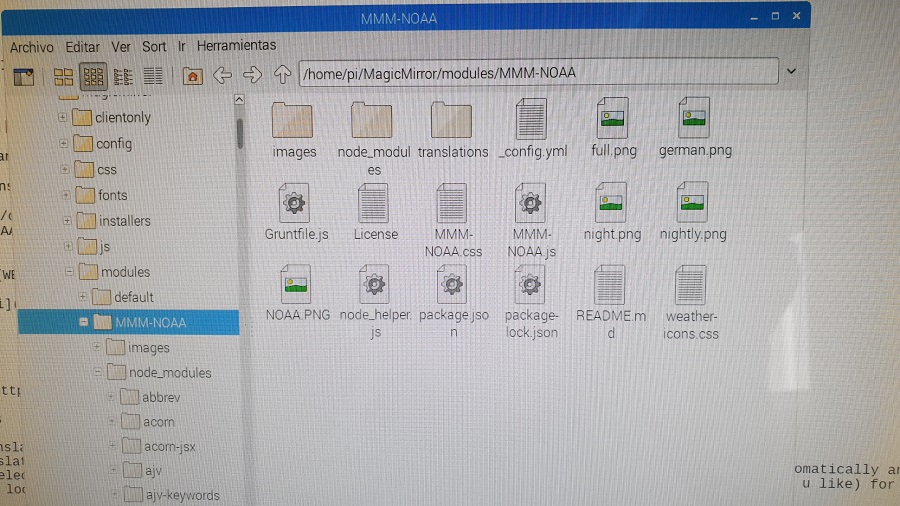
Thank you
-
@cowboysdude
How to change the default language?
I’ve seen a translation folder with some .json files so I created an it.json file to enable the italian translation. After that I added some lined to the MMM-NOAA.js file but it doesn’t work. Where’s my mistake? Thanks./* Magic Mirror * Module: MMM-NOAA * By cowboysdude and tbbear modified by barnosch */ var c = 0; var l = 1; var loco = ""; "use strict"; Module.register("MMM-NOAA", { // Module config defaults. defaults: { updateInterval: 70 * 60 * 1000, // every 10 minutes animationSpeed: 0, initialLoadDelay: 8000, rotateInterval: 20 * 1000, maxWidth: "100%", apiKey: "", airKey: "", loco1: "xxx", loco2: "xxx", loco3: "xxx", pws: "XXX", pws1: "xxx", pws2: "xxx", pws3: "xxx", langFile: { "en": "en-US", "de": "de-DE", "sv": "sv-SE", "es": "es-ES", "fr": "fr-FR", "zh_cn": "zh-CN", "da": "da", "nl": "nl-NL", "nb": "nb-NO", "it": "it-IT" }, langTrans: { "en": "EN", "de": "DL", "sv": "SW", "es": "SP", "fr": "FR", "zh_cn": "CN", "da": "DK", "nl": "NL", "nb": "NO", "it": "IT", }, levelTrans: { "1":"green", "2":"yellow", "3":"orange", "4":"red", } }, getTranslations: function() { return { en: "translations/en.json", da: "translations/da.json", sv: "translations/sv.json", de: "translations/de.json", es: "translations/es.json", fr: "translations/fr.json", zh_cn: "translations/zh_cn.json", nl: "translations/nl.json", nb: "translations/nb.json", it: "translations/it.json", }; },/* Magic Mirror Config Sample * * By Michael Teeuw http://michaelteeuw.nl * MIT Licensed. * * For more information how you can configurate this file * See https://github.com/MichMich/MagicMirror#configuration * */ var config = { address: "localhost", // Address to listen on, can be: // - "localhost", "127.0.0.1", "::1" to listen on loopback interface // - another specific IPv4/6 to listen on a specific interface // - "", "0.0.0.0", "::" to listen on any interface // Default, when address config is left out, is "localhost" port: 8080, ipWhitelist: ["127.0.0.1", "::ffff:127.0.0.1", "::1"], // Set [] to allow all IP addresses // or add a specific IPv4 of 192.168.1.5 : // ["127.0.0.1", "::ffff:127.0.0.1", "::1", "::ffff:192.168.1.5"], // or IPv4 range of 192.168.3.0 --> 192.168.3.15 use CIDR format : // ["127.0.0.1", "::ffff:127.0.0.1", "::1", "::ffff:192.168.3.0/28"], language: "it", timeFormat: 24, units: "metric", modules: [ { module: "alert", }, { module: 'MMM-NOAA', position : "top_right", language: "it", config: { apiKey: "xxxxxx", // https://www.wunderground.com/weather/api select the middle plan... airKey: "xxxxxxx" // IF you want Air Quality Index } }, -
@tadeus1975 Please read the readme file ;)
There is no longer any PWS just enter your apiKey and airKey…that’s all.
-
@tadeus1975 Please check out the Readme. You need to add this object to to
/home/pi/MagicMirror/config/config.js -
@tadeus1975 I assume you have never added any module, you can post your config if this is the case and I may be able to send you the correct config.js
-
Any suggestion about changing the default language and using the Italian?
-
@hriereb As far I see Italian is not supported. You can contribute by adding the italian translation for MMM-NOAA.
-
JS@hriereb said in MMM-NOAA:
@cowboysdude
How to change the default language?
I’ve seen a translation folder with some .json files so I created an it.json file to enable the italian translation. After that I added some lined to the MMM-NOAA.js file but it doesn’t work. Where’s my mistake? Thanks./* Magic Mirror * Module: MMM-NOAA * By cowboysdude and tbbear modified by barnosch */ var c = 0; var l = 1; var loco = ""; "use strict"; Module.register("MMM-NOAA", { // Module config defaults. defaults: { updateInterval: 70 * 60 * 1000, // every 10 minutes animationSpeed: 0, initialLoadDelay: 8000, rotateInterval: 20 * 1000, maxWidth: "100%", apiKey: "", airKey: "", loco1: "xxx", loco2: "xxx", loco3: "xxx", pws: "XXX", pws1: "xxx", pws2: "xxx", pws3: "xxx", langFile: { "en": "en-US", "de": "de-DE", "sv": "sv-SE", "es": "es-ES", "fr": "fr-FR", "zh_cn": "zh-CN", "da": "da", "nl": "nl-NL", "nb": "nb-NO", "it": "it-IT" }, langTrans: { "en": "EN", "de": "DL", "sv": "SW", "es": "SP", "fr": "FR", "zh_cn": "CN", "da": "DK", "nl": "NL", "nb": "NO", "it": "IT", }, levelTrans: { "1":"green", "2":"yellow", "3":"orange", "4":"red", } }, getTranslations: function() { return { en: "translations/en.json", da: "translations/da.json", sv: "translations/sv.json", de: "translations/de.json", es: "translations/es.json", fr: "translations/fr.json", zh_cn: "translations/zh_cn.json", nl: "translations/nl.json", nb: "translations/nb.json", it: "translations/it.json", }; },/* Magic Mirror Config Sample * * By Michael Teeuw http://michaelteeuw.nl * MIT Licensed. * * For more information how you can configurate this file * See https://github.com/MichMich/MagicMirror#configuration * */ var config = { address: "localhost", // Address to listen on, can be: // - "localhost", "127.0.0.1", "::1" to listen on loopback interface // - another specific IPv4/6 to listen on a specific interface // - "", "0.0.0.0", "::" to listen on any interface // Default, when address config is left out, is "localhost" port: 8080, ipWhitelist: ["127.0.0.1", "::ffff:127.0.0.1", "::1"], // Set [] to allow all IP addresses // or add a specific IPv4 of 192.168.1.5 : // ["127.0.0.1", "::ffff:127.0.0.1", "::1", "::ffff:192.168.1.5"], // or IPv4 range of 192.168.3.0 --> 192.168.3.15 use CIDR format : // ["127.0.0.1", "::ffff:127.0.0.1", "::1", "::ffff:192.168.3.0/28"], language: "it", timeFormat: 24, units: "metric", modules: [ { module: "alert", }, { module: 'MMM-NOAA', position : "top_right", language: "it", config: { apiKey: "xxxxxx", // https://www.wunderground.com/weather/api select the middle plan... airKey: "xxxxxxx" // IF you want Air Quality Index } },As I posted before I made an it.json file and put it in the translation folder. I’ve tried to update the MMM-NOAA.js
but it doesn’t seem to work. Can you help me finding my mistake? -
@hriereb May you please also post your
it.json -
{
“Atmospheric Conditions” : “Condizioni Atmosferiche”,
“Sunrise/Sunset”:“Alba/Tramonto”,
“AQI/UV/Wind”:“AQI/UV/Vento”,
“4 Day Forecast”:"Previsioni su quattro giorni ",
“Monday”: “Lunedì”,
“Tuesday”: “Martedì”,
“Wednesday”: "Mercoledì ",
“Thursday”: “Giovedì”,
“Friday”: “Venerdì”,
“Saturday”: “Sabato”,
“Sunday”: “Domenica”,
“Hours of Light”:“Ore di luce”,
“Last Updated”: “Ultimo aggiornamento”,
“Today”:“Oggi”,
“Mon”:“Lun”,
“Tue”:“Mar”,
“Wed”:“Mer”,
“Thu”:“Giov”,
“Fri”:“Ven”,
“Sat”:“Sab”,
“Sun”:“Dom”,
“Forecast”:“Previsioni”,
“Weather warning”:“Allerta meteo”,
“Night”: “Notte”
} -
@hriereb This is an invalide JSON, please replace
“with". -
@idoodler
Sorry,
I’m an absolute beginner, what do I have to replace? -
@hriereb As I already mentioned previously (but only halve correct) replace the characters
“(Left Double Quotation Mark) and”(Right Double Quotation Mark) with"(Quotation Mark).
NOTE: The characters you used are slightly tilted (italic).{ "Atmospheric Conditions" : "Condizioni Atmosferiche", "Sunrise/Sunset":"Alba/Tramonto", "AQI/UV/Wind":"AQI/UV/Vento", "4 Day Forecast":"Previsioni su quattro giorni ", "Monday": "Lunedì", "Tuesday": "Martedì", "Wednesday": "Mercoledì ", "Thursday": "Giovedì", "Friday": "Venerdì", "Saturday": "Sabato", "Sunday": "Domenica", "Hours of Light":"Ore di luce", "Last Updated": "Ultimo aggiornamento", "Today":"Oggi", "Mon":"Lun", "Tue":"Mar", "Wed":"Mer", "Thu":"Giov", "Fri":"Ven", "Sat":"Sab", "Sun":"Dom", "Forecast":"Previsioni", "Weather warning":"Allerta meteo", "Night": "Notte" } -
@idoodler
Ah ok, my tablet wrote a wrong character but I have the right version in my translation folder. What’s wrong with that? -
@hriereb You may try to lint your JSON then -> https://jsonlint.com/



Hello! It looks like you're interested in this conversation, but you don't have an account yet.
Getting fed up of having to scroll through the same posts each visit? When you register for an account, you'll always come back to exactly where you were before, and choose to be notified of new replies (either via email, or push notification). You'll also be able to save bookmarks and upvote posts to show your appreciation to other community members.
With your input, this post could be even better 💗
Register Login