Read the statement by Michael Teeuw here.
Changing icons of the modules Current Weather and Weather Forecast
-
Hello World,
I want try to change icons on the Current Weather and Weather Forecast.
I love the Icons of MMM Wunderground but i can’t have an API Key free from Weather Underground site. How i can do that ?
Best regard
Luciano -
Can we take animated Icon like this ? :https://www.behance.net/gallery/2235034/Animated-weather-icons
-
$19
-
Do you have something free ?
-
@lucianomag There is an issue with licensing, you would have to pay $19 per mirror.
-
Here are a few links to some I have found recently…
https://www.amcharts.com/free-animated-svg-weather-icons/
https://codepen.io/joshbader/pen/EjXgqr
https://365webresources.com/weather-icon-sets-shouldnt-miss/
http://blogsizzle.com/free-icons/animated-weather-icons-free-download/
https://codemyui.com/pure-css-animated-weather-icons/
https://codemyui.com/animated-weather-icons-in-css/
https://codepen.io/joshbader/full/EjXgqr
https://codepen.io/motorlatitude/pen/CyqDf
http://cssdeck.com/labs/2izqhmuv
hope it helps!!!
“Life’s Too Short To Dance With Ugly People”
Jim Hallock - 1995 -
thank you .
What do you thing about this one :
https://vclouds.deviantart.com/art/VClouds-Weather-Icons-179152045
Can we use then ?
-
@justjim1220 There are some realy awesome icons! I’d prefere https://codepen.io/joshbader/pen/EjXgqr
I was just looking on how to implement these icons in the MMM-forecast-io module and noticed, that there are way more possible conditions then available icons. And this is the case for most of the icon sets.
-
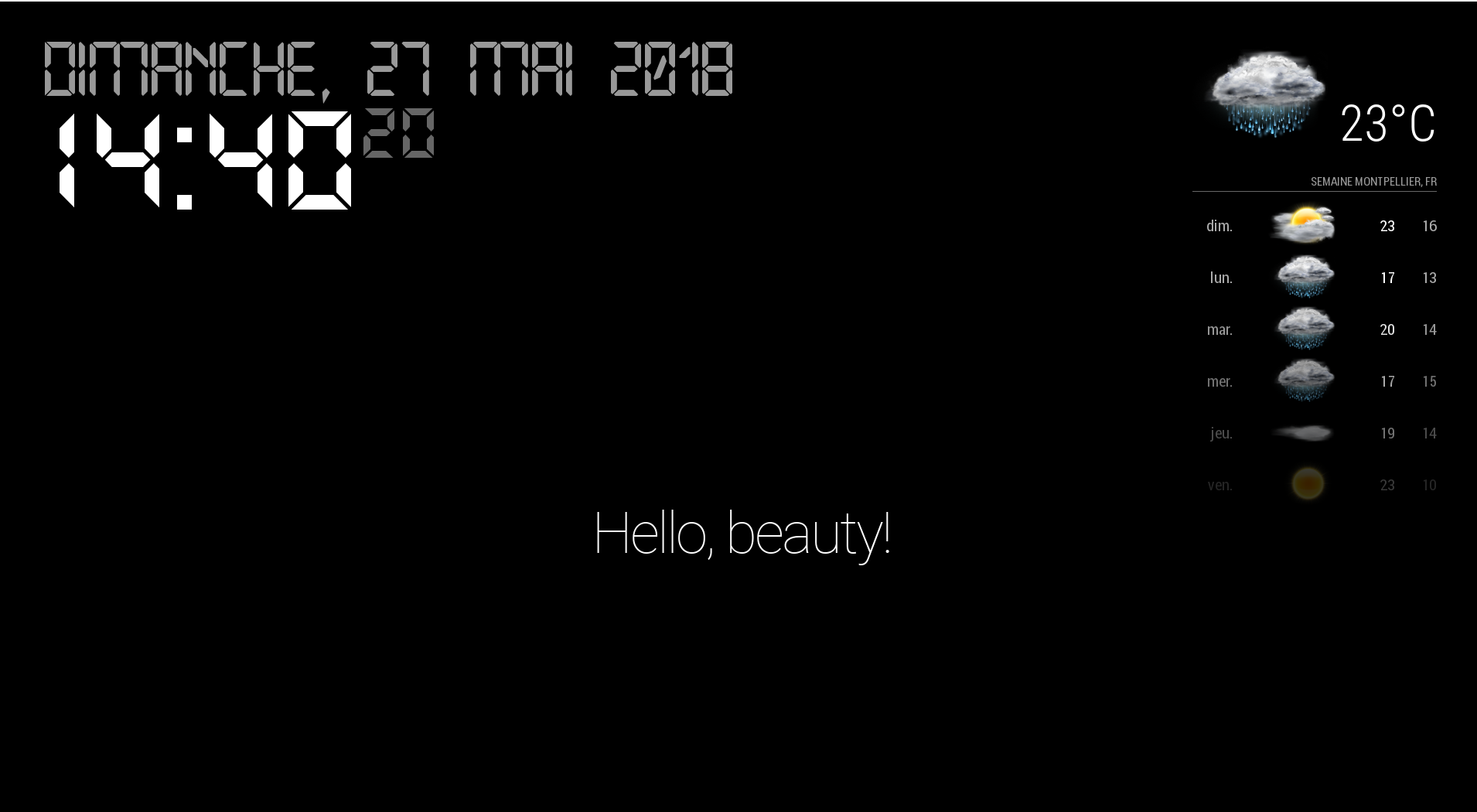
@lucianomag I try this set, its not bad !!
-
@Vulcain how did you implented the weather icons?
-
@PhilReis just a try but, here an example
I put all the icons in a directory called “icon” (/home/pi/MagicMirror/css/icon) in the css directory and i configure :
custom.css (/home/pi/MagicMirror/css/custom.css)
.wi-cloudy:before {

content: url("/css/icon/28.png");

}

.weatherforecast .wi-cloudy:before {

content: "";
height:60px;
width:87.5px;
display: block;
background-image : url("/css/icon/28.png");
background-size: 87.5px 60px;
}
config.js (/home/pi/MagicMirror/config/config.js)
		{
			module: "currentweather",
			position: "top_right",
			config: {
				location: "Montpellier",
				locationID: "2992166",
				appid: "XXXXXXXX",
				roundTemp: true,
				degreeLabel: true,
				showPeriod: false,
				onlyTemp: true,
				iconTable: {
    					'01d': 'wi-day-sunny',
    					'02d': 'wi-day-cloudy',
    					'03d': 'wi-cloudy',
    					'04d': 'wi-cloudy-windy',
    					'09d': 'wi-showers',
    					'10d': 'wi-rain',
    					'11d': 'wi-thunderstorm',
    					'13d': 'wi-snow',
    					'50d': 'wi-fog',
    					'01n': 'wi-night',
    					'02n': 'wi-night-cloudy',
    					'03n': 'wi-night-cloudy',
    					'04n': 'wi-night-cloudy',
    					'09n': 'wi-night-showers',
    					'10n': 'wi-night-rain',
    					'11n': 'wi-night-thunderstorm',
    					'13n': 'wi-night-snow',
    					'50n': 'wi-night-alt-cloudy-windy'
				}
If it helps you I’m happy !
-
@vulcain i will try it soon. Thank you 🙂🙂
-
@philreis Nice !!!:clapping_hands_light_skin_tone: :clapping_hands_light_skin_tone: :clapping_hands_light_skin_tone:
-
@vulcain I can’t seem to find the icon folder… could it be in another location?
-
I try this icons: https://www.amcharts.com/free-animated-svg-weather-icons/
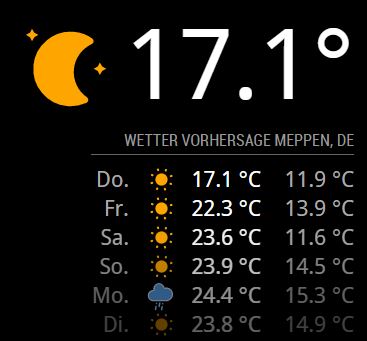
But at the moment only the 3 icons on the picture works.
-
@philreis said in Changing icons of the modules Current Weather and Weather Forecast:
These are awesome, can you walk me through how you did it?
-
@SoleLo in the next few days i will implement the other icon. Then I’ll tell you how I did it.
-
@philreis sounds great. Thanks!
-
I have add the other icons. But not all are properly positioned yet.
And a there is no icon for fog.
In the next few weeks I will position the icon correctly.
This solution is maybe not the best but it works!Picture:
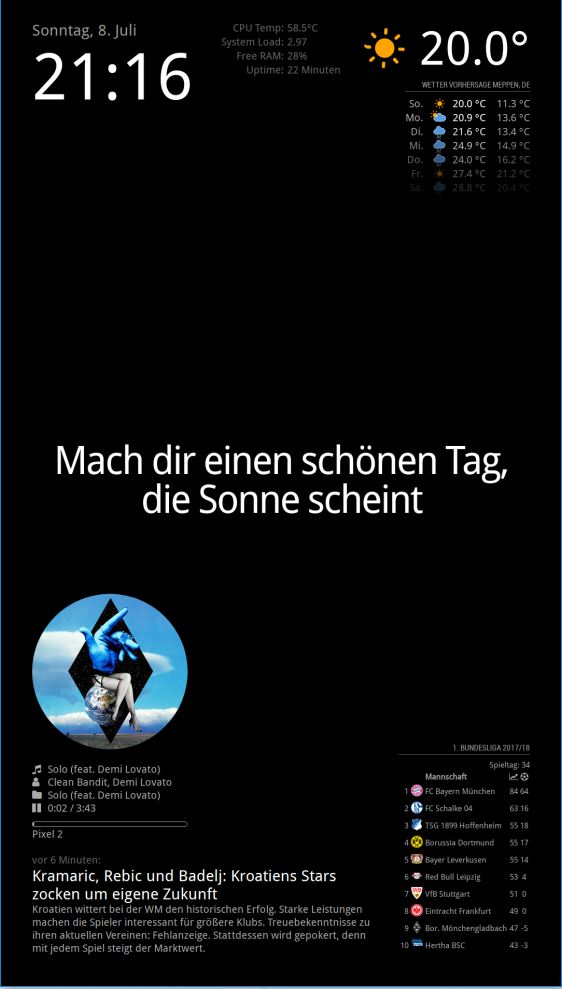
For this icons you need this icon package:
https://www.amcharts.com/free-animated-svg-weather-icons/Copy the icon from the folder “animated” to the folder “MagicMirror/css/icons”
Then you have to add this code to your “custom.css” file.
/* Aenderungen Wetter Icon */
/* Aenderungen aktuelles Wetter */

.currentweather .weathericon {
  position: absolute;
  z-index: 0;
  height: 200px;
  right: 180px;
  margin-top: -65px;
}

.currentweather .wi-day-sunny {
content: url("/css/icons/day.svg");
}

.currentweather .wi-day-cloudy {
content: url("/css/icons/cloudy-day-1.svg");
}

.currentweather .wi-rain {
content: url("/css/icons/rainy-6.svg");
}

.currentweather .wi-night-clear {
content: url("/css/icons/night.svg");
}

.currentweather .wi-night-cloudy {
content: url("/css/icons/cloudy-night-2.svg");
padding-right: 15px;
padding-top: 10px;
}

.currentweather .wi-cloudy {
content: url("/css/icons/cloudy.svg");
}

.currentweather .wi-showers {
content: url("/css/icons/rainy-7.svg");
}

.currentweather .wi-thunderstorm {
content: url("/css/icons/thunder.svg");
}

.currentweather .wi-snow {
content: url("/css/icons/snowy-6.svg");
}

.currentweather .wi-cloudy-windy {
content: url("/css/icons/cloudy-day-3.svg");
}

.currentweather .wi-night-rain {
content: url("/css/icons/rainy-6.svg");
}

.currentweather .wi-night-snow {
content: url("/css/icons/snowy-6.svg");
}

.currentweather .wi-night-thunderstorm {
content: url("/css/icons/thunder.svg");
}

.currentweather .wi-night-showers {
content: url("/css/icons/rainy-7.svg");
}

.currentweather .wi-fog {
content: url("/css/icons/cloudy.svg");
}

.currentweather .wi-night-alt-cloudy-windy {
content: url("/css/icons/cloudy-night-1.svg");
}

/* Aenderungen Wettervorhersage */

.weatherforecast .weathericon {
  position: absolute;
  left: 35px;
  z-index: 1;
  margin-top: -30px;
  height: 60px;
}

.weatherforecast .wi-day-sunny {
content: url("/css/icons/day.svg");
padding-left: 6px;
padding-top: 5px;
height: 50px;
}

.weatherforecast .wi-day-cloudy {
content: url("/css/icons/cloudy-day-1.svg");
}

.weatherforecast .wi-rain {
content: url("/css/icons/rainy-6.svg");
padding-left: 8px;
padding-top: 5px;
height: 45px;
}

.weatherforecast .wi-night-clear {
content: url("/css/icons/night.svg");
}

.weatherforecast .wi-night-cloudy {
content: url("/css/icons/cloudy-night-2.svg");
height: 50px;
padding-left: 5px;
padding-top: 7px;
}

.weatherforecast .wi-cloudy {
content: url("/css/icons/cloudy.svg");
}

.weatherforecast .wi-showers {
content: url("/css/icons/rainy-7.svg");
}

.weatherforecast .wi-thunderstorm {
content: url("/css/icons/thunder.svg");
}

.weatherforecast .wi-snow {
content: url("/css/icons/snowy-6.svg");
}

.weatherforecast .wi-cloudy-windy {
content: url("/css/icons/cloudy-day-3.svg");
height: 45px;
padding-left: 8px;
padding-top: 7px;
}

.weatherforecast .wi-night-rain {
content: url("/css/icons/rainy-6.svg");
padding-left: 8px;
padding-top: 5px;
height: 45px;
}

.weatherforecast .wi-night-snow {
content: url("/css/icons/snowy-6.svg");
}

.weatherforecast .wi-night-thunderstorm {
content: url("/css/icons/thunder.svg");
}

.weatherforecast .wi-night-showers {
content: url("/css/icons/rainy-7.svg");
}

.weatherforecast .wi-fog {
content: url("/css/icons/cloudy.svg");
}

.weatherforecast .wi-night-alt-cloudy-windy {
content: url("/css/icons/cloudy-night-1.svg");
height: 50px;
padding-left: 5px;
padding-top: 7px;
}
As I said not completely finished.
-
@philreis said in Changing icons of the modules Current Weather and Weather Forecast:
https://www.amcharts.com/free-animated-svg-weather-icons/
This looks great so far. I’ll give it a try





Hello! It looks like you're interested in this conversation, but you don't have an account yet.
Getting fed up of having to scroll through the same posts each visit? When you register for an account, you'll always come back to exactly where you were before, and choose to be notified of new replies (either via email, or push notification). You'll also be able to save bookmarks and upvote posts to show your appreciation to other community members.
With your input, this post could be even better 💗
Register Login