MagicMirror Forum
    • Recent
    • Tags
    • Unsolved
    • Solved
    • MagicMirror² Repository
    • Documentation
    • 3rd-Party-Modules
    • Donate
    • Discord
    • Register
    • Login
    A New Chapter for MagicMirror: The Community Takes the Lead
    Read the statement by Michael Teeuw here.

    Changing icons of the modules Current Weather and Weather Forecast

    Scheduled Pinned Locked Moved Development
    301 Posts 30 Posters 1.6m Views 33 Watching
    Loading More Posts
    • Oldest to Newest
    • Newest to Oldest
    • Most Votes
    Reply
    • Reply as topic
    Log in to reply
    This topic has been deleted. Only users with topic management privileges can see it.
    • M Offline
      Manu85 @sdetweil
      last edited by

      @sdetweil I put this in custom.css?

      .weather .weather-icon img {
      
        }
      
      S 1 Reply Last reply Reply Quote 0
      • S Do not disturb
        sdetweil @Manu85
        last edited by

        @Manu85 AND the sizing stuff u created n the developer console upper right window inside the braces, copy/paste

        swipe them with the mouse, copy

        Sam

        How to add modules

        learning how to use browser developers window for css changes

        M 1 Reply Last reply Reply Quote 0
        • M Offline
          Manu85 @sdetweil
          last edited by

          @sdetweil I copied this line because it’s the one that enlarges the icon in the console, I put that in css.custom and it’s still the same

          .weather .weather-icon img {
             max-width: 64px;
            }
          

          default is 44px
          when I refresh the console page and I select the icon I don’t have any additional css.custom lines, I don’t know if my explanation is clear

          S 1 Reply Last reply Reply Quote 0
          • S Do not disturb
            sdetweil @Manu85
            last edited by

            @Manu85 should be a strike thru on the 44px

            did u save the custom.css?

            Sam

            How to add modules

            learning how to use browser developers window for css changes

            M 1 Reply Last reply Reply Quote 0
            • M Offline
              Manu85 @sdetweil
              last edited by

              @sdetweil yes, I saved the custom and when I type 64px instead of 44px I see the icon growing, but that doesn’t change anything and in the console window it’s always the same data

              6839169f-40d3-4cdc-b215-cb2a3c7dd902-image.png

              S 1 Reply Last reply Reply Quote 0
              • S Do not disturb
                sdetweil @Manu85
                last edited by

                @Manu85 ok hang on. I’ll get my laptop …

                Sam

                How to add modules

                learning how to use browser developers window for css changes

                M 1 Reply Last reply Reply Quote 0
                • M Offline
                  Manu85 @sdetweil
                  last edited by

                  @sdetweil OK thanks

                  S 1 Reply Last reply Reply Quote 0
                  • S Do not disturb
                    sdetweil @Manu85
                    last edited by

                    @Manu85 ok, i think this is what you want

                    1. add
                    classes:"forecast",
                    

                    the the weather forecast , after the module:“weather”, line

                    1. then add this to custom.css
                    .forecast .weathericon {
                        font-size: 125%;
                    }
                    

                    you can change the font-size bigger too

                    refresh the mm page

                    Sam

                    How to add modules

                    learning how to use browser developers window for css changes

                    M M 2 Replies Last reply Reply Quote 0
                    • M Offline
                      manu85340 @sdetweil
                      last edited by

                      @sdetweil ok thanks I’ll try that when I get home

                      1 Reply Last reply Reply Quote 1
                      • M Offline
                        Manu85 @sdetweil
                        last edited by

                        @sdetweil I added in js.config

                        classes:"forecast",
                        

                        after the line:

                        module: "MMM-OneCallWeather",
                        

                        then in custom css:

                        .forecast .weather-icon {
                             font-size: 125%;
                        }
                        

                        I refreshed but it doesn’t change anything…

                        S 2 Replies Last reply Reply Quote 0
                        • S Do not disturb
                          sdetweil @Manu85
                          last edited by sdetweil

                          @Manu85 sorry, darn using the default calendar again… hang on
                          this TOPIC is about default calendar and weather

                          Sam

                          How to add modules

                          learning how to use browser developers window for css changes

                          1 Reply Last reply Reply Quote 0
                          • S Do not disturb
                            sdetweil @Manu85
                            last edited by sdetweil

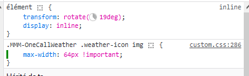
                            @Manu85 in custom.css

                            .MMM-OneCallWeather .weather-icon  img {
                                max-width: 64px !important;    
                            }
                            

                            Sam

                            How to add modules

                            learning how to use browser developers window for css changes

                            M 2 Replies Last reply Reply Quote 0
                            • M Offline
                              Manu85 @sdetweil
                              last edited by

                              @sdetweil I’m sorry, it’s my fault, I mixed up the topics…but I didn’t know how to make another topic and let it be you who answers me!
                              I modified the custom and it works, thanks again for that

                              S 1 Reply Last reply Reply Quote 0
                              • M Offline
                                Manu85 @sdetweil
                                last edited by

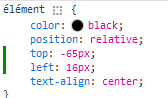
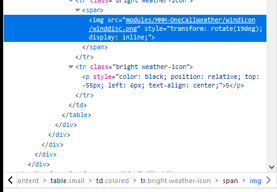
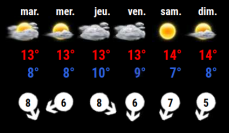
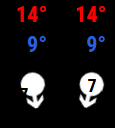
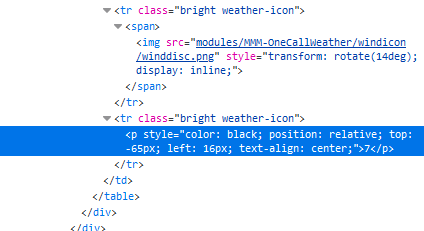
                                @sdetweil I still need you, in the weather module there are “bubbles” with the wind speed inside, but the numbers are not centered, I made screenshots of the console and I saw where I can change the position however I am unable to put this in my custom css, can you help me please?
                                3db6d3af-8390-4972-830a-1fde9be27cca-image.png

                                78d73559-8422-4d49-a321-97630215656c-image.png

                                d5c9e8aa-0945-4570-a26e-5afabc684d99-image.png

                                S 1 Reply Last reply Reply Quote 0
                                • S Do not disturb
                                  sdetweil @Manu85
                                  last edited by sdetweil

                                  @Manu85 so, you need to make the selector clause

                                  all the stuff before the {

                                  you know it starts w the module name class (with a leading dot)

                                  the bottom of the html pane has a list of the elements tree. the rightmost is the thing u are selected on

                                  for your prior post (on my phone again)
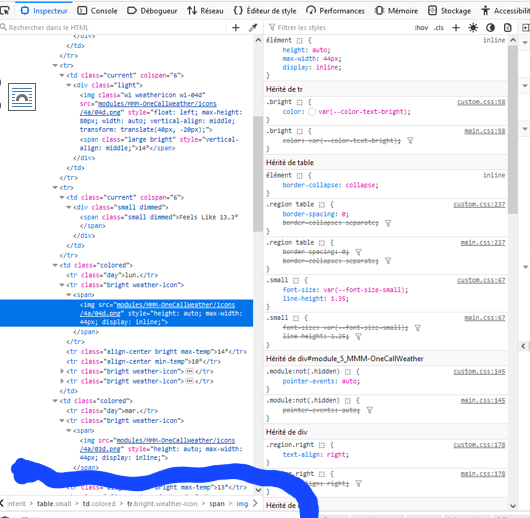
                                  1706543513190-eccf1f82-12aa-4411-ae1c-611152e9678a-image.png

                                  so you need to find the smallest unique list that makes it work. start from the right
                                  and you may have to use !important to force
                                  it. css always uses the most specific attributes

                                  drawing w my thumb…

                                  Sam

                                  How to add modules

                                  learning how to use browser developers window for css changes

                                  M 1 Reply Last reply Reply Quote 0
                                  • S Do not disturb
                                    sdetweil @Manu85
                                    last edited by

                                    @Manu85 topic.

                                    you should have been able to create a new topic

                                    Sam

                                    How to add modules

                                    learning how to use browser developers window for css changes

                                    M 1 Reply Last reply Reply Quote 0
                                    • M Offline
                                      Manu85 @sdetweil
                                      last edited by

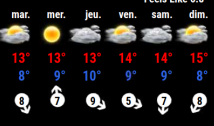
                                      @sdetweil thanks to you I succeeded, I hope I understood the logic well, I will try on other icons to be sure I understand, you are the best
                                      56c1d9eb-7e75-4786-a23e-346ecd8d35c1-image.png

                                      S 1 Reply Last reply Reply Quote 1
                                      • M Offline
                                        Manu85 @sdetweil
                                        last edited by

                                        @sdetweil I put that in my css…

                                        .MMM-OneCallWeather .weather-icon  p {
                                            top: -65px !important;    
                                            left: 16px  !important;  
                                        }
                                        
                                        S 1 Reply Last reply Reply Quote 1
                                        • S Do not disturb
                                          sdetweil @Manu85
                                          last edited by

                                          @Manu85 awesome!!!

                                          Sam

                                          How to add modules

                                          learning how to use browser developers window for css changes

                                          1 Reply Last reply Reply Quote 0
                                          • S Do not disturb
                                            sdetweil @Manu85
                                            last edited by

                                            @Manu85 said in Changing icons of the modules Current Weather and Weather Forecast:

                                            I will try on other icons

                                            it’s the same process icons or text…

                                            Sam

                                            How to add modules

                                            learning how to use browser developers window for css changes

                                            1 Reply Last reply Reply Quote 0

                                            Hello! It looks like you're interested in this conversation, but you don't have an account yet.

                                            Getting fed up of having to scroll through the same posts each visit? When you register for an account, you'll always come back to exactly where you were before, and choose to be notified of new replies (either via email, or push notification). You'll also be able to save bookmarks and upvote posts to show your appreciation to other community members.

                                            With your input, this post could be even better 💗

                                            Register Login

                                            • 1
                                            • 2
                                            • 12
                                            • 13
                                            • 14
                                            • 15
                                            • 16
                                            • 15 / 16
                                            • First post
                                              Last post
                                            Enjoying MagicMirror? Please consider a donation!
                                            MagicMirror created by Michael Teeuw.
                                            Forum managed by Sam, technical setup by Karsten.
                                            This forum is using NodeBB as its core | Contributors
                                            Contact | Privacy Policy