MagicMirror Forum
    • Recent
    • Tags
    • Unsolved
    • Solved
    • MagicMirror² Repository
    • Documentation
    • 3rd-Party-Modules
    • Donate
    • Discord
    • Register
    • Login
    A New Chapter for MagicMirror: The Community Takes the Lead
    Read the statement by Michael Teeuw here.

    MMM-SleepWake using external motion detection source

    Scheduled Pinned Locked Moved System
    16 Posts 4 Posters 9.8k Views 4 Watching
    Loading More Posts
    • Oldest to Newest
    • Newest to Oldest
    • Most Votes
    Reply
    • Reply as topic
    Log in to reply
    This topic has been deleted. Only users with topic management privileges can see it.
    • S Do not disturb
      sdetweil
      last edited by yawns

      Description

      Enable MagicMirror sleep from external (camera) sources

      If you are running the MM on a non PI device, or want to control sleep/wake without having to wire up another device, this module will take external info and signal MM to sleep or wake up.

      I use a Webcam camera for the motion detection, driven by the github Motion project.
      That project allows for a script to be run when motion starts and ends. I provide a script that
      creates a file for both events, and the module detects those files.

      the module supports sleep and wake 3 different ways… On PI using the tvservice command, or the exec dpms command if not using HDMI, or hiding all modules if using an energystar monitor (like my tv)

      I have submitted changes to MMM-voice and HelloLucy to allow our modules to know about the others processing… so voice Go To Sleep and motion wakeup work… if using the Hide method, modules already hidden at sleep will remain hidden on wakeup.

      Download:

      [card:sdetweil/MMM-SleepWake]


      Version 1.0

      Sam

      How to add modules

      learning how to use browser developers window for css changes

      Mykle1M 1 Reply Last reply Reply Quote 3
      • Mykle1M Offline
        Mykle1 Project Sponsor Module Developer @sdetweil
        last edited by

        @sdetweil

        Well done, sir!

        Create a working config
        How to add modules

        1 Reply Last reply Reply Quote 0
        • E Offline
          elleclouds
          last edited by

          Can this use a Nest Smoke Detector’s motion detecting as a trigger to activate SleepWake?

          S 1 Reply Last reply Reply Quote 0
          • S Do not disturb
            sdetweil @elleclouds
            last edited by

            @elleclouds I do not know. Is there a nest API the reports motion?

            I have not found the same for my ecobee room sensors

            If u can find the API, just call my little shell script to report start and end of movement

            Sam

            How to add modules

            learning how to use browser developers window for css changes

            E 1 Reply Last reply Reply Quote 0
            • E Offline
              elleclouds @sdetweil
              last edited by elleclouds

              @sdetweil Can this script be used with a raspberry pi camera? I want my mirror to wake and sleep upon detection from camera. It there a step by step for a noob as myself?

              S 1 Reply Last reply Reply Quote 0
              • S Do not disturb
                sdetweil @elleclouds
                last edited by sdetweil

                @elleclouds I didn’t want to learn all about cameras, or be on the hook for continuing configuration options for cameras… and I found this code that handles all that AND signals motion

                https://motion-project.github.io/

                on its configuration page its says

                Determine the type of camera
                v4l2 devices which are most webcams
                Composite capture cards
                Network or IP cameras
                The PI camera
                Static movie files.
                

                it documents using the Raspberry Pi camera

                Raspberry Pi cameras can be set up two different ways. If Motion is installed by using the apt packages (e.g. apt-get install motion), then the camera must be set up using the bcm2835-v4l2 module which creates a v4l2 device for the camera. Users will need to install this module using the command sudo modprobe bcm2835-v4l2. This will set up the camera as a normal v4l2 device and it can be accessed via a standard /dev/videoX device. If Motion is built from source or installed via the deb packages on the project release page, then an additional option is to set up the camera using the mmalcam_name parameter or using the bcm2835-v4l2 module. When Motion is installed via apt, the mmalcam option is not available.
                

                Motion project can also record images on motion, movies, etc,etc,etc,etc,

                Sam

                How to add modules

                learning how to use browser developers window for css changes

                1 Reply Last reply Reply Quote 0
                • E Offline
                  elleclouds
                  last edited by elleclouds

                  I am a noobie, but I feel like I followed most of the instructions I’ve found online on how to get this to work, but I’m still having some issues of actually getting the mirror to turn of or on. I keep getting the error in terminal when I run motion : vid_v4lx_start: Failed to open video device /dev/video: No such file directory.

                  I’d greatly appreciate a video or help with set up… A youtube video would save me time and troubleshooting something that may be simple.

                  S 1 Reply Last reply Reply Quote 0
                  • S Do not disturb
                    sdetweil @elleclouds
                    last edited by sdetweil

                    @elleclouds ok…
                    the motion module needs a video device…

                    run these two commands

                    sudo apt-get install v4l-utils
                    v4l2-ctl --list-devices
                    

                    find the ‘camera’ device in the list
                    mine shows

                    odroid@odroid:~/MagicMirror$ v4l2-ctl --list-devices
                    s5p-mfc-dec (platform:11000000.codec):
                            /dev/video10
                            /dev/video11
                    
                    s5p-jpeg encoder (platform:11f50000.jpeg):
                            /dev/video30
                            /dev/video31
                    
                    s5p-jpeg encoder (platform:11f60000.jpeg):
                            /dev/video32
                            /dev/video33
                    
                    exynos-gsc gscaler (platform:13e00000.video-scaler):
                            /dev/video20
                    
                    exynos-gsc gscaler (platform:13e10000.video-scaler):
                            /dev/video21
                    
                    UVC Camera (046d:0825) (usb-xhci-hcd.3.auto-1.2):
                            /dev/video0
                    

                    the last is the camera…

                    so, in the motion.conf,

                    set the line videodevice to the value returned for the camera, in my case /dev/video0

                    # Videodevice to be used for capturing  (default /dev/video0)
                    
                    
                    # for FreeBSD default is /dev/bktr0
                    videodevice  /dev/video0
                    

                    after changing the config file
                    either do

                    ps -ef | grep motion
                         get the process id (pid) use below
                    kill -s SIGHUP pid
                    

                    mine is

                    odroid@odroid:~/MagicMirror$ ps -ef | grep motion
                    root      7756     1  0 Mar08 ?        00:14:21 motion
                    

                    pid = 7756

                    or reboot

                    Sam

                    How to add modules

                    learning how to use browser developers window for css changes

                    1 Reply Last reply Reply Quote 1
                    • M Offline
                      mithatcak
                      last edited by

                      this is exactly what I need. works perfect! just hiding modules and no more ugly “NO SIGNAL” message floating on my mirror. Thank you!

                      S 1 Reply Last reply Reply Quote 0
                      • S Do not disturb
                        sdetweil @mithatcak
                        last edited by

                        @mithatcak glad its working !.. i use it everyday on multiple mirrors…

                        Sam

                        How to add modules

                        learning how to use browser developers window for css changes

                        1 Reply Last reply Reply Quote 0
                        • M Offline
                          mithatcak
                          last edited by

                          @sdetweil I noticed a weird issue. sometimes after several sleep&wake cycles, when it goes to sleep only the stock currentweather and weatherforecast modules stays on. there is no error in the motion.log or MM log.

                          here is my config, I was using delay: 5 then switched to 0.2 so I can repeat the issue faster.

                          {
                          			module: "MMM-SleepWake",
                          			config:{
                          				delay:  0.2,               // default
                          				source: "external",
                          				mode:  "HIDE"
                          			}
                          			 // detectionDir: folder containing externally generated file when motion starts
                          			 //               will be created if needed
                          			 // detectionFile:  filename generated for motion start. default = 'detected'
                          },
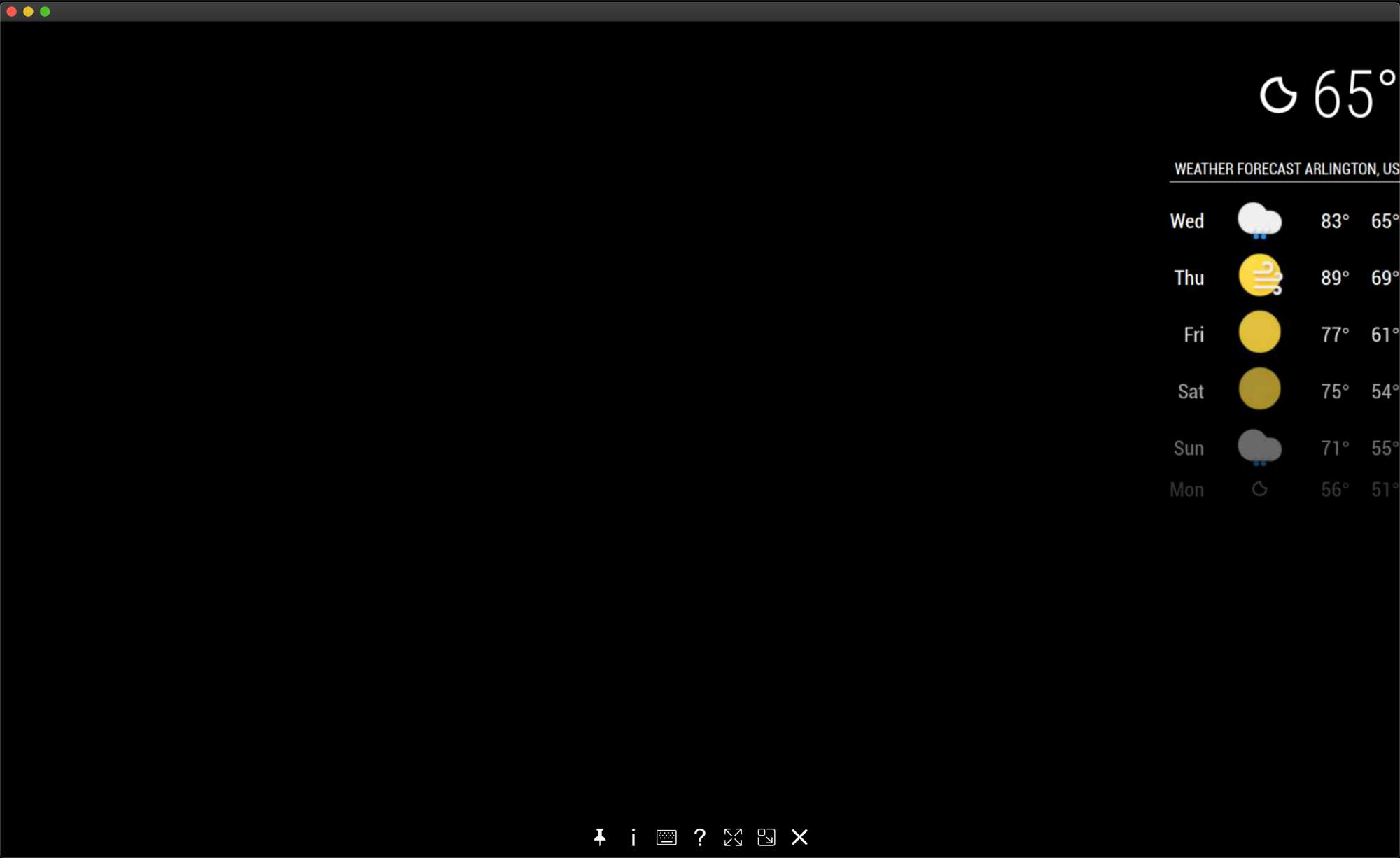
                          

                          0_1566395564247_Screen Shot 2019-08-21 at 1.27.52 AM.png

                          S 2 Replies Last reply Reply Quote 0
                          • S Do not disturb
                            sdetweil @mithatcak
                            last edited by

                            @mithatcak very interesting… I use those default modules too and I have never seen that behavior.
                            like they didn’t handle the suspend request…

                            i have 4 systems running this everyday for months… only see the updatenotification module output on one as it doesn’t handle hide/suspend…

                            i will do some additional debugging

                            Sam

                            How to add modules

                            learning how to use browser developers window for css changes

                            1 Reply Last reply Reply Quote 0
                            • S Do not disturb
                              sdetweil @mithatcak
                              last edited by

                              @mithatcak could you try something for me

                              i cannot reproduce this on any of my systems…

                              edit the MMM-SleepWake.js file

                              		case "SLEEP_HIDE":
                              			MM.getModules().enumerate((module) => {
                              				// if the module is already hidden
                              				if(module.hidden==true)
                              					// save it for wake up
                              					{v_self1.previously_hidden.push(module.identifier);}
                              				else
                              					// hide this module
                              					{module.hide(1000);}   // < --- change this line , remove the 1000 
                              ```
                              should look like this
                              ```
                              		case "SLEEP_HIDE":
                              			MM.getModules().enumerate((module) => {
                              				// if the module is already hidden
                              				if(module.hidden==true)
                              					// save it for wake up
                              					{v_self1.previously_hidden.push(module.identifier);}
                              				else
                              					// hide this module
                              					{module.hide();}
                              ```
                              
                              let me know

                              Sam

                              How to add modules

                              learning how to use browser developers window for css changes

                              M 1 Reply Last reply Reply Quote 0
                              • M Offline
                                mithatcak @sdetweil
                                last edited by

                                @sdetweil Unfortunately same result :/ I will try to replace currentweather and weatherforecast with weather module and see if it’s going to make any difference.

                                1 Reply Last reply Reply Quote 0
                                • M Offline
                                  mithatcak
                                  last edited by

                                  @sdetweil Good news, switching to new weather module fixed the issue.

                                  S 1 Reply Last reply Reply Quote 0
                                  • S Do not disturb
                                    sdetweil @mithatcak
                                    last edited by

                                    @mithatcak interesting

                                    Sam

                                    How to add modules

                                    learning how to use browser developers window for css changes

                                    1 Reply Last reply Reply Quote 0

                                    Hello! It looks like you're interested in this conversation, but you don't have an account yet.

                                    Getting fed up of having to scroll through the same posts each visit? When you register for an account, you'll always come back to exactly where you were before, and choose to be notified of new replies (either via email, or push notification). You'll also be able to save bookmarks and upvote posts to show your appreciation to other community members.

                                    With your input, this post could be even better 💗

                                    Register Login

                                    • 1 / 1
                                    • First post
                                      Last post
                                    Enjoying MagicMirror? Please consider a donation!
                                    MagicMirror created by Michael Teeuw.
                                    Forum managed by Sam, technical setup by Karsten.
                                    This forum is using NodeBB as its core | Contributors
                                    Contact | Privacy Policy
