Read the statement by Michael Teeuw here.
MMM-GooglePhotos
-
I use raspberry pi 3b with raspbian borwser chromium.
cool i wait :] p.s. express response -
@kivlow
I’ve fixed.cd ~/MagicMirror/modules/MMM-GooglePhotos git pull node auth_and_test.jsYou can see like this image;
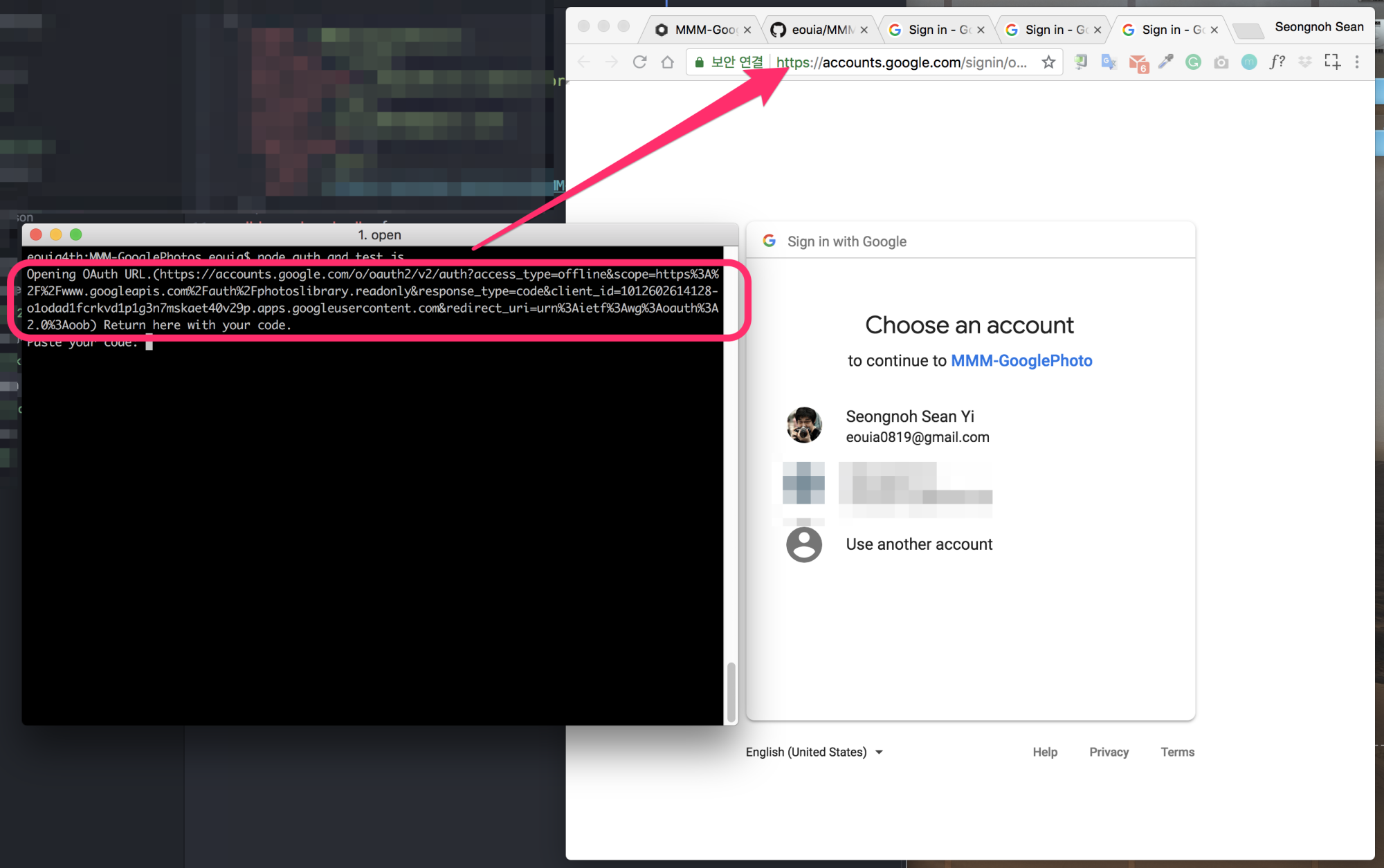
When the browser is not be opened automatically, copy the url and paste it into your browser manually.
-
Hi Sean,
Firstly thank you for this, it has great potential and is something that has been missing for such a long time compared to the alternative dakboard that I was forced to use to get photos displayed.
I have an issue though, I believe I have been through the steps correctly but can not get it to work. When I reboot my RPI2 it looks like the ‘auth_and_test.js’ is ran and this brings up the browser with googlin login and if I follow this through it gives me the code which is the same experience I have when running ‘auth_and_test.js’ in order to get the album id.
This then repeats itself every 5mins or so…
I have added the album id in the config.js but it does not seem to matter if I put a correct or incorrect one in here the same happens. It does not look like it trys to put images on the desktop so I don’t think the module is getting that far.
Any idea what I have done wrong?
Thanks
Nathan
-
@naththedude
You mean, your MM is trying to re-auth again(every 5 mins.) right?
First, you should check whether you havetoken.jsonin root directory ofMMM-GooglePhotos.cd ~/MagicMirror/modules/MMM-GooglePhotos cat token.jsonIt should be something similar with this;
{"access_token":"...","token_type":"Bearer","scope":"https://www.googleapis.com/auth/photoslibrary.readonly","expiry_date":1533304224450,"refresh_token":"..."}Your simptom would happen when
token.jsonis missed.token.jsonshould be generated as result ofauth_and_test.js -
Hey @Sean ,
Thank you for your quite reply, you are correct the token.josn file was missing. Looks like I needed to run ‘node auth_and_test’ as sudo for this file to be created. Once I did this the photos started to appear :) just need to configure the size and position now.
Thank you again.
Regards
Nathan
-
@naththedude good to you.
The only thing I worry is, if you run assudothere could be a possibility of a problem to refresh token with proper authority. -
@sean
hello :]
I make git pull but nothing change :/
still when i wrote in terminal even sudo node auth_and_test.js i get only info that is started.
my chromium not open and i dont have any link it termina to past it in chromium :[. -
@kivlow show me what is seen when you execute
node auth_and_test.js. (Do not need to usesudo)cd ~/MagicMirror/modules/MMM-GooglePhotos node auth_and_test.js -
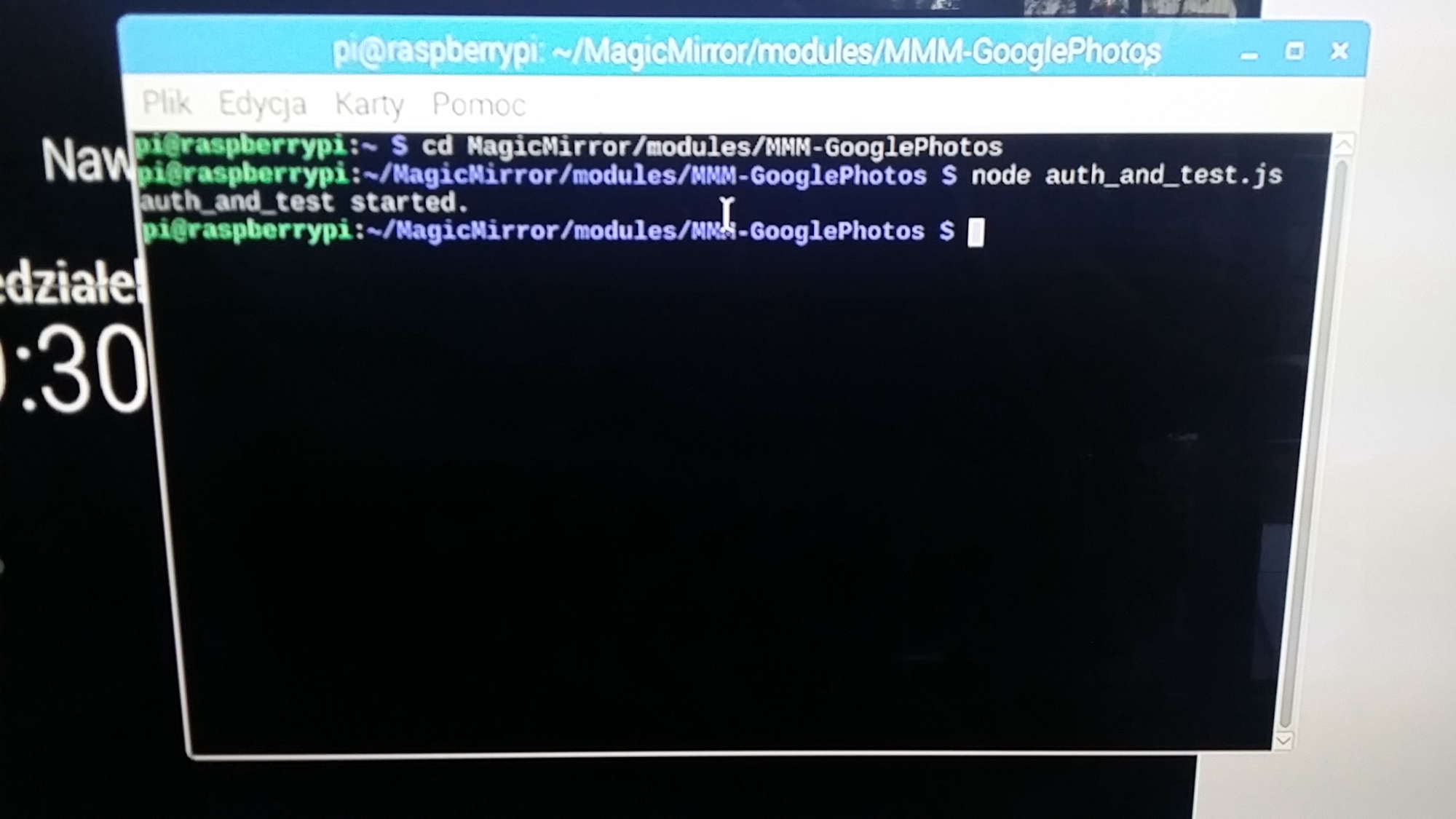
-
@kivlow
Hmmm… very weird.
Could you try this?cd ~/MagicMirror/modules/MMM-GooglePhotos nano test.jsThen, copy below and paste
'use strict';

const request = require('request')

const Auth = require('./auth.js')

var authConfig = {
  keyFilePath: "./credentials.json",
  savedTokensPath: "./token.json",
  scope: "https://www.googleapis.com/auth/photoslibrary.readonly"
}

const auth = new Auth(authConfig)

auth.on('ready', (client) => {
  console.log("auth_and_test started.")
  var token = client.credentials.access_token
  console.log("token:", token)
  function getAlbum(client, pageSize=50, pageToken="") {
    var url = 'https://photoslibrary.googleapis.com/v1/albums'
    url = url + "?pageSize=" + pageSize + "&pageToken=" + pageToken
    console.log("url:", url)
    request.get(
      url,
      {
        json:true,
        auth: {"bearer": token},
      },

      (err, res, body) => {
        console.log("response:", body)
        if (err) {
          console.log("Error: ", err)
          process.exit(1);
        }
        var found = 0
        for (var i in body.albums) {
          var album = body.albums[i]
          console.log (album.title, " : ", album.id)
          found++;
        }
        if (body.nextPageToken && found > 0) {
          getAlbum(client, pageSize, body.nextPageToken)
        }
      }
    )
  }
  getAlbum(client, 50)
})
Then, close and save (
Ctrl+XandYandenter)
Then try.node test.jsAnd show me the result.
-
:] thx you are the best :]
-
@kivlow
Ok. Now I think I’ve found what’s wrong.
https://github.com/eouia/MMM-GooglePhotos#get-auth-and-albumid
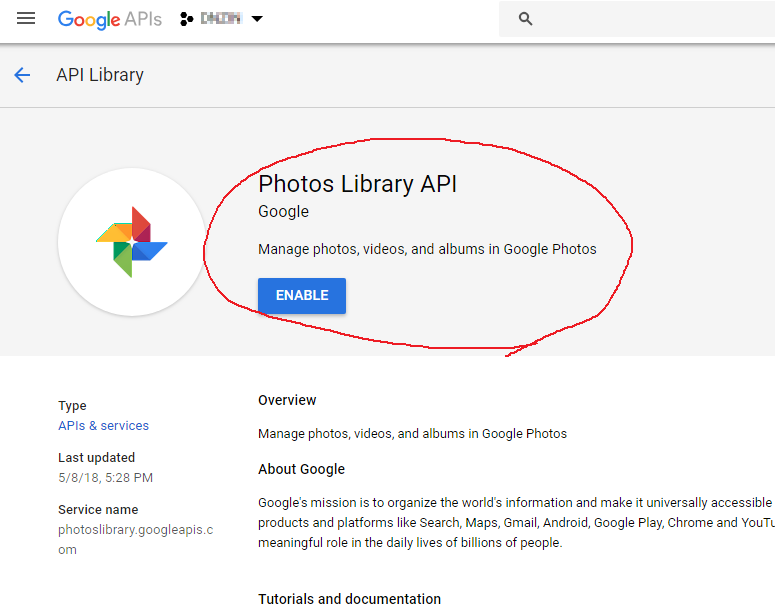
You seem to have missed4. Search for "Google Photos Library API". Select the correct result and click Enable. (You may need to enable "Google Plus" also.)
Do 1~4 again.
You can access your developer console with URL in the screen also. -
-
Ok i got it.
I enable Photos Library at different account (i have two google account) so everything works fine right now :] -
@kivlow Good to you. It’s my pleasure. Have a nice day.
-
Hello again ;p
I have one question - how to show full picture but in spec dimension.
I use top_right.
I set display 1280x720 and from google 1920x1080.
I see picture from google but many is cut :/ -
@kivlow
mode:’cover’ will cover your entire target area, but cropped.
mode:’contain’ will show entire image but resized(with black borders) -
:thumbs_up:
works fine :] -
Hi,
i have a problem when i paste my code error message:
pi@raspberrypi:~/MagicMirror/modules/MMM-GooglePhotos $ cat toto.txt
pi@raspberrypi:~/MagicMirror/modules/MMM-GooglePhotos $ node auth_and_test.js
Opening OAuth URL.(https://accounts.google.com/o/oauth2/v2/auth?access_type=offline&scope=https%3A%2F%2Fwww.googleapis.com%2Fauth%2Fphotoslibrary.readonly&response_type=code&client_id=491102864701-4kg1b7lbb90bt2vsc0cuh5af5acefgje.apps.googleusercontent.com&redirect_uri=urn%3Aietf%3Awg%3Aoauth%3A2.0%3Aoob) Return here with your code.
Paste your code: 4/xxxxxxxxxxxxxxxxxxxxxxxxxxxxxxxxxxx
(node:3967) UnhandledPromiseRejectionWarning: Error: Error getting tokens:
at oauthClient.getToken (/home/pi/MagicMirror/modules/MMM-GooglePhotos/auth.js:93:24)
at /home/pi/MagicMirror/modules/MMM-GooglePhotos/node_modules/google-auth-library/build/src/auth/oauth2client.js:158:46
at
at process._tickCallback (internal/process/next_tick.js:182:7)
(node:3967) UnhandledPromiseRejectionWarning: Unhandled promise rejection. This error originated either by throwing inside of an async function without a catch block, or by rejecting a promise which was not handled with .catch(). (rejection id: 2)
(node:3967) [DEP0018] DeprecationWarning: Unhandled promise rejections are deprecated. In the future, promise rejections that are not handled will terminate the Node.js process with a non-zero exit code.Can you help me please ?
Bérenger.
-
@bchabbert
Hmmm… I think, your oAuth was failed. But I cannot figure out what was wrong at that moment. I suggest you to try again from scratch.
Hello! It looks like you're interested in this conversation, but you don't have an account yet.
Getting fed up of having to scroll through the same posts each visit? When you register for an account, you'll always come back to exactly where you were before, and choose to be notified of new replies (either via email, or push notification). You'll also be able to save bookmarks and upvote posts to show your appreciation to other community members.
With your input, this post could be even better 💗
Register Login