MagicMirror Forum
    • Recent
    • Tags
    • Unsolved
    • Solved
    • MagicMirror² Repository
    • Documentation
    • 3rd-Party-Modules
    • Donate
    • Discord
    • Register
    • Login
    A New Chapter for MagicMirror: The Community Takes the Lead
    Read the statement by Michael Teeuw here.

    Can you help me about this error

    Scheduled Pinned Locked Moved Unsolved Troubleshooting
    29 Posts 4 Posters 10.3k Views 4 Watching
    Loading More Posts
    • Oldest to Newest
    • Newest to Oldest
    • Most Votes
    Reply
    • Reply as topic
    Log in to reply
    This topic has been deleted. Only users with topic management privileges can see it.
    • Mykle1M Offline
      Mykle1 Project Sponsor Module Developer @Fonfon
      last edited by

      @fonfon said in Can you help me about this error:

      is it the good method ?

      This is how I disable modules without copying and pasting and moving things around. You can simply add disabled: false, at the beginning of all your config.js entries. true will disable the module.

      {
                  disabled: false,
                  module: 'MMM-EventHorizon',
                  position: 'bottom_left',
                  config: {
                      date: "2018-09-17", // (YYYY-MM-DD)  Date timer will end
                      time: "00:01:00", // (HH:MM:SS)    Exact time you want timer to end
                      text1: "Lucy's Birthday", // 2 lines of text during timer
                      text2: "Tempus Fugit", // 2 lines of text during timer
                      endText1: "Lucy is 1 today!", // 2 lines of text when timer ends
                      endText2: "What a big girl!", // 2 lines of text when timer ends
                  }
              },
      

      Create a working config
      How to add modules

      justjim1220J 1 Reply Last reply Reply Quote 1
      • justjim1220J Offline
        justjim1220 Module Developer @Fonfon
        last edited by

        @fonfon

        no need to cut/paste each module…

        you can add

           disabled: false
        

        above each module, like this…

        {
            disabled: false,
            module: "clock",
            position: "top_center"
        },
        

        then, you can change it to true to shut off the module.

        it would be the easiest way to determine which module is causing the issue.
        load all your modules back into the config.js,
        add the code above,
        make all the default modules ‘false’,
        and all the rest ‘true’,
        refresh your mirror,
        if you still get the same issues,
        turn off the mirror and your terminal,
        maybe even restart your computer,
        then open your terminal,
        restart the mirror with ‘npm start -dev’
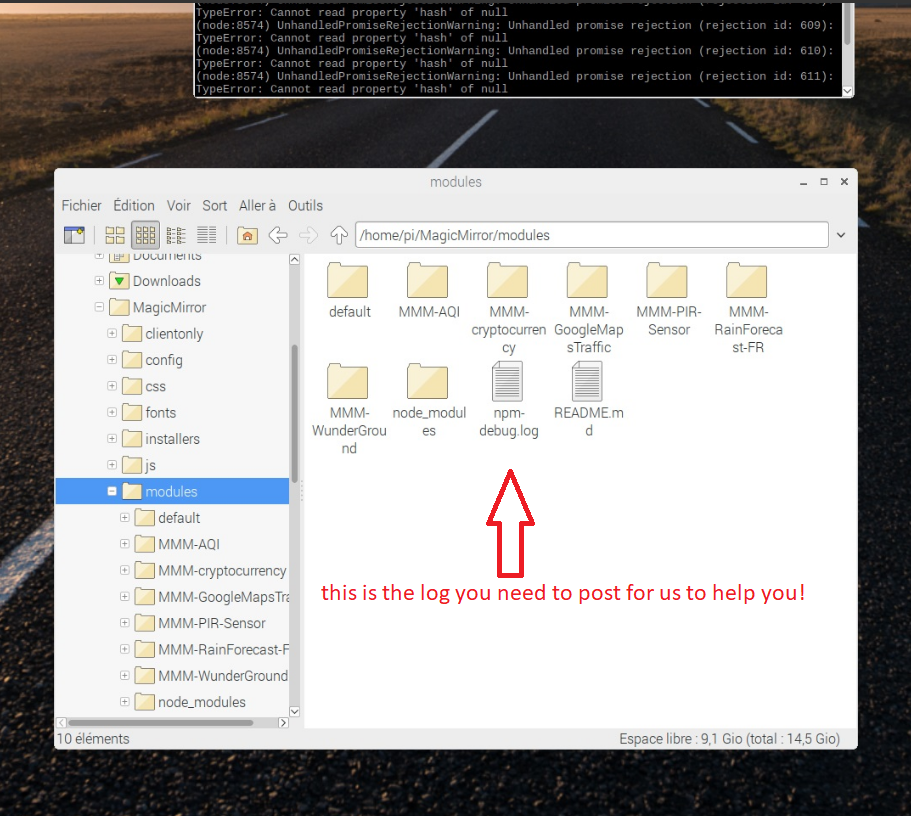
        this will give you an error log, find that and post it in here,
        this would be easier for us to help you

        "Life's Too Short To Dance With Ugly People"
        Jim Hallock - 1995

        1 Reply Last reply Reply Quote 1
        • justjim1220J Offline
          justjim1220 Module Developer @Mykle1
          last edited by

          @mykle1

          LMAO!

          I was posting my reply when yours popped up! :winking_face:

          "Life's Too Short To Dance With Ugly People"
          Jim Hallock - 1995

          1 Reply Last reply Reply Quote 0
          • justjim1220J Offline
            justjim1220 Module Developer @Fonfon
            last edited by

            @fonfon

            0_1533477543812_Screenshot (28).png

            "Life's Too Short To Dance With Ugly People"
            Jim Hallock - 1995

            F 1 Reply Last reply Reply Quote 0
            • Mykle1M Offline
              Mykle1 Project Sponsor Module Developer @Fonfon
              last edited by

              @fonfon

              I’d like to see any errors from your terminal and/or your console

              Create a working config
              How to add modules

              F 1 Reply Last reply Reply Quote 0
              • F Offline
                Fonfon @justjim1220
                last edited by Fonfon

                @justjim1220
                info it worked if it ends with ok
                1 verbose cli [ ‘/usr/bin/node’, ‘/usr/bin/npm’, ‘start’ ]
                2 info using npm@3.10.10
                3 info using node@v6.13.1
                4 verbose stack Error: ENOENT: no such file or directory, open ‘/home/pi/MagicMirror/modules/package.json’
                4 verbose stack at Error (native)
                5 verbose cwd /home/pi/MagicMirror/modules
                6 error Linux 4.9.59-v7+
                7 error argv “/usr/bin/node” “/usr/bin/npm” “start”
                8 error node v6.13.1
                9 error npm v3.10.10
                10 error path /home/pi/MagicMirror/modules/package.json
                11 error code ENOENT
                12 error errno -2
                13 error syscall open
                14 error enoent ENOENT: no such file or directory, open ‘/home/pi/MagicMirror/modules/package.json’
                15 error enoent ENOENT: no such file or directory, open ‘/home/pi/MagicMirror/modules/package.json’
                15 error enoent This is most likely not a problem with npm itself
                15 error enoent and is related to npm not being able to find a file.
                16 verbose exit [ -2, true ]

                this is my npm-debug.log
                i dont understand it i think its a problem with package .js
                i try to start with npm start -dev for a error log
                where is the error log in wich folder?

                thanks for your help

                Mykle1M 1 Reply Last reply Reply Quote 0
                • F Offline
                  Fonfon @Mykle1
                  last edited by

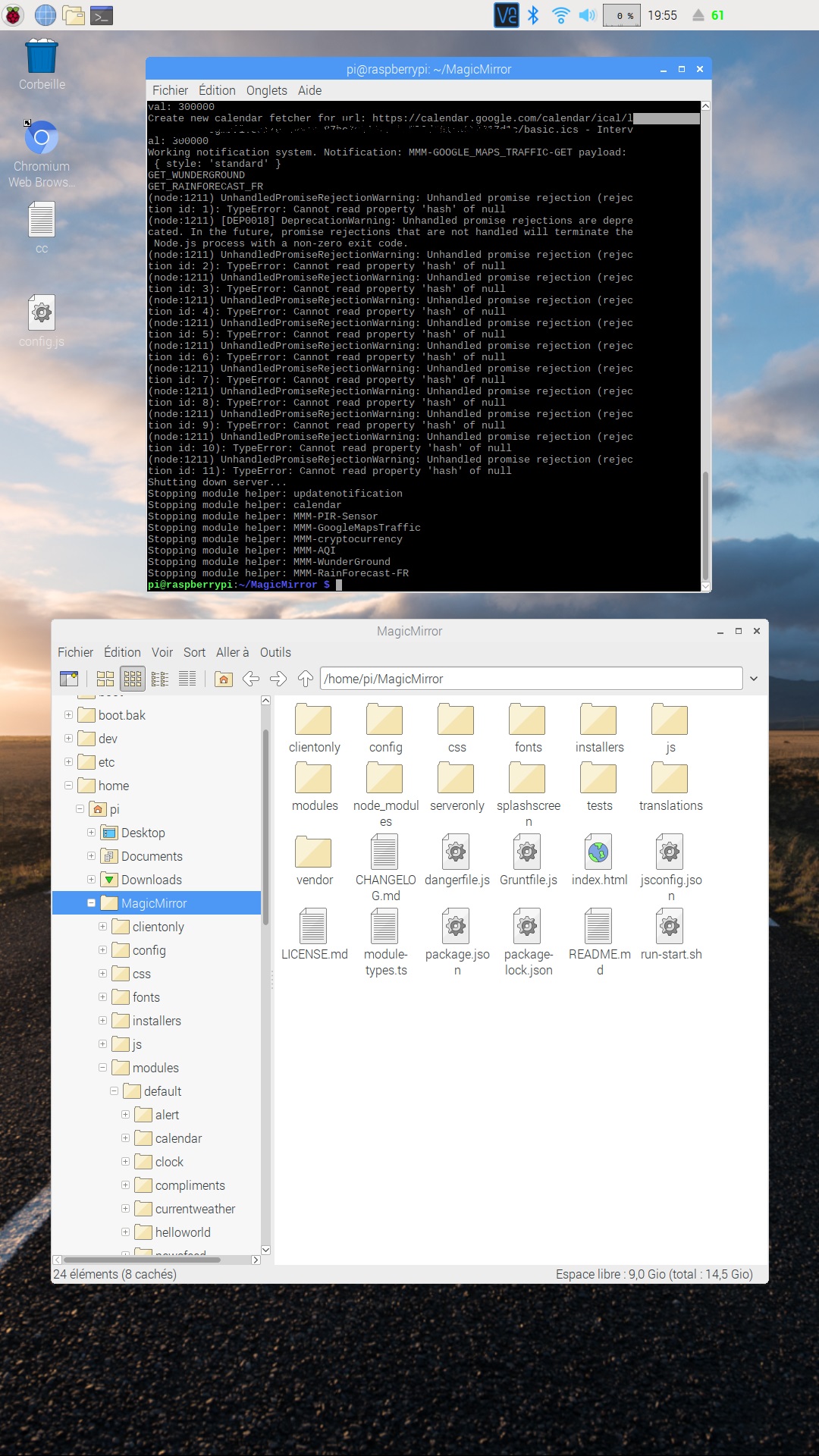
                  @mykle1 0_1533491904731_2018-08-05-195524_1080x1920_scrot.jpg

                  This is after only 15 min of MM running

                  ? 2 Replies Last reply Reply Quote 0
                  • ? Offline
                    A Former User @Fonfon
                    last edited by

                    @fonfon
                    One of your modules is using promise pattern but not handling rejection. Usually this is caused by missing some exception handling in module.
                    I cannot figure out which module is causing that message. You can find which module has problem by disabling or removing module from config.js one-by-one.
                    Maybe your suspicious module might have SOMETHING.hash in its codes. the error will be caused object SOMETHING is really null. so, when you find which module has the error, tell the module developer the symptom. (S)he will fix it.

                    1 Reply Last reply Reply Quote 0
                    • ? Offline
                      A Former User @Fonfon
                      last edited by

                      @fonfon
                      And one more thing.
                      Most of those UnhandledPromiseRejectionWarning does not give harm to MM’s execution, the real problem is TypeError: Cannot read property 'hash' of null. You should find which module is causing this message.

                      1 Reply Last reply Reply Quote 0
                      • Mykle1M Offline
                        Mykle1 Project Sponsor Module Developer @Fonfon
                        last edited by

                        @fonfon said in Can you help me about this error:

                        i try to start with npm start -dev for a error log
                        where is the error log in wich folder?

                        Start MM with npm start dev. This opens the Developers Tools window. Click “Console” tab at the top of the window. Here you will find any errors. It does not save as a log.

                        Follow Sean’s suggestion (and mine) that you determine which module is causing the issue. Then paste the errors from that module here.

                        Create a working config
                        How to add modules

                        F 1 Reply Last reply Reply Quote 0
                        • F Offline
                          Fonfon @Mykle1
                          last edited by

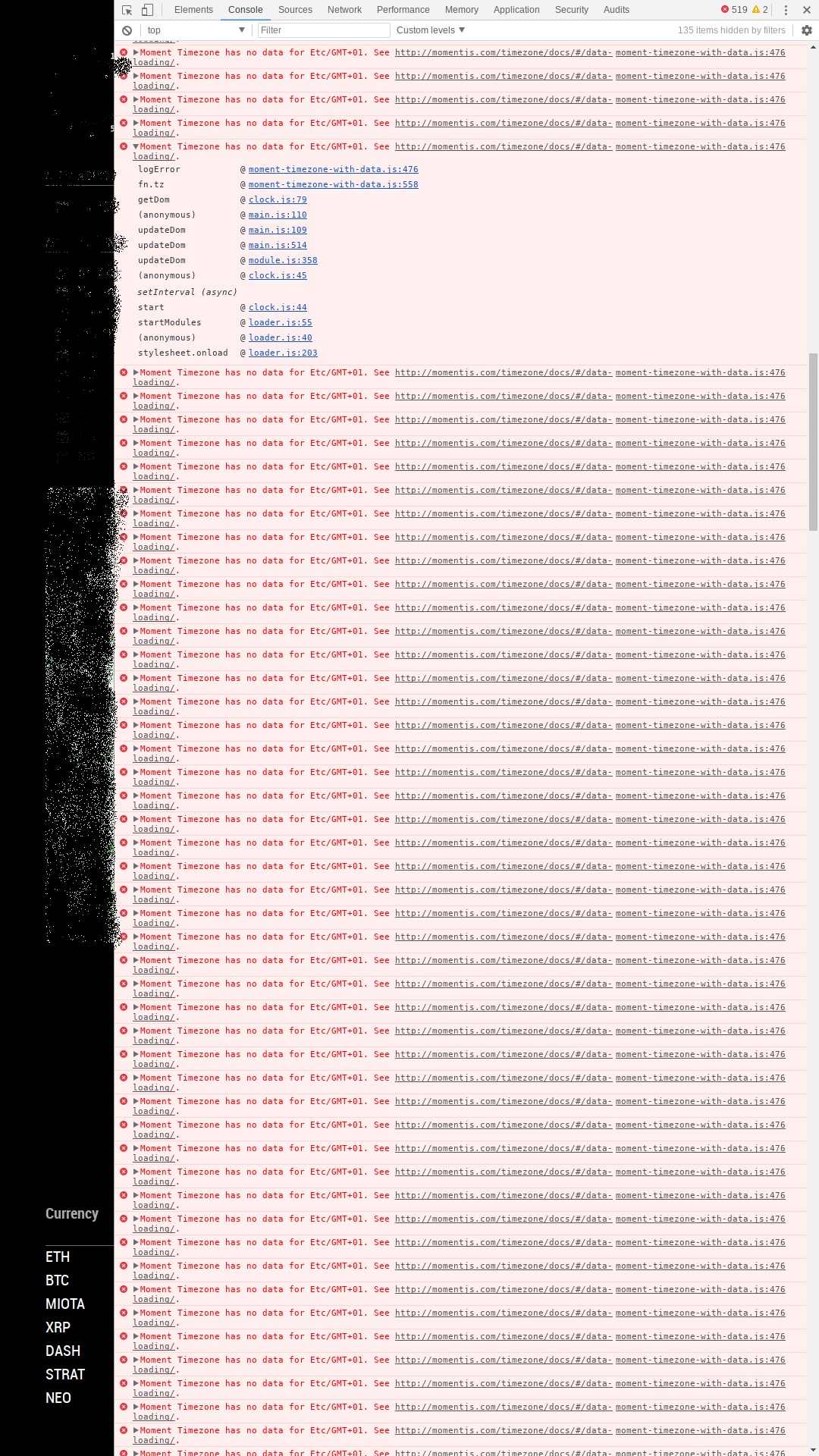
                          @mykle1 When i start with npm start dev: 0_1533511909992_2018-08-06-012648_1080x1920_scrot.jpg
                          Mykle1M ? 2 Replies Last reply Reply Quote 0
                          • Mykle1M Offline
                            Mykle1 Project Sponsor Module Developer @Fonfon
                            last edited by

                            @fonfon

                            Do you get that error with just the default modules?

                            Create a working config
                            How to add modules

                            F 1 Reply Last reply Reply Quote 0
                            • F Offline
                              Fonfon @Mykle1
                              last edited by

                              @mykle1 yes with default modules

                              1 Reply Last reply Reply Quote 0
                              • Mykle1M Offline
                                Mykle1 Project Sponsor Module Developer @Fonfon
                                last edited by

                                @fonfon said in Can you help me about this error:

                                only with pir module its good
                                but after with wunderground or google maps traffic module i have a lot of error or other…

                                Above you said with pir module its good . . . .

                                So now I am confused. I think that perhaps we don’t understand each other. Run MM with ONLY the default modules. If you are having trouble that way then your problem lies with your installation of MM.

                                Create a working config
                                How to add modules

                                1 Reply Last reply Reply Quote 0
                                • ? Offline
                                  A Former User @Fonfon
                                  last edited by A Former User

                                  @fonfon
                                  I think there is invalid ’timezone’ value in your config(whichever it is)
                                  Have you set any value with ’Etc/gmt+1’?

                                  F 1 Reply Last reply Reply Quote 0
                                  • F Offline
                                    Fonfon @Guest
                                    last edited by

                                    @sean yes in my config for clock module i have gmt +1

                                    ? 2 Replies Last reply Reply Quote 0
                                    • ? Offline
                                      A Former User @Fonfon
                                      last edited by

                                      @fonfon
                                      Use Etc/GMT+1 instead Etc/GMT+01.
                                      But, this modifying only can fix your front-end error of Moment Timezone has no data for..., not your UnhandledPromise... error in the background-server.
                                      You should remove modules one-by-one to figure out which module is causing that error.

                                      1 Reply Last reply Reply Quote 0
                                      • ? Offline
                                        A Former User @Fonfon
                                        last edited by

                                        @fonfon
                                        And Could you tell us which modules are in your config.js?

                                        1 Reply Last reply Reply Quote 0
                                        • F Offline
                                          Fonfon
                                          last edited by Fonfon

                                          OK guys i think i find my problems:

                                          You have included the Google Maps JavaScript API multiple times on this page.This may cause unexpected errors
                                          The google trafic module is the cause

                                          An idea to fix it ?

                                          thanks

                                          ? 1 Reply Last reply Reply Quote 0
                                          • ? Offline
                                            A Former User @Fonfon
                                            last edited by A Former User

                                            @fonfon
                                            First, I think you’d better ask the creator on Github.
                                            Second, Have you registered that module once?

                                            1 Reply Last reply Reply Quote 0

                                            Hello! It looks like you're interested in this conversation, but you don't have an account yet.

                                            Getting fed up of having to scroll through the same posts each visit? When you register for an account, you'll always come back to exactly where you were before, and choose to be notified of new replies (either via email, or push notification). You'll also be able to save bookmarks and upvote posts to show your appreciation to other community members.

                                            With your input, this post could be even better 💗

                                            Register Login

                                            • 1
                                            • 2
                                            • 2 / 2
                                            • First post
                                              Last post
                                            Enjoying MagicMirror? Please consider a donation!
                                            MagicMirror created by Michael Teeuw.
                                            Forum managed by Sam, technical setup by Karsten.
                                            This forum is using NodeBB as its core | Contributors
                                            Contact | Privacy Policy