MagicMirror Forum
    • Recent
    • Tags
    • Unsolved
    • Solved
    • MagicMirror² Repository
    • Documentation
    • 3rd-Party-Modules
    • Donate
    • Discord
    • Register
    • Login
    A New Chapter for MagicMirror: The Community Takes the Lead
    Read the statement by Michael Teeuw here.

    MagicMirror sleep in 5 minutes

    Scheduled Pinned Locked Moved Solved Troubleshooting
    9 Posts 4 Posters 3.7k Views 4 Watching
    Loading More Posts
    • Oldest to Newest
    • Newest to Oldest
    • Most Votes
    Reply
    • Reply as topic
    Log in to reply
    This topic has been deleted. Only users with topic management privileges can see it.
    • matimilkoM Offline
      matimilko
      last edited by

      Re: Power/Sleep Settings?

      Hi!
      I’m finishing my MagicMirror and have one problem. Raspberry is going to sleep after 10-15 minutes. Monitor is connected to electricity over moving sensor, so Monitor is after 12 min off power. When (moving sensor) turn on monitor, Raspberry is on idle so I have to move the mouse or keyboard to wake it.
      Is any possibility to set MagisMirror to be on all the time?

      Mykle1M 1 Reply Last reply Reply Quote 0
      • Mykle1M Offline
        Mykle1 Project Sponsor Module Developer @matimilko
        last edited by

        @matimilko

        Have you disabled the screensaver? May I suggest installing xscreensaver? In the options of xscreensaver you can disable the screensaver altogether. When your monitor comes on, MM will be visible.

        Create a working config
        How to add modules

        matimilkoM 1 Reply Last reply Reply Quote 2
        • matimilkoM Offline
          matimilko @Mykle1
          last edited by

          @mykle1 I’ll try that today :)
          Thanks

          1 Reply Last reply Reply Quote 0
          • matimilkoM Offline
            matimilko
            last edited by matimilko

            Great!
            I’ve done it with xscreensaver. Perfect.
            Thanks!!!

            Mykle1M A 2 Replies Last reply Reply Quote 0
            • Mykle1M Offline
              Mykle1 Project Sponsor Module Developer @matimilko
              last edited by

              @matimilko

              Fantastic! Now if you would mark the post that solved your issue. :-)

              Create a working config
              How to add modules

              yawnsY 1 Reply Last reply Reply Quote 1
              • yawnsY Offline
                yawns Moderator @Mykle1
                last edited by

                @mykle1 said in MagicMirror sleep in 5 minutes:

                @matimilko

                Fantastic! Now if you would mark the post that solved your issue. :-)

                I did that on behalf of @matimilko

                Mykle1M 1 Reply Last reply Reply Quote 1
                • Mykle1M Offline
                  Mykle1 Project Sponsor Module Developer @yawns
                  last edited by

                  @yawns said in MagicMirror sleep in 5 minutes:

                  I did that on behalf of @matimilko

                  That’s because you’re awesome! :-)

                  Create a working config
                  How to add modules

                  1 Reply Last reply Reply Quote 1
                  • A Offline
                    asaxena11 @matimilko
                    last edited by

                    @matimilko

                    Cold you please post the command you use after installing xscreensaver

                    Mykle1M 1 Reply Last reply Reply Quote 0
                    • Mykle1M Offline
                      Mykle1 Project Sponsor Module Developer @asaxena11
                      last edited by Mykle1

                      @asaxena11

                      Simply type xscreensaver in your terminal and Enter. Click Settings and you choose your options here.
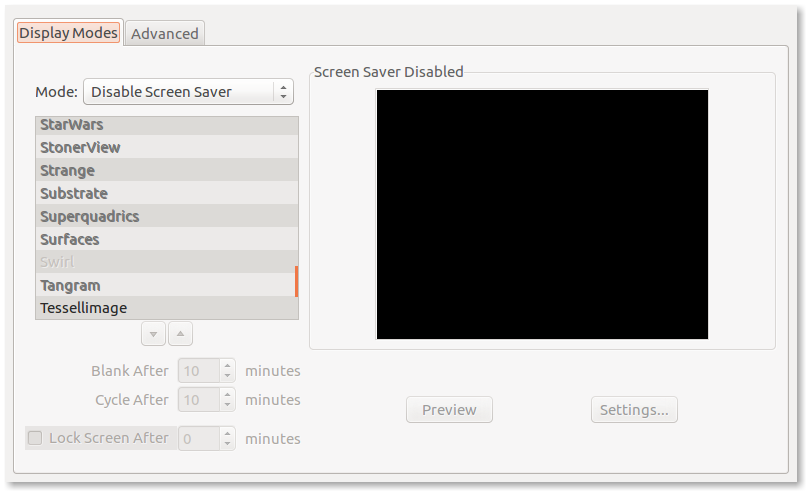
                      0_1536625788840_x.png

                      Create a working config
                      How to add modules

                      1 Reply Last reply Reply Quote 0

                      Hello! It looks like you're interested in this conversation, but you don't have an account yet.

                      Getting fed up of having to scroll through the same posts each visit? When you register for an account, you'll always come back to exactly where you were before, and choose to be notified of new replies (either via email, or push notification). You'll also be able to save bookmarks and upvote posts to show your appreciation to other community members.

                      With your input, this post could be even better 💗

                      Register Login

                      • 1 / 1
                      • First post
                        Last post
                      Enjoying MagicMirror? Please consider a donation!
                      MagicMirror created by Michael Teeuw.
                      Forum managed by Sam, technical setup by Karsten.
                      This forum is using NodeBB as its core | Contributors
                      Contact | Privacy Policy

