Read the statement by Michael Teeuw here.
MMM-PC-Stats
-
Comment out
console.log(this.Stats)so you only get the sensors output -
@mykle1 ok
-
Take a screenshot of just the output, not the whole screen. I might be able to see it then
-
pop@HPEu:~/MagicMirror$ sensors nouveau-pci-0100 Adapter: PCI adapter fan1: 1110 RPM temp1: +39.0°C (high = +95.0°C, hyst = +3.0°C) (crit = +105.0°C, hyst = +5.0°C) (emerg = +135.0°C, hyst = +5.0°C) coretemp-isa-0000 Adapter: ISA adapter Core 0: +29.0°C (high = +83.0°C, crit = +99.0°C) Core 1: +30.0°C (high = +83.0°C, crit = +99.0°C) Core 2: +29.0°C (high = +83.0°C, crit = +99.0°C) Core 3: +28.0°C (high = +83.0°C, crit = +99.0°C) f71858fg-isa-0a00 Adapter: ISA adapter +3.3V: +3.31 V 3VSB: +3.31 V Vbat: +3.20 V fan1: 1910 RPM fan2: 998 RPM fan3: 0 RPM ALARM temp1: +29.2°C (high = +70.0°C, hyst = +60.0°C) temp2: +15.4°C (high = +100.0°C, hyst = +85.0°C) temp3: +32.5°C (high = +100.0°C, hyst = +85.0°C) pop@HPEu:~/MagicMirror$ ^C pop@HPEu:~/MagicMirror$ -
Objectacpitz-virtual-0: {Virtual device: {…}}k8temp-pci-00c3: {PCI adapter: {…}}nouveau-pci-0090: {PCI adapter: {…}}__proto__: Object
moment-timezone-with-data.js:481 Moment Timezone has no data for American/Chicago. See http://momentjs.com/timezone/docs/#/data-loading/.
logError @ moment-timezone-with-data.js:481
MMM-PC-Stats.js:126 Uncaught (in promise) TypeError: Cannot read property 'ISA adapter' of undefined
    at Class.getDom (MMM-PC-Stats.js:126)
    at main.js:110
    at new Promise (<anonymous>)
    at updateDom (main.js:109)
    at Object.updateDom (main.js:514)
    at Class.updateDom (module.js:358)
    at Class.socketNotificationReceived (MMM-PC-Stats.js:262)
    at module.js:246
    at r.<anonymous> (socketclient.js:25)
    at r.emit (index.js:83)
MMM-PC-Stats.js:126 Uncaught (in promise) TypeError: Cannot read property 'ISA adapter' of undefined
    at Class.getDom (MMM-PC-Stats.js:126)
    at main.js:110
    at new Promise (<anonymous>)
    at updateDom (main.js:109)
    at Object.updateDom (main.js:514)
    at Class.updateDom (module.js:358)
    at Class.socketNotificationReceived (MMM-PC-Stats.js:268)
    at module.js:246
    at r.<anonymous> (socketclient.js:25)
    at r.emit (index.js:83)
“Life’s Too Short To Dance With Ugly People”
Jim Hallock - 1995 -
jim@jim-Aspire-4520:~/MagicMirror$ sensors k8temp-pci-00c3 Adapter: PCI adapter Core0 Temp: +69.0°C Core0 Temp: +67.0°C Core1 Temp: +69.0°C Core1 Temp: +68.0°C acpitz-virtual-0 Adapter: Virtual device temp1: +71.0°C (crit = +100.0°C) nouveau-pci-0090 Adapter: PCI adapter GPU core: +1.20 V (min = +1.00 V, max = +1.20 V) temp1: +64.0°C (high = +95.0°C, hyst = +3.0°C) (crit = +105.0°C, hyst = +2.0°C) (emerg = +135.0°C, hyst = +5.0°C) -
Ok, I see it. In dev tools you can expand the output to see the tree
-
there is a lot of things to expand, how much do you need?
Objectacpitz-virtual-0: Virtual device: temp1: name: "temp1"type: "temperature"value: 80__proto__: Objectconstructor: ƒ Object()arguments: (...)assign: ƒ assign()caller: (...)create: ƒ create()defineProperties: ƒ defineProperties()defineProperty: ƒ defineProperty()entries: ƒ entries()freeze: ƒ freeze()getOwnPropertyDescriptor: ƒ getOwnPropertyDescriptor()getOwnPropertyDescriptors: ƒ getOwnPropertyDescriptors()getOwnPropertyNames: ƒ getOwnPropertyNames()getOwnPropertySymbols: ƒ getOwnPropertySymbols()getPrototypeOf: ƒ getPrototypeOf()is: ƒ is()isExtensible: ƒ isExtensible()isFrozen: ƒ isFrozen()isSealed: ƒ isSealed()keys: ƒ keys()length: 1name: "Object"preventExtensions: ƒ preventExtensions()prototype: {constructor: ƒ, __defineGetter__: ƒ, __defineSetter__: ƒ, hasOwnProperty: ƒ, __lookupGetter__: ƒ, …}seal: ƒ seal()setPrototypeOf: ƒ setPrototypeOf()values: ƒ values()__proto__: ƒ ()[[FunctionLocation]]: <unknown>hasOwnProperty: ƒ hasOwnProperty()isPrototypeOf: ƒ isPrototypeOf()propertyIsEnumerable: ƒ propertyIsEnumerable()toLocaleString: ƒ toLocaleString()toString: ƒ toString()valueOf: ƒ valueOf()__defineGetter__: ƒ __defineGetter__()__defineSetter__: ƒ __defineSetter__()__lookupGetter__: ƒ __lookupGetter__()__lookupSetter__: ƒ __lookupSetter__()get __proto__: ƒ __proto__()set __proto__: ƒ __proto__()__proto__: Objectconstructor: ƒ Object()hasOwnProperty: ƒ hasOwnProperty()isPrototypeOf: ƒ isPrototypeOf()propertyIsEnumerable: ƒ propertyIsEnumerable()toLocaleString: ƒ toLocaleString()toString: ƒ toString()valueOf: ƒ valueOf()__defineGetter__: ƒ __defineGetter__()__defineSetter__: ƒ __defineSetter__()__lookupGetter__: ƒ __lookupGetter__()__lookupSetter__: ƒ __lookupSetter__()get __proto__: ƒ __proto__()set __proto__: ƒ __proto__()__proto__: Objectk8temp-pci-00c3: PCI adapter: __proto__: Objectconstructor: ƒ Object()hasOwnProperty: ƒ hasOwnProperty()isPrototypeOf: ƒ isPrototypeOf()propertyIsEnumerable: ƒ propertyIsEnumerable()toLocaleString: ƒ toLocaleString()toString: ƒ toString()valueOf: ƒ valueOf()__defineGetter__: ƒ __defineGetter__()__defineSetter__: ƒ __defineSetter__()__lookupGetter__: ƒ __lookupGetter__()__lookupSetter__: ƒ __lookupSetter__()get __proto__: ƒ __proto__()set __proto__: ƒ __proto__()__proto__: Objectconstructor: ƒ Object()hasOwnProperty: ƒ hasOwnProperty()isPrototypeOf: ƒ isPrototypeOf()propertyIsEnumerable: ƒ propertyIsEnumerable()toLocaleString: ƒ toLocaleString()toString: ƒ toString()valueOf: ƒ valueOf()__defineGetter__: ƒ __defineGetter__()__defineSetter__: ƒ __defineSetter__()__lookupGetter__: ƒ __lookupGetter__()__lookupSetter__: ƒ __lookupSetter__()get __proto__: ƒ __proto__()set __proto__: ƒ __proto__()nouveau-pci-0090: PCI adapter: {GPU core: {…}, temp1: {…}}__proto__: Object__proto__: constructor: ƒ Object()hasOwnProperty: ƒ hasOwnProperty()isPrototypeOf: ƒ isPrototypeOf()propertyIsEnumerable: ƒ propertyIsEnumerable()toLocaleString: ƒ toLocaleString()toString: ƒ toString()valueOf: ƒ valueOf()__defineGetter__: ƒ __defineGetter__()__defineSetter__: ƒ __defineSetter__()__lookupGetter__: ƒ __lookupGetter__()__lookupSetter__: ƒ __lookupSetter__()get __proto__: ƒ __proto__()set __proto__: ƒ __proto__() -
It looks like this is the line it is having a problem with…
var core0TempCheck = Sensors["coretemp-isa-0000"]['ISA adapter']['Core 0'];particularly with: [‘ISA adapter’]
-
I know the line that is the problem. Listen, I’m tired. If you’ll let me TeamViewer into your machine tomorrow I’ll fix it. Doing it this way is very tedious
-
Absolutely.
No Problem.
Just let me know when. -
is there something I need to set up on this end for TeamViewer?
-
And, your gonna have to let me know how to do a screen shot of just a certain part of the screen, or how to crop the image. A lot different than Windows.
-
This is what you need to change in the main js
// Check if core0 has temp sensor var core0TempCheck = Sensors["acpitz-virtual-0"]; // ['ISA adapter']['Core 0']; if (typeof core0TempCheck !== 'undefined'){ var core0Temp = document.createElement("div"); core0Temp.classList.add("small", "bright", "core0Temp"); core0Temp.innerHTML = Sensors["acpitz-virtual-0"]["Virtual device"].temp1.value + "   @   " + Sensors["acpitz-virtual-0"]["Virtual device"].temp1.value + "°C"; wrapper.appendChild(core0Temp); } // ["acpitz-virtual-0"]["Virtual device"].temp1.value // Check if core1 has temp sensor var core1TempCheck = Sensors["acpitz-virtual-0"]; // ['ISA adapter']['Core 1']; if (typeof core1TempCheck !== 'undefined'){ var core1Temp = document.createElement("div"); core1Temp.classList.add("small", "bright", "core1Temp"); core1Temp.innerHTML = Sensors["acpitz-virtual-0"]["Virtual device"].temp2.value + "   @   " + Sensors["acpitz-virtual-0"]["Virtual device"].temp2.value + "°C"; wrapper.appendChild(core1Temp); } -
Now leave me alone. I’m going to bed. :-)
-
@mykle1 ok
-
@mykle1 YES SIR!!!
-
This is what I ended up with:
for (var i = 0, len = Stats.cpu.threads.length; i < len; i++) { var Element = document.createElement("div"); Element.classList.add("large", "bright", "usage"); Element.innerHTML = Stats.cpu.threads[i].name + "   @   " + Number(Math.round(Stats.cpu.threads[i].usage+"e2")+"e-2") + "%"; wrapper.appendChild(Element); // ["acpitz-virtual-0"]["Virtual device"].temp1.value // Check if core0 has temp sensor var core0TempCheck = Sensors["acpitz-virtual-0"]["Virtual device"]; if (typeof core0TempCheck !== 'undefined'){ // core0Temp var core0Temp = document.createElement("div"); core0Temp.classList.add("large", "bright", "core0Temp"); core0Temp.innerHTML = Stats.cpu.threads[i].name + "   @   " + Sensors["acpitz-virtual-0"]["Virtual device"].temp1.value + "°C"; wrapper.appendChild(core0Temp); } }this is the output:
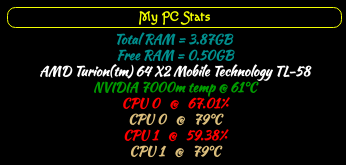
-
So, when I use the code you sent last night, It gives error regarding
.temp2.valuebeing that the ‘Virtual device’ only has 1 output value.
My changes will always show the ‘temp value’ as the same for all CPU’s
When I run ‘sensors’ in MM, it showed a ‘Core0 Temp’ and a ‘Core1 Temp’, It actually showed 2 temps for each one.
jim@jim-Aspire-4520:~/MagicMirror$ sensors
k8temp-pci-00c3
Adapter: PCI adapter
Core0 Temp:   +69.0°C
Core0 Temp:   +67.0°C
Core1 Temp:   +69.0°C
Core1 Temp:   +68.0°C

acpitz-virtual-0
Adapter: Virtual device
temp1:        +71.0°C  (crit = +100.0°C)

nouveau-pci-0090
Adapter: PCI adapter
GPU core:     +1.20 V  (min =  +1.00 V, max =  +1.20 V)
temp1:        +64.0°C  (high = +95.0°C, hyst =  +3.0°C)
                       (crit = +105.0°C, hyst =  +2.0°C)
                       (emerg = +135.0°C, hyst =  +5.0°C)
With this being a Dual Core CPU, why can’t I get it to use the ‘PCI adapter’ to give the output?
-
Another question…
How can be changed to show F°?
Not really a big deal, mostly just curious… :upside-down_face:


Hello! It looks like you're interested in this conversation, but you don't have an account yet.
Getting fed up of having to scroll through the same posts each visit? When you register for an account, you'll always come back to exactly where you were before, and choose to be notified of new replies (either via email, or push notification). You'll also be able to save bookmarks and upvote posts to show your appreciation to other community members.
With your input, this post could be even better 💗
Register Login