Read the statement by Michael Teeuw here.
Problem with the Module "email"
-
i don’t see that on my console… I see
password
use your phone
2-step verification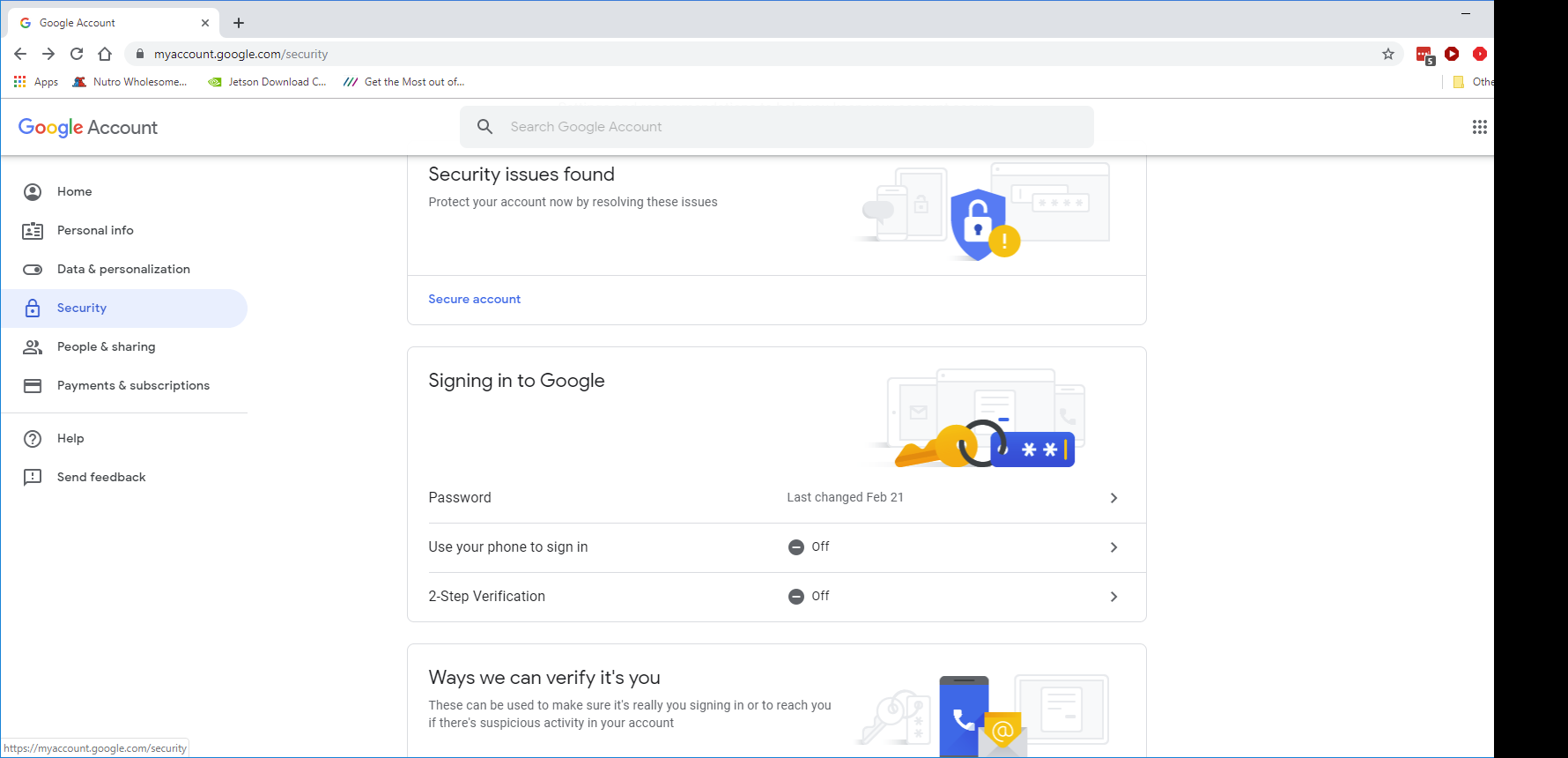
-
@sdetweil Strange. I had to generate a key to get email to work. Not sure why you guys don’t see the option.
Edit:
Maybe because your 2FA is turned off. -
@mumblebaj yes, had to turn on 2fa… hate that
-
I do not see it either. I see the same as sdetweil. I’ve also approved third-party apps with account access on this page below.
Can I do something that would help you? Post a log or something. You just have to tell me the command;)
-
@CyruS1337 you have to turn on 2 step verification (2 factor authentication aka 2fa)
-
@CyruS1337 I just setup the module and created my app key and email is working for me.
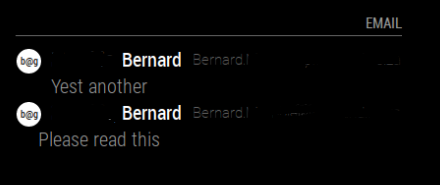
And my config: I also had to change fade to false in order for email to display properly
module: 'email', position: 'top_right', header: 'Email', config: { accounts: [ { user: 'xxxxxxxxxxxxx@gmail.com', password: 'xxxxxxxxxxxxxxxx', host:'imap.gmail.com', port: 993, tls: true, authTimeout: 10000, numberOfEmails: 5, } ], fade: false, maxCharacters: 30 } }, -
Good Morning
So I activated the 2FA and replaced the generated key with my password. I also took your config and added my username and password from 2FA. Unfortunately, as before, there is still “load” and it does not show any emails.
-
If i enter
npm start devhe following will come out:npm ERR! path /home/pi/package.json npm ERR! code ENOENT npm ERR! errno -2 npm ERR! syscall open npm ERR! enoent ENOENT: no such file or directory, open '/home/pi/package.json' npm ERR! enoent This is related to npm not being able to find a file. npm ERR! enoent npm ERR! A complete log of this run can be found in: npm ERR! /home/pi/.npm/_logs/2019-09-06T07_07_27_973Z-debug.log -
@CyruS1337 u need to be in the MagicMirror folder before npm start
-
@CyruS1337 I assume that you meant that you replace your password with the generated key? When you run
pm2 logswhat do you get? Does it show anything for email? Have you in the /modules/email folder run npm install?Check out my modules at: https://github.com/mumblebaj?tab=repositories
Check my blog-post: https://mumblebaj.xyz/
Check my MM Container: https://hub.docker.com/repository/docker/mumblebaj/magicmirror/general -
That’s right, sorry
> magicmirror@2.8.0 start /home/pi/MagicMirror > sh run-start.sh "dev" Starting MagicMirror: v2.8.0 Loading config ... Loading module helpers ... No helper found for module: alert. Initializing new module helper ... Module helper loaded: updatenotification No helper found for module: clock. Initializing new module helper ... Module helper loaded: MMM-SystemStats Initializing new module helper ... Module helper loaded: MMM-Remote-Control Initializing new module helper ... Module helper loaded: MMM-MyCommute Initializing new module helper ... Module helper loaded: MMM-AVStock Initializing new module helper ... Module helper loaded: MMM-GoogleMapsTraffic Initializing new module helper ... Module helper loaded: MMM-SoccerLiveScore Initializing new module helper ... Module helper loaded: email Initializing new module helper ... Module helper loaded: MMM-MyCalendar All module helpers loaded. Starting server on port 8080 ... Server started ... Connecting socket for: updatenotification Connecting socket for: MMM-SystemStats Connecting socket for: MMM-Remote-Control Starting node helper for: MMM-Remote-Control Connecting socket for: MMM-MyCommute ====================== Starting node_helper for module [MMM-MyCommute] Connecting socket for: MMM-AVStock Connecting socket for: MMM-GoogleMapsTraffic Starting node_helper for module: MMM-GoogleMapsTraffic Connecting socket for: MMM-SoccerLiveScore MMM-SoccerLiveScore helper started... Connecting socket for: email email helper started ... Connecting socket for: MMM-MyCalendar Starting node helper for: MMM-MyCalendar Sockets connected & modules started ... Whoops! There was an uncaught exception... { Error: listen EADDRINUSE 0.0.0.0:8080 at Server.setupListenHandle [as _listen2] (net.js:1330:14) at listenInCluster (net.js:1378:12) at doListen (net.js:1492:7) at process._tickCallback (internal/process/next_tick.js:63:19) at Function.Module.runMain (internal/modules/cjs/loader.js:755:11) at startup (internal/bootstrap/node.js:241:19) at bootstrapNodeJSCore (internal/bootstrap/node.js:579:3) errno: 'EADDRINUSE', code: 'EADDRINUSE', syscall: 'listen', address: '0.0.0.0', port: 8080 } MagicMirror will not quit, but it might be a good idea to check why this happened. Maybe no internet connection? If you think this really is an issue, please open an issue on GitHub: https://github.com/MichMich/MagicMirror/issues Launching application. -
Exactly, I replaced the password with the key. I have also installed npm.
cd MagicMirror/modules
cd email
npm install
npm WARN email@0.0.1 No repository field. npm WARN email@0.0.1 No license field. audited 24 packages in 2.521s found 0 vulnerabilitiespm2 logspi@raspberrypi_LOL:~/MagicMirror/modules/email $ pm2 logs [TAILING] Tailing last 15 lines for [all] processes (change the value with --lines option) /home/pi/.pm2/pm2.log last 15 lines: PM2 | 2019-09-07T04:30:05: PM2 log: App [mm:0] online PM2 | 2019-09-07T07:40:45: PM2 log: Process 0 in a stopped status, starting it PM2 | 2019-09-07T07:40:45: PM2 log: Stopping app:mm id:0 PM2 | 2019-09-07T07:40:46: PM2 log: pid=20666 msg=failed to kill - retrying in 100ms PM2 | 2019-09-07T07:40:46: PM2 log: App [mm:0] exited with code [0] via signal [SIGINT] PM2 | 2019-09-07T07:40:46: PM2 log: pid=20666 msg=process killed PM2 | 2019-09-07T07:40:46: PM2 log: App [mm:0] starting in -fork mode- PM2 | 2019-09-07T07:40:46: PM2 log: App [mm:0] online PM2 | 2019-09-07T07:55:09: PM2 log: Process 0 in a stopped status, starting it PM2 | 2019-09-07T07:55:09: PM2 log: Stopping app:mm id:0 PM2 | 2019-09-07T07:55:10: PM2 log: pid=5504 msg=failed to kill - retrying in 100ms PM2 | 2019-09-07T07:55:10: PM2 log: App [mm:0] exited with code [0] via signal [SIGINT] PM2 | 2019-09-07T07:55:10: PM2 log: pid=5504 msg=process killed PM2 | 2019-09-07T07:55:10: PM2 log: App [mm:0] starting in -fork mode- PM2 | 2019-09-07T07:55:10: PM2 log: App [mm:0] online /home/pi/.pm2/logs/mm-error.log last 15 lines: 0|mm | SyntaxError: Unexpected token u in JSON at position 0 0|mm | at JSON.parse (<anonymous>) 0|mm | at Request._callback (/home/pi/MagicMirror/modules/MMM-SoccerLiveScore/node_helper.js:146:29) 0|mm | at self.callback (/home/pi/MagicMirror/node_modules/request/request.js:185:22) 0|mm | at Request.emit (events.js:182:13) 0|mm | at Request.onRequestError (/home/pi/MagicMirror/node_modules/request/request.js:881:8) 0|mm | at ClientRequest.emit (events.js:182:13) 0|mm | at TLSSocket.socketErrorListener (_http_client.js:382:9) 0|mm | at TLSSocket.emit (events.js:182:13) 0|mm | at emitErrorNT (internal/streams/destroy.js:82:8) 0|mm | at emitErrorAndCloseNT (internal/streams/destroy.js:50:3) 0|mm | ATTENTION: default value of option force_s3tc_enable overridden by environment. 0|mm | (node:5525) [DEP0005] DeprecationWarning: Buffer() is deprecated due to security and usability issues. Please use the Buffer.alloc(), Buffer.allocUnsafe(), or Buffer.from() methods instead. 0|mm | ATTENTION: default value of option force_s3tc_enable overridden by environment. 0|mm | (node:7860) [DEP0005] DeprecationWarning: Buffer() is deprecated due to security and usability issues. Please use the Buffer.alloc(), Buffer.allocUnsafe(), or Buffer.from() methods instead. /home/pi/.pm2/logs/mm-out.log last 15 lines: 0|mm | Connecting socket for: email 0|mm | email helper started ... 0|mm | Connecting socket for: MMM-MyCalendar 0|mm | Starting node helper for: MMM-MyCalendar 0|mm | Sockets connected & modules started ... 0|mm | Launching application. 0|mm | [AVSTOCK] Initialized. 0|mm | Working notification system. Notification: MMM-GOOGLE_MAPS_TRAFFIC-GET payload: { style: 'standard' } 0|mm | listening for emails... 0|mm | Create new calendar fetcher for url: https://calendar.google.com/calendar/ical/zeptrion%40gmail.com/private-75149d8982f910a209e0fe7d0363d75f/basic.ics - Interval: 300000 0|mm | NEW MAIL 0|mm | NEW MAIL 0|mm | NEW MAIL 0|mm | NEW MAIL 0|mm | NEW MAIL -
@CyruS1337 MMM-SoccerLiveScore/ is the one throwing the error… not email
-
I have disabled the module, but the mails are still not displayed :(
/*{ module: 'MMM-SoccerLiveScore', position: 'top_right', header: 'Fussball Rangliste', config: { leagues: [215,399,1], showNames: true, showLogos: true, displayTime: 60 * 1000, showTables: true } },*/ -
@CyruS1337 i don’t know anything about email module, i remember it was hard to get working, i didn;t like the results…
anyhow… for the commenting out module,
you can also just adddisabled: true,
to the module info, before/after the module name
disabled: false,
is the default -
@sdetweil I do not really like the module any more. I’m trying to get it up and running for a year :)
Thank you very much for your great support
-
@CyruS1337 Please remember, for the emails to display you need to set
fade: false.


Hello! It looks like you're interested in this conversation, but you don't have an account yet.
Getting fed up of having to scroll through the same posts each visit? When you register for an account, you'll always come back to exactly where you were before, and choose to be notified of new replies (either via email, or push notification). You'll also be able to save bookmarks and upvote posts to show your appreciation to other community members.
With your input, this post could be even better 💗
Register Login