MagicMirror Forum
    • Recent
    • Tags
    • Unsolved
    • Solved
    • MagicMirror² Repository
    • Documentation
    • 3rd-Party-Modules
    • Donate
    • Discord
    • Register
    • Login
    A New Chapter for MagicMirror: The Community Takes the Lead
    Read the statement by Michael Teeuw here.

    MMM-CalendarWeek

    Scheduled Pinned Locked Moved Utilities
    33 Posts 18 Posters 25.5k Views 18 Watching
    Loading More Posts
    • Oldest to Newest
    • Newest to Oldest
    • Most Votes
    Reply
    • Reply as topic
    Log in to reply
    This topic has been deleted. Only users with topic management privileges can see it.
    • lavolp3L Offline
      lavolp3 Module Developer
      last edited by

      Looks good!
      Since I’m currently working on the calendar module: What does your module do with multi-day events?

      How to troubleshoot modules
      MMM-soccer v2, MMM-AVStock

      H 1 Reply Last reply Reply Quote 0
      • H Offline
        heskja Module Developer @lavolp3
        last edited by

        @lavolp3 It does currently not support multi-day events very well. Had to do some testing as I saw your question, but ended up creating an issue on this one… :)

        H 1 Reply Last reply Reply Quote 0
        • H Offline
          heskja Module Developer @heskja
          last edited by

          Actually made an attempt to solve the multi day issue, hope it works :)

          1 Reply Last reply Reply Quote 0
          • C Offline
            Cattoo
            last edited by

            Hi,
            I have set the config to
            maximumNumberOfDays: 7,
            showEndDate: true
            displayDescription: true

            But it aint taking it, what could be wrong?
            Only seeing the default values.

            yawnsY 1 Reply Last reply Reply Quote 0
            • yawnsY Offline
              yawns Moderator @Cattoo
              last edited by

              @cattoo said in MMM-CalendarWeek:

              Hi,
              I have set the config to
              maximumNumberOfDays: 7,
              showEndDate: true
              displayDescription: true

              But it aint taking it, what could be wrong?
              Only seeing the default values.

              Please post the entire MMM-CalendarWeek section of your config.js, just remove any personal details like links to your calendars. Maybe you added the config details in the wrong place?

              C 1 Reply Last reply Reply Quote 0
              • C Offline
                Cattoo @yawns
                last edited by

                Here is the code

                {
                			module: "MMM-CalendarWeek",
                			position: "bottom_bar",
                			config: {
                				calendars: [
                					{
                						symbol: "calendar-check-o",
                						displayLocation: 'true',
                						displayDescriptio: "true",
                						maximumNumberOfDays: '5',
                						showEndDate: "true",
                						url: "************"
                					}
                				]
                		}
                		},
                
                
                1 Reply Last reply Reply Quote 0
                • yawnsY Offline
                  yawns Moderator
                  last edited by

                  Okay, please try this.

                  {
                  	module: "MMM-CalendarWeek",
                  	position: "bottom_bar",
                  	config: {
                  		showEndDate: true,
                  		displayLocation: true,
                  		displayDescription: true,
                  		calendars: [
                  			{
                  				symbol: "calendar-check-o",
                  				maximumNumberOfDays: 5,
                  				url: "************"
                  			}
                  		]
                  	}
                  },
                  
                  C 1 Reply Last reply Reply Quote 1
                  • C Offline
                    Cattoo @yawns
                    last edited by

                    That did the trick, thanks a lot :)

                    @yawns said in MMM-CalendarWeek:

                    Okay, please try this.

                    {
                    	module: "MMM-CalendarWeek",
                    	position: "bottom_bar",
                    	config: {
                    		showEndDate: true,
                    		displayLocation: true,
                    		displayDescription: true,
                    		calendars: [
                    			{
                    				symbol: "calendar-check-o",
                    				maximumNumberOfDays: 5,
                    				url: "************"
                    			}
                    		]
                    	}
                    },
                    
                    1 Reply Last reply Reply Quote 1
                    • P Offline
                      PTcrusher
                      last edited by

                      For some reason i cannot get CalendarWeek to display more than 4 days, could you kindly take a look at my configuration?

                      {
                      		 module: "MMM-CalendarWeek",
                      		 displayLocation: true,
                      		 displayDescription: true,
                      		 maximumNumberOfDays: "7",
                      		 maximumDaysPerLine: "7",
                      		 position: "bottom_bar", // This can be any of the regions. Best results in bottom region.
                      		 config: {
                      				 // The config property is optional.
                      				 // If no config is set, an example calendar is shown.
                      				 // See 'Configuration options' for more information.
                      				 calendars: [
                      						 {
                      								 maximumNumberOfDays: "7",
                      								 symbol: "google",
                      								 url: "",
                      						 },
                      						 {
                      								 maximumNumberOfDays: "7",
                      								 symbol: "umbrella-beach",
                      								 url: "",
                      						 },
                      						 {
                      								 maximumNumberOfDays: "7",
                      								 symbol: "building",
                      								 url: "",
                      						 },
                      						 {
                      								 maximumNumberOfDays: "7",
                      								 symbol: "birthday-cake",
                      								 url: "",
                      						 }
                      				 ],
                      		 }
                      },
                      

                      Thanks in advance,
                      Edgar Santos

                      P 1 Reply Last reply Reply Quote 0
                      • P Offline
                        PTcrusher @PTcrusher
                        last edited by

                        @ptcrusher said in MMM-CalendarWeek:

                        For some reason i cannot get CalendarWeek to display more than 4 days, could you kindly take a look at my configuration?

                        {
                        		 module: "MMM-CalendarWeek",
                        		 displayLocation: true,
                        		 displayDescription: true,
                        		 maximumNumberOfDays: "7",
                        		 maximumDaysPerLine: "7",
                        		 position: "bottom_bar", // This can be any of the regions. Best results in bottom region.
                        		 config: {
                        				 // The config property is optional.
                        				 // If no config is set, an example calendar is shown.
                        				 // See 'Configuration options' for more information.
                        				 calendars: [
                        						 {
                        								 maximumNumberOfDays: "7",
                        								 symbol: "google",
                        								 url: "",
                        						 },
                        						 {
                        								 maximumNumberOfDays: "7",
                        								 symbol: "umbrella-beach",
                        								 url: "",
                        						 },
                        						 {
                        								 maximumNumberOfDays: "7",
                        								 symbol: "building",
                        								 url: "",
                        						 },
                        						 {
                        								 maximumNumberOfDays: "7",
                        								 symbol: "birthday-cake",
                        								 url: "",
                        						 }
                        				 ],
                        		 }
                        },
                        

                        Thanks in advance,
                        Edgar Santos

                        This options need to go to the config key :)

                        displayLocation: true,
                        displayDescription: true,
                        maximumNumberOfDays: "7",
                        maximumDaysPerLine: "7",
                        

                        Now it works fine

                        1 Reply Last reply Reply Quote 0
                        • Q Offline
                          qjaxxx
                          last edited by

                          Hi sorry for the lack of information, I have gotten your module to the point where it shows that no upcoming events are listed. So it IS showing up now. Would I actually make the config adjustments in the main config file, or are those adjustments to be made in the secondary file or node helper I think is what it is called? My code is attached. I adjusted my specific Ical url and username/password. Any help is appreciated.

                          Thanks,

                          image

                          H 1 Reply Last reply Reply Quote 0
                          • O Offline
                            othomys
                            last edited by

                            Hello,

                            I have integrated several calendars. I would like to add a separate icon to each calendar. In which folder do I have to put the new symbols? What properties must the symbols have? (Type, size)

                            Many Thanks.

                            H 1 Reply Last reply Reply Quote 2
                            • B Offline
                              bolish
                              last edited by bolish

                              Hi,

                              Great module!
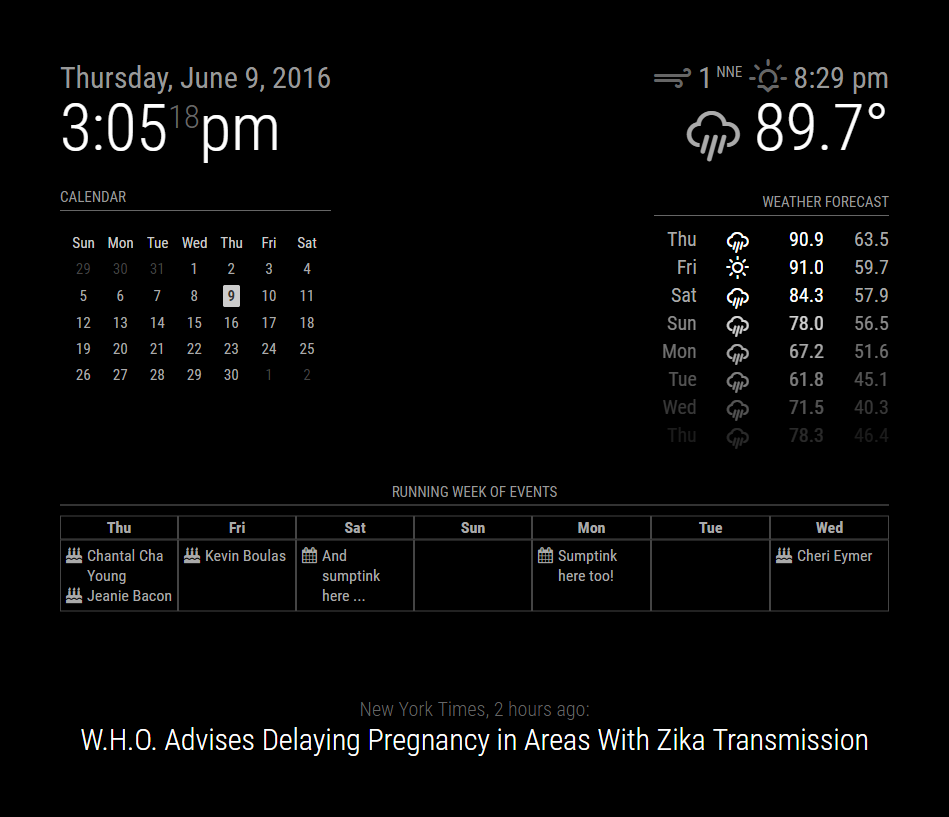
                              Is there any way to display it as a table? I mean adding lines to separate each date cell?
                              Something similar to :

                              link text

                              Maybe by aplying around with the .css?

                              H 1 Reply Last reply Reply Quote 0
                              • B Offline
                                bolish
                                last edited by bolish

                                Hi,

                                I’m trying to use this module as a monthly calendar also!
                                (7 days per row, 31 days max).

                                Would be great if you could add below options to the modules!!::

                                • Module start date options :
                                  - Today
                                  - Monday of the current week (monday of this week)
                                  - Monday of the week that precedes the day week of the month (this is the one I’m really looking for)

                                I will have a look on my side on parallel but I’m far from having the skills for now… Let’s see.

                                Cherry on the cake, be able to move the starting date upon notifications (i.e : move to next month following a gesture that triggers notification)

                                1 Reply Last reply Reply Quote 2
                                • P Offline
                                  peter_mcc
                                  last edited by

                                  We’re experimenting with MagicMirror to keep track of what’s going on with our family calendar. It works fairly well - we’ve got a calendar set up for each person (5 of us) and another one for family events.

                                  I have a problem though - when an event is in more than one calendar it only shows up as the first calendar. So if it’s in calendars 1, 2 & 3 MagicMirror will only show the event as being in Calendar 1.

                                  Is there any way to stop it getting rid of duplicate entries?

                                  D 1 Reply Last reply Reply Quote 0
                                  • D Offline
                                    Daveey @peter_mcc
                                    last edited by

                                    @peter_mcc Just looking at the documentation, it looks like you’re running up against the allowDuplicate config, which is false by default, so it’s finding your multiple/same events and hiding them. add to the module config a line for

                                    allowDuplicate: true,
                                    
                                    1 Reply Last reply Reply Quote 1
                                    • G Offline
                                      Gingos
                                      last edited by

                                      Hey, I’m using this tool and I’m appreciate it very much - thank you!

                                      But is there any possibility/option to adjust the columns-width or the space between two days?

                                      H 1 Reply Last reply Reply Quote 0
                                      • C Offline
                                        Cattoo
                                        last edited by

                                        How should i type in for multiple calendars?
                                        Have tried different things but its just ending up config error.

                                        S 1 Reply Last reply Reply Quote 0
                                        • H Offline
                                          heskja Module Developer @qjaxxx
                                          last edited by

                                          @qjaxxx
                                          As far as I can see, you have closed the “config”-section of the module configuration too soon. As you have posted a screenshot of your config, not the config yourself, I will refrain from typing it manually, but you have a closing bracket “}” between “fetchInterval” and “calendars”. Please remove it, as the array of calendars should be within your config section.

                                          1 Reply Last reply Reply Quote 0
                                          • S Do not disturb
                                            sdetweil @Cattoo
                                            last edited by

                                            @Cattoo

                                            repeat this block for each calendar

                                                                                             {
                                            								 symbol: "some_label",
                                            								 url: "http://someurl",
                                            						 },
                                            

                                            Sam

                                            How to add modules

                                            learning how to use browser developers window for css changes

                                            1 Reply Last reply Reply Quote 0

                                            Hello! It looks like you're interested in this conversation, but you don't have an account yet.

                                            Getting fed up of having to scroll through the same posts each visit? When you register for an account, you'll always come back to exactly where you were before, and choose to be notified of new replies (either via email, or push notification). You'll also be able to save bookmarks and upvote posts to show your appreciation to other community members.

                                            With your input, this post could be even better 💗

                                            Register Login

                                            • 1
                                            • 2
                                            • 1 / 2
                                            • First post
                                              Last post
                                            Enjoying MagicMirror? Please consider a donation!
                                            MagicMirror created by Michael Teeuw.
                                            Forum managed by Sam, technical setup by Karsten.
                                            This forum is using NodeBB as its core | Contributors
                                            Contact | Privacy Policy