Read the statement by Michael Teeuw here.
MMM-DarkSkyForecast - Yet ANOTHER weather module
-
Hi folks
UPDATE 28-FEB-2021
This module has been replaced with MMM-OpenWeatherForecast. Apple bought Dark Sky and decided to stop allowing free access to their weather API (Thanks Apple). OpenWeatherForecast does everything this module does plus a bunch of improvements you’ve all been asking for.UPDATE 9-Dec-2018
I’ve updated this module to use the Nunjucks HTML templating system, which means as of verison 1.6, this module requires MagicMirror version 2.2.0 or later. If you are running on an older version of MagicMirror, then please use v1.5 of the module, which you can download here:https://github.com/jclarke0000/MMM-DarkSkyForecast/releases/tag/v1.5
Instead of using
git cloneto get the module code, download the zip file from the link above and extract the contents of the ZIP file to your modules directory. This zip puts all of the files into a folder namedMMM-DarkSkyForecast-1.5. I don’t know if it’s necessary to rename this directory to justMMM-DarkSkyForecastor if it will work as-is. Runnpm installas normal in the directory to install all of the dependencies.END UPDATES
I had been using my old weather module for quite some time, but now that Weather Underground no longer allows free API access, I’ve needed a replacement.
The great news is that there are SO many weather modules available now, but given that each of them behaved a little differently, it would have taken a considerable amount of time to go through and evaluate each one to see if it suited my needs.
I instead decided to use that time to write one that exactly matches my needs. I’ll admit it is quite possible that another weather module does everything mine does and perhaps more, but being the lazy ass that I am, I didn’t take the time to check :)
If you find it useful, then here it is.
[card:jclarke0000/MMM-DarkSkyForecast]
It supports current conditions, hourly and daily forecasts and is highly configurable. It includes a handful of icon sets and even supports Dark Sky’s Skycons animated icon set.
If you don’t already have one, you’ll need to get a Dark Sky API key from here:
https://darksky.net/devYou’ll also need the latitude and longitude of the region for which you want to display weather conditions. You can find that here:
https://www.latlong.net/Screenshot:

Included Icon sets
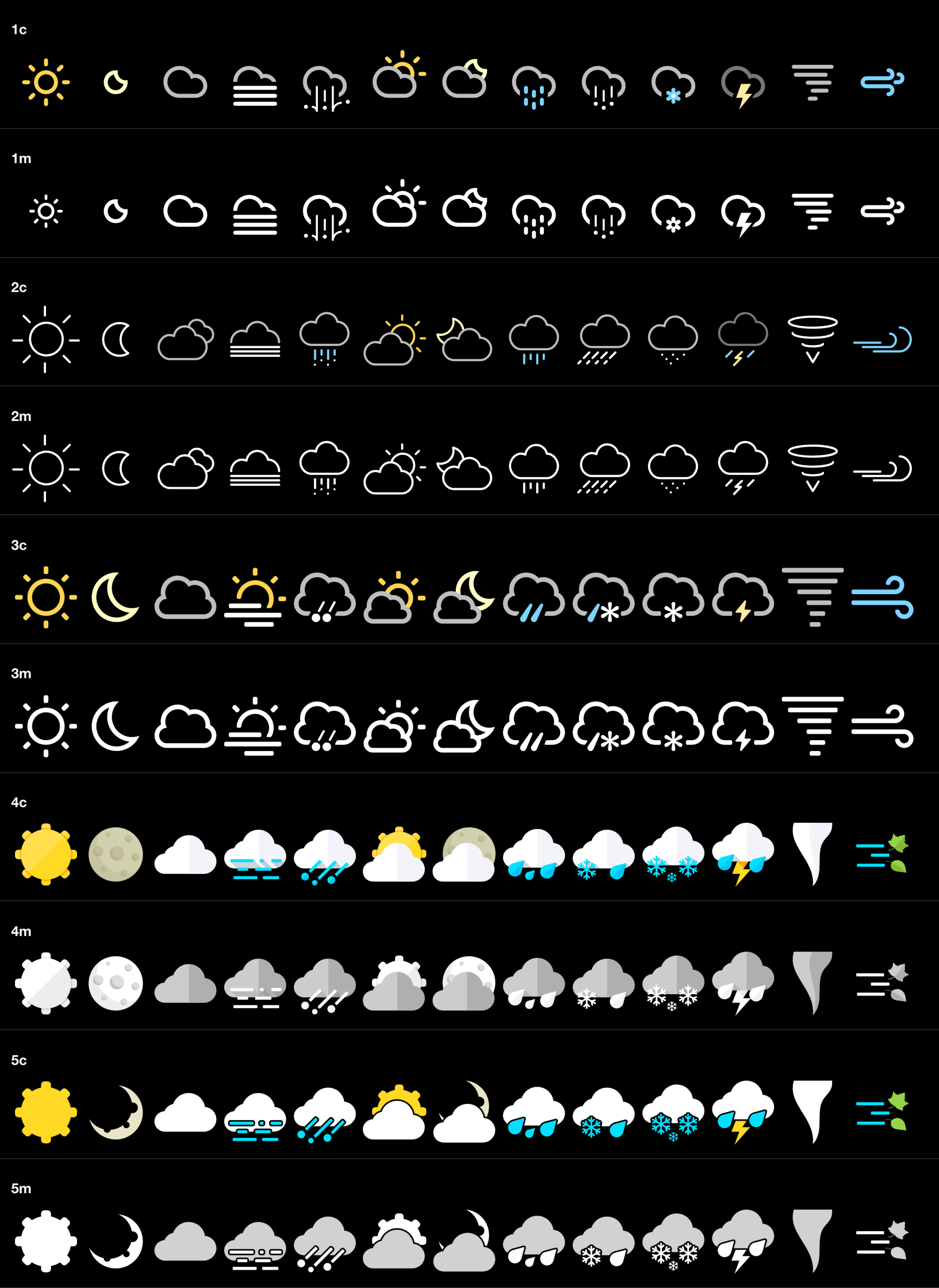
This does not share any code with my old MMM-MyWeather module. This is a completely new module from scratch that is a bit more organized code-wise and outputs HTML markup better suited for multiple layouts.
-
@j-e-f-f
What a beautiful module! Thank you always.
Anyway, is there any feature to broadcast weather via notification? (current weather & forecasts) If so, it will be great.I’m making another calendar module, and want to use forecast info.
And, My another module WeatherBackground also is using current weather info for searching image. Could you add this feature? just periodical simple notifications with payload will be enough. -
Beautifull but…
On mine, 'Loading"…
and no error on log:
Module helper loaded: MMM-DarkSkyForecast
…
Connecting socket for: MMM-DarkSkyForecast
====================== Starting node_helper for module [MMM-DarkSkyForecast]
… -
@sean I think that’s doable. Should be a simple addition to the code. Will take a look this weekend.
-
So beautiful - thank you very much!!
This is more than an adequate replacement for MyWeather. Great job!I’d like to bring forward three questions:
-
Does the module support the USER_PRESENCE notification to suspend / resume API calls? If not, it would be nice if you could consider that.
-
Could you please add an option for a"label_timeFormatSuffix"? It would be nice if the time could be displayed like “14h” if one uses the 24h format.
-
Could you please add an option to hide the icons above the table (umbrella and wind) to make it more compact, if needed?
-
-
@rudibarani said in MMM-DarkSkyForecast - Yet ANOTHER weather module:
Does the module support the USER_PRESENCE notification to suspend / resume API calls?
It doesn’t suspend API calls based on user presence. This is intentional. I don’t spend more than about 30 seconds looking at my mirror, so when I do, I want the information that appears to be immediately up to date. By default the module polls every ten minutes for data, so you don’t run the risk of exceeding the 1000 request limit per day, nor are you really burning up a lot of CPU cycles to do so.
@rudibarani said in MMM-DarkSkyForecast - Yet ANOTHER weather module:
Could you please add an option for a"label_timeFormatSuffix"?
This is already possible. Look at the
label_timeFormatparameter@rudibarani said in MMM-DarkSkyForecast - Yet ANOTHER weather module:
Could you please add an option to hide the icons above the table (umbrella and wind) to make it more compact, if needed?
I’ll add this in at some point, but you can do it now in your custom CSS. Just hide the div with the
.header-rowclass, like so:.MMM-DarkSkyForecast .header-row { display: none; } -
Dear @j-e-f-f,
thanks for the quick reply. Today, I tried to get my toes wet with JS coding and added an option to hide the column header icons from the forecast table or optionally show a header above the forecast table. It seems to work as expected and I have created a pull-request to give others access to the feature as well and maybe safe you some time.I also found a way to hide the vertical lines from the table via the custom.css file and now the module looks even better, if a fullscreen background image is used.
-
@smotx I fixed a bug with the summary display last night. Try doing a
git pullin theMMM-DarkSkyForecastdirectory, then restart MagicMirror. See if that fixes it. -
@rudibarani I merged your pull request, but then I did a bit of refactoring. I renamed the the parameter
forecastTableHeaderTexttoforecastHeaderText, as it can be used in both thetableandtiledviews.I also fixed up how the header is formatted. I’m now using an HTML5
headerelement and it has two classes:module-headerso that it is formatted the same as all of the other module headers, andforecast-headerif you want to target it specifically with CSS.Lastly, this update enables notifications for other modules. The notification is called
DARK_SKY_FORECAST_WEATHER_UPDATEand the payload is Dark Sky’s weather JSON object. For details see https://darksky.net/dev/docs. -
@j-e-f-f :) This looks familiar… well done!
-
Does it handle midnight properly in 12 hour mode? So darned tired of the 0am stuff the other DarkSky one has. ;)
-
@j-e-f-f said in MMM-DarkSkyForecast - Yet ANOTHER weather module:
I also fixed up how the header is formatted. I’m now using an HTML5 header element and it has two classes: module-header so that it is formatted the same as all of the other module headers, and forecast-header if you want to target it specifically with CSS.
Thanks for accepting my pull request and your improvements. They help me learn how this all works.
I have some trouble with the animated current conditions icons. Sometimes they do not show up, although configured - and reappear on a restart. Sometimes they are shown only for one instance of MMM-DarkSkyForecast. Do you have any idea, what might be the cause?
A second question: I have limited the max-width of MMM-DarkSkyForecast to 250px as I would like to have my mirror with cascading module widths with in creasing width the lower a module is. This works fine on the left side. If I send MMM-DarkSkyForecast to the right side and the module below is wider, it is aligned on the left side of the right region. Do you have any advice how to right align all modules in the right region?
-
@j-e-f-f ,
I am also stuck at “Loading” actually it says “Bezig met laden…” which is Dutch for “Loading”.
I ran the “git clone…”, switched to the “MMM-DarkSkyForecast” directory, and ran the NPM Install.
I do get this warning: “npm WARN mmm-darkskyforecast@1.0.0 No repository field.”, but I do not know how to act upon it.The module is making calls to DarkSky, I see that in the Api usage.
The logs show no error.
This is the config:{ module: "MMM-DarkSkyForecast", header: "Weersverwachting", position: "top_right", // classes: "default everyone", disabled: false, config: { apikey: "XXXXXXXXXXXXX", latitude: "51.5096192", longitude: "5.6364183", iconset: "1c", // maxHourliesToShow: 4, // maxDailiesToShow: 4, // useAnimatedIcons: true, concise: false, // label_timeFormat: "k[h]", forecastLayout: "table" } },I am not sure were I went wrong. Can you provide help?
Kind Regards,
Hein-Jan
-
Same here with “Loading” and nothing happens.
Seems to be a problem with lon/lat.
If i provide the example lon/lat it works.
-
looks awesome but doesn’t work with the coordinates of Berlin. It says “loading” but nothing happens.
{ module: "MMM-DarkSkyForecast", header: "Weather", position: "top_right", classes: "default everyone", disabled: false, config: { apikey: "db7derpderpderp214eae3b0f6e", latitude: "52.520008", longitude: "13.404954", iconset: "2m", concise: false, forecastLayout: "table", language: "de" } }, -
I posted this on the GitHub page;
When I use the default Long and Lat, the module loads. London works as does Vancouver and New York however when trying Hawaii, Sydney, Paris, Cape Town, Moscow, Melbourne, and Wellington, the module will not load. Using https://www.latlong.net/ for Long and Lat.
When I use the same Long and Lat in this module that works with the Forecast.io module, the module won’t load. At first, I thought it was southern hemisphere’s (given the Lat is a ‘negative’ number) but that doesn’t appear to be the cause.
-
@baschke, @karsten13, @Hein-Jan
@j-e-f-f has updated the module on GitHub. Go to the module folder and update it via
git pull.If the error still persists, leave out line
concise: false,
from the config file. That solved it for me in the prior version.
-
I had the same loading issue after just installing it…but leaving out the concise line worked for me too
-
Beautiful module!
A bit too beautiful in my opinion since I’m currently putting a lot of work into MMM-forecast-io :-D -
MMM-WeatherBackgroundsupportsMMM-DarkSkyForecastnow. (Just setsourceas"MMM-DarkSkyForecast")
Thanks @j-e-f-f again.





Hello! It looks like you're interested in this conversation, but you don't have an account yet.
Getting fed up of having to scroll through the same posts each visit? When you register for an account, you'll always come back to exactly where you were before, and choose to be notified of new replies (either via email, or push notification). You'll also be able to save bookmarks and upvote posts to show your appreciation to other community members.
With your input, this post could be even better 💗
Register Login