Read the statement by Michael Teeuw here.
MMM-Hue-Lights - new module for your Philips Hue lights!
-
@christian Sure - post it as an issue/feature request in the Github repo for this package and I’ll find some time to build it!
-
Hi,
I’ve recently installed this module and setup pretty painless. I am, however, having some issues in customising the display. As it’s likely me and not the module I thought here might be a better place than Github to ask.
The first issue is that, despite setting the position to be middle_center it adamantly displays justified to the left. If I set it as bottom_center, bottom_right or a variety of other positions it displays as expected; but always to the left if middle_center selected.
The second issue is that I can’t seem to get grid mode working. I’ve modified custom.css as advised, but it it just displays as a single column. I’ve even tried a full reboot of the RPi, but no difference.
The third is more of a question as I can’t find out how to do this. One of the display examples has the left column with room groups and the right with individual lights. Can anyone point in the direction as to how to do this?
Also - and I haven’t tried this yet - but has anyone tried this with two hubs?
For completeness, the config.js looks like this:
          {
                     module: "mmm-hue-lights",
                     position: "middle_center",
                     config: {
                            bridgeIp: "w.x.y.x",
                            user: "12345678901234567890",
                            displayType: "grid",
                            displayMode: "groups",
                            displayFilter: ['all'],
                            hideFilter: ['Annex'],
                            updateInterval: "5000"
                }
Thanks,
Dave
-
Hi,
Just to add that I have managed to work out why the multi-column grid wasn’t working - it was down to me adding the suggested lines between the default { } entries. Adding the lines at the very end of the file and I have columns at last! Just in case anyone else ever has the same issue the custom.css file looks like:
body {
}
.mmm-hue-lights .grid {
width: auto;
display: flex;
flex-flow: row wrap;
margin: -10px;
max-width: none;
justify-content: center;
}.mmm-hue-lights .grid .hue {
width: calc(25% - 20px);
margin: 10px;
display: block;
}Still puzzling over how the example had rooms in one column and lights in another - if anyone knows I’d be grateful of the help.
Thanks,
Dave
-
Hi,
very great module. Thanks for job.
It’s not possible to just see ‘your Rooms’, same as android Hue official app ?
Official app :

MagicMirror module :

-
I don’t understand why settings 'displaymode: “groups” does not work :(Setting ‘groups’ work only in mmm-hue-lights?js file, on config file does not work.
-
@dhoggan said in MMM-Hue-Lights - new module for your Philips Hue lights!:
The first issue is that, despite setting the position to be middle_center it adamantly displays justified to the left. If I set it as bottom_center, bottom_right or a variety of other positions it displays as expected; but always to the left if middle_center selected.
The position has nothing to do with the internal alignment of the module - you need to add:
alignment: 'center',to your config for the content to be centered.
The third is more of a question as I can’t find out how to do this. One of the display examples has the left column with room groups and the right with individual lights. Can anyone point in the direction as to how to do this?
Ahh … I guess I should have been more specific in the description of the examples. There’s no way to do what you describe above - in the screenshots I just wanted to show what both the lights and groups settings looked like, so I took 2 screenshots and placed them next to each other.
-
@Smotx said in MMM-Hue-Lights - new module for your Philips Hue lights!:
Hi,
very great module. Thanks for job.
It’s not possible to just see ‘your Rooms’, same as android Hue official app ?
Sure - in the config, set this:
displayMode: 'groups',and then it will only show your Rooms.
-
@Smotx said in MMM-Hue-Lights - new module for your Philips Hue lights!:
I don’t understand why settings 'displaymode: “groups” does not work :(Setting ‘groups’ work only in mmm-hue-lights?js file, on config file does not work.
What do you mean it doesn’t work? That’s what I do on my mirror:
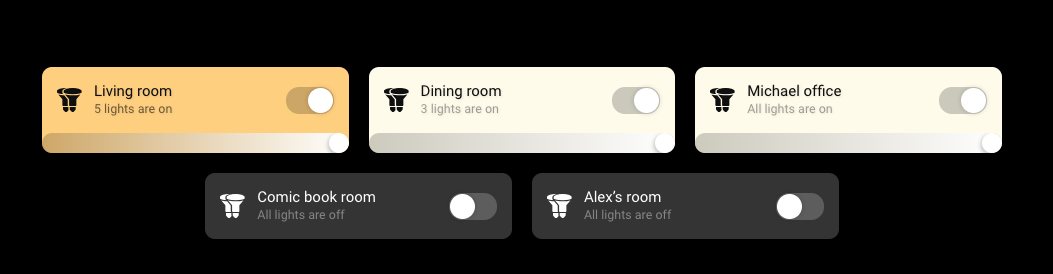
-
If i set
displayMode: ‘groups’,
in config file, MM show ‘lights’,
to view Groups, I have to parameter on mmm-hue-lights.js.
I don’t know why.
-
@Smotx said in MMM-Hue-Lights - new module for your Philips Hue lights!:
If i set
displayMode: ‘groups’,
in config file, MM show ‘lights’,
to view Groups, I have to parameter on mmm-hue-lights.js.
I don’t know why.
Please paste in your entire config for this module - you can XXX out the sensitive info. Thanks!
-
Amazing job !!
did you plan to make your module tactile ready :-p
-
```{
module: “mmm-hue-lights”,
position: “lower_third”, // pick whichever position you want
config: {
bridgeIp: “192.168.1.156”,
user: “xxxxxxxxx”,
displayType: “grid”,
displaymode: “groups”,
hideFilter: [“Bloom”, “V3”, “SDB”],
// … and whatever else configuration options you want to use
}
}, -
Hi,
Why if i set
var config = {
	address: "0.0.0.0",
(To open my MM from another computer)
I have error on this module :
Hue api erroe:error ; read ECONNREST
hue api error: null
Thx
-
I just reinstalled magic mirror on the pi. I installed the mmm-hue-lights module. I tried the default config, and my old config and neither seem to work. The module just sits there with ‘Loading…’
Anybody have ideas?
I did open debug logs and see the module load.
‘Starting module: mmm-hue-lights, version 1.3.2’ with no errors.Inserting GET and POST with the user id works fine in the api nginx webpage.
I just noticed: Someone on GitHub put a bug report in this as well with the same issue.
-
have you tried restarting the hue hub ?
-
I installed mmm-hue-lights by default and get the following error message after 5 minutes. Hue API ERROR: Error: Read ECONNRESET. I ask for help with this problem. I’ve already reinstalled everything and it doesn’t help.
-
Even after using Hue Developer to access the API debug/clip.html and generate a user string the Magic Mirror displays “please add your hue bridge IP and user to MagicMirror config.js file.”
Has anyone seen anything new on this? Is there a change in the authentication for Hue, maybe something that broke this module? -
@jasim can nobody help me?
-
@jasim can you post module config?
-
{
module: “mmm-hue-lights”,
position: “top_right”, // pick whichever position you want
config: {
bridgeIp: “192.168.178.21”,
user: “ueRkyc6AclD2RnpgaUjnTYZb-1Z30eRsjYeF5bt”,
// … and whatever else configuration options you want to use


Hello! It looks like you're interested in this conversation, but you don't have an account yet.
Getting fed up of having to scroll through the same posts each visit? When you register for an account, you'll always come back to exactly where you were before, and choose to be notified of new replies (either via email, or push notification). You'll also be able to save bookmarks and upvote posts to show your appreciation to other community members.
With your input, this post could be even better 💗
Register Login