MagicMirror Forum
    • Recent
    • Tags
    • Unsolved
    • Solved
    • MagicMirror² Repository
    • Documentation
    • 3rd-Party-Modules
    • Donate
    • Discord
    • Register
    • Login
    A New Chapter for MagicMirror: The Community Takes the Lead
    Read the statement by Michael Teeuw here.

    MMM-CalendarExt2

    Scheduled Pinned Locked Moved Utilities
    486 Posts 83 Posters 942.3k Views 83 Watching
    Loading More Posts
    • Oldest to Newest
    • Newest to Oldest
    • Most Votes
    Reply
    • Reply as topic
    Log in to reply
    This topic has been deleted. Only users with topic management privileges can see it.
    • S Offline
      sdetweil @BKeyport
      last edited by

      @BKeyport i believe no-one is working on the module at this time.

      Sam

      How to add modules

      learning how to use browser developers window for css changes

      1 Reply Last reply Reply Quote 0
      • V Offline
        Vauxdvihl
        last edited by

        Hello all,
        one question
        I was trying to filter from an ics datas and sign them to other icons, colors and so on…
        But unfortunately nothing happend and i am really confused because i am sitting here for days and i really do not know the bug

        {//MMM-CalendarExt2
        		  module: 'MMM-CalendarExt2',
        		  config: {
        			locale: "de-DE",
        			calendars : [
        				  {
        					name: "Ferien Bayern",
        					url: "http://www.ecoline-media.de/ics/bayern_gf.ics",
        					className: "Ferien",
        					icon: "noto-v1:flag-for-germany",
        				  },
        				 {
        					name: "Müllabfuhr",
        					url: "http://localhost:8080/modules/abfallkalender.ics",
        					transform: (event)=>{
        										  if (event.title.search("Biotonne") > -1) { // If the event might include "Birthday" in its title,
        											event.icon = "mdi-bio" // Set icon of that event to "fxemoji-birthdaycake"
        											event.className = "AbfallBio"
        										  }
        										 
        										  if (event.title.search("Restmuelltonne") > -1) { // If the event might include "Birthday" in its title,
        											event.icon = "fa-solid:trash" // Set icon of that event to "fxemoji-birthdaycake"
        											event.className = "AbfallRest"
        										  } 
        										  
        										  if (event.title.search("Problemabfaelle") > -1) { // If the event might include "Birthday" in its title,
        											event.icon = "emojione-monotone:biohazard" // Set icon of that event to "fxemoji-birthdaycake"
        											event.className = "AbfallProb"
        										  } 
        										  
        										  if (event.title.search("Papiertonne") > -1) { // If the event might include "Birthday" in its title,
        											event.icon = "emojione-monotone:newspaper" // Set icon of that event to "fxemoji-birthdaycake"
        											event.className = "AbfallPap"
        										  } 
        										  
        										  if (event.title.search("Gelber Sack") > -1) { // If the event might include "Birthday" in its title,
        											event.icon = "fa-solid:trash" // Set icon of that event to "fxemoji-birthdaycake"
        											event.className = "AbfallGelb"
        										  } 
        										  
        										  return event // Return that event.
        											},//transform*/
        					},
        

        Can please somebody help me
        Thanks a lot

        1 Reply Last reply Reply Quote 0
        • S Offline
          steverichab
          last edited by sdetweil

          Hello,
          I understand that this module currently has no one supporting it but this is a general question concerning this module(I am a total new bee)
          Here is my entry into config.js and everything works fine except I see no entry from MMM-CalendarExt2. Can anyone tell me what I’m doing wrong ? The default calendar works fine with these google calendars.

          {
            module: 'MMM-CalendarExt2',
            position: "top_left",
            rotateInterval: 1000*60,
            config: {
              calendars : [
                {
                  url:"webcal://www.calendarlabs.com/ical-calendar/ics/76/US_Holidays.ics",
                },
              ],
          views: [
                    { 
                      name: "view1",
                      mode: "month",
                      slotCount: "7",
                      maxItems: "1000",
                      hideOverflow: false,
                      slotMaxHeight: "95px",
                      monthFormat: "MMMM YYYY",
                      position: "top_left",
                      calendars: []
                    },
                  ],
              scenes: [
                {
                  name: "DEFAULT",
                },
              ],
            },
          },
          
          BKeyportB 1 Reply Last reply Reply Quote -1
          • BKeyportB Offline
            BKeyport Module Developer @steverichab
            last edited by

            @steverichab I’d name the calendar. The example is thus:

            {
                name: "US holiday",
                className: "holiday", // This allows you to modify it in css
                url: "http://www.calendarlabs.com/templates/ical/US-Holidays.ics",
              },
            

            Compare to a working config:

            		{
            			module: "MMM-Block",
            			position: "top_right",
            		},
            		{
            			module: "MMM-CalendarExt2",
            			config: {
            				calendars : [
            					{
            						url: "[private]",
            						name: "Main Calendar", // Optional, Recommended
            						maxItems: 99,
            						scanInterval: 1000*60*1, // every minute, Appt Book, needs this speed
            						beforeDays: 0,
            						afterDays: 999,
            						maxIterations: 999,
            						forceLocalTZ: false,
            					},
            					{
            						url: "http://www.trumba.com/calendars/seattle-seahawks-schedule.ics",
            						name: "Seahawks Calendar",
            						maxItems: 100,
            						scanInterval: 24*60*60*1000,
            						beforeDays: 0,
            						afterDays: 999,
            						maxIterations: 999,
            						forceLocalTZ: false,
            					},
            				],
            				views: [
            					{
            						mode: "daily",
            						position: "top_right",
            						slotCount: 99,
            						timeFormat:"h:mm A",
            						hideOverflow: false,
            						filterPassedEvent: true,
            						name: "Daily View",
            						className: "remove_empty_slot",
            						calendars: ["Main Calendar","Seahawks Calendar"],
            						transform: function(event) {
            							if (event.title.search("Recycle") > -1) {
            								event.icon = "mdi:recycle";
            								event.className = "lemay";
            							}
            							if (event.title.search("Yard Waste") > -1) {
            								event.icon = "entypo-leaf";
            								event.className = "lemay";
            							}
            							if (event.title.search("Seahawks") > -1) {
            								event.icon = "fa-solid:football-ball";
            								event.className = "seahawks";
            							}
            							return event;
            						},
            					},
            				],
            				scenes: [
            					{
            						name: "DEFAULT",
            					},
            				],
            			},
            		},
            

            The "E" in "Javascript" stands for "Easy"

            1 Reply Last reply Reply Quote 0
            • R Offline
              rmcelwee
              last edited by

              My calendar flashes every 60 seconds but as far as I can tell, I have all my calendars updating every 180 seconds.

              
              					{
              			  module: 'MMM-CalendarExt2',
              			  config: {
              			   
              				calendars : [
              				  
              				  {
              				    className: "vacation",
              					scanInterval: "1000*180",
              					url: "https://calendar.google.com/calendar/ical/...",
              				  },
              				  {
              				    className: "nights",
              				    scanInterval: "1000*180",
              					url: "https://calendar.google.com/calendar/ical/...",
              				  },
              				  {
              				    className: "days",
              				    scanInterval: "1000*180",
              					url: "https://calendar.google.com/calendar/ical/...",
              				  },
              				  {
              				    className: "bob",
              				    scanInterval: "1000*180",
              					url: "https://calendar.google.com/calendar/ical/...",
              				  },
              				  {
              				    className: "bunny",
              				    scanInterval: "1000*180",
              					url: "https://calendar.google.com/calendar/ical/...",
              				  },
              				{
              				    className: "special",
              				    scanInterval: "1000*180",
              					url: "https://calendar.google.com/calendar/ical/...",
              				  },				    
              						],
              				views: [
              				  {
              					name: "view1",
              					mode: "week",
              					slotCount: 8,
              					maxItems: "1000",
              					hideOverflow: "false",
              					//slotMaxHeight: "64px",
              					slotMaxHeight: "105px",
              					monthFormat: "MMMM YYYY",
              					position: "bottom_bar",
              					updateInterval: "1000*180",
              					calendars: []
              					
              					 
              				  },
              				],
              				scenes: [
              				  {
              					name: "DEFAULT",
              				  },
              				],
              			  },
              			},
              
              
              R 1 Reply Last reply Reply Quote 0
              • R Offline
                rmcelwee
                last edited by rmcelwee

                I would like to center the text on my events (or whatever they are called - the yellow, green, white, etc lines). I’ve tried a few things but it has not worked for me. My calendar position is “bottom_bar”.
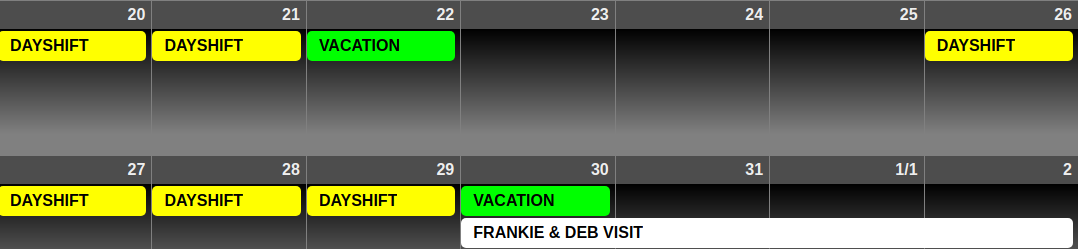
                foto.png

                
                body {
                  color: #000;
                }
                
                .dimmed {
                  color: #000;
                }
                
                .normal {
                  color: #000;
                }
                
                .bright {
                  color: #000;
                }
                .module.clock {
                  background-color:rgba(255,255,255,0.5);
                  border-radius:8px;
                  padding:56px;
                  }
                .module.currentweather {
                  background-color:rgba(255,255,255,0.5);
                  border-radius:8px;
                  padding:22px;
                  }
                .module.weatherforecast {
                  background-color:rgba(255,255,255,0.5);
                  border-radius:8px;
                  padding:8px;
                  height: 200;
                  }/*
                 .MMM-GooglePhotos {
                  margin-top: -300px;
                  margin-left: -123;
                    }*/
                    #GPHOTO_INFO {
                	display:none;
                }
                  #GPHOTO_BACK {
                	display:none;
                }
                .module.MMM-CalendarExt2 {
                  background-color:rgba(255,255,255,0.5);
                  height: 870px;
                    }
                .CX2 .weeksmark {
                display:none;
                }
                .CX2 .vacation.fullday {
                background-color:#00FF00;
                color:#000;
                }
                .CX2 .nights.fullday {
                background-color:#009DFF;
                color:#000;
                }
                .CX2 .special.fullday {
                background-color:#FF0000;
                color:#000;
                }
                .CX2 .days.fullday {
                background-color:#FFFF00;
                color:#000;
                }
                /*.region.bottom_bar {
                  text-align: center;
                  }
                .CX2 .days.eventTitle {
                text-align:center;
                }*/
                  .module.MMM-EventHorizon {
                  background-color:rgba(255,255,255,0.5);
                  border-radius:8px;
                  padding:8px;
                  }/*
                body {
                  position: absolute;
                  margin: 2;
                  height: 100%;
                  width: 99%;
                }*/
                .region.top.left {
                  position: absolute;
                  top: -52px;
                  left: 0px;
                  bottom: -2px;
                  width: 270px;
                  }
                .region.middle.center {
                  width: 100%;
                  left: -15px;
                  top: 640px;
                }
                body {
                  margin: 0;
                  height: 100%;
                  width: 100%;
                }
                
                
                BKeyportB 1 Reply Last reply Reply Quote 0
                • BKeyportB Offline
                  BKeyport Module Developer @rmcelwee
                  last edited by

                  @rmcelwee

                  .CX2 .[view_mode] .eventTitle {
                    text-align:center;
                  }
                  

                  eg:

                   .CX2 .daily .eventTitle {
                    text-align:center;
                  }
                  

                  The "E" in "Javascript" stands for "Easy"

                  R 1 Reply Last reply Reply Quote 0
                  • R Offline
                    rmcelwee @BKeyport
                    last edited by

                    @BKeyport said in MMM-CalendarExt2:

                     .CX2 .daily .eventTitle {
                      text-align:center;
                    }
                    

                    This is not working for me for some reason???

                    .CX2 .week .eventTitle {
                    text-align:center;
                    }

                    BKeyportB 1 Reply Last reply Reply Quote 0
                    • BKeyportB Offline
                      BKeyport Module Developer @rmcelwee
                      last edited by BKeyport

                      @rmcelwee Looks like that’s the only one that isn’t assigned a class for CSS, I can’t find anything in the defaults that’ll do what you want.

                      Sorry.

                      The "E" in "Javascript" stands for "Easy"

                      1 Reply Last reply Reply Quote 0
                      • D Offline
                        DJ6sTep
                        last edited by DJ6sTep

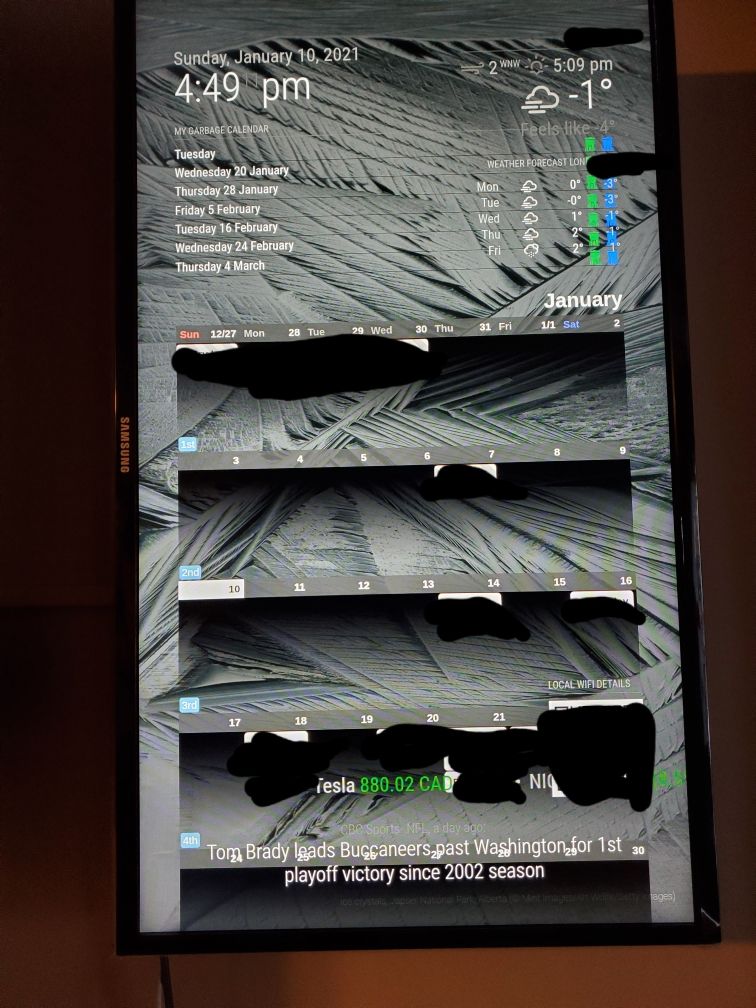
                        20210110_170629.jpg
                        I’m a noob to this MM/java stuff, so please be patience with me. I just need help with a few things:

                        • How do I move the position of my calendar so it’s above my WIFI-PASSWORD module?
                        • How do I remove the weekly count on the left side of the calendar (ie- 1st week, 2nd week, etc)?
                        • Is there any way I could make the calendar size smaller? So it doesn’t take up the whole screen?
                        • Why did the calendar move my garbage & recycling icons to the far right, covering the temperature?

                        Really appreciate the help & this module is so sick!!

                        BKeyportB R 2 Replies Last reply Reply Quote 0
                        • BKeyportB Offline
                          BKeyport Module Developer @DJ6sTep
                          last edited by

                          @DJ6sTep said in MMM-CalendarExt2:

                          • How do I move the position of my calendar so it’s above my WIFI-PASSWORD module?

                          normally, the order of things coming up is determined by the order in config.js - however, in this case, the module is using a fake container, so it’ll load AFTER everything else. It’s best to use it’s own region for it.

                          see: https://forum.magicmirror.builders/topic/286/regions?_=1610316572966

                          • How do I remove the weekly count on the left side of the calendar (ie- 1st week, 2nd week, etc)?

                          Take a look at https://github.com/MMM-CalendarExt2/MMM-CalendarExt2/blob/master/docs/Configuration/Views/week%2C-month.md

                          in particular weeksFormat

                          • Is there any way I could make the calendar size smaller? So it doesn’t take up the whole screen?

                          Yep. Change your view and/or region.

                          • Why did the calendar move my garbage & recycling icons to the far right?

                          The calendar wedges itself into a region, and expands the region to fit. the icons must be right justified.

                          Be aware that the author of the module has left the project, and nobody has picked it up, so we’re just helping from what we know.

                          Good luck.

                          The "E" in "Javascript" stands for "Easy"

                          D 1 Reply Last reply Reply Quote 0
                          • D Offline
                            DJ6sTep @BKeyport
                            last edited by

                            @BKeyport I was able to get my calendar in the position I want now. Thanks so much for all the great info man.

                            Still having these issues:

                            • What parameter do I use for weeksFormat? I tried using false & disabled & it still didn’t remove the weekly count on the left. I couldn’t find any of the parameter options in the link you posted.
                            • I’m having issues finding info on how to resize my calendar & how to resize the font size of events inside a date.

                            I really appreciate the support & your quick response to my questions man.

                            BKeyportB R 2 Replies Last reply Reply Quote 0
                            • BKeyportB Offline
                              BKeyport Module Developer @DJ6sTep
                              last edited by

                              @DJ6sTep

                              @DJ6sTep said in MMM-CalendarExt2:

                              @BKeyport I was able to get my calendar in the position I want now. Thanks so much for all the great info man.

                              Still having these issues:

                              • What parameter do I use for weeksFormat? I tried using false & disabled & it still didn’t remove the weekly count on the left. I couldn’t find any of the parameter options in the link you posted.

                              Try

                              weeksFormat: "",
                              

                              in the view section of your config. Effectively, that tells it to display nothing.

                              • I’m having issues finding info on how to resize my calendar & how to resize the font size of events inside a date.

                              That sounds like css, and honestly, even though I’ve written a module, I’m lost when it comes to css, someone else should see this and help, hopefully.

                              The "E" in "Javascript" stands for "Easy"

                              M 1 Reply Last reply Reply Quote 0
                              • R Offline
                                rmcelwee @rmcelwee
                                last edited by rmcelwee

                                @rmcelwee said in MMM-CalendarExt2:

                                My calendar flashes every 60 seconds but as far as I can tell, I have all my calendars updating every 180 seconds.

                                
                                					{
                                			  module: 'MMM-CalendarExt2',
                                			  config: {
                                			   
                                				calendars : [
                                				  
                                				  {
                                				    className: "vacation",
                                					scanInterval: "1000*180",
                                					url: "https://calendar.google.com/calendar/ical/...",
                                				  },
                                

                                I forgot to post what fixed this for me. I added (without quotes):

                                " updateInterval: 1000*600, "

                                in between config: { and calendars : [ at the top. scanInterval does something completely different but I don’t know what. Now my calendar only updates every 10 minutes. Hopefully this will help someone. Thanks!

                                1 Reply Last reply Reply Quote 0
                                • R Offline
                                  rmcelwee @DJ6sTep
                                  last edited by

                                  @DJ6sTep said in MMM-CalendarExt2:

                                  Still having these issues:

                                  • What parameter do I use for weeksFormat? I tried using false & disabled & it still didn’t remove the weekly count on the left.

                                  I am still learning this but I put this in my custom.css to get rid of the week count:

                                  .CX2 .weeksmark {
                                  display:none;
                                  }

                                  1 Reply Last reply Reply Quote 0
                                  • R Offline
                                    rmcelwee @DJ6sTep
                                    last edited by

                                    @DJ6sTep said in MMM-CalendarExt2:

                                    • Is there any way I could make the calendar size smaller? So it doesn’t take up the whole screen?

                                    I had a ton of trouble with the sizing on my modules and basically fixed them via trial and error. Go to your config.js and add this to your views config (play with your px number and you will see):

                                    slotMaxHeight: “105px”,

                                    I think I also messed with this as well (in the same section):

                                    slotCount: 8,

                                    Good luck! Glad to see another newbie in here. Makes me feel a little better with the two month struggle I went through to get my mirror looking right!

                                    D 1 Reply Last reply Reply Quote 0
                                    • D Offline
                                      DJ6sTep @rmcelwee
                                      last edited by

                                      @rmcelwee said in MMM-CalendarExt2:

                                      slotCount: 8,

                                      Appreciate the tips man, adding that weekformat line in the custom.css file did the trick.

                                      Sorry man, I have a few more questions if you know :)

                                      • How do I change the font size & the size of that background color that’s behind all my events? I find the default font size is too big. And I could probably fit more event slots in each day, if it was smaller font.

                                      • How to update the calendar so it just shows the days of that month? Instead of it showing the previous days of the month before, because it’s on the last week as the new month. Same with it showing the days of the next month in the last week of the current month. Hopefully that makes sense. lol

                                      Thanks for all the encouragement man & us newbies gotta help each other out. I’m on week 4 of this & I’m starting to see the finish line :)

                                      1 Reply Last reply Reply Quote 0
                                      • D Offline
                                        DJ6sTep
                                        last edited by

                                        I almost have my calendar how I want it to be, how would I move my calendar just a few inches down from it’s current position? Closer to my WIFI password module.
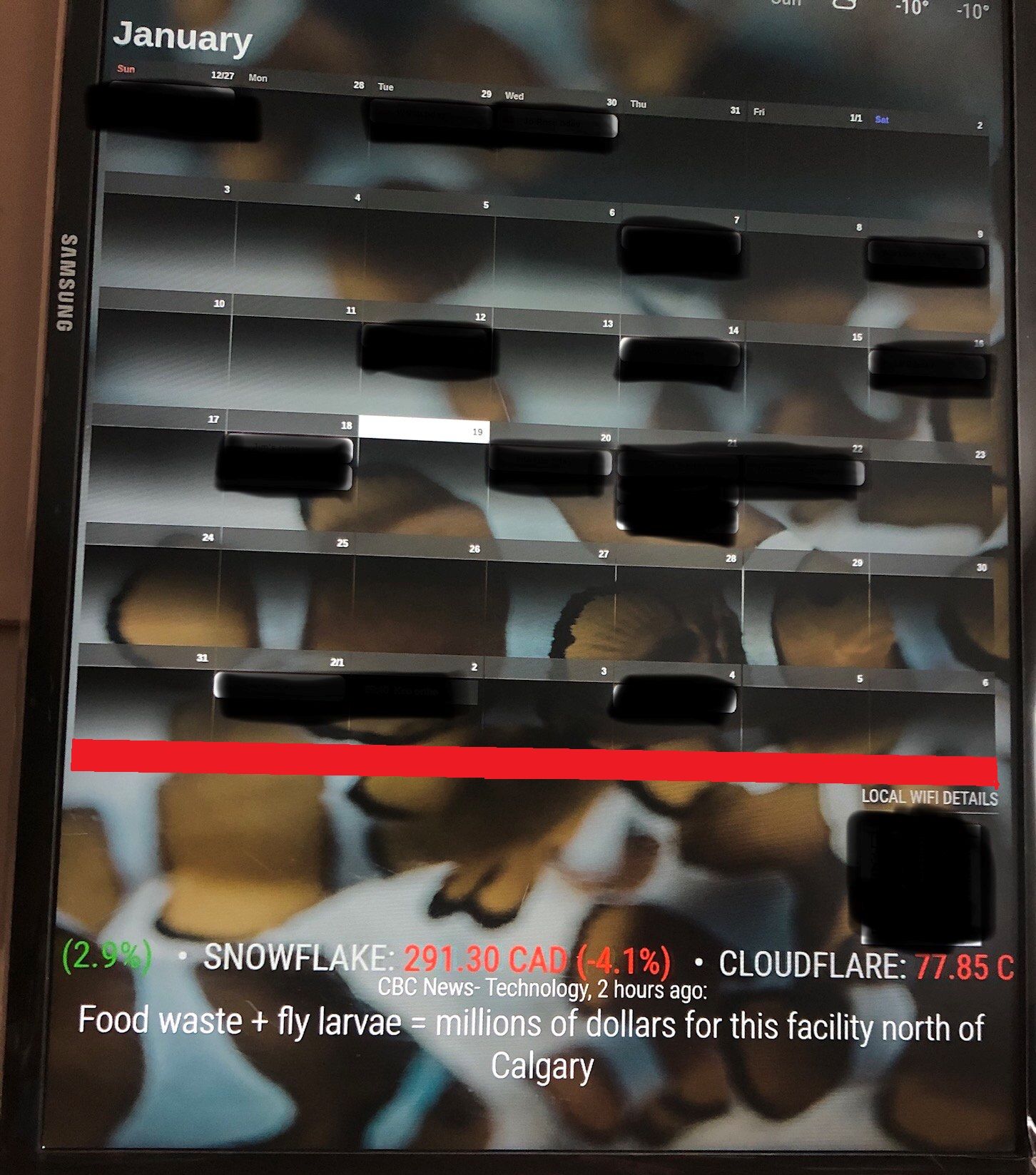
                                        MM- Calendar (2).jpg

                                        I’ve attached a pic of what I’m talking about & highlighted in RED the empty space I want to lower my calendar to.

                                        Do I have to exit the custom.css with something like this? I could be way off on this one. lol.
                                        .cx2 {
                                        width: 800px;
                                        }

                                        R 1 Reply Last reply Reply Quote 0
                                        • R Offline
                                          rmcelwee @DJ6sTep
                                          last edited by

                                          @DJ6sTep said in MMM-CalendarExt2:

                                          I almost have my calendar how I want it to be, how would I move my calendar just a few inches down from it’s current position? Closer to my WIFI password module.

                                          I did this in the custom.css to move my photos around (note the negative numbers):

                                          .MMM-GooglePhotos {
                                          margin-top: -300px;
                                          margin-left: -123;
                                          }*/
                                          #GPHOTO_INFO {
                                          display:none;
                                          }

                                          D 1 Reply Last reply Reply Quote 0
                                          • D Offline
                                            DJ6sTep @rmcelwee
                                            last edited by DJ6sTep

                                            @rmcelwee That worked & it moved my calendar down, where I wanted it to be. Thanks so much for the pro tip man!

                                            R 1 Reply Last reply Reply Quote 0

                                            Hello! It looks like you're interested in this conversation, but you don't have an account yet.

                                            Getting fed up of having to scroll through the same posts each visit? When you register for an account, you'll always come back to exactly where you were before, and choose to be notified of new replies (either via email, or push notification). You'll also be able to save bookmarks and upvote posts to show your appreciation to other community members.

                                            With your input, this post could be even better 💗

                                            Register Login

                                            • 1
                                            • 2
                                            • 3
                                            • 4
                                            • 5
                                            • 24
                                            • 25
                                            • 2 / 25
                                            • First post
                                              Last post
                                            Enjoying MagicMirror? Please consider a donation!
                                            MagicMirror created by Michael Teeuw.
                                            Forum managed by Sam, technical setup by Karsten.
                                            This forum is using NodeBB as its core | Contributors
                                            Contact | Privacy Policy