MagicMirror Forum
    • Recent
    • Tags
    • Unsolved
    • Solved
    • MagicMirror² Repository
    • Documentation
    • 3rd-Party-Modules
    • Donate
    • Discord
    • Register
    • Login
    A New Chapter for MagicMirror: The Community Takes the Lead
    Read the statement by Michael Teeuw here.

    MMM-CalendarExt2

    Scheduled Pinned Locked Moved Utilities
    486 Posts 83 Posters 942.5k Views 83 Watching
    Loading More Posts
    • Oldest to Newest
    • Newest to Oldest
    • Most Votes
    Reply
    • Reply as topic
    Log in to reply
    This topic has been deleted. Only users with topic management privileges can see it.
    • F Offline
      Fr8Trayne
      last edited by

      I’ve removed the actual links to calendars solely for this . Please note that it has been working up until 2 days ago. I love this module just not sure this stopped working. Also note I have a second version of this one a weekly view that still is working just fine.
      {
      module: “MMM-CalendarExt2”,
      pages: {second: “fullscreen_above”},
      defaultset: {
      view: {
      slotCount: 5,
      },
      },

      		config: {
      
      				scenes: [
        					{
          				name: "Month Calendar",
      				views: ["family"],
      				className: "scene_1",
        					},
      					],
      			
      				views: [
        					{
      				    name: "family",
          				    mode: "week",
      				    fromNow:0,
      				    className: "view_1",
      				    calendars: [],
      				    slotTitleFormat:"MM/DD",
      				    slotSubTitleFormat: "dddd",
      				    beforeDays: "7",
      				    hideOverflow: false,
      				    type: "row",
        					},
      					],
      
      				calendars: [
      				    {
      				    name: "Family Calendar",
      				    url: "https://calendar.google.com/calendar/ical",
      				    scanInterval: 2000,
      				    className: "family_calendar",
      				    maxIterations: 100,
      				    },
      
      				    {
      				    name: "Dad's Calendar",
      				    url: "https://calendar.google.com/calendar/ical",
      					    scanInterval: 2000,
      				    className: "dads_calendar",
      				    maxIterations: 100,
      				    },
      
      				    {
      				    name: "Mom's Calendar",
      				    url: "https://calendar.google.com/calendar/ical",
      				    scanInterval: 2000,	
      				    className: "moms_calendar",
      				    maxIterations: 100,
      				    },
      
      				    {
      				    name: "Alana's Calender",
      				    url: "https://calendar.google.com/calendar/ical",
      				    scanInterval: 2000,
      				    className: "alanas_calendar",
      				    maxIterations: 100,
      				    },
      
      				    {
      				    name: "John's Calendar",
      				    url: "https://calendar.google.com/calendar/ical",
      				    scanInterval: 2000,
      				    className: "johns_calendar",
      				    maxIterations: 100,
      				    },
      
      				    {
      				    name: "Holiday Calendar",
      				    url: "https://calendar.google.com/calendar/ical,
      				    scanInterval: 2000,
      				    className: "holiday_calendar",
      				    maxIterations: 100,
      				    },
      				],
      			},
      	},
      
      ? 1 Reply Last reply Reply Quote 0
      • ? Offline
        A Former User @Fr8Trayne
        last edited by A Former User

        @Fr8Trayne
        I think this could be also maxItems issue of view.
        You have several calendars in a view, it means you might have tons of events in the memory of RPI.(You can check how much events are selected to load on your log.)
        Which events should be displayed would be decided by some rules with some condition - filter, sort, … In this case, you haven’t set your rule, so the view would contain 100 events(set as default, sorted by time) from whole calendars. And most(or all) of them would be too old events to display in this view.

        Just set the maxItems of view bigger, or set your rule of filter or sort events to display.

        1 Reply Last reply Reply Quote 0
        • F Offline
          Fr8Trayne
          last edited by

          @Sean thanks. I have added those changes with no effect. Would you mind guiding me to find those stores events in the RPI? I’d like to see if that is the issue.

          ? 1 Reply Last reply Reply Quote 0
          • ? Offline
            A Former User @Fr8Trayne
            last edited by

            @Fr8Trayne
            Could you share with me your real ical url or file to inspect? you can send it via email. (eouia0819@gmail.com)

            1 Reply Last reply Reply Quote 0
            • L Offline
              lotusvball
              last edited by

              Can someone show me what I am doing wrong. I have this configuration:

              	{
              		module: 'MMM-CalendarExt2',
              		config: {
              			//firstDrawingDelay: 1000*10,
              			scenes:[
              				{
              					name: "DEFAULT",
              					views: ["VIEW1"],
              				},
              				],
              			views:[
              				{
              					name: "VIEW1",
              					mode: "daily",
              					title: "Bard Family Schedule",
              					position: "bottom_right",
              					maxItems: 100,
              					maxDays: 5,
              					locale: "en",
              					hideOverflow: true,
              					filterPassedEvent: true,
              					slotCount: 4,
              					calendars: ["Steve","Tracie","Alex"],
              				},
              				],
              			calendars: [
              			    
              				{
              					name: "Steve",
              					url: "https://calendar.google.com/calendar/ical/",
              					beforeDays:0,
              					afterDays: 5,
              				},
              				
              				{
              					name: "Tracie",
              					url: "https://calendar.google.com/calendar/ical/",
              					beforeDays:0,
              					afterDays: 5,
              				},
              				{
              					name: "Alex",
              					url: "https://calendar.google.com/calendar/ical/",
              					beforeDays:0,
              					afterDays: 5,
              				},


              				],
              			},
              	},
              

              The actual calendars have the correct url in my setup. If I set one calendar to show in the view ie. [“Alex”] it works but if I try to do all of them I get nothing. Only the headings for the days.

              Here is the startup sequence:

              Starting MagicMirror: v2.9.0
              Loading config …
              Loading module helpers …
              No helper found for module: alert.
              Initializing new module helper …
              Module helper loaded: updatenotification
              No helper found for module: clock.
              Initializing new module helper …
              Module helper loaded: MMM-GooglePhotos
              No helper found for module: currentweather.
              No helper found for module: weatherforecast.
              Initializing new module helper …
              Module helper loaded: MMM-MyScoreboard
              No helper found for module: MMM-pages.
              Initializing new module helper …
              Module helper loaded: MMM-OnScreenMenu
              No helper found for module: MMM-SmartWebDisplay.
              Initializing new module helper …
              Module helper loaded: MMM-CalendarExt2
              All module helpers loaded.
              Starting server on port 8080 …
              Server started …
              Connecting socket for: updatenotification
              Connecting socket for: MMM-GooglePhotos
              MMM-GooglePhotos started
              Connecting socket for: MMM-MyScoreboard
              Starting node_helper for module [MMM-MyScoreboard]
              Connecting socket for: MMM-OnScreenMenu
              Connecting socket for: MMM-CalendarExt2
              Sockets connected & modules started …
              Launching application.
              MMM-GooglePhotos initialized after loading.
              [CALEXT2] calendar:Steve >> Scanning start with interval:1800000
              [CALEXT2] calendar:Tracie >> Scanning start with interval:1800000
              [CALEXT2] calendar:Alex >> Scanning start with interval:1800000
              [CALEXT2] calendar:Alex >> Scanned: 3, Selected: 3
              [GPHOTO] Scan finished : 66
              [CALEXT2] calendar:Steve >> Scanned: 0, Selected: 0
              [CALEXT2] calendar:Tracie >> Scanned: 7, Selected: 7

              Can you see anything I am doing wrong?

              ? 1 Reply Last reply Reply Quote 1
              • ? Offline
                A Former User @lotusvball
                last edited by A Former User

                @lotusvball
                Could you share with me your real ical(.ics) file or URL? By only inspection of real ical, I can tell what’s wrong.
                email : eouia0819@gmail.com

                L 1 Reply Last reply Reply Quote 0
                • L Offline
                  lotusvball @Guest
                  last edited by

                  @Sean Just emailed it. from sabard@gmail.com

                  1 Reply Last reply Reply Quote 0
                  • C Offline
                    code999 @wegz15
                    last edited by

                    @wegz15 Hey!! your layout is the exact one I have been trying to do for many hours over the last months. May you please paste the code you used to make it looks like that? thx ( the doc’s are confusing and do not show where the part of the codes go to make it work. i liked the first Ext docs better.)

                    1 Reply Last reply Reply Quote 0
                    • R Offline
                      rookiepilot
                      last edited by

                      Did anybody else’s MMM-CalendarExt2 module break after daylight savings? (Sunday November 3rd). Both my “MMM-MyCalendar” AND “MMM-CalendarExt2” modules are showing events on the wrong days now. The problem seems to only occur with reoccurring events; they usually show up one day earlier. Rebooting does not correct the issue. I hope someone can figure this out soon 😞

                      1 Reply Last reply Reply Quote 0
                      • C Offline
                        code999
                        last edited by

                        Hi All,

                        So I have been trying to figure out how to make the calendar smaller. It is over lapping other modules. I have read the docs but I am unclear on how it all comes together to work. Please help.

                        C 1 Reply Last reply Reply Quote 0
                        • C Offline
                          code999 @code999
                          last edited by

                          @code999 I guess no one knows how to do this? Everything I try it does not change what I want.

                          ? 1 Reply Last reply Reply Quote 0
                          • ? Offline
                            A Former User @code999
                            last edited by

                            @code999
                            Too ambiguous. What you tried and what you expected as a result? It would be nice to understand with an image about where is an issue and how to change it.
                            You can customize CSS to adjust the size of almost every element, and you can adjust some height-related values on the configuration. And, there be some brief information about the HTML structure and CSS selectors on docs. e.g) https://github.com/eouia/MMM-CalendarExt2/wiki/4.-Styling
                            So, what is your issue?

                            C 1 Reply Last reply Reply Quote 0
                            • C Offline
                              code999 @Guest
                              last edited by

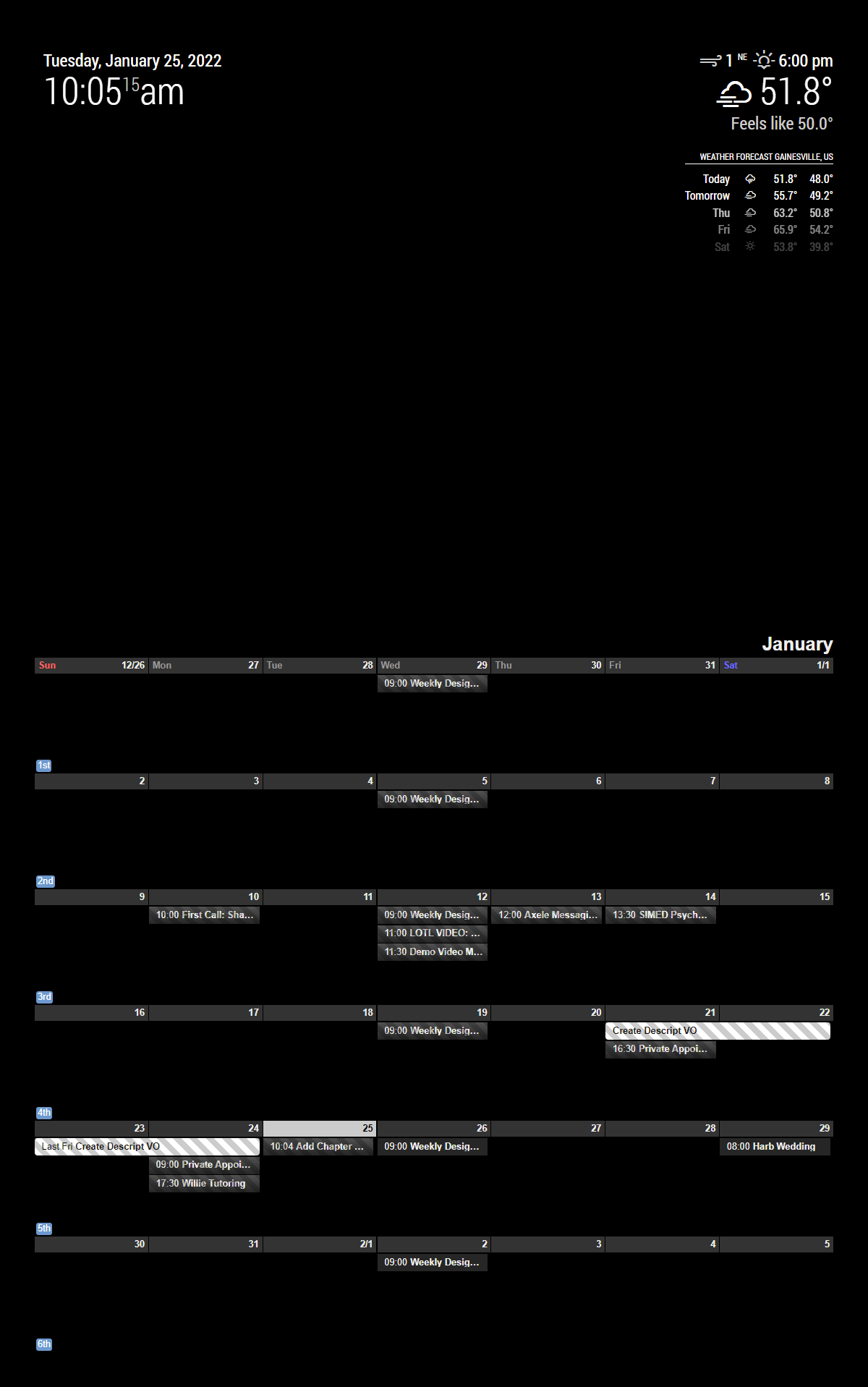
                              @Sean sorry about me not able to explain what I am trying to do. this is how it looks now. 0_1573232750888_before edit.JPG I want to move it to the right and shrink it so it does not overlap the other modules. 0_1573232901007_trying to do.JPG
                              Thanks for your help.

                              M ? 2 Replies Last reply Reply Quote 0
                              • M Offline
                                mrdenmark
                                last edited by

                                This post is deleted!
                                1 Reply Last reply Reply Quote 0
                                • M Offline
                                  mrdenmark @code999
                                  last edited by

                                  @code999
                                  try position top_right instead of full_screen and see how that looks, you can then have a dig around the files and see if you can alter the size by specifying the size % or pixels

                                  1 Reply Last reply Reply Quote 0
                                  • M Offline
                                    mrdenmark
                                    last edited by mrdenmark

                                    @Sean ,
                                    can this module work with mmm-keybindings?i’d like to use the spacebar or similar to cycle through scenes

                                    ? 1 Reply Last reply Reply Quote 0
                                    • ? Offline
                                      A Former User @code999
                                      last edited by

                                      @code999
                                      Which position did you set for the view? put the view in a proper position, then, add this into your css/custom.css

                                      .CX2 {
                                        width: 800px;
                                      }
                                      

                                      Or any size you want.

                                      0_1573387050845_0213703d-e4ca-4192-97f6-9b46faa4cd07-image.png

                                      C 1 Reply Last reply Reply Quote 0
                                      • ? Offline
                                        A Former User @mrdenmark
                                        last edited by

                                        @mrdenmark

                                        can this module work with mmm-keybindings?i’d like to use the spacebar or similar to cycle through scenes

                                        https://github.com/eouia/MMM-CalendarExt2/wiki/3.-Usage
                                        If your module can emit customized notifications(e.g: CALEXT2_SCENE_NEXT or somethings), possible.
                                        Or you can use MMM-NotificationTrigger to translate or relay original notification to specific customized target notification.

                                        1 Reply Last reply Reply Quote 0
                                        • J Offline
                                          jani.karna
                                          last edited by jani.karna

                                          Hi! I’m trying to modify css. I created css/custom.css in MagicMirror/modules/MMM-CalendarExt2/ and tried doing modifications but none of them seem to do anything. Permissions for dir and file are 777.
                                          Is there something I’m not understanding here?

                                          for example I tried this in custom.css but it doesn’t work. This only works in MMM-CalendarExt.css file.

                                          
                                          .CX2 .weekSlot.seq_0 .cellSlot .slotSubTitle {
                                            position:relative;
                                            top:-30px;
                                            left:40%;
                                          }
                                          

                                          Also, how can I get month calendar to only show 4 weeks instead of 5?

                                          ? 1 Reply Last reply Reply Quote 0
                                          • ? Offline
                                            A Former User @jani.karna
                                            last edited by

                                            @jani-karna
                                            You don’t need to create your own css/custom.css under module directory. That file locates under your MagicMirror directory. css/custom.css is a global common file to be used by all the modules.

                                            1 Reply Last reply Reply Quote 0

                                            Hello! It looks like you're interested in this conversation, but you don't have an account yet.

                                            Getting fed up of having to scroll through the same posts each visit? When you register for an account, you'll always come back to exactly where you were before, and choose to be notified of new replies (either via email, or push notification). You'll also be able to save bookmarks and upvote posts to show your appreciation to other community members.

                                            With your input, this post could be even better 💗

                                            Register Login

                                            • 1
                                            • 2
                                            • 21
                                            • 22
                                            • 23
                                            • 24
                                            • 25
                                            • 23 / 25
                                            • First post
                                              Last post
                                            Enjoying MagicMirror? Please consider a donation!
                                            MagicMirror created by Michael Teeuw.
                                            Forum managed by Sam, technical setup by Karsten.
                                            This forum is using NodeBB as its core | Contributors
                                            Contact | Privacy Policy