Read the statement by Michael Teeuw here.
[MMM-Remote-Control](v2-dev) Extensible REST API, Dynamic Menus, and Socket Communications, plus other updates
-
Description
I created an updated version of @Jopyth’s excellent MMM-Remote-Control module with an extensible REST API for controlling everything about your mirror, as well as an upgrade of the
/remote.htmltool to use the module’s node_helper socket connection for communication back and forth–instead of get/post calls.Example REST Calls:
Turn on the monitor
GET /api/monitor/on (curl -X GET 'http://magicmirror:8080/api/monitor/on')Hide All Modules
GET /api/modules/all/hide (curl -X GET 'http://magicmirror:8080/api/modules/all/hide')Here’s the link to the API README and API Documentation. The API also includes the ability to automatically interpret other modules’ anticipated notifications to create a “guessed” API to control it (created from MMM-API). Modules’ can also send a notification to this module to explicitly declare their own API actions.
This is still in testing, and I’m still adding a few features, but I wanted to share in case anyone is interested in testing as well.
Inspiration
I’ve now written several modules and end up constantly including similar functions into my code (things like monitor control, module switching, etc.) for the different modules and I wanted to start migrating to a “One Remote to Rule Them All”-style module. @Jopyth’s module is an awesome base with a lot of the functions needed already built in, but I also wanted to have a better RESTful interface (inspired by @juzim’s MMM-API module natively incorporated) so I could control the mirror from my home automation devices. Eventually, I’ll scrub my other modules like MMM-OnScreenMenu and MMM-KeyBindings to just call the functions from this module and keep them focused on their own key features.
Download
[card:shbatm/MMM-Remote-Control]
Recommend using the Develop Branch for most recent changes.Key Features and Changes
Added:
- REST API interface for controlling all aspects of the MagicMirror from HTTP RESTful-style GET and POST calls, based on principles from MMM-Api
- Full API Documentation at API/README.md
- Extensible Actions – Interprets other modules’ notifications to “guess” an API, but also allows a module to explicitly provide API actions to use.
- Live daily updates of
modules.jsonfrom the MagicMirror wiki, based on @eouia’s MMM-Remote-Control-Repository. - Incorporated some features found in MMM-OnScreenMenu that were not originally in this module.
- Monitor (Connected Screen) On-Off Status and Toggle
- If using Electron: Open Dev Tools, Minimize, Toggle Fullscreen
- Configuration Option to send custom shell commands to use. Currently, only custom monitor on/off/status commands are supported. Addresses PR #99.
Changed:
- Updates to
remote.htmland thenode_helper.jsto use direct SocketIO communication back and forth instead of separate HTTP calls.- Future framework for following PM2 logs and more live update options.
- General clean-up and standardization of status reporting for GET and POST calls, to original URLs and to new API URLs.
- Updated to ES2015 (ES Version 6) function calls in most locations.
- Added USER_PRESENCE controls from AgP42, PR #84
- Added translations from BKeyport, PR #103
- Added SHOW/HIDE/TOGGLE ALL modules option per request from Rene1709, Issue #101
- REST API interface for controlling all aspects of the MagicMirror from HTTP RESTful-style GET and POST calls, based on principles from MMM-Api
-
Additional Features Added:
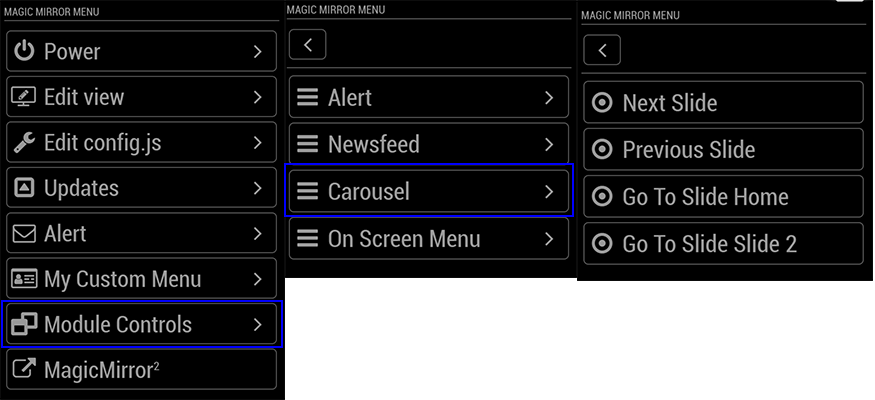
- Dynamic Module Control menu – uses the new API to create a Module Control menu on the remote page to control other modules via notifications.
- Custom Menu – ability to specify your own custom menu items from a file (for advanced users)
- Use PM2 API to control restarts/stops of MM. Can also support starting/stopping other PM2 scripts by passing processName: “scriptToUse” in the query payload.
Example Dynamic Menu for MMM-Carousel w/ Navigation
-
@shbatm
The first time I Install MMM-Remote-Control (by Jopyth ) before
If I would like to use your MMM-Remote-Control (by shbatm)
question
I have to Remove from jopyth or notThank so much
-
@nobita said in [MMM-Remote-Control](v2-dev) Extensible REST API, Dynamic Menus, and Socket Communications, plus other updates:
I have to Remove from jopyth or not
You can checkout my fork/branch without removing @Jopyth’s by adding a remote:
$ cd ~/MagicMirror/modules/MMM-Remote-Control
$ git remote add shbatm https://github.com/shbatm/MMM-Remote-Control.git
$ git fetch shbatm
$ git checkout -b shbatm-develop shbatm/develop
$ npm install
After that you can switch back and forth using
git checkout masterandgit checkout shbatm-develop -
@shbatm
Thanks again -
Can this also update modules like MMM-Remote-Control-Repositories, in just this one module?
-
@dazza120 said in [MMM-Remote-Control](v2-dev) Extensible REST API, Dynamic Menus, and Socket Communications, plus other updates:
Can this also update modules like MMM-Remote-Control-Repositories, in just this one module?
Yes. This version pulls the list of modules from the Wiki and updates the modules.json file when its started (at most 1x per day).
-
@shbatm cheers I’ve looked through the read me and I am completely lost, it’s not just like doing a git clone and then putting stuff in the config file 🧠😁
-
This post is deleted! -
@dazza120 Sorry, I’ve been away. What are you lost with? Can I help point you in the right direction?
If you’re just looking to install this version, see a couple posts up. For the most part it functions just like the other version, but adds a lot of advanced control features on top–like controlling your mirror from a browser or home automation controller (via API) or adding module control menus to the existing “/remote.html” page.
-
Is there any way to track traffic from remote control Nothing is visible in pm2 logs.
A kind debuging or like.
Alert it does not work. It comes the OK for transmit but nothing appears. Restart works and also monitor ON OFF.
But the browser does not refresh again.
Everything works as long as I only have the sample config.
But as soon as I have several other modules running (Page-Selector, Buttons, DWD-Warn-Wetter, PublicTransportHafas, etc.), it is no longer possible.
I would like to know what blocks the module. -
@robiv8 I don’t have a debug mode, but you can try adding:
console.log(notification, payload);to Line #988 of node_helper.js to print all notifications received by the back-end from other modules; orconsole.log(query)to Line #644. If you are using the API, you should be getting a response back in the browser or Postman.Looking at your list, I have a sneaking suspicion that
Page-Selectoris causing the issues, just because it may be inadvertently suspending the module. If you troubleshoot and find that to be the case, and can’t find a work around with that module, you can try using MMM-Carousel w/ Navigation which is what Page-Selector was originally based off of. I know there is an option in that module to “exclude” a module from being suspended. -
@shbatm
Thanks for your explanation
I will try it tonight and then report it.And yes, I also suspect that it is the page selector.
Whereby I set “Alert, notification, buttons and podcast2” to exclude. And nevertheless.
I’ll take a look. -
@shbatm I’ve done the Italian translation if you want to add it. ;)
-
@shbatm
are you sure with console.log(notification, payload); to Line #988
my node_helper.js is going only to line 958 -
@cr4z33 thanks! I’ll add it when I get a chance.
-
@robiv8 make sure your are on the
developbranch (git checkout developfrom a command line inside the module folder).https://github.com/shbatm/MMM-Remote-Control/blob/develop/node_helper.js#L988
-
This post is deleted! -
OK So i can see that:
REMOTE_CLIENT_CONNECTED {}
0|mm  | REMOTE_ACTION { data: 'translations' }
0|mm  | REMOTE_ACTION { action: 'SHOW_ALERT',
0|mm  |   type: 'alert',
0|mm  |   title: 'Test',
0|mm  |   message: 'This is a test text',
0|mm  |   timer: '4' }
but nothing happened!
The Devtools says:alert is suspended. updatenotification is suspended.so I mean you are right with MMM-Page-Selector
Good to know on the one hand,
but on the other SHIT
I spent a lot of time making it look and working with the page selector.
Now I can start over :-( -
One more question!
Now I have 6 pages that I use with physical buttons.
If I restart the setup now with Carousel which example am I taking?
Global, Positional or Slides
I found it out myself. :-)Thank you


Hello! It looks like you're interested in this conversation, but you don't have an account yet.
Getting fed up of having to scroll through the same posts each visit? When you register for an account, you'll always come back to exactly where you were before, and choose to be notified of new replies (either via email, or push notification). You'll also be able to save bookmarks and upvote posts to show your appreciation to other community members.
With your input, this post could be even better 💗
Register Login